Small neural networks you can train, inspect and edit in Rust, JavaScript, TypeScript and the browser. Add bounded weight search, independent model evaluation, finite-domain checks and explicit AgentDB revisions. The repository also contains separate forecasting, agent, GPU-compute and image-processing projects.
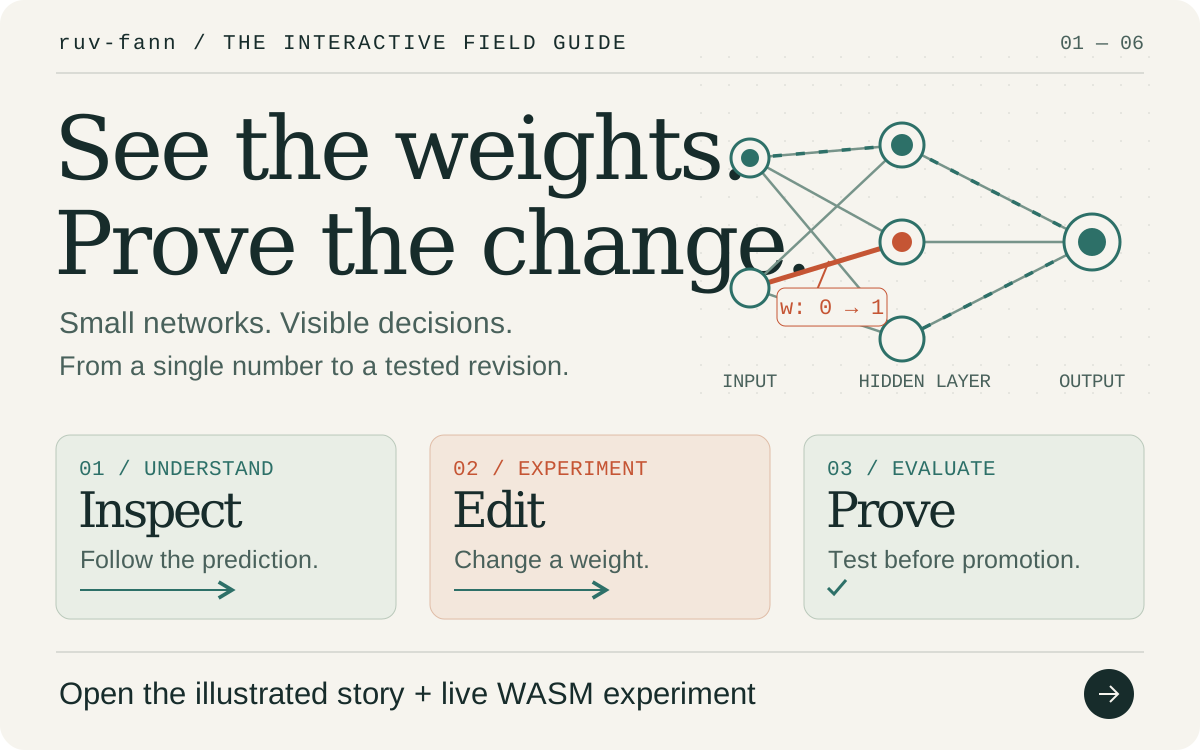
Explore the interactive field guide → Follow a prediction through a network, make a real WASM weight edit in your browser, and see why evaluation comes before promotion. The guide includes animated diagrams, package choices and reproducible benchmark results.


For Rust, start with the ruv-fann crate. For JavaScript and TypeScript, start with the ruv-fann npm package. Core npm 0.3.0 exposes the weight toolkit through explicit ruv-fann/* subpaths. Choose standalone ruv-fann-wsp for a smaller weight-editing installation, or individual toolkit packages for focused integrations. The Rust core provides generic floating-point networks, training algorithms and model I/O inspired by FANN.

| Location | Available behavior | Version / guide |
|---|---|---|
packages/wsp/ |
ruv-fann-wsp: inspect and trace models, build bounded weight patches, evaluate candidates, then promote or roll back |
Published npm 0.2.0 · WSP guide · Interactive story |
packages/core/ |
ruv-fann for JavaScript/TypeScript: WASM inference/training plus fifteen explicit toolkit subpaths, including Agenticow memory |
npm release 0.3.0 · JavaScript guide |
packages/wsp-toolkit/ |
Twelve focused packages: bounded search, holdout gates, invariants, worker proposals, AgentDB authority, Hub/Workers adapters and constellation tools | 0.1.0 each · Toolkit guide · Umbrella release |
packages/wasm/ |
ruv-fann-wasm: direct WASM bindings, bundled runtime binaries and SIMD detection |
Published npm 0.1.2 · Runtime guide |
| Repository root | ruv-fann for Rust: train feedforward networks, prepare immutable CPU inference snapshots, and use optional WebGPU operations |
Checkout 0.2.2 · Crate · Core example · API |
integrations/candle/ |
Import actual Candle CPU linear layers and compare training gradients/SGD/AdamW with Candle | ruv-fann-candle 0.1.0 · Candle guide |
bindings/napi/ |
Native Node inference and dense autograd through napi-rs, sharing the Rust core | @ruv-fann/napi 0.1.0 · Native Node guide |
ruv-swarm/ |
Fourteen Rust packages for scheduling, persistence, transport, MCP, CLI, and WASM | 1.0.6–1.0.8; unified WASM 2.0.0 · Rust guide |
ruv-swarm/npm/ |
Node CLI/MCP, SQLite state, prepared WASM inference, historical forecast intervals, and capability assignment | ruv-swarm 2.0.0 · npm guide |
integrations/ruv-fann/ |
Use ruv-FANN neural outputs in RuVector search and tune inference batches with MetaHarness | @ruv-fann/integrations 0.1.0 · Integration guide |
neuro-divergent/ |
Six Rust packages: RNN training, baselines, chronological evaluation, residual-calibrated intervals, and checkpoints | 0.2.0 · Forecasting guide |
cuda-wasm/ |
Translate a CUDA subset to Rust or WGSL source; Node wrapper requires the external cuda2rust compiler |
Rust 0.2.0; npm 2.0.0 · Translator guide |
opencv-rust/ |
Portable Rust matrices, browser image operations, a small SDK, and native OpenCV C++ bindings | Portable/SDK 4.9.0; native opencv-sys 0.2.0 · Image-processing guide |
The five main Cargo workspaces have separate build requirements; the optional Candle and napi-rs packages each have their own workspace and lockfile. Running cargo test at the repository root tests the core crate; use the verification driver below to cover the other workspaces. The npm WSP, core and WASM releases are identified above; other version numbers describe this checkout and should be checked against their package registries before use. The dated release inventory records earlier package identities and registry observations; scripts/verify-packages.py --inventory reports the current checkout.
Each family has a defined scope. Forecasting currently implements a univariate RNN and simple baselines; LSTM/GRU forecasting architectures return unsupported errors. Agent assignment records scheduling decisions; external task execution depends on the integration you supply. CUDA translation emits source and does not execute a GPU kernel. The native OpenCV bridge calls an installed C++ library, while the portable packages implement a smaller set of operations.
A neural network's weights are the numbers that control how inputs become predictions. Training adjusts those numbers using examples and an optimizer. Weight-space programming makes a direct, explicit edit instead. A person, an agent or an algorithm can propose the edit; evaluation decides whether it meets your stated criteria.
Install the published [email protected]:
npm install ruv-fann-wspIt includes TypeScript declarations and uses ESM on Node.js 20.9+ or compatible
browsers. It depends on [email protected], which loads [email protected].
The npm packages run the actual Rust neural engine through WebAssembly.
| Step | What the WSP package provides | What it tells you |
|---|---|---|
| Inspect | inspectWeightModel, traceWeightModel |
Model dimensions, a checkpoint fingerprint, and the values before and after each layer's activation |
| Experiment | createNeuronAblationPatch, analyzeWeightSensitivity |
What happens when you disconnect a hidden neuron, or slightly change a named weight or bias |
| Propose | applyWeightPatch, createWeightEditPrompt |
A bounded patch tied to its starting checkpoint, with a provider-neutral prompt helper |
| Evaluate | evaluateWeightPatch |
Real WASM predictions and baseline/candidate errors against your supplied cases and thresholds |
| Version | createWeightWorkspace |
Explicit proposal, promotion and rollback, with increasing revisions |
Sensitivity uses central finite differences: it probes a small change in each direction and measures the error. It is a numerical diagnostic, not autograd. A patch does not activate itself, and a passing evaluation only supports the cases you evaluated. Keep independent cases for testing generalization.
Start with the complete XOR repair example, then follow the inspection and diagnostics guide and browser deployment instructions. The package does not call an LLM provider or execute generated code; your application supplies the patch and controls promotion.
Try a weight edit in the interactive field guide →
The public-data benchmark compares a small MLP with majority, nearest-centroid, linear and ExtraTrees baselines on UCI Iris and Wine. It uses five fixed stratified splits, learns normalization from training data, and retains every result. Mean test accuracy was 96.00% on Iris and 95.90% on Wine for the small MLP; ExtraTrees reached 94.67% and 99.49%. These classification results do not establish weight-editing improvements, agent-task performance or a general state-of-the-art claim.
The WSP 0.2.0 release links benchmark and security evidence, including 46 tests on each of Node.js 22 and 24, real Chromium checks, and 19 adversarial input checks. See the field guide for an illustrated explanation of those results and their limits.
Explore the animated field guide →
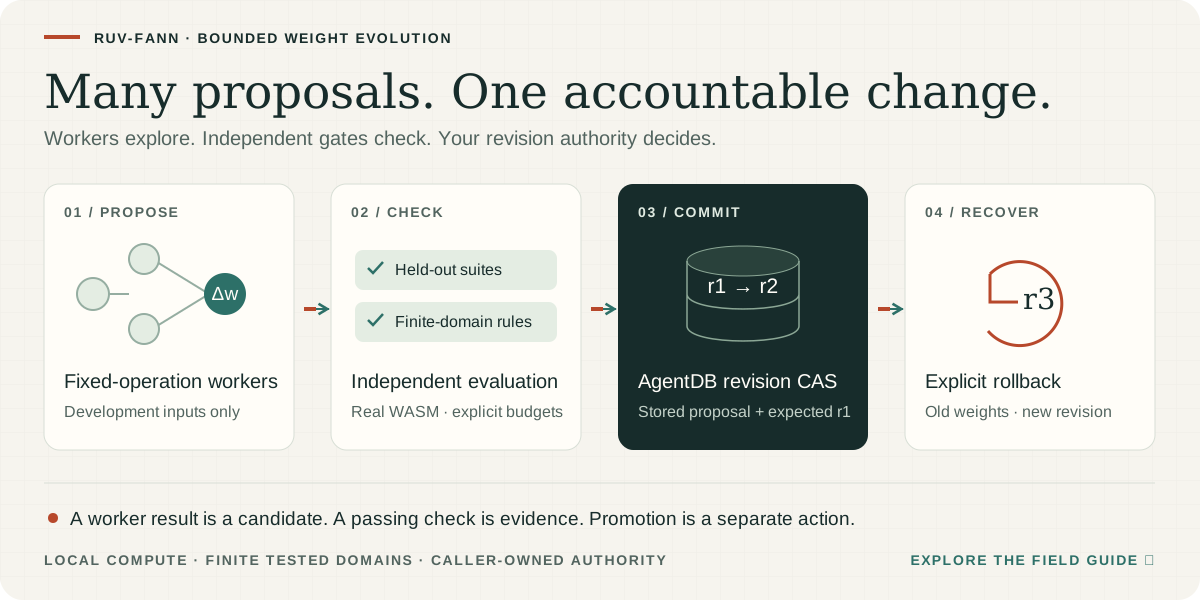
The toolkit extends local weight editing into a bounded proposal/evaluation loop. Node.js workers explore development cases, while the coordinator keeps holdouts and output constraints separate. A passing candidate is re-proposed through the supplied authority and activated only with an expected-revision comparison. Rollback creates a new revision containing the chosen old weights.
npm install [email protected]| Need | Core import | Individual package |
|---|---|---|
| Inspect weights and trace activations | ruv-fann/wsp |
[email protected] |
| Search a bounded parameter set | ruv-fann/search |
[email protected] |
| Test named independent datasets | ruv-fann/lifecycle |
[email protected] |
| Check finite-domain output constraints | ruv-fann/invariants |
[email protected] |
| Coordinate workers and bounded generations | ruv-fann/swarm, ruv-fann/loop |
ruv-fann-wsp-swarm, ruv-fann-wsp-loop |
| Branch model memory, checkpoint experiments and promote explicitly | ruv-fann/agenticow |
[email protected] (native Node.js) |
| Serialize AgentDB revisions and acknowledge persistence | ruv-fann/registry |
[email protected] |
| Load a pinned checkpoint or build a stateless edge handler | ruv-fann/huggingface, ruv-fann/cloudflare |
Hub and Cloudflare adapters |
| Plan packages, validate metadata and render observations | ruv-fann/constellation, ruv-fann/contracts, ruv-fann/telemetry |
Three constellation packages |
Read the complete runnable rejection→gate→promotion example, the core environment matrix, or run the source toolkit's npm run demo:loop for actual AgentDB reopen and rollback. The complete facade installs the toolkit, including its build tooling; individual packages provide smaller dependency footprints. Existing satellite pins intentionally retain a nested core 0.1.2 runtime. Agenticow 0.3.0 is a direct dependency exposed through ruv-fann/agenticow; its RVF bindings require Node.js and a supported native binary. See the complete branch-and-gate example. AgentDB is separately installed and owned by the application.
The loop does not call an LLM provider, execute generated code or publish packages. Worker threads are execution contexts, not security sandboxes; finite-domain tests and hashes do not establish universal safety or generalization. Release publication is a separate protected workflow that verifies exact archives and public installations.
Topics: Rust neural networks · JavaScript machine learning · TypeScript · WebAssembly SIMD · weight-space programming · model evaluation · neural weight search · AgentDB persistence · Agenticow copy-on-write memory · Cloudflare Workers.
Install Rust, then run the included example:
git clone https://github.com/ruvnet/ruv-FANN.git
cd ruv-FANN
cargo run --locked --example basic_usage
For the published crate, run cargo add ruv-fann in your application. To try changes from this checkout, use cargo add ruv-fann --path /path/to/ruv-FANN instead. Published API documentation describes the published version; new checkout APIs become available after a release.
This example uses explicit weights so you can check the result without training:
use ruv_fann::{ActivationFunction, NetworkBuilder};

fn main() -> Result<(), Box<dyn std::error::Error>> {
    let mut network = NetworkBuilder::<f32>::new()
        .input_layer(2)
        .output_layer_with_activation(1, ActivationFunction::Linear, 1.0)
        .build();

    // Two input weights, followed by the bias weight.
    network.set_weights(&[0.5, -0.25, 0.1])?;
    let outputs = network.run(&[1.0, 2.0])?;
    assert!((outputs[0] - 0.1).abs() < 1e-6);
    println!("Output: {}", outputs[0]);

    Ok(())
}
The calculation is 0.5 × 1.0 − 0.25 × 2.0 + 0.1 = 0.1. A real task needs suitable data and trained weights. Training examples and algorithms include backpropagation, RPROP, Quickprop, Adam, and AdamW.

For repeated inference, the checkout adds Network::run_into(inputs, outputs). Pass a mutable output slice whose length equals num_outputs(). It reuses that buffer and the network's stored neuron values. run() remains the convenient API that returns a vector. Check input and output lengths through the returned Result.
The ESP32 C5 example compiles a RuFANN dense JSON checkpoint into a native fixed point evidence scorer. The device accepts local and adjacent evidence from 0 to 1024, where 1024 represents one. Scoring uses integer arithmetic and requires no heap allocation.
The supported checkpoint has two ReLU units with weights [1, -1, 1, -1], followed by one linear unit with weights [1, -1] and zero bias. The hidden biases set the two hinges. For example, [-0.125, -0.875] subtracts a margin of 0.125 and caps the result at 0.75. Both hinge values must be exact multiples of 1/1024 in [0, 1], with the second greater than the first. Replace examples/esp32-c5/model.json and rebuild to apply a supported weight edit.
With Rust 1.90 or newer and espflash installed, run from the checkout:
cd examples/esp32-c5
cargo test --locked
rustup target add riscv32imac-unknown-none-elf
cargo build --locked --release --features firmware --target riscv32imac-unknown-none-elf
espflash flash --monitor --chip esp32c5 target/riscv32imac-unknown-none-elf/release/ruvfann-c5
The host test compares 1,089 scores with the Rust core. On a C5, the demo prints ruvfann-c5 PASS cases=1089 after its boot self test. The printed duration includes the test loop and its reference calculation. For a CSI integration, pass window features to score from a worker and measure latency and packet loss with WiFi active.
To run the same boot test in Espressif's emulator, package a merged image with espflash, then select the USB JTAG console:
espflash save-image --chip esp32c5 --merge --skip-padding target/riscv32imac-unknown-none-elf/release/ruvfann-c5 /tmp/ruvfann-c5-flash.bin
esp-emu --chip esp32c5 --firmware /tmp/ruvfann-c5-flash.bin --console usb-jtag --timeout 10s --exit-on 'ruvfann-c5 PASS'
The checkout adds AutogradNetwork<f32> and AutogradNetwork<f64> for an
explicit sequence of dense layers. You can inspect parameter and input
gradients, then apply SGD or AdamW. MSE means the average squared error over
every row and output. Linear, Sigmoid, Tanh, SigmoidSymmetric and ReLU have
derivative rules; other activations return an unsupported error.
use ruv_fann::{ActivationFunction, AutogradNetwork, DenseLayer};
let mut model = AutogradNetwork::<f64>::from_dense_layers(&[DenseLayer {
    inputs: 1, outputs: 1, weights: &[0.0], bias: Some(&[0.0]),
    activation: ActivationFunction::Linear, steepness: 1.0,
}])?;
let mut tape = model.workspace(2, 1024 * 1024)?;
let loss = model.backward_mse(&[1.0, 2.0], &[2.0, 4.0], 2, &mut tape)?;
assert_eq!(loss, 10.0);
assert_eq!(tape.parameter_gradients(), &[-10.0, -6.0]); // weight, then bias
model.sgd_step(&mut tape, 0.1)?;
let frozen = model.prepare()?;
Run cargo run --locked --example dense_autograd for a complete AdamW learning
example. The tape and optimizer allocate during setup; repeated forward,
backward and update calls reuse their buffers. Each successful update consumes
its gradients. Training again requires a fresh backward pass. Frozen snapshots
keep their own weights after later training or model destruction.
Actual Candle CPU tensors can enter through the optional
Candle adapter. Its JSON export uses
ruv-fann.dense-layers/1, with [outputs, inputs] row-major weights and optional
bias. The same schema initializes Rust training, WASM
runtime.createTrainableNetwork(json, maxRows) and native
NativeTrainableNetwork.from_dense_layers_json(json, maxRows).
to_dense_layers_json() stores topology and weights; optimizer moments are
separate state. A trained prepare() result works with the existing
RuVector search and MetaHarness tuning.
The source review explains the design and the actual Candle gradient oracle. This is fixed dense training; general tensor graphs, transformers and GPU backward execution have separate requirements.

After training, network.prepare() copies validated parameters into an immutable
snapshot. Give each caller its own reusable workspace; several threads can share
the same prepared network without sharing mutable neuron caches:
let prepared = network.prepare()?;
let mut workspace = prepared.workspace()?;
let mut output = vec![0.0; prepared.num_outputs()];
prepared.run_into(&[1.0, 2.0], &mut output, &mut workspace)?;
Hot calls allocate no memory. Changing the original network does not change the snapshot; prepare a new one after training or editing weights. Preparation rejects invalid graph indices, non-finite parameters and noncanonical bias state. The default estimated allocation budget is 64 MiB, including one workspace; this is not a process-memory limit. A failed call leaves the output slice unchanged.
Dense rows use contiguous scalar arithmetic; sparse and reordered connections
retain their order. This path adds no external inference engine or quantization.
Run the complete example with
cargo run --locked --example prepared_inference. The current research review
explains adoption choices and separate benchmark/evaluation requirements.
The ruv-swarm JavaScript package includes prepared inference and historical
forecast intervals in its ordinary and SIMD WASM binaries. In Node.js 22.13+:
import { RuvSwarm } from 'ruv-swarm';
const runtime = await RuvSwarm.initialize();
const network = runtime.createNeuralNetwork([2, 1], 'Linear');
network.set_weights(Float64Array.of(2, -1));
const prepared = network.prepare();
network.free();
const output = new Float64Array(1);
prepared.run_into(Float64Array.of(3, 4), output); // [2]
prepared.free();
runtime.createPreparedNetwork(networkJson) also imports native Rust
Network<f64> JSON, retaining sparse connection order and all native activations.
runtime.createConformalCalibrator(config) fits the shared residual engine with
explicit past observations. Its timestamps are safe-integer Unix milliseconds.
See the JavaScript guide for formats and limits, or
serve the browser example
over HTTP. The browser imports the generated WASM bindings directly.
run_into reuses Rust numeric buffers and the output array; JavaScript boundary
checks and copies still have a cost. The native f32 benchmark below does not
measure browser or Node.js latency. Historical intervals retain their documented
time-series coverage limitations. The WASM results
show measured timings and the tradeoff for very small networks.
For many samples, create a fixed-capacity batch workspace. Native Rust supports both f32 and f64; input and output slices contain one row after another:
let mut batch = prepared.batch_workspace(2, 1024 * 1024)?;
let inputs = [1.0, 2.0, 3.0, 4.0]; // two rows for a two-input network
let mut outputs = vec![0.0; 2 * prepared.num_outputs()];
prepared.run_batch_into(&inputs, &mut outputs, 2, &mut batch)?;
The JavaScript API exposes prepared.create_batch(capacity) and
batch.run_into(inputs, outputs, rows). It reuses numeric buffers and can keep
running after the original prepared handle is freed. The SIMD build processes
independent samples in parallel without reordering any sample's weighted sum.

| Feature | Purpose and limits |
|---|---|
| Default features | Enable model I/O, serialization, compression, logging, and parallel-related utilities. CPU inference does not require a GPU. |
io |
Enables file formats and training-data I/O. Keep bounds on bytes, decompressed data, and declared model dimensions when loading external data. |
simd / parallel |
Expose CPU optimization utilities. A feature being enabled does not mean every network or training operation uses vector instructions or multiple threads. Measure the path you call. |
gpu |
Enables the native Rust WGPU backend with checked matrix/batch dispatch, f32 activations, and managed device buffers. It needs a compatible device and driver. f64 compute uses the CPU to preserve precision. It does not route every network or trainer through a GPU. |
webgpu / wasm-gpu |
On wasm32, expose the async WasmGpuBridge for f32 matrix multiplication and activations in a browser with WebGPU. Buffers are limited to 64 MiB and device limits; matrix calls have a work budget. GPU unavailability returns an error. These features do not enable the native gpu backend. |
wasm |
Enables WASM-related bindings and dependencies. Browser execution has a separate test gate; target compilation alone does not establish browser behavior. |
no_std |
Currently a feature marker. The core still uses the Rust standard library; this is not a supported bare-metal #![no_std] build. |
See Cargo.toml for the precise feature dependency graph. Native Rust gpu tests use software Vulkan. Browser tests load the built Rust WASM bridge and verify matrix results, all 21 activations, invalid inputs, and device lifecycle with Chromium/SwiftShader. A separate harness directly checks all seven WGSL modules and Adam/AdamW updates. These checks establish numerical behavior on software adapters. Physical GPU throughput and every experimental training combination remain unevaluated. See the core review for limits, tolerances, and commands.
Use a current stable Rust toolchain for full-repository development. The core declares Rust 1.81; native swarm packages require Rust 1.89 for patched SQLite. The minimal swarm WASM crate, napi-rs binding and all four OpenCV packages retain Rust 1.88. The optional Candle adapter is tested with Rust 1.99.1 and declares 1.99. Python 3.11 or newer runs the verification tools. Node 22.13 or newer covers the root tooling and swarm distribution; the standalone CUDA wrapper requires Node 22.12 or newer.
The full OpenCV workspace also needs a C++17 compiler, pkg-config, libclang, and OpenCV 4.4 or newer development files. On Debian/Ubuntu these are typically g++, pkg-config, libclang-dev, and libopencv-dev. See the native setup guide for a checked user-owned prefix option. Portable OpenCV packages can be tested with --exclude opencv-sys. Swarm's SQLite npm addon requires Python and a C++20 toolchain: installation builds a verified SQLite 3.54.1 source archive and checks its version, source ID, binary hash and Node ABI before opening user databases. See the Node installation guide.
# Inventory every Cargo workspace and npm distribution.
python3 scripts/verify-packages.py --inventory

# Check and test registered libraries, binaries, tests, examples, and benchmarks.
# Install the native OpenCV prerequisites first.
python3 scripts/verify-packages.py --check
python3 scripts/verify-packages.py --test

# Audit all five Cargo lockfiles (requires cargo-audit).
python3 scripts/verify-packages.py --audit

# Validate README links and the SVG diagram sources.
python3 scripts/verify-packages.py --docs
The driver uses --workspace --all-targets, enables all features for swarm and forecasting, and selects CUDA's portable serde configuration. It also runs the targeted safety regressions and reports every failed command. GPU/browser execution, npm consumers, and Cargo archive verification have separate gates recorded in the modernization report. An inventory or successful metadata resolution is not a passing test suite.
For work on the core alone:
cargo test --locked --lib
cargo test --locked --doc
cargo check --locked --no-default-features
cargo bench --locked --bench neural_network
To build and test the Rust browser GPU bridge, install wasm-pack, the root npm dependencies, and Playwright's Chromium, then run node scripts/verify-rust-browser-gpu.cjs --build. This checks generated Rust WASM through the public browser API. The bridge accepts Float32Array inputs and implements compute rather than canvas rendering or browser agent orchestration.
For a single family, pass --workspace neuro-divergent to the verification driver or use its manifest directly. The family guide explains optional features and native libraries. Run JavaScript commands from the relevant npm directory; the repository root is an integration harness. See each npm guide for a clean install, genuine artifact build, tests, and packed-consumer validation.
Measure the workload you intend to deploy. Record the commit, compiler, CPU or GPU, target features, model shape, batch size, thread count, warm-up, and numeric tolerance. Compare identical inputs and weights, and include allocation and transfer costs in end-to-end results. Criterion output is written under target/criterion/.
The latest comparison uses actual Float64 WASM in Node and Chromium. A 128-row SIMD batch produced these mean per-row latencies, including JavaScript validation and copies. Speed ratios compare repeated prepared single calls in the same binary; setup and compilation are outside the timings.
| Linear network | Node 24 | Chromium 156 | Chromium speed ratio |
|---|---|---|---|
| 5 → 7 → 3 | 83.3 ns | 87.6 ns | 25.96× |
| 100 → 50 → 25 → 10 | 2.11 µs | 2.22 µs | 3.07× |
| 784 → 128 → 64 → 10 | 29.38 µs | 29.02 µs | 3.35× |

These single-host results are workload-specific. One-row batches can be slower; the native f32/f64 comparison also shows small-batch regressions. Release WASM uses optimization level 3 and checked arithmetic: compared with the size profile, the binaries grow by about 65 KB each. All measured inference outputs match, and old/new calibration JSON is byte-identical. The full results include raw samples, confidence intervals, native calibration results, and reproduction commands. See the research review for adoption choices and the earlier modernization report for package verification.
Rune now checks a runnable product built from this repository's actual core. The integration pins Rune's source revision and lockfile, builds it locally, then freezes a plan, replays it and rebuilds in a fresh target directory. The digest-bound executable exercises f32/f64 batches and historical calibration; separate release tests cover the core library.
python3 scripts/rune.py plan --repo .
python3 scripts/rune.py --help
Setup and dependency fetching are explicit steps. Verification uses Cargo offline, records zero model calls, and rejects stale source, a changed plan or a corrupted stored artifact. It copies source into an isolated directory and leaves project files and existing locks intact. This is build provenance and correctness evidence; it does not measure a performance gain or provide an OS sandbox. The setup guide explains the commands and scope. The Rune workflow runs on relevant pushes/PRs and is also part of the full release acceptance gate.
The optional integration package connects actual
neural inference to RuVector and MetaHarness. Import a native Rust Network<f64>
JSON export into the existing prepared WASM runtime, index its neural outputs
with RuVector flat or HNSW search, and measure batch configurations with Darwin.
The core library does not acquire these dependencies.
npm ci --prefix integrations/ruv-fann --ignore-scripts --omit=optional
npm run example --prefix integrations/ruv-fann
The package exposes typed APIs for numerical feature search and reusable batch encoding. It uses fixed model weights, explicit local WASM bytes, bounded inputs and clear ownership. A trained model determines whether its vectors have useful semantic meaning; no text embedding model is supplied. The Node-only tuner recommends a setting only after fresh measurements and never applies it itself. The validation and retrieval measurements include browser and extracted-package checks and the small-corpus tradeoff.
The private MetaHarness tool uses the real Darwin numeric optimizer to search batch sizes for the shipped WASM. Every candidate processes the same rows and must reproduce every reference output. A fresh paired measurement checks the candidate after search; a faster search sample alone is not enough for a recommendation.
npm ci --prefix tools/metaharness --ignore-scripts --omit=optional
node tools/metaharness/src/cli.mjs plan --repo .
node tools/metaharness/src/cli.mjs optimize --repo . --variant simd --model medium --baseline-batch-rows 128 --output /tmp/ruv-fann-tuning
Use POSIX (Linux or macOS) and Node 22.13+. Set the baseline to your current batch
size (the default is one row). Use a new output directory for each run. The loop
bounds evaluations, time and
output, reuses identical observations, and records raw timings and confidence
intervals. It changes batch configuration inside the experiment, without
editing source or applying the result to production. The optional score
command is a static metadata assessment, separate from runtime tests.

The detailed workflow explains installation, presets, receipts and limits. The CI gate executes real core/SIMD trials on supported Node versions without requiring a speedup on shared runners. No model service or provider key is needed.
The measured results include the 128-row control: no confirmed gain over that existing setting, which the loop correctly retained.
Choose a package, reproduce the issue, and add a regression test for a behavior change. Run that package's checks and the relevant integration checks before opening a pull request. Include the commands and results so another contributor can reproduce them.
Model files, training data, plugins, and network messages cross trust boundaries. Changes to those inputs should validate dimensions and resource use before allocating, return useful errors, and preserve format compatibility or document a migration. See the deserialization decision and migration notes.
Thanks to the contributors listed in CONTRIBUTORS.md, including Ocean (@ohdearquant), Bron (@syndicate604), Jed (@jedarden), and Shep (@elsheppo), and to the FANN, Rust, NeuralForecast, Tokio, Serde, and WebAssembly communities.
See the repository LICENSE and each package's manifest for licensing information.