


English · 简体中文 · 繁體中文 · 日本語 · 한국어 · Español · Français · Deutsch · Português · Italiano · Русский · Polski · Türkçe · Tiếng Việt · Bahasa Indonesia · ไทย · हिन्दी · العربية
Download latest release · Website · Pricing · Changelog
Keywords: Zotero translation plugin, Zotero PDF translation, paper translation, translate PDF keep layout, bilingual PDF, side-by-side translation, selection translation, Word translation, PowerPoint translation, Excel translation, academic translation, zotero plugin, zotero translate, pdf translator
Translate in one click, read side by side. Equalang's Zotero plugin translates PDFs and other documents, as well as selected text: right-click an attachment to translate the whole document; the translation keeps the layout and is attached to the original item; in the reader, selecting text shows its translation and definitions immediately in a popup.

- Document translation: Right-click a PDF, Word, PowerPoint or Excel attachment to translate it. The translation keeps the layout and is attached to the original item; a PDF can also come back as a bilingual edition to read the original and translation side by side.
- Selection translation: Select text in the reader and the translation appears immediately in a popup; selecting a word also gives definitions, phonetic transcriptions, and example sentences.
- Background translation: You can quit Zotero at any time; unfinished tasks will resume the next time it starts, and translations will still be attached to the original item.
- Shared credits with the website: Before a document is translated, you see the expected credits and your current balance; cancelled tasks cost nothing.
- Download the plugin file: Go to the Releases page and download the latest
equalang.xpi; there is nothing to unzip. - Open Zotero's plugin manager: In Zotero, choose Tools → Plugins.
- Install from file: Click the gear icon at the top right, choose Install Plugin From File…, and pick the file you downloaded; you can also drag the file directly into this plugins window.
- Sign in to Equalang: A welcome window opens once it is installed. Click Sign In or Register and finish signing in in your browser. New accounts get free credits.
From then on the plugin updates automatically with Zotero; you can also check for updates manually in the gear menu under Tools → Plugins.
-
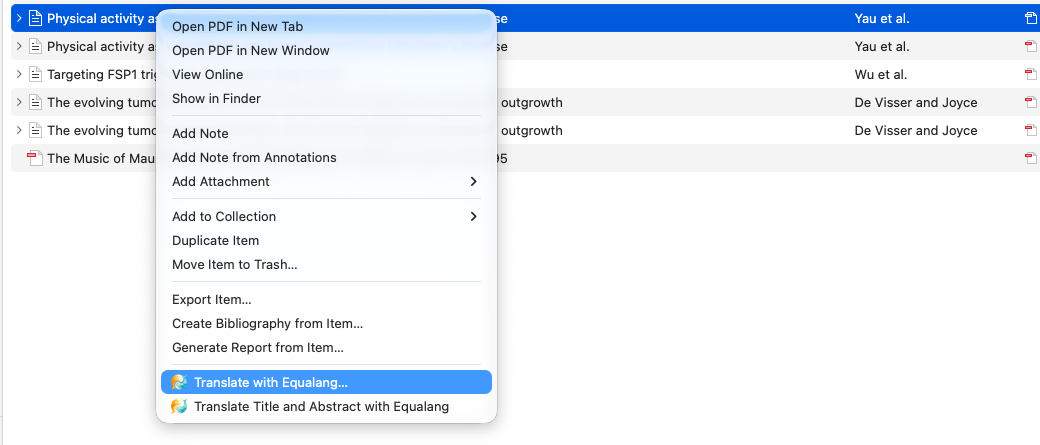
Translate documents: Right-click an item or attachment, choose “Translate with Equalang…”, and confirm the target language and expected credits to begin. Progress is shown in the Equalang section on the right, or you can check it under Tools → Equalang → Translation Tasks….
-
Side-by-side reading: Open the bilingual edition; in the reader, View → Spreads → Odd shows the original and translation side by side.
-
Selection translation: Simply select text in the reader. You can also change the setting to “Show a Translate button first” to translate only after clicking it.
-
Settings: Under Tools → Equalang → Settings…, you can set the target language, choose whether PDFs should be bilingual or translation only, where translations are saved, whether to “Open translations when they're done”, and whether to optimize formula layout in PDFs (costs extra credits).

Which versions of Zotero and which systems does it work with?
Supports Zotero 7, 8, 9 and 10, on Windows and macOS.
How is it charged?
The plugin is free to install. Translation uses the same credit balance as the Equalang website, charged at the website's prices. Before a document is translated you see the expected credits and your current balance, and a cancelled task costs nothing. New accounts get free credits.
Where do the translated files go?
By default, translated files are attached to the original item and sync with Zotero; in the settings you can save them to a folder on your computer instead and link them to the item (My Library only).
- Equalang website · Zotero plugin page · Pricing · Privacy Policy · Terms of Service
- Equalang browser extension: Web page, video subtitle, and manga translation
- Questions: [email protected]
This repository hosts the plugin's install packages (see Releases) and changelog.