This repository describes approaches and hands-on exercises for storing Multi-tenant data using Amazon Simple Storage Service (Amazon S3)
This is a teaching exercise for S3 data-partitioning approaches. It is not production ready, it has no authentication, and it should not be deployed into an account that holds anything you care about or left running.
The partitioning approaches below are the subject of the exercise, and they work. What the exercise does not implement is any verification of who is calling. Specifically:
- The API methods are deployed with no authorization.
src/setup.shpasses--authorization-type "NONE"when it creates the API Gateway methods, so every endpoint is open to anyone who knows the URL. Note thatsrc/s3_manager/src/design_time/api_spec/openapi.yamldoes declare abearerAuthsecurity scheme and applies it to the operations —setup.shsimply never imports that spec. The design intent was there; the deployment script diverges from it. - Tenant identity is taken from request headers. In
src/layers/token_manager/.../token_manager.py,get_header()readsx-tenant-idandx-user-idstraight off the request when no token is present, and then mints a token for whatever tenant was named. A caller chooses their own tenant simply by setting a header. - The token signing key defaults to a literal in this repository.
vend()andget_header()both defaultsecret_keyto'aws-saas-factory', so a token presented instead of the headers can be forged by anyone reading this source. - This affects all five approaches, not just one. Bucket, Prefix, Tag, Access Point and
Database (NoSQL) all resolve the caller through the same
helper.get_tenant_context(). - The Lambda execution role is broad. It holds
s3:GetObject*/s3:PutObject*together withs3:CreateBucketands3:ListAllMyBucketsonResource: "*", so the blast radius of a call is not limited to the buckets this exercise creates.
The consequence is that anyone who can reach a deployment of this exercise can read and write any tenant's data by naming that tenant in a header. The S3 partitioning is doing its job; it is the identity feeding it that is unverified.
If you are adapting any of these approaches for real use, take the partitioning patterns and replace the identity layer entirely: put a real authorizer in front of the API (Amazon Cognito, or an OIDC provider), verify the token's signature against a key you control rather than a default string, derive the tenant from a verified claim rather than a header, and scope the Lambda role to the specific buckets and prefixes it needs. The notes under Introduction already point at AWS KMS and Amazon Cognito for the token; this notice is to make clear that those are prerequisites for real use rather than optional improvements.
Note also that src/setup.sh pins --runtime python3.7, which AWS Lambda no longer accepts for
new functions, so a fresh deployment of this exercise will fail until that is updated.
- Security notice
- Introduction
- Approaches
- High Level Architecture
- Example Flow
- APIs
- Tech Stack
- Prerequisites
- Demo
- Installing
- Hands-on
- Uninstalling
- Built With
- Versioning
- Code of Conduct
- Contributing
- License
Amazon S3 is storage for the internet. You can use Amazon S3 to store and retrieve any amount of data at any time, from anywhere on the web. Amazon S3 provides multiple approaches to manage data based on design needs for scalability, security, cost-efficiency and performance. Five approaches are illustrated below. Some of these approaches can be combined to suit requirements.
- Bucket
- Prefix
- Tag
- Access Points (announced at re:Invent 2019)
- Database metadata (NoSQL - DynamoDB)
For the rest of hands-on, assume that tenanta tracks entertainment events and tenantb tracks sports events.
- Bucket per Tenant
- Prefix/folder per User
- User objects can have multiple prefix levels


- Common bucket for all tenants
- One folder/prefix per tenant
- One sub-folder/prefix for each user
- User objects can have multiple prefix levels

- Common bucket for all tenants
- Tag per Tenant and per User object
- Prefix/folder per User
- User objects can have multiple prefix levels
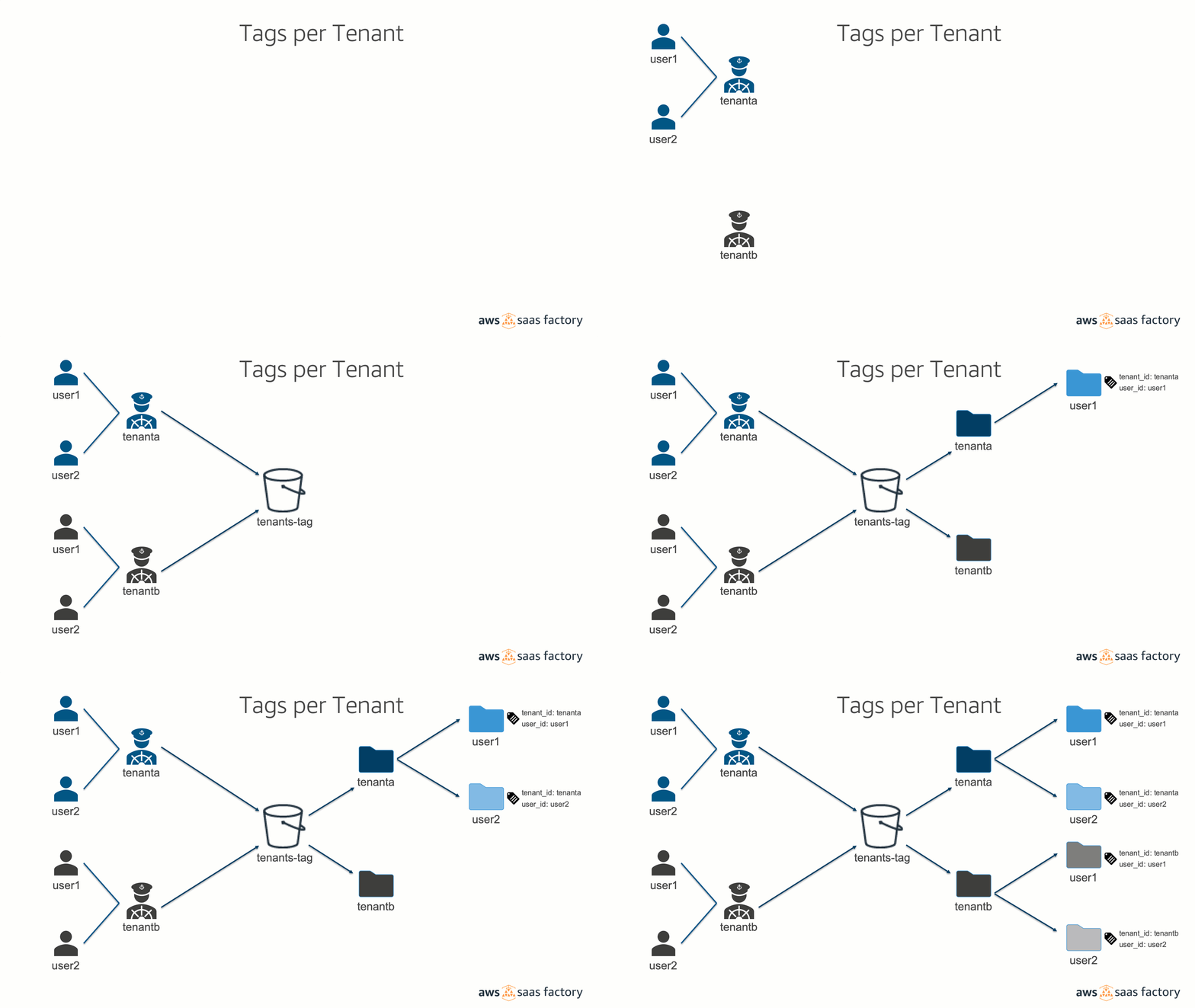

- Common bucket for all tenants
- Access point per Tenant
- Prefix/folder per User
- User objects can have multiple prefix levels
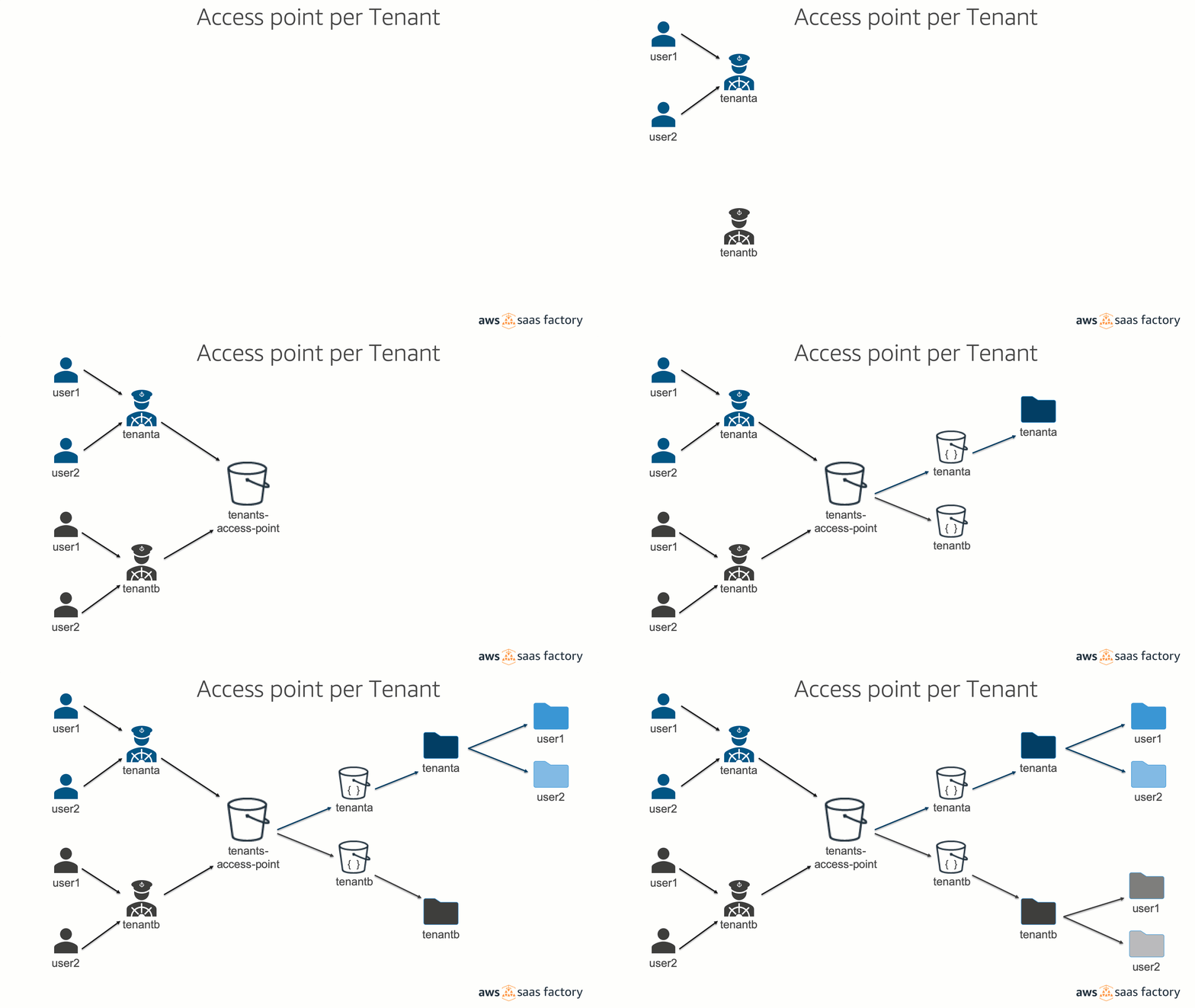

- Common bucket for all tenants to store objects
- Database to store metadata.
- Prefix/folder per User
- User objects can have multiple prefix levels

Multi-tenant data can be stored on S3 in multiple ways. In this hands-on, user's identity is used to manage the ownership of the objects. The identity is a JWT (JSON Web Token) comprised of user's identity/name and tenant's identity/user to which the user belongs. The JWT token is signed using a random text. In reality, AWS Key Management Service can be used for stronger security. Another option for the JWT Token is using Amazon Cognito which yields a JWT Token (ID, Access and Refresh) signed by Amazon Cognito. REST APIs designed using OpenAPI (3.0) and developed in Python (3.7) are hosted in Amazon API Gateway. User issues curl statements to the APIs that invoke Lambda functions. These functions internally invoke Lambda Layers that inspect the token and generate Identity-based user policies based on context embedded in JWT to create short-term security credentials (AWS Security Token Service (STS)). Subsequently, AssumeRole is issued to access AWS services to perform PUT and GET based operations using AWS SDK to manage data using Amazon S3 Buckets, Prefix, Tag, Access Points and DB-based metadata.


Here is a list of APIs implemented.

- Python3.7 for REST APIs
- AWS SDK for Python (Boto3)
- AWS Services (API Gateway, Lambda functions, Lambda Layers, S3, DynamoDB)
- AWS CLI (for deployment)
- AWS CLI (Command Line Interface)
- AWS Credentials
- Ensure the user has "Administrator Access" policy attached
- curl
- jq
- Install Git (Using Homebrew)
brew install git
- AWS CLI (Command Line Interface)
- AWS Credentials
- Ensure the user has "Administrator Access" policy attached
- curl
- Download to folder "[Program Files location]\curl"
- Add curl.exe to Windows PATH (Current Session)
set PATH="%PATH%;<Program Files>\curl\bin\"
- jq
- Download to folder "[Program Files location]\jq"
- Rename executable to jq.exe
- Add jq.exe to Windows PATH (Current Session)
set PATH="%PATH%;<Program Files>\jq"
- Install Git
- Note: On the "Select Components" screen, make sure to select "Windows Explorer Integration/Git Bash Here"
Visit APN YouTube
For mac, open Terminal.
For Windows, open Start -> Git -> Git Bash
git clone https://github.com/aws-samples/aws-saas-factory-s3-multitenancy.git
cd aws-saas-factory-s3-multitenancy/src
bash setup.sh
This would take 1 to 2 minutes for setup.

Open the output.txt and copy the value of APIGTW_BASE_URL. On the terminal
APIGTW_BASE_URL=<copied value from above>4 JWT Tokens for 2 Users each for 2 Tenants are pre-generated for the hands-on. For the rest of hands-on, assume that tenanta tracks entertainment events and tenantb tracks sports events.
On the existing Terminal, set 4 JWT Tokens for each tenant user.
tenanta/user1
TNTAUSR1=eyJ0eXAiOiJKV1QiLCJhbGciOiJIUzI1NiJ9.eyJ0ZW5hbnRfaWQiOiJ0ZW5hbnRhIiwidXNlcl9pZCI6InVzZXIxIn0.jAqNXRPDPR1U4VrLb6yubV8022JfzKoRpStriQhJRXAtenanta/user2
TNTAUSR2=eyJ0eXAiOiJKV1QiLCJhbGciOiJIUzI1NiJ9.eyJ0ZW5hbnRfaWQiOiJ0ZW5hbnRhIiwidXNlcl9pZCI6InVzZXIyIn0.E38IhJBzBodP3qDbTbITy8QKJrksBvMVDJqIgc2ttsEtenantb/user1
TNTBUSR1=eyJ0eXAiOiJKV1QiLCJhbGciOiJIUzI1NiJ9.eyJ0ZW5hbnRfaWQiOiJ0ZW5hbnRiIiwidXNlcl9pZCI6InVzZXIxIn0.4LtIpnzICGlxf8QrQxIyMAVHzzfNb4RnBldxVnFIBZYtenantb/user2
TNTBUSR2=eyJ0eXAiOiJKV1QiLCJhbGciOiJIUzI1NiJ9.eyJ0ZW5hbnRfaWQiOiJ0ZW5hbnRiIiwidXNlcl9pZCI6InVzZXIyIn0.1Z12kKN5sRTWfQF2iab0-DNEonjC5y4ziFrPIusaU7gYou can skip the Optional step.
If you want to generate new tokens, create 2 Tenants with 2 Users each. Create JWT tokens for TenantA users using /get_token endpoint.
tenanta/user1
TNTAUSR1=$(curl -X GET ${APIGTW_BASE_URL}/token \
        -H "Content-Type: application/json" \
        -H "x-tenant-id: tenanta" \
        -H "x-user-id: user1" \
        | jq -r '.result.token') && \
        echo $TNTAUSR1 && \
        echo "tenanta/user1: $TNTAUSR1" >> output.txt
tenanta/user2
TNTAUSR2=$(curl -X GET ${APIGTW_BASE_URL}/token \
        -H "Content-Type: application/json" \
        -H "x-tenant-id: tenanta" \
        -H "x-user-id: user2" \
        | jq -r '.result.token') && \
        echo $TNTAUSR2 && \
        echo "tenanta/user2: $TNTAUSR2" >> output.txt
Similar steps for TenantB users
tenantb/user1
TNTBUSR1=$(curl -X GET ${APIGTW_BASE_URL}/token \
        -H "Content-Type: application/json" \
        -H "x-tenant-id: tenantb" \
        -H "x-user-id: user1" \
        | jq -r '.result.token') && \
        echo $TNTBUSR1 && \
        echo "tenantb/user1: $TNTBUSR1" >> output.txt
tenantb/user2
TNTBUSR2=$(curl -X GET ${APIGTW_BASE_URL}/token \
        -H "Content-Type: application/json" \
        -H "x-tenant-id: tenantb" \
        -H "x-user-id: user2" \
        | jq -r '.result.token') && \
        echo $TNTBUSR2 && \
        echo "tenantb/user2: $TNTBUSR2" >> output.txt
These tokens are also copied into the output.txt file
tenanta/user1 stores a text file movies.txt in a bucket aws-saas-s3-tenanta-<account-id> under a folder/prefix user1.
curl  -X PUT ${APIGTW_BASE_URL}/object?partition=bucket \
      -H "Content-Type: application/json" \
      -H "x-token: ${TNTAUSR1}" \
      -d '{"key": "movies.txt", "value": "Oscar, Golden Globe"}' \
| jq -r '.status'
You should receive a response with Created status.
Created
Similarly tenanta/user2 stores a text file music.txt in a bucket aws-saas-s3-tenanta-<account-id> under a folder/prefix user2.
curl  -X PUT ${APIGTW_BASE_URL}/object?partition=bucket \
      -H "Content-Type: application/json" \
      -H "x-token: ${TNTAUSR2}" \
      -d '{"key": "music.txt", "value": "Grammys, MTV Music awards"}' \
| jq -r '.status'
tenantb/user1 stores a text file basketball.txt in a bucket aws-saas-s3-tenantb-<account-id> under a folder/prefix user1.
curl  -X PUT ${APIGTW_BASE_URL}/object?partition=bucket \
      -H "Content-Type: application/json" \
      -H "x-token: ${TNTBUSR1}" \
      -d '{"key": "basketball.txt", "value": "Larry O\" Brien NBA Championship Trophy"}' \
| jq -r '.status'
You should receive Created status.
Created
Similarly user2 stores a text file golf.txt in a bucket aws-saas-s3-tenantb-<account-id> under a folder/prefix user2.
curl  -X PUT ${APIGTW_BASE_URL}/object?partition=bucket \
      -H "Content-Type: application/json" \
      -H "x-token: ${TNTBUSR2}" \
      -d '{"key": "golf.txt", "value": "The Wanamaker Trophy"}' \
| jq -r '.status'tenanta/user1 retrieves data stored using its token.
curl  -X GET ${APIGTW_BASE_URL}/object?partition=bucket \
      -H "Content-Type: application/json" \
      -H "x-token: ${TNTAUSR1}" \
| jq -r '.result'
You should receive OK status with array of file names.
["movies.txt"]
tenanta/user2 retrieves data stored using its token.
curl  -X GET ${APIGTW_BASE_URL}/object?partition=bucket \
      -H "Content-Type: application/json" \
      -H "x-token: ${TNTAUSR2}" \
| jq -r '.result'
You should receive OK status with array of file names.
["music.txt"]
tenantb/user1 retrieves data stored using its token.
curl  -X GET ${APIGTW_BASE_URL}/object?partition=bucket \
      -H "Content-Type: application/json" \
      -H "x-token: ${TNTBUSR1}" \
| jq -r '.result'
You should receive OK status with array of file names.
["basketball.txt"]
tenantb/user2 retrieves data stored using its token.
curl  -X GET ${APIGTW_BASE_URL}/object?partition=bucket \
      -H "Content-Type: application/json" \
      -H "x-token: ${TNTBUSR2}" \
| jq -r '.result'
You should receive OK status with array of file names.
["golf.txt"]
tenanta/user1 stores a text file movies.txt in a bucket aws-saas-s3-prefix-<account-id> under a folder/prefix tenanta/user1.
curl  -X PUT ${APIGTW_BASE_URL}/object?partition=prefix \
      -H "Content-Type: application/json" \
      -H "x-token: ${TNTAUSR1}" \
      -d '{"key": "movies.txt", "value": "Oscar, Golden Globe"}' \
| jq -r '.status'
You should receive a response with Created status.
Created
Similarly tenanta/user2 stores a text file music.txt in a bucket aws-saas-s3-prefix-<account-id> under a folder/prefix tenanta/user2.
curl  -X PUT ${APIGTW_BASE_URL}/object?partition=prefix \
      -H "Content-Type: application/json" \
      -H "x-token: ${TNTAUSR2}" \
      -d '{"key": "music.txt", "value": "Grammys, MTV Music awards"}' \
| jq -r '.status'
tenantb/user1 stores a text file basketball.txt in a bucket aws-saas-s3-prefix-<account-id> under a folder/prefix user1.
curl  -X PUT ${APIGTW_BASE_URL}/object?partition=prefix \
      -H "Content-Type: application/json" \
      -H "x-token: ${TNTBUSR1}" \
      -d '{"key": "basketball.txt", "value": "Larry O\" Brien NBA Championship Trophy"}' \
| jq -r '.status'
You should receive Created status.
Created
Similarly user2 stores a text file golf.txt in a bucket aws-saas-s3-prefix-<account-id> under a folder/prefix user2.
curl  -X PUT ${APIGTW_BASE_URL}/object?partition=prefix \
      -H "Content-Type: application/json" \
      -H "x-token: ${TNTBUSR2}" \
      -d '{"key": "golf.txt", "value": "The Wanamaker Trophy"}' \
| jq -r '.status'tenanta/user1 retrieves data stored using its token.
curl  -X GET ${APIGTW_BASE_URL}/object?partition=prefix \
      -H "Content-Type: application/json" \
      -H "x-token: ${TNTAUSR1}" \
| jq -r '.result'
You should receive OK status with file names.
["movies.txt"]
tenanta/user2 retrieves data stored using its token.
curl  -X GET ${APIGTW_BASE_URL}/object?partition=prefix \
      -H "Content-Type: application/json" \
      -H "x-token: ${TNTAUSR2}" \
| jq -r '.result'
You should receive OK status with file names.
["music.txt"]
tenantb/user1 retrieves data stored using its token.
curl  -X GET ${APIGTW_BASE_URL}/object?partition=prefix \
      -H "Content-Type: application/json" \
      -H "x-token: ${TNTBUSR1}" \
| jq -r '.result'
You should receive OK status with file names.
["basketball.txt"]
tenantb/user2 retrieves data stored using its token.
curl  -X GET ${APIGTW_BASE_URL}/object?partition=prefix \
      -H "Content-Type: application/json" \
      -H "x-token: ${TNTBUSR2}" \
| jq -r '.result'
You should receive OK status with array of file names.
["golf.txt"]
tenanta/user1 stores a text file movies.txt in a bucket aws-saas-s3-tag-<account-id> under a folder/prefix tenanta/user1.
curl  -X PUT ${APIGTW_BASE_URL}/object?partition=tag \
      -H "Content-Type: application/json" \
      -H "x-token: ${TNTAUSR1}" \
      -d '{"key": "movies.txt", "value": "Oscar, Golden Globe"}' \
| jq -r '.status'
You should receive a response with Created status.
Created
Similarly tenanta/user2 stores a text file music.txt in a bucket aws-saas-s3-tag-<account-id> under a folder/prefix tenanta/user2.
curl  -X PUT ${APIGTW_BASE_URL}/object?partition=tag \
      -H "Content-Type: application/json" \
      -H "x-token: ${TNTAUSR2}" \
      -d '{"key": "music.txt", "value": "Grammys, MTV Music awards"}' \
| jq -r '.status'
tenantb/user1 stores a text file basketball.txt in a bucket aws-saas-s3-tag-<account-id> under a folder/prefix user1.
curl  -X PUT ${APIGTW_BASE_URL}/object?partition=tag \
      -H "Content-Type: application/json" \
      -H "x-token: ${TNTBUSR1}" \
      -d '{"key": "basketball.txt", "value": "Larry O\" Brien NBA Championship Trophy"}' \
| jq -r '.status'
You should receive Created status.
Created
Similarly user2 stores a text file golf.txt in a bucket aws-saas-s3-tag-<account-id> under a folder/prefix user2.
curl  -X PUT ${APIGTW_BASE_URL}/object?partition=tag \
      -H "Content-Type: application/json" \
      -H "x-token: ${TNTBUSR2}" \
      -d '{"key": "golf.txt", "value": "The Wanamaker Trophy"}' \
| jq -r '.status'tenanta/user1 retrieves data stored using its token.
curl  -X GET ${APIGTW_BASE_URL}/object?partition=tag \
      -H "Content-Type: application/json" \
      -H "x-token: ${TNTAUSR1}" \
| jq -r '.result'
You should receive OK status with file names.
["movies.txt"]
tenanta/user2 retrieves data stored using its token.
curl  -X GET ${APIGTW_BASE_URL}/object?partition=tag \
      -H "Content-Type: application/json" \
      -H "x-token: ${TNTAUSR2}" \
| jq -r '.result'
You should receive OK status with file names.
["music.txt"]
tenantb/user1 retrieves data stored using its token.
curl  -X GET ${APIGTW_BASE_URL}/object?partition=tag \
      -H "Content-Type: application/json" \
      -H "x-token: ${TNTBUSR1}" \
| jq -r '.result'
You should receive OK status with file names.
["basketball.txt"]
tenantb/user2 retrieves data stored using its token.
curl  -X GET ${APIGTW_BASE_URL}/object?partition=tag \
      -H "Content-Type: application/json" \
      -H "x-token: ${TNTBUSR2}" \
| jq -r '.result'
You should receive OK status with array of file names.
["golf.txt"]
tenanta/user1 stores a text file movies.txt in a bucket aws-saas-s3-ap-<account-id> under a folder/prefix tenanta/user1.
curl  -X PUT ${APIGTW_BASE_URL}/object?partition=access_point \
      -H "Content-Type: application/json" \
      -H "x-token: ${TNTAUSR1}" \
      -d '{"key": "movies.txt", "value": "Oscar, Golden Globe"}' \
| jq -r '.status'
You should receive a response with Created status.
Created
Similarly tenanta/user2 stores a text file music.txt in a bucket aws-saas-s3-ap-<account-id> under a folder/prefix tenanta/user2.
curl  -X PUT ${APIGTW_BASE_URL}/object?partition=access_point \
      -H "Content-Type: application/json" \
      -H "x-token: ${TNTAUSR2}" \
      -d '{"key": "music.txt", "value": "Grammys, MTV Music awards"}' \
| jq -r '.status'
tenantb/user1 stores a text file basketball.txt in a bucket aws-saas-s3-ap-<account-id> under a folder/prefix user1.
curl  -X PUT ${APIGTW_BASE_URL}/object?partition=access_point \
      -H "Content-Type: application/json" \
      -H "x-token: ${TNTBUSR1}" \
      -d '{"key": "basketball.txt", "value": "Larry O\" Brien NBA Championship Trophy"}' \
| jq -r '.status'
You should receive Created status.
Created
Similarly user2 stores a text file golf.txt in a bucket aws-saas-s3-ap-<account-id> under a folder/prefix user2.
curl  -X PUT ${APIGTW_BASE_URL}/object?partition=access_point \
      -H "Content-Type: application/json" \
      -H "x-token: ${TNTBUSR2}" \
      -d '{"key": "golf.txt", "value": "The Wanamaker Trophy"}' \
| jq -r '.status'tenanta/user1 retrieves data stored using its token.
curl  -X GET ${APIGTW_BASE_URL}/object?partition=access_point \
      -H "Content-Type: application/json" \
      -H "x-token: ${TNTAUSR1}" \
| jq -r '.result'
You should receive OK status with file names.
["movies.txt"]
tenanta/user2 retrieves data stored using its token.
curl  -X GET ${APIGTW_BASE_URL}/object?partition=access_point \
      -H "Content-Type: application/json" \
      -H "x-token: ${TNTAUSR2}" \
| jq -r '.result'
You should receive OK status with file names.
["music.txt"]
tenantb/user1 retrieves data stored using its token.
curl  -X GET ${APIGTW_BASE_URL}/object?partition=access_point \
      -H "Content-Type: application/json" \
      -H "x-token: ${TNTBUSR1}" \
| jq -r '.result'
You should receive OK status with file names.
["basketball.txt"]
tenantb/user2 retrieves data stored using its token.
curl  -X GET ${APIGTW_BASE_URL}/object?partition=access_point \
      -H "Content-Type: application/json" \
      -H "x-token: ${TNTBUSR2}" \
| jq -r '.result'
You should receive OK status with array of file names.
["golf.txt"]
tenanta/user1 stores a text file movies.txt in a bucket aws-saas-s3-dbns-<account-id> under a folder/prefix tenanta/user1.
curl  -X PUT ${APIGTW_BASE_URL}/object?partition=db_nosql \
      -H "Content-Type: application/json" \
      -H "x-token: ${TNTAUSR1}" \
      -d '{"key": "movies.txt", "value": "Oscar, Golden Globe"}' \
| jq -r '.status'
You should receive a response with Created status.
Created
Similarly tenanta/user2 stores a text file music.txt in a bucket aws-saas-s3-dbns-<account-id> under a folder/prefix tenanta/user2.
curl  -X PUT ${APIGTW_BASE_URL}/object?partition=db_nosql \
      -H "Content-Type: application/json" \
      -H "x-token: ${TNTAUSR2}" \
      -d '{"key": "music.txt", "value": "Grammys, MTV Music awards"}' \
| jq -r '.status'
tenantb/user1 stores a text file basketball.txt in a bucket aws-saas-s3-dbns-<account-id> under a folder/prefix user1.
curl  -X PUT ${APIGTW_BASE_URL}/object?partition=db_nosql \
      -H "Content-Type: application/json" \
      -H "x-token: ${TNTBUSR1}" \
      -d '{"key": "basketball.txt", "value": "Larry O\" Brien NBA Championship Trophy"}' \
| jq -r '.status'
You should receive Created status.
Created
Similarly user2 stores a text file golf.txt in a bucket aws-saas-s3-dbns-<account-id> under a folder/prefix user2.
curl  -X PUT ${APIGTW_BASE_URL}/object?partition=db_nosql \
      -H "Content-Type: application/json" \
      -H "x-token: ${TNTBUSR2}" \
      -d '{"key": "golf.txt", "value": "The Wanamaker Trophy"}' \
| jq -r '.status'tenanta/user1 retrieves data stored using its token.
curl  -X GET ${APIGTW_BASE_URL}/object?partition=db_nosql \
      -H "Content-Type: application/json" \
      -H "x-token: ${TNTAUSR1}" \
| jq -r '.result'
You should receive OK status with file names.
["movies.txt"]
tenanta/user2 retrieves data stored using its token.
curl  -X GET ${APIGTW_BASE_URL}/object?partition=db_nosql \
      -H "Content-Type: application/json" \
      -H "x-token: ${TNTAUSR2}" \
| jq -r '.result'
You should receive OK status with file names.
["music.txt"]
tenantb/user1 retrieves data stored using its token.
curl  -X GET ${APIGTW_BASE_URL}/object?partition=db_nosql \
      -H "Content-Type: application/json" \
      -H "x-token: ${TNTBUSR1}" \
| jq -r '.result'
You should receive OK status with file names.
["basketball.txt"]
tenantb/user2 retrieves data stored using its token.
curl  -X GET ${APIGTW_BASE_URL}/object?partition=db_nosql \
      -H "Content-Type: application/json" \
      -H "x-token: ${TNTBUSR2}" \
| jq -r '.result'
You should receive OK status with array of file names.
["golf.txt"]
On a mac, open Terminal
bash teardown.shThis would take about 1 to 2 minutes for cleanup.
Delete buckets starting with aws-saas-*
- API Spec designed using OpenAPI 3.0
Initial Version (3/26/2020)
This library is licensed under the MIT-0 License. See the LICENSE file.