The first and only Home Assistant integration that forecasts solar production with a local AI —
a transformer with attention, running on your own hardware
Your data. Your property.
Nothing leaves your Home Assistant. No cloud AI, no external services.




Important
solarforecastml.com is the authoritative source for everything: what each component does, which sensors you need, installation, troubleshooting, known bugs and release notes.
Is SFML right for me? · Installation · Sensors · Help · Bug tracker · Updates · Deutsch
Fuel my late-night ideas with a coffee? I'd really appreciate it — it keeps this project running.

Own modern UI · Mobile-ready · Built-in dashboard cards
STATS brings a complete interface of its own — desktop and phone — plus six Home Assistant dashboard cards that follow your theme.
Every solar forecast tells you what a roof like yours should produce. This one learns what your roof actually does — and it learns it on your own hardware.
Solar Forecast ML runs a complete local AI stack inside Home Assistant. It trains on your measurements, corrects itself against your weather and reports how good it currently is. No cloud service calculates your forecast. No external AI service ever sees your data. Nothing is uploaded — not even to me as the developer.
That is the difference. Not a better formula, but a system that knows your installation and keeps that knowledge where it belongs.
What no other Home Assistant integration offers today:
- A local AI that forecasts solar production. Other solar integrations either query a cloud service or apply a static formula. None of them trains its own model on your hardware.
- A transformer with attention, inside Home Assistant. Not a call to a remote model — the architecture itself runs in Home Assistant, within the resource limits of a home server, without TensorFlow or PyTorch.
- A model pre-trained on multi-year weather and climate data. It does not start from zero on your roof. It starts with an understanding of weather and then learns your installation on top of it.
- Complete data ownership. Production data, sensor readings, location and the learned model all stay on your system. Not with a cloud provider, not with an external AI service, not with me.
A cloud forecast knows tilt, orientation and kilowatt-peak. It does not know the tree that shades your roof from 3 p.m. in winter, the fog in your valley, your second array facing west, or the inverter that caps at 4 kW.
Solar Forecast ML builds a digital twin of your system instead: solar physics, weather data, your system geometry and your own measurements become an hourly forecast for today, tomorrow and the day after — recalculated every morning on your Home Assistant hardware.
It gets better with every day of data, because it learns from your installation rather than a reference one. And it tells you how good it currently is: accuracy, deviation, usable data days, long-term trends. No subscriptions, no telemetry, no cloud training.
SFML and STATS — who does what: SFML is the integration. It learns, forecasts and publishes the forecast as Home Assistant sensors. STATS is the optional companion module with a complete interface of its own — not just Lovelace cards. The modern workspace covers cockpit, forecast evaluation, panel groups, energy and costs, smart charging and room heating, laid out for desktop and optimised for phones and tablets. Separately, STATS also ships six ready-made Home Assistant dashboard cards that follow your light or dark theme.
Required: a DC power sensor for your panels — the power arriving at the inverter, not the inverter's AC output. With a battery, a PV-to-battery sensor as well. Without these values SFML cannot work, and there is no way around it.
Also needed: your system data (capacity in kWp, orientation and tilt per panel group), Home Assistant 2026.3.0 or newer, and some willingness to understand your own PV system.
Not suitable for: systems without a DC power reading, AC-coupled battery systems, or anyone looking for a one-click product.
The website has the full suitability check for every component, including the effort each one takes.
STATS is a complete interface of its own — desktop and phone — with live energy flow, forecast quality, and Hubble explaining the day in plain language. Separately, it also ships six built-in Home Assistant dashboard cards that follow your theme.
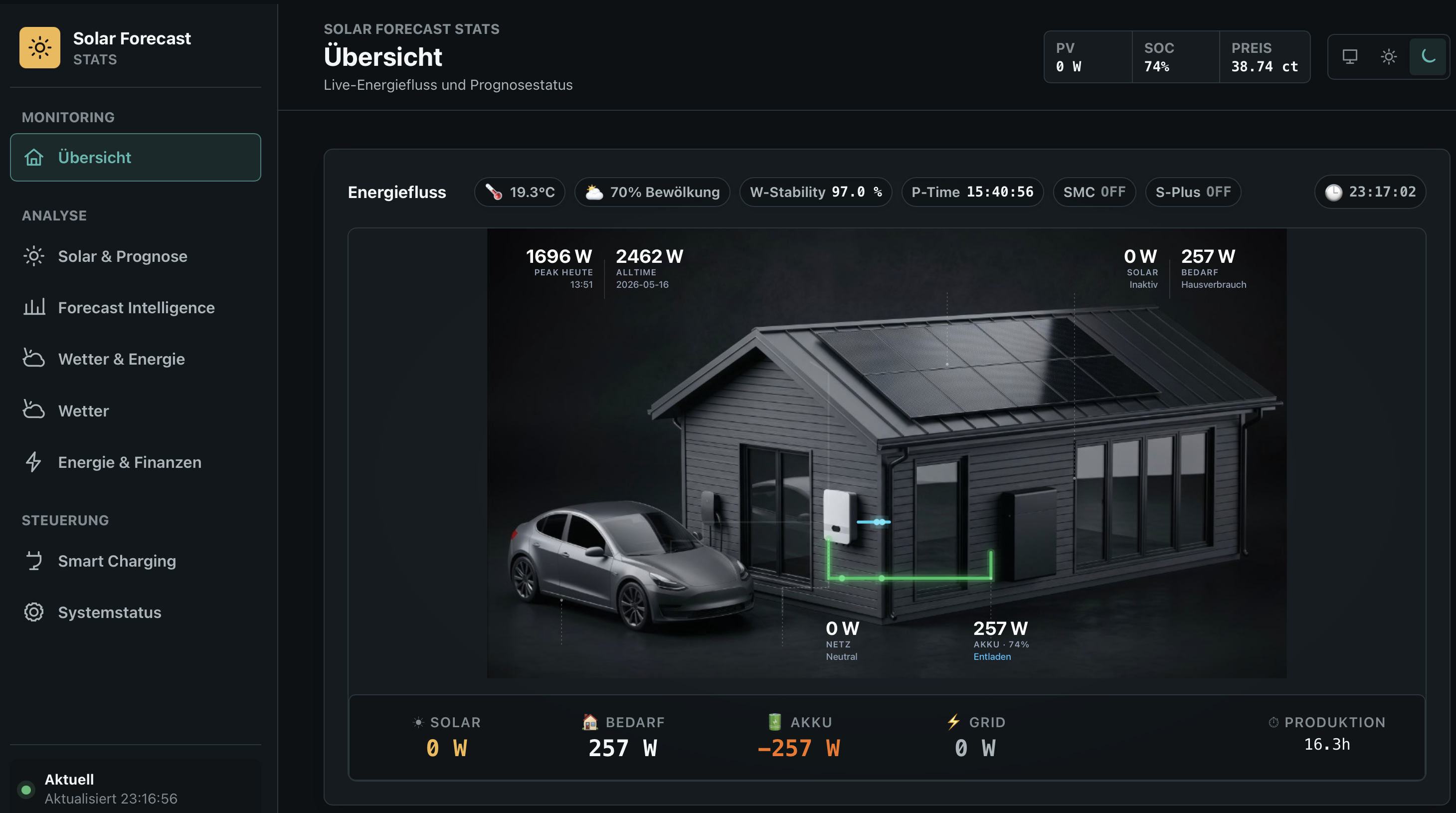
STATS Modern cockpit: live energy flow between solar, home, battery and grid, with weather, forecast quality and today’s profile.
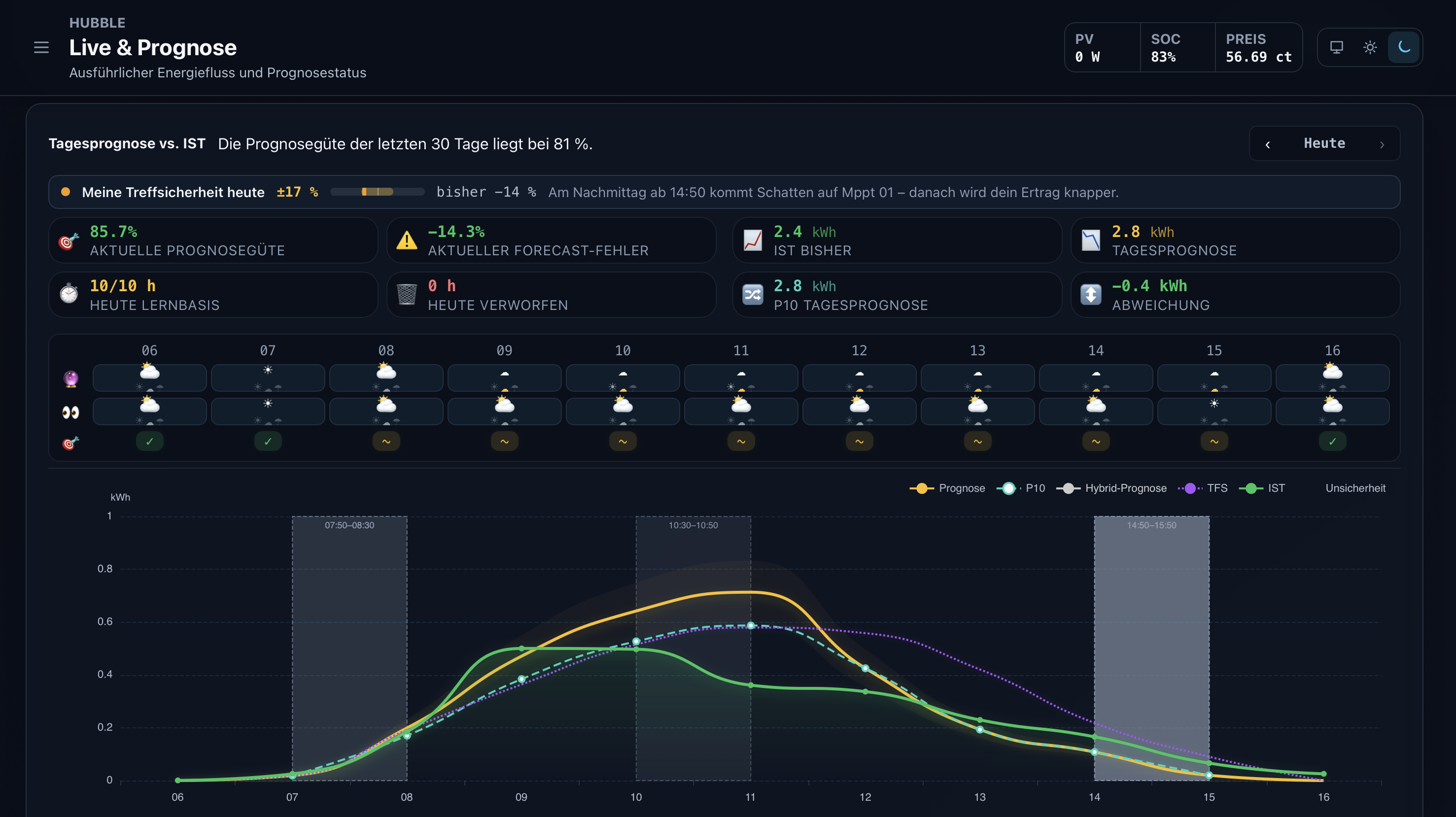
Forecast against measured production: accuracy band for the day, learned shade windows, and how reliable the forecast is right now.
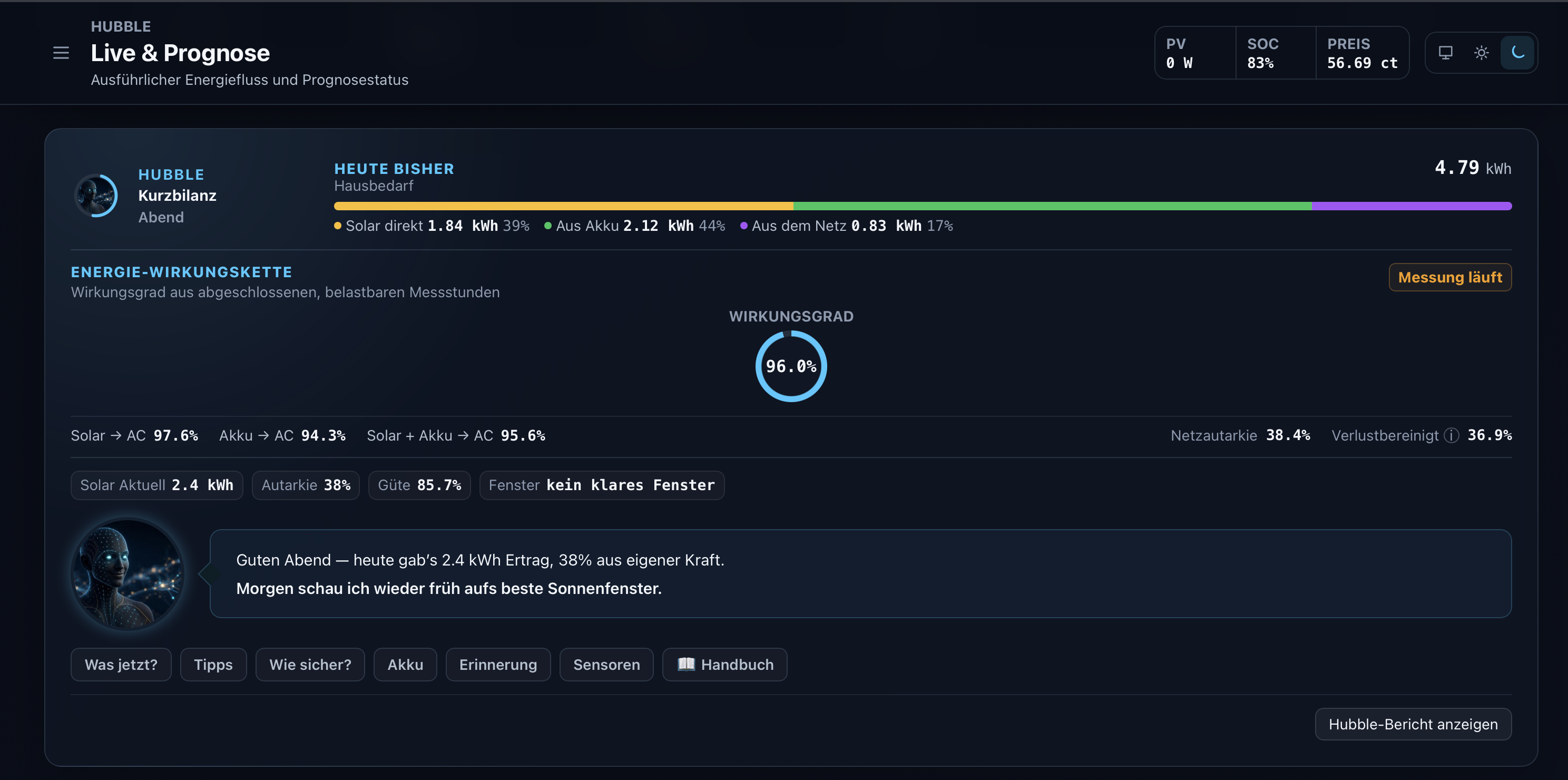
Home view with Hubble: short balance, efficiency chain, and a companion tip for the evening — mobile-ready layout.
All three screenshots are from the optional STATS module. SFML itself provides the forecast and its sensors to Home Assistant. Dashboard cards and room heating are additional STATS features (room heating is premium).
| Cloud forecasts | Solar Forecast ML | |
|---|---|---|
| Where it runs | Remote service | Entirely on your hardware |
| Model | Shared formula or remote model | Local AI, trained on your system |
| Basis | A typical installation | Your measurements, your roof |
| Shading | Not covered | Learned, including seasonal change |
| Environment | Ignored | Snow, fog, haze, air mass and altitude |
| Inverter limits | Unknown | Clipping and curtailment recognised and excluded from learning |
| Quality | Stated | Measured, shown and traceable |
| Your data | Sent to a service | Stays in your home |
Two local AI stacks carry the system: Hubble for the solar forecast and the energy companion that explains it, Kepler for energy decisions in the companion modules. Both run entirely inside Home Assistant. If the methods behind a forecast disagree, solar physics takes over — so the result stays dependable even in unusual weather.
Seven capabilities that make the difference in daily operation. Each one has its own page with screenshots and the reasoning behind it:
| What it does for you | |
|---|---|
| The forecast | Hourly for 72 hours, learned from your roof: shading, local weather, panel groups — and forecast quality is measured, not claimed. |
| Smart Charge | Charges the battery from the grid when electricity is cheap and the sun will not be enough — and leaves room for solar power otherwise. |
| Hubble energy companion | Reads your energy data and answers in plain sentences: what is worth doing today, how accurate the forecast is right now, whether the battery will last the night. |
| Energy & finance | Where your energy comes from, which device consumes it, what a kilowatt-hour really costs — and when the system has paid for itself. |
| Kepler energy management | House, heat pump, storage and car all want the sun. Kepler distributes it in a fixed order and explains every recommendation. |
| Room heating | Every room gets warm when it is needed — and only then. Kepler learns how fast each room heats up and preheats in time; Hubble starts and ends the heating season. |
| Dashboard cards | Six built-in cards for your Home Assistant dashboard — forecast, energy flow, weather, warnings, power price and heating. No YAML; they follow your theme on phone and desktop. |
The forecast is SFML itself. Smart Charge, the Hubble companion, Energy & finance, Kepler, room heating and the dashboard cards come with the companion modules below.
SFML works standalone. These modules build on top of it and are installed through the install_extras service:
| Module | What it adds | Platform |
|---|---|---|
| Solar Forecast STATS | Complete modern UI on top of the SFML sensors (desktop + mobile): live flows, forecast evaluation, weather history, energy balance, costs, battery and smart charging, room heating — plus six built-in Home Assistant dashboard cards | x86_64 |
| Solar Forecast Energy AI | Explainable recommendations for heat pump, storage and wallbox, calculated locally by Kepler. Advisory only — it never switches a device | x86_64, ARM64 |
| Grid Price Monitor | Dynamic electricity prices, time-of-use tariffs, real total price per kWh | all |
SFML itself runs on x86_64, ARM and Raspberry Pi. STATS currently requires x86_64.
Details and screenshots: solarforecastml.com
Via HACS (recommended)
- HACS → Integrations → Custom repositories
- Add
https://github.com/Zara-Toorox/ha-solar-forecast-mlas category Integration - Install Solar Forecast ML
- Restart Home Assistant, wait 10–15 minutes, restart once more
- Add the integration under Settings → Devices & Services
Manually: download the release, copy it to config/custom_components/solar_forecast_ml, restart twice as above.
During setup you provide the power sensor, orientation, tilt and capacity for each panel group, plus your total system capacity. Daily-reset energy helpers are not required — SFML derives hourly and daily energy from the configured power sensors and keeps its own validated state.
The installation guide walks through every step, including the optional modules.
Local AI only. Training, forecasting and every recommendation run inside your own Home Assistant instance. No cloud language models. No external AI services.
No telemetry, no analytics, no tracking. The integration contains no usage tracking, no error-reporting endpoints and no background callbacks. I cannot see whether you installed it, how you use it or what your system produces.
Nothing is shared. Production data, sensor readings, location and learned model state never leave your system — not to me, not to third parties. The learned model weights are stored encrypted in the local database.
Weather requests only. Public weather APIs are queried with coordinates alone: no personal data, no identifiers, no usage metadata. Once configured, everything else works without an internet connection.
Parts of this integration are protected with PyArmor. The reasons: preventing the source from being used for AI training without permission, protecting work that took considerable effort, and responding to code having been copied into commercial products in the past.
Protection does not change behaviour — the integration works exactly like an unprotected build, with minimal runtime overhead. If you have a legitimate interest in details about the code, contact me through the website.
Proprietary Non-Commercial — free for personal and educational use. See LICENSE.
Developer: Zara-Toorox
SFML is a private project. It is discussed in several independent communities; none of them belongs to the project, and the website is the authoritative source. Thanks to everyone testing, reporting and discussing — your feedback shapes every release.