English · Türkçe · Deutsch · Français · Español · Italiano · Português · Nederlands · Polski · Русский · 中文 (简体)
Turn an old Android phone into a desk panel for your computer.
PC stats, AI coding sessions, music and touch controls over USB or Wi-Fi.
Windows, Linux and macOS. No root, PhoneBox account or cloud service required.
Try the live demo · Download · Quick start





Example layouts with demo data.
PhoneBox pairs a full-screen Android app with a small desktop agent. Build your panel in a browser-based visual editor: 115 widgets, 30 templates, multiple pages and a live preview. Connect several phones with their own layouts, or switch one phone between paired computers.
| Use it for | What appears on the phone |
|---|---|
| PC monitoring | CPU, GPU, RAM, disks, network and ping; charts, GPU details and process controls |
| AI coding | Claude, Codex and Antigravity quotas, reset times and burn-rate forecasts; local Claude Code and Codex sessions; GitHub reviews and CI status |
| Touch controls | App and URL shortcuts, key combinations and macros; application audio, microphone, media, OBS and system controls through Control Deck |
| Everyday use | Now Playing, internet radio, clocks, weather, calendars, notes, checklists, pomodoro and timers |
| Automation | Webhook values and notifications, Home Assistant controls and rules that react to activity on the computer |
Tap an AI session for its model, timing and token details. Opt in to Claude Code permission prompts to answer Allow or Deny from the phone. Optional CodexBar integration adds quota providers and a cost overview.
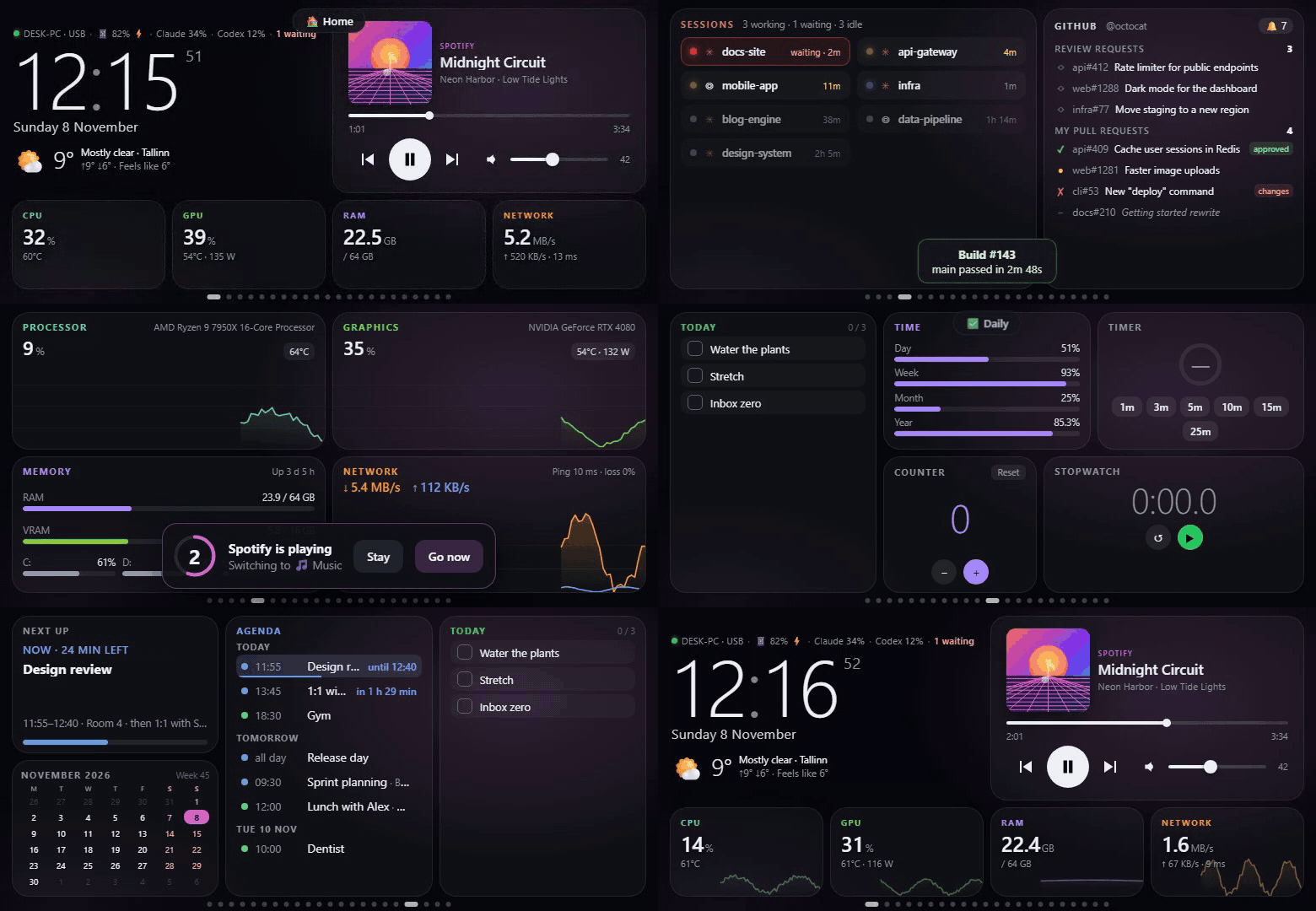
A tour with demo data: notifications, permission prompts and automatic page switching. Watch the MP4
You need an Android 7+ phone and a supported computer. USB uses a data cable and USB debugging; Wi-Fi pairing works without either. Release agents include .NET, so you do not need to install the runtime.
Windows 10/11 x64 — paste into a normal PowerShell window:
irm https://raw.githubusercontent.com/ersinkoc/phonebox/main/setup.ps1 | iexLinux or macOS — run as your own user:
curl -fsSL https://raw.githubusercontent.com/ersinkoc/phonebox/main/setup.sh | bashSetup downloads the latest release, checks its SHA-256 checksum, offers missing dependencies and start-at-login, and opens the settings at http://127.0.0.1:8765. It can also install the Android app over USB. Run setup again to update or repair the installation while keeping settings and pairings.
Windows signing: release agents are currently unsigned while the SignPath Foundation application is pending. SmartScreen or antivirus software may warn or block them. See the code signing policy and installation warnings. USB debugging should be authorized only on computers you trust.
Read the scripts before running them: Windows · Linux/macOS. The installation guide covers options, dependencies, install paths, troubleshooting and uninstalling.
| USB | Wi-Fi only |
|---|---|
| Enable Developer options → USB debugging, connect a data cable and accept the phone's authorization prompt. Let setup install the app, or use Settings → General → Install the phone app. | Install the APK from the latest release. Enable Settings → General → Wi-Fi & Tailscale, restart the agent when asked, then choose Pair a phone over Wi-Fi. Scan the pairing QR code and confirm the matching check code. |
| Wakes and opens the panel on connection; supports app updates over adb. | No adb or developer options needed; install app updates manually unless you later configure USB. |
For automatic USB/Wi-Fi fallback, enable Wi-Fi and connect the phone over USB once. Connection details and Tailscale setup →
Open http://127.0.0.1:8765 (or double-click the Windows tray icon). Under Pages, choose a template, drag and resize widgets, then Save. Use Live preview to see unsaved edits with live data. Swipe, tap the page dots or use the phone's volume keys to move between pages.
Other installation methods
-
Manual download: unzip the agent for your system from the release page and run it. Install the APK on the phone. Checksums and build provenance accompany the release assets.
-
Scoop (Windows):
scoop bucket add phonebox https://github.com/ersinkoc/phonebox
scoop install main/adb phonebox/phonebox
-
From source: see the installation guide and development guide.
-
winget: manifests are prepared in packaging/winget; see the installation guide for details.
Start with Home, System, AI quotas, Sessions, Music, Planner, Automation or a Control Deck template, then adapt the 12 × 6 grid to your phone. Portrait and landscape layouts are supported. Smart Stack puts up to 12 widgets in one slot.
| Home | AI sessions |
|---|---|
 |
 |
| System | Layout editor |
 |
 |
Screenshots use demo data. Browse the template gallery and widgets. Change fonts, size, spacing, corners and surfaces globally or for one page or widget with the appearance guide.
| Windows | Linux | macOS | |
|---|---|---|---|
| Release builds | x64 | x64 / ARM64, glibc | Apple silicon / Intel |
| CPU, RAM, disks, network, processes | ✓ | ✓ | ✓ |
| GPU data | Windows counters; NVIDIA via nvidia-smi; extra sensors via LibreHardwareMonitor |
NVIDIA / AMD; Intel clock | Apple silicon, when exposed by macOS |
| Media | System media sessions | playerctl |
nowplaying-cli; Spotify / Music fallback |
| Volume | Native | wpctl / pactl |
System output; availability varies by device |
| Agent interface | Tray icon + browser settings | Browser settings | Browser settings |
Widgets depend on the host's hardware, installed tools and permissions. Advanced Control Deck features have their own platform requirements. Windows ARM and musl Linux (such as Alpine) do not have release builds. See the full compatibility table.
| Guide | Contents |
|---|---|
| Installation and connections | Setup options, warnings, manual and source installs, USB, Wi-Fi, Tailscale, updates, uninstall and troubleshooting |
| User guide | Template gallery, widgets, AI integrations, editor, Claude Code prompts, webhooks and automation rules |
| Appearance | Fonts, surfaces, presets, inheritance and live preview |
| Control Deck | Audio, media, OBS, shortcuts, tasks, protocols, dependencies and platform limits |
| Development | Architecture, local demo, builds, tests, widget sources and isolated agent runs |
| Contributing | Contribution scope, review expectations, privacy and required checks |
| Changelog | Release history and unreleased changes |
| Release checklist | Maintainer build, signing and publication workflow |
The UMIDIGI BISON extras contain the reversible, no-root tune-up used on the original development phone.
The desktop settings server listens on 127.0.0.1:8765; USB reaches it through adb reverse.
Optional Wi-Fi uses HTTPS on port 8766 with a pinned certificate and a paired key. Settings and pairing endpoints
stay local. The phone requests configured actions by ID; commands and integration credentials stay on the computer.
PhoneBox has no telemetry, analytics or accounts of its own. Optional widgets and integrations contact external services for weather, quotas, GitHub and other data, and the agent checks GitHub for updates. Supported public feeds can fall back through the agent over USB when the phone has no internet. The privacy policy lists outbound connections and how to disable them. Read the security details. To report a vulnerability, follow SECURITY.md.
The agent uses .NET 10; the Android app uses Kotlin and a WebView with plain JavaScript widgets. For Android builds, install JDK 17 and Android SDK Platform 35. Preview the panel and editor from source with Python 3, using simulated data:
python tools/demo-server.pyOpen http://127.0.0.1:8790/panel/ or http://127.0.0.1:8790/settings/. See development commands for running the agent, building the APK and testing changes. Contributions are welcome; start with CONTRIBUTING.md.
Free code signing provided by SignPath.io, certificate by SignPath Foundation.
- Windows agent: the SignPath Foundation application is pending; releases are unsigned until approved.
The intended signing target is
PhoneBoxAgent.exein thewin-x64release zip, built by the release workflow. Every signing request requires manual approval. Bundled runtime and library notices are in THIRD-PARTY-NOTICES.txt. - Android app: release APKs use the project's own signing key, independently of SignPath.
- Team roles: committer, reviewer and signing approver: ersinkoc. Pull requests from other contributors are reviewed before merging.
- Privacy: see the privacy policy.
People who tested PhoneBox on their own hardware:
- anandyakshit: Android 7 support, on an Android 7.1.1 phone (#73).
Supported by WrongStack ·
An open-source AI coding agent that remembers your codebase.
Explore WrongStack → ·
View on GitHub & give it a star ★