
Web browser · Torrent streamer · Movie & TV hub · Anime player · YouTube client · Live TV
Manga & comic reader · Jellyfin & Plex client · Casting · Watch parties · Subtitles · Translation
Downloads · RSS · Plugins · Local AI · Voice control · Agent automation




macOS · Linux · Windows · iOS · Android (planned)
Download · Website · Features · Install · What’s new

Native UI preview. Sintel © Blender Foundation, CC BY 3.0. Credits.
Streaming is split across subscriptions, servers, and a dozen apps. Opal puts it in one native app: no server to run, no account to create, no subscription, no telemetry.
| Opal | Netflix | Plex | Jellyfin | |
|---|---|---|---|---|
| Free & open source | ✅ | ❌ | ❌ | ✅ |
| No server required | ✅ | ✅ | ❌ | ❌ |
| No account or subscription | ✅ | ❌ | ❌ | ✅ |
| Your own files and sources | ✅ | ❌ | ✅ | ✅ |
| Torrent streaming | ✅ | ❌ | ❌ | ❌ |
| YouTube, live TV, manga in the same app | ✅ | ❌ | ❌ | ❌ |
| Local AI & agent automation | ✅ | ❌ | ❌ | ❌ |
| Plays both Plex & Jellyfin libraries | ✅ | ❌ | Plex only | Jellyfin only |
Opal is a player and source hub. It ships no catalog and no Netflix titles; it connects to Plex and Jellyfin servers rather than replacing them.
| 🎬 Movie & TV hub | Netflix-style discovery, details, watchlists, and resume, all from your own files and sources. |
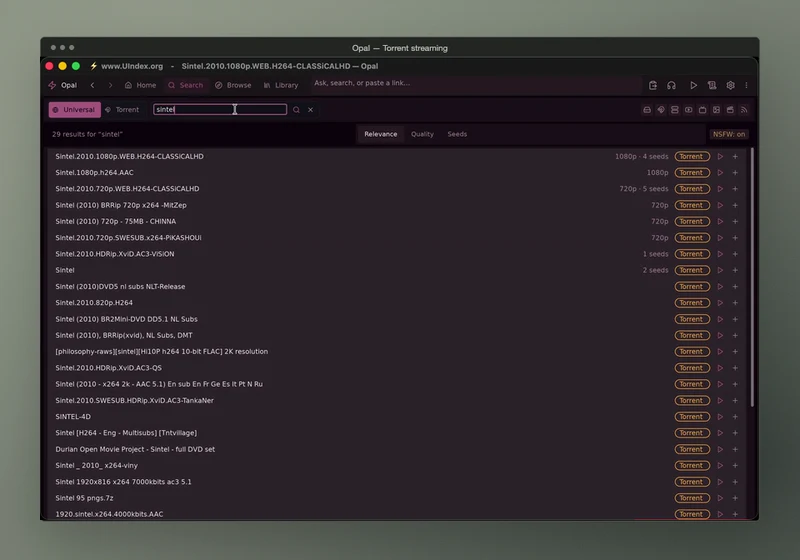
| 🧲 Torrent streamer | Stream a magnet while it downloads, with queues, transfers, and an optional in-memory buffer. |
| 🌸 Anime player | Anime sources, airing schedules, and subtitle tracks. |
| Search and play, with SponsorBlock and browser handoff. | |
| 📺 Live TV | IPTV and M3U channels from the sources you enable. |
| 📚 Manga & comics | A built-in reader with Suwayomi and Mihon/Tachiyomi extensions. |
| 🗂️ Jellyfin & Plex client | Browse and play your existing server libraries. |
| 🌐 Web browser | Tabs, extensions, and send-to-player (macOS). |
| 📡 Casting & watch parties | Cast to another screen or watch in sync with friends. |
| 💬 Subtitles & translation | Pick tracks, fetch subtitles, and translate them on the fly. |
| ⬇️ Downloads & RSS | Download queues, plus RSS feeds for torrents and podcasts. |
| 🧩 Plugins | Install only the sources you want; every source starts disabled. |
| 🧠 Local AI & voice | Optional on-device recommendations, voice control, and OCR. |
| 🤖 Agent automation | 100+ MCP tools so Claude Code, Codex, or any MCP client can search, play, queue, and download. |
 |
 |
| Native player. Big Buck Bunny © 2008 Blender Foundation, CC BY 3.0. | Connect. Plex, Jellyfin, indexers, and more. |
 |
 |
| Torrent streaming (watch). Sintel © Blender Foundation, CC BY 3.0. | Built-in browser with tabs and extensions. |
One command detects your platform and verifies the download:
curl -fsSL https://raw.githubusercontent.com/debpalash/Opal/main/scripts/install.sh | shOr grab a package from Releases:
| Platform | Install |
|---|---|
| macOS (Apple silicon) | .dmg, or brew install debpalash/tap/opal |
| Linux | AppImage, .deb, .rpm, or AUR opal-media-player-bin |
| Windows (alpha) | .msi or portable .zip |
| iOS (preview) | Sideload the .ipa, or build for your device |
| Android | Planned |
Install notes
- macOS: if an unnotarized DMG shows “damaged,” run
sudo xattr -cr /Applications/Opal.app. Intel Macs need a source build withHOMEBREW_PREFIX=/usr/local. - Linux: standard builds need glibc 2.38+. Ubuntu 20.04/22.04, Debian 12, and Mint 21 should use
_compat_amd64.deb(glibc 2.31+); the installer picks it for you. Compatibility details. - Windows: expect SmartScreen prompts and rough edges. Report an issue.
- Updates: Opal checks for updates and installs them in place on macOS. Package-managed installs update through their package manager.
First launch: browse Movies & TV right away, or add sources in Settings → General → Install source plugins.
- From your phone: enable Settings → Web UI, set Network to LAN, and scan the QR code. Phone guide
- From your browser: the Opal Connect extension for Chrome, Edge, and Firefox sends videos to Opal and controls playback.
- From an AI agent: turn on Settings → Agent Access and connect
opal-mcpto Claude Code, Codex, Gemini CLI, or any MCP client. Destructive tools are off until you opt in. Agent guide
Zig 0.17 · dvui · mpv: one native binary with no Electron and no web runtime.
brew install mpv sqlite sdl2 libtorrent-rasterbar webp
git clone https://github.com/debpalash/Opal.git && cd Opal
zig build run
Linux and development
Linux / Wayland: run ./scripts/install-deps.sh, then make run. Minimums: libmpv 0.34 (0.38+ recommended), libtorrent-rasterbar 2.0, SDL 2.0.22.
| Command | Purpose |
|---|---|
./dev.sh |
Hot reload |
just release |
ReleaseFast build |
zig build test |
Unit tests |
just test-all |
Full feature suite |
If Opal replaces a subscription for you, star the repo to help others find it.
Report a bug · Discussions · Ko-fi · PayPal
GPL-3.0. License · Notices. Opal plays sources you configure; it hosts no media and provides no Netflix titles. Not affiliated with Netflix, Plex, or Jellyfin. Only access content you have the right to use. BitTorrent shares your IP with peers. Content policy · Privacy · DMCA