Community firmware, local printer control and reproducible build tools for the ELEGOO Centauri Carbon 2, maintained by Neme77.

CC2 CONTROL 1.2.26 — OPEN RFID, ONE INSTALLER. An open, extensible path toward broader spool compatibility, autonomous guarded Canvas activation/restoration, EXHAUST minimum, improved calibration layout, mesh/runout improvements and installation fixes. CC2 non Combo is supported without RFID activation. Release notes and checksums.


| Complete firmware · V4.4.3 | Application update · CC2 Control 1.2.26 |
|---|---|
| Signed firmware · Notes | Windows / macOS / Linux ZIP · Signed panel update |
| The existing full firmware includes Control 1.2.25 and the native touchscreen refresh. Install it first when needed, then update the app. | Complete cumulative app/native-component update for the exact supported V4.4.3 base. It does not replace the touchscreen or base firmware. |
Use the Canvas reader beyond the original producer filter: scan → review the material/colour/temperature preview → choose a Canvas slot → confirm. Material assignment and physical filament presence are independent; insert the filament in the chosen inlet to mark it present. The reader stays in a collapsible menu on the right of Canvas Actions.
An Anycubic PETG tag and a Creality spool have been read on a real printer. Other brands, tag technologies and data layouts still need testing. The aim is broader, potentially universal support for compatible tags—not a claim that every spool already works. The implementation is open to additional decoders, documented layouts and reproducible community tests. Contribute or report a tag/format.
One installer handles first activation, supported active updates and an already current installation. It preserves Canvas on an app-only update. On CC2 non Combo, or when Canvas is not currently available, the app, EXHAUST, camera and Connections update normally without waiting for an absent RFID reader. Rerun the same installer with Canvas connected if the accessory is added later.
First RFID activation verifies the original Canvas backup and host protection, then follows full idle-printer reboot prompts for transfer and verification. Do not interrupt power or reboot during transfer. Original-Canvas restoration precedes host-guard removal. Protocol ACKs are distinct from physical flash readback. English installation/recovery guide · Italian guide.
- Printing and cooling: manual nozzle targets, profiles and backups align with the native 350 °C maximum; valid targets survive manual homing. Requested EXHAUST minimum applies to the current print, native cooling can demand more, and Automatic/pause/end/cancel/restart release it. Flap and minimum controls sit in the Chamber fan management group.
- Control and calibration: load-cell functions have a dedicated Bed Levelling tab; full Rotation Distance sits below Pressure Advance, Input Shaper is grouped with Movement, material profiles use a compact full-width card, and Job details show live nozzle/bed/chamber temperatures. The approved Dashboard layout is retained.
- Meshes and runout: active-mesh queries avoid serializing every saved profile on the motion thread; plate meshes can follow print bed temperature, including blended meshes. Continue a paused runout print from another suitable Canvas slot while preserving its tool mapping, with an optional material-only refill choice.
- Spools: clicking outside the selection popup keeps the question and draft; explicit buttons and Escape remain available.
- Installer and telemetry: one signed payload across PC and panel updates; exact native-profile verification, transactional app/RFID rebinding and rollback; lighter component parsing, queued UDS response recovery, fresh MQTT acquisition before scan/update and preservation of Connections/EXHAUST.
Credits: Neme77 for design, investigation, maintenance and extensive physical acceptance; Noahwhite2014 for mesh/runout and retained print improvements; OpenRFID / DnG-Crafts for the Anycubic layout reference; OpenCentauri/COSMOS as a comparison reference; mcknight89 and Sangra6969 for requests/reports. Thanks to the contributors and translators listed below, and special thanks to DamiBFryta for extensive beta testing. Non-Combo routing has automated installation/rollback coverage; the physical acceptance was on a Combo printer.
The application update includes the controls and calibration tools below. The native touchscreen refresh is included in full firmware V4.4.3.
- Exhaust flaps: explicit Open / Close buttons beside the EXHAUST fan, using the native firmware commands and existing operation guards. Also available as configurable Quick Actions.
- Pressure Advance: read, apply temporarily or disable the active native value alongside speed and flow. Start G-code can override it; applying does not silently save configuration or change smooth time.
- Load-cell tools: native read, diagnostics, tare and guided known-mass calibration, with explicit measurement, acceptance, verified saving and protected restart. No automatic heating or motion is started.
- Rotation Distance: read active/configured/saved values, calculate from a physical extrusion measurement, apply temporarily, restore the configured reference and save with verification. Other PID, mesh, gear-ratio and offset settings are preserved.
- Configurable Quick Actions: four slots retain existing choices and gain Open/Close flaps and navigation to Connections, Fans, Pressure Advance and bed/chamber heating. Opening a page does not activate heating or a calibration.
- Experimental nozzle thermal-expansion calibration: native temperature-range calibration, validated results and a way back to the factory table; by @Noahwhite2014 (#273). Enable it separately under Settings → Integrations.
- Experimental chamber preheat: an additional bed-heating mode with closed exhaust grille, tapered auxiliary circulation, ready/hold reporting, reachability estimate and print hand-off. Requested by @Sceletor (#270), contributed by @Noahwhite2014 (#277). Filament drying keeps its separate limits; this does not add an active chamber heater.
- Native display redesign: Obsidian/cyan styling across the original sections, refreshed Home and icons, CC2 Community boot artwork with animated loading bar, native language support and inline read-only LAN information. Original ELEGOO printer/Canvas artwork and native functions are retained. Full firmware V4.4.3 only (#282).
- USB Ethernet and hubs: corrected RTL8153 interface-parent recognition behind USB hubs. TP-Link UE300
0bda:8153revision31fdis physically qualified; revision3000requires explicit experimental opt-in (#274, reported by @kalross, #278). Other IDs/revisions are not automatically qualified. Full firmware ships the reviewed modules; the stock kernel is unchanged and Ethernet remains opt-in. - Recovery after a supported base-firmware reinstall: recognize the exact retained Connections installation, restore its hooks with backups and preserve confirmed settings. Unknown edits remain refused.
- Installation and cleanup: computer-assisted installers stage payloads on persistent disk rather than RAM-backed
/tmp, check available disk/RAM before transfer and before parsing embedded components, verify archives, retain failed attempts/logs and clean input payloads only after success. Fixes the installation-time OOM reproduced and verified by @Neme77. - Calibration and UI fixes: save plate measurements only after the current native mesh run positively completes (#279, reported by @Noahwhite2014); continuous Obsidian gradients on Appearance/About; clear bed-drying/chamber-preheat text in all nine UI languages; hide a superseded completed updater selection after a firmware upgrade.
- Existing stability fixes retained: reactor callback integration, webcam R2 client-thread reclamation and readiness recovery, direct emergency stop, pending SAVE_CONFIG protection, Canvas/material tools, Spoolman and previous cumulative improvements.
The native maintenance tools and display were developed and physically tested by @Neme77 (#282, #283, #286, #287). Thanks to @Surfoo, @beanbo, @tharje, @pezso92, all contributors/translators and DamiBFryta, our ultimate beta tester. Complete original attribution.
During Ethernet driver installation/activation, Canvas LEDs may briefly flash red while native services realign, then return to operation. Wait for Canvas to reconnect and follow every complete idle-printer reboot request before printing. Experimental features remain off until explicitly enabled.
Windows / Linux / macOS application installer · Signed panel update · Complete application release notes · Complete firmware and native display
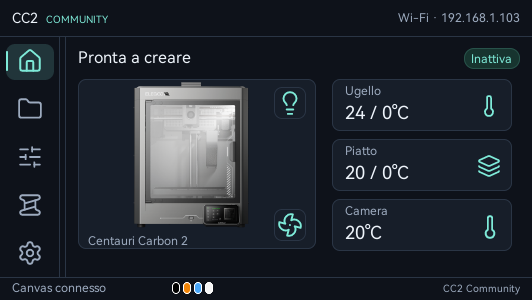
Actual 532 × 300 printer capture. Native functions and ELEGOO printer/Canvas artwork are retained; the example uses Italian. The display refresh is included in full firmware V4.4.3. Both release pages list features, contributor credits, adapter qualification and installation details.
Optional experiment · Canvas pull-back R4: Download the Windows / Linux / macOS kit. Extends the configurable limit up to 1000 mm on qualified V4.4.1/V4.4.2 with Control 1.2.21/1.2.22. By Noahwhite2014. Instructions. Remove the component and reboot before app/firmware updates.
Updating from the panel? Use Settings → Updates or the signed 1.2.26 download above. Follow the installation guide and every full idle-printer reboot prompt. Canvas may flash red while native services stop for transfer; wait for verification before printing.
Documentation · Downloads · Screenshots
Independent community project, not affiliated with or supported by ELEGOO. This project targets the Centauri Carbon 2, not the first Centauri Carbon.

| What you need | Guide |
|---|---|
| Install the complete community firmware | First installation |
| Update an existing CC2 Control installation | Application updates |
| Connect OrcaSlicer and synchronize Canvas slots | OrcaSlicer setup |
Download files from GitHub Releases and follow the matching guide and release notes. Complete firmware, the CC2 Control application and the source builder are different downloads: the builder ZIP is not an installable printer update. Check the supplied SHA-256 checksums before installation.
The current qualified firmware family is V4.4/V4.4.1/V4.4.2/V4.4.3, based on ELEGOO 02.01.01.07. Its application updates are not interchangeable with stock firmware, older community firmware or experimental builds.
Open http://PRINTER-IP:8081 on your local network. OrcaSlicer also needs
:8081 after the printer IP. App installation requires the printer’s LAN
access code, which is different from the SSH password; checking for updates
does not. Installation always requires confirmation. Camera-component updates
require a full printer reboot as described in their release notes.
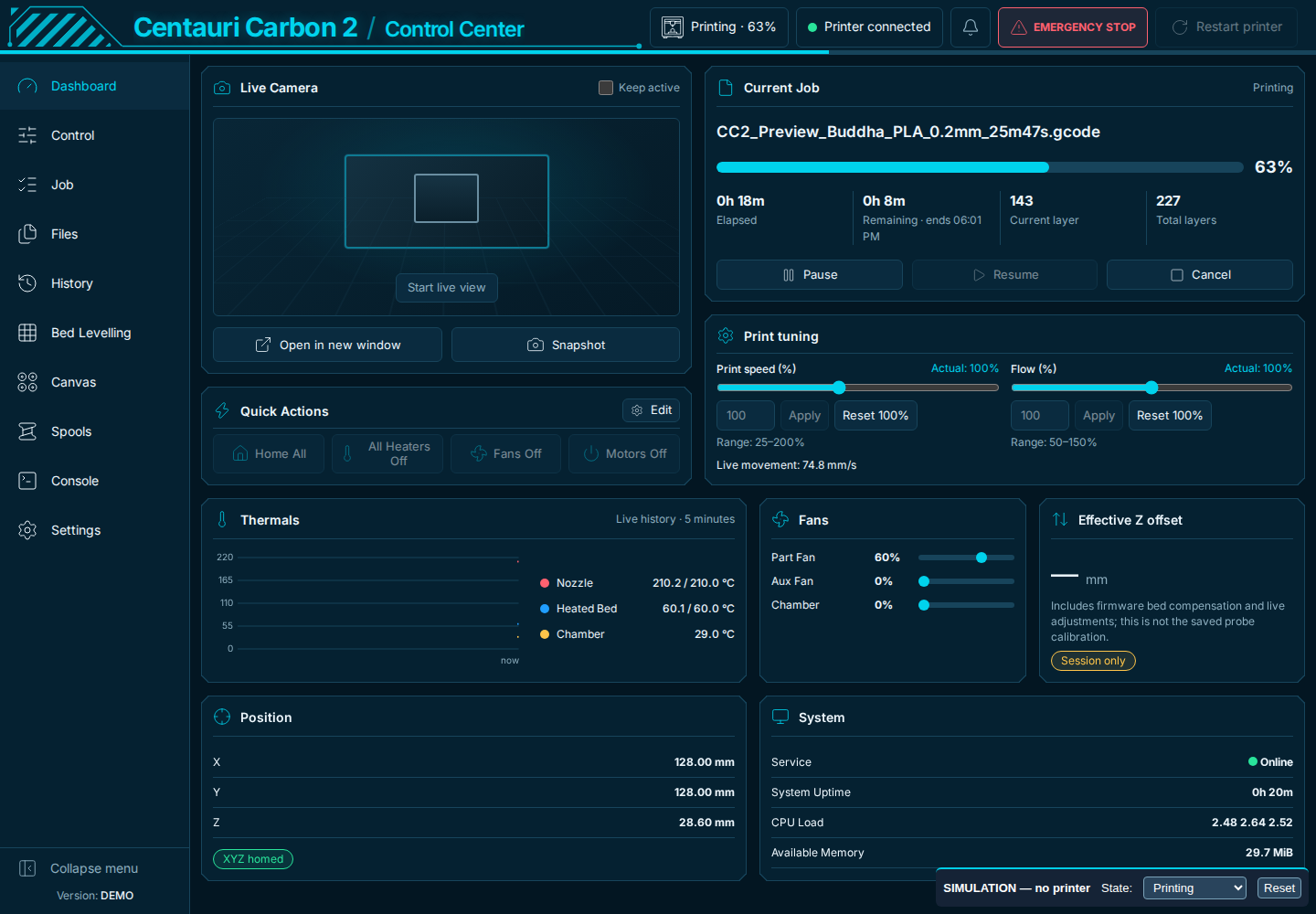
- Local dashboard, live video, temperatures, fans, print speed and flow controls.
- Internal/USB files, model previews and interactive object exclusion.
- Canvas slot states, material settings, auto refill and OrcaSlicer filament sync.
- Bed leveling, saved plate/nozzle meshes and optional spool inventory/tracking.
- Backup and selective restore, diagnostics, protected Console and signed app updates.
- Multiple interface languages, themes and desktop/mobile layouts.
See the application guide and screenshot gallery. Experimental features remain opt-in and require their own validation.
- Connections: optional USB Ethernet alongside native Wi-Fi, saved Wi-Fi profiles, DHCP/static IPv4, manual connection selection, interface switches and Diagnostics. Wi-Fi remains available without an adapter; no automatic signal-quality switching.
- Qualified adapter: TP-Link UE300 / Realtek RTL8153, USB 0bda:8153 revision 31fd, on Community V4.4.2. Other products or revisions are not automatically qualified by sharing a chipset. Stock firmware is unsupported; Ethernet link rate is not a USB 2.0 transfer benchmark.
- Obsidian and layout: new theme, centered page widths, sidebar resize/collapsed-icon polish and stronger Canvas rings (#255, #257–#259, Neme77 and Surfoo).
- Cumulative fixes: direct emergency stop (#264/#265, Noahwhite2014 and maintainer review), long calibration bed keep-alive (#256, beanbo), guarded busy-file deletion (#259), localized refusals (#261/#262, pezso92 report), corrected Z arrows/calibration copy (#252–#254), and pending SAVE_CONFIG protection (#267, Noahwhite2014 report; Neme77 correction).
Original 1.2.24 release and contributor credits.
Enable External spool with Canvas connected under Settings → Integrations → Experimental integrations, then select External spool in Canvas or Control. It remains EXPERIMENTAL, optional and off by default. A direct external filament path is required: TPU does not run through Canvas. Native source selection keeps Canvas connected and communicating.
DamiBFryta, our definitive beta tester, validated the full PLA → TPU cycle, including eSUN TPU 95A printing, without unplugging Canvas: no issues and no errors. Neme77 validated external PLA loading/purge, a completed print and return to normal Canvas loading. Other flexible materials, hardness and paths need their own validation. Native loading/purge speeds are unchanged.
CC2 Control 1.2.23: download and complete release notes.
Corrected in 1.2.23: the Updates text now correctly points to Settings → Integrations. Sorry for the earlier misleading wording.
- External spool, including printers bought without the Canvas Combo: native Load / Unload when Canvas is confirmed absent, plus Brand → Type → Subcategory → Colour editing. Canvas shares the stock material catalog and 24-colour palette (#233). External feeding with Canvas connected is available as an opt-in experiment starting in 1.2.23.
- Dashboard: pezso92’s paused-camera artwork, speed/flow sliders alongside numeric Apply/Reset controls, aligned panels and Keep active in the camera header (#223).
- Control: compact machine actions, live Z offset above print tuning and aligned calibration panels (#226).
- Spoolman: optional server sync by tharje (#208), independently enabled in Integrations; configuration and local tracking are kept when disabled (#227).
- LAN code: optional verified browser-local remembering, masked prefilled fields and explicit Forget (#225).
- Print completion: nonblocking filename/duration notice, Confirm and Print again; idle progress clears without homing (#219).
- Spool history: bounded scrolling with All / Consumption-only filters, suggested by DamiBFryta (#220).
- Experimental integrations: Canvas UDS, Quiet and timed bed heating grouped in Settings → Integrations, independently enabled with aligned actions (#223/#232).
- Filament drying experiment: finite timed bed heating, explicit stop and zero-target confirmation (#198/#218/#230); requested by romeopuch, native help-check issue diagnosed by Noahwhite2014, documentation clarified by pezso92 (#235).
- Updates and packaging: supported-version notices corrected in all nine languages (#222); unused firmware web overlay removed (#229). Cumulative webcam fix, preferences, mesh libraries and backups retained.
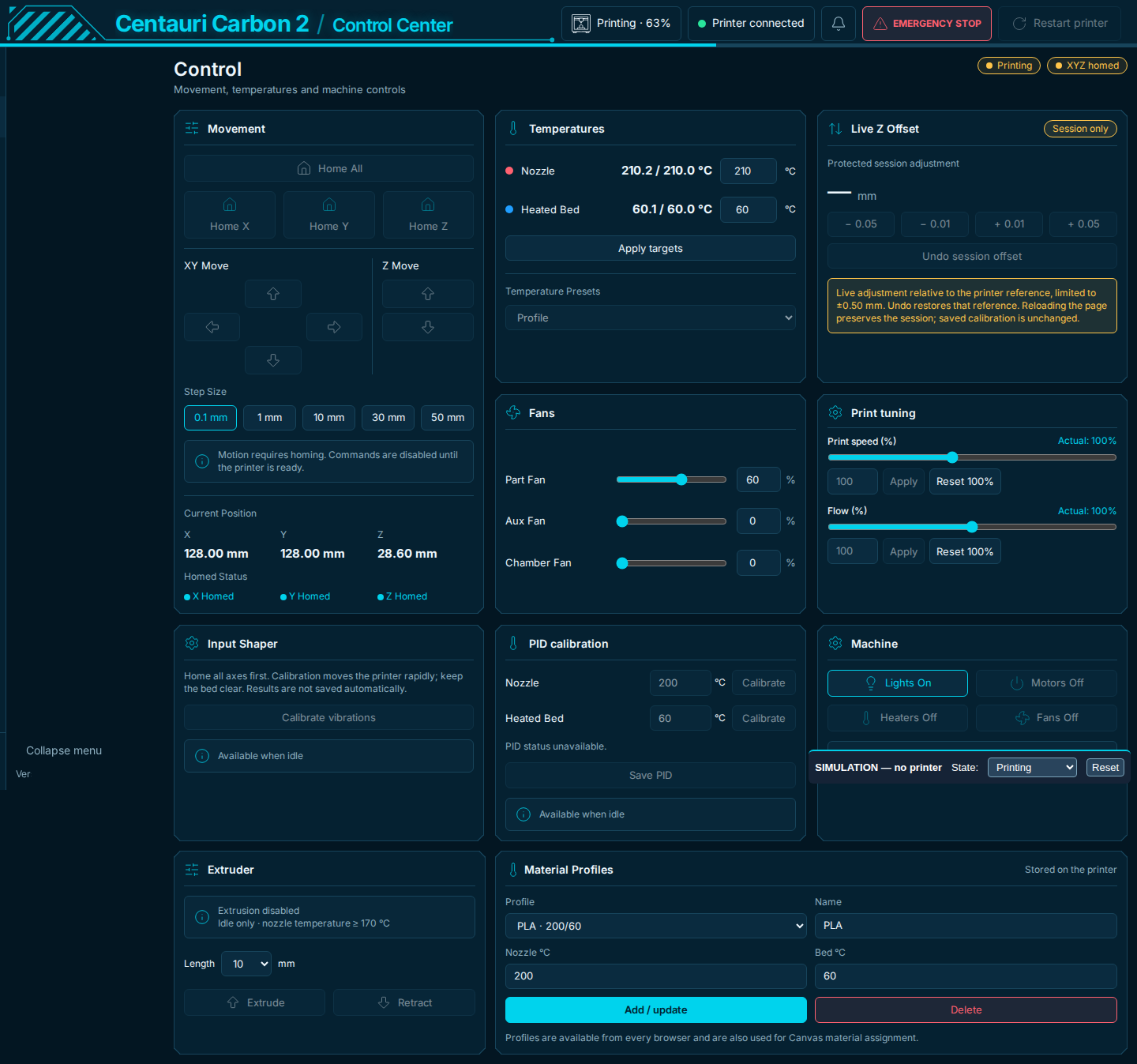
Separate experimental Windows / Linux / macOS kit, by Noahwhite2014 (#228). Qualified V4.4.1/V4.4.2 only, with Control 1.2.21/1.2.22. Raises the accepted range up to 1000 mm without choosing a distance or sending movement; suitability depends on the filament path. Remove it and reboot before app/firmware updates. Never installed by the automatic updater. Instructions.
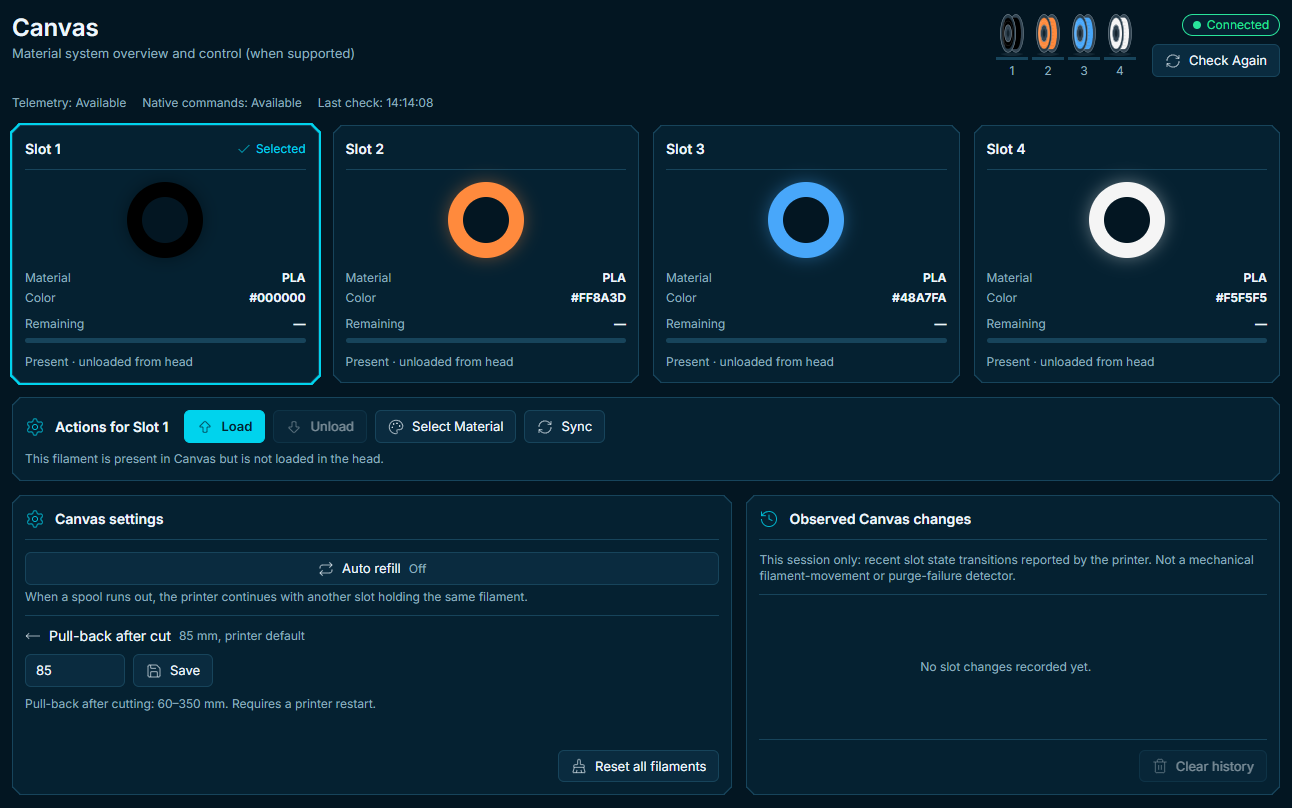
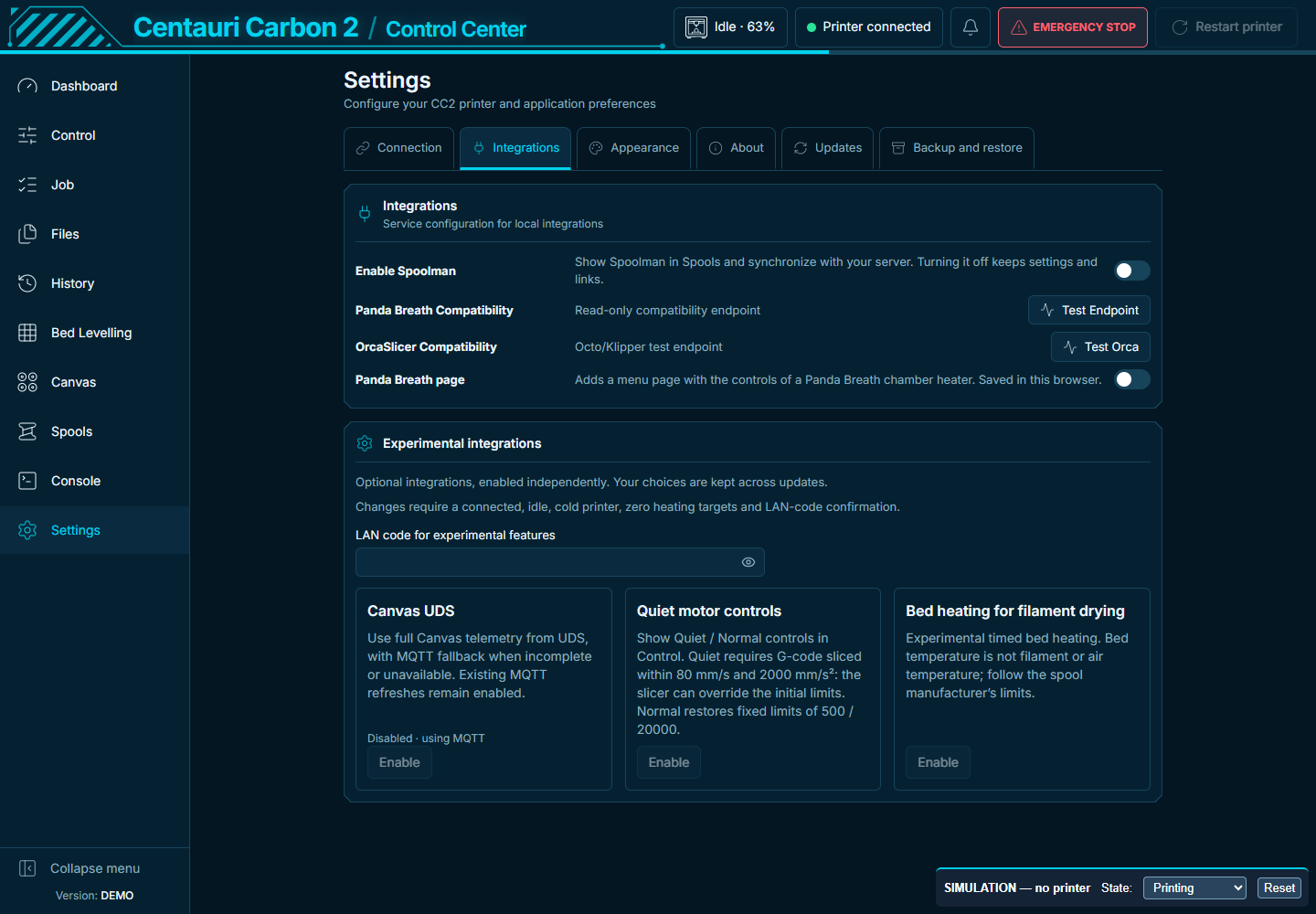
Canvas layout inspired by Surfoo; original Quiet feature by BorjaLL. Experiments retain saved choices. Previews use simulated data. Full V4.4.3 includes Control 1.2.25 and the native touchscreen refresh; the separate app update retains the existing display.
Release notes / Note complete, validation, checksums and credits.
Documentation index · Report a problem · Contributing · Build guide · Source and provenance
Version history belongs in the CHANGELOG and release notes. Installation details and compatibility requirements are maintained in the guides linked above.
Join the Centauri Carbon 2 Community Firmware Discord for community discussions, setup help, print experiences and feedback. For reproducible bugs and feature requests, please keep using GitHub Issues so reports remain searchable and trackable.
Thanks to Surfoo, beanbo, efiten, Skcycos, pezso92, asiersan, Noahwhite2014, tharje, Nick Plateringen-Paul, and every contributor, translator and tester. Special thanks to DamiBFryta, our ultimate beta tester. Full credits and original contributions.
AI-assisted work is reviewed and validated. Architecture decisions, printer-side testing and release approval remain with the maintainer and community testers.
Project code is GPL-3.0-only where contributors have the right to license it. Vendor firmware and third-party components retain their own terms. See LICENSE and NOTICE.md.