
A Python framework for modular, self-contained skill management for machines.


Skillware is an open-source framework and registry for modular, actionable Agent capabilities. It installs know-how for AI agents, or modular Skills (code, contract, and host guidance) decoupling capability from intelligence. In short, don't prompt your agents, equip them.
"I know Kung Fu." - Neo
Every new agent stack tends to reinvent tool schemas, system prompts, and safety rules. Skillware packages each capability as a self-contained bundle and adapts it to Gemini, Claude, OpenAI, Ollama, and other OpenAI-compatible hosts. For the full story and roadmap, see Vision.
A Skill in this framework provides everything a host agent needs to use a capability in a domain:
- Contract: Constitution, safety boundaries, and typed I/O baked into the bundle.
- Effect: Executable Python so agents run real work, not guess it.
- Directive: System instructions and cognitive maps so any host uses the capability as intended.
- Assurance: Offline tests that Effect honors Contract before a skill joins the registry.
- Interface: Standardized tool schemas for any LLM or agent runtime.
Optional Corpus and Reference assets extend bundles when needed. Every bundled registry skill also ships Presentation (card.json) for catalog and UI metadata. Full reference: Introduction — Skill anatomy.
Browse capabilities by category in Supported Agent Skill Categories, the Skill library, the documentation sitemap, or on our site ↗.
flowchart LR
    Registry[Registry] -->|Load| Loader[Loader]
    Loader -->|Adapt| AnyHost["Any Host"]
Install the registry once. Skillware loads a bundle, adapts it to your host's tool format, and your app runs the agent loop (Gemini, Claude, Ollama, custom scripts, …). See the Introduction for loader details, Agent loops for the execution pattern, and Skill chaining for multi-skill sessions (SkillContext, named chains:).
This repository is organized into a core framework, a registry of skills, and documentation. Runnable provider scripts are indexed in examples/README.md.
Skillware/
├── docs/                       # Introduction, testing, category hubs (docs/skills/<category>/), usage guides (docs/usage/)
├── examples/                   # Provider reference scripts — usage demos, not pytest (see examples/README.md)
├── skills/                     # Skill Registry
│   └── category/               # Domain boundaries (e.g., finance)
│       └── skill_name/         # The Skill bundle
│           ├── manifest.yaml   # Contract: schema, constitution, issuer
│           ├── skill.py        # Effect: deterministic execution
│           ├── instructions.md # Directive: host guidance
│           ├── card.json       # Presentation: catalog / UI metadata
│           └── test_skill.py   # Assurance (required for registry skills)
├── skillware/                  # Core Framework Package
│   ├── cli.py                  # Command-line interface
│   ├── context.py              # SkillContext — multi-skill registry host context
│   ├── chains.py               # Named skill chain runner (run_chain, validate_chain)
│   └── core/
│       ├── base_skill.py       # Abstract Base Class for skills
│       ├── chains_config.py    # chains: YAML parsing
│       ├── env.py              # Environment Management
│       └── loader.py           # Universal Skill Loader and Model Adapter
├── templates/                  # Boilerplate templates for new skills
│   └── python_skill/           # Standard template with required files
└── tests/                      # Clone-repo tests (framework + optional maintainer skill tests)
    ├── test_*.py               # Framework tests (loader, CLI, issuer, …)
    └── skills/                 # Optional maintainer skill tests (edge cases)
Category hubs live under docs/skills/<category>/. Full catalog: Skill library. Crawl map: documentation sitemap.
| Category | Skills | Description |
|---|---|---|
| Data Engineering | 5 | Datasets, generation, and ETL-style tooling |
| Compliance | 3 | Privacy, policy, and regulatory guardrails |
| DeFi | 3 | On-chain ops, trading, and agent wallet management |
| Office | 3 | Documents, desktop work, and productivity automation |
| Security | 3 | Defenses for untrusted input reaching logical systems |
| Creative | 2 | Image processing, media editing, and creative utilities |
| Finance | 2 | Fintech, blockchain, payments, and financial services |
| Monitoring | 2 | Agent loop observability, budget gates, and task control |
| Optimization | 2 | Middleware, efficiency, and token economics |
| Bio | 1 | Life sciences, bioinformatics, genomics, and biotechnology |
| Dev Tools | 1 | Developer workflows, repo tooling, and coding |
| Linguistics | 1 | Language adapters and internet-register lexicons |
| Networking | 1 | Egress proxy rotation, multi-region inspection, and transport middleware |
| Wellness | 1 | Coaching guardrails and mental health support |
Requires Python 3.10 or newer (see requires-python in pyproject.toml).
You can install Skillware directly from PyPI:
pip install skillwareOr for development, clone the repository and install in editable mode:
git clone https://github.com/arpahls/skillware.git
cd skillware
pip install -e ".[dev,all]"
For documentation-only work, pip install -e ".[dev]" is enough. Skill and framework contributors should use [dev,all] to match CI (see TESTING.md and Install extras).
Note: Every skill has a dedicated pip extra (
pip install "skillware[category_skill]"). TheSkillLoadervalidatesmanifest.yamlon load and suggests the matching extra when packages are missing. See Install extras.
skillware list
skillware paths
You should see a table of bundled registry skills and a paths summary confirming install and discovery. Bundled skills from pip install skillware are always available — an empty local skills/ folder does not disable them.
For path tiers, shadowing, config files, and the interactive menu, see CLI — paths & tiers, CLI — config, and Finding skills on disk. If skillware is not on your PATH, use python -m skillware list (CLI Reference).
Skill paths (optional): copy .skillware.yaml.example to .skillware.yaml in your project root, or use the interactive menu (4 / paths) to persist project and external skill roots. Inspect merged settings with skillware config show. See CLI — config.
API keys: copy the environment template and add your keys.
Unix / macOS:
cp .env.example .envWindows (PowerShell):
Copy-Item .env.example .envEdit .env with agent keys (for example Gemini) and any keys your skills need. Agent keys power your LLM client; skill keys are declared per skill in the Skill library. Operator files (skillware addressbook init, skillware evm init) live under ~/.config/skillware/ and survive upgrades. See API keys for skills for .env setup, Address book operator config, and skillware doctor.
pip install "skillware[office_gmail_handler,gemini]"Set GOOGLE_API_KEY, GMAIL_ADDRESS, and GMAIL_APP_PASSWORD in .env (API keys). Then run the interactive loop:
python examples/gemini_gmail_minimal.pyMinimal wiring:
from skillware.core.env import load_env_file
from skillware.core.loader import SkillLoader
import google.genai as genai
from google.genai import types

load_env_file()
bundle = SkillLoader.load_skill("office/gmail_handler")
skill = bundle["class"]()
chat = genai.Client().chats.create(
    model="gemini-3.5-flash",
    config=types.GenerateContentConfig(
        tools=[SkillLoader.to_gemini_tool(bundle)],
        system_instruction=bundle["instructions"],
    ),
)
# Loop: chat.send_message(user) → skill.execute(tool args) → from_function_response
What happens: SkillLoader loads the bundle (manifest, instructions.md, Effect class) and adapts it to a Gemini tool → Gemini receives your message plus the skill directive and calls the tool → skill.execute() runs structured Gmail actions (resolve recipients from the address book, search/read inbox, preview or send mail) over your dedicated agent mailbox → results (status, previews, agent_hint) return to Gemini via from_function_response so the model can confirm with you before sends and continue the conversation.
More providers and patterns: usage guides.
| Topic | Links |
|---|---|
| Introduction | Introduction · Vision · Comparison |
| Usage guides | Skill Library · Category hubs · Sitemap · Usage Guide · Skill chaining · Gemini · Enterprise cloud · OpenAI-compatible hosts · Install extras · Examples · Agent Loops · API Keys · CLI |
| Operator config | EVM operator config · Address book operator config |
| Security | Skill trust model · SECURITY.md |
| Contributing | Contributing · Glossary · Agent Native Workflow · Testing · Changelog |
Skills, docs, tests, and framework fixes are welcome. Start with Contributing, the glossary, Agent Native Workflow, and Testing. See the Agent Code of Conduct. Open PRs with the pull request template.
Most agent frameworks treat capabilities as prompt recipes, markdown checklists, or loose protocol wrappers that ask models to generate code on the fly. Skillware treats capabilities as versioned software modules: self-contained bundles pairing typed contracts, tested Python logic, agent directives, and offline assurance suites. Pre-compiled host execution decouples capability from model hallucination and eliminates the trial-and-error debugging loops inherent in unstructured tool calling.
Every skill in the registry is curated, tested, and steered by ARPA Hellenic Logical Systems rather than aggregated from thousands of unvetted, arbitrary third-party uploads. At runtime, dumping full tool documentation degrades model reasoning and inflates token costs. Through just-in-time progressive disclosure, SkillContext mounts compact one-line taxonomy briefs upfront (~45 tokens per skill) and unlocks full playbooks only when an action is dispatched, excising up to 85% of redundant prompt tokens.
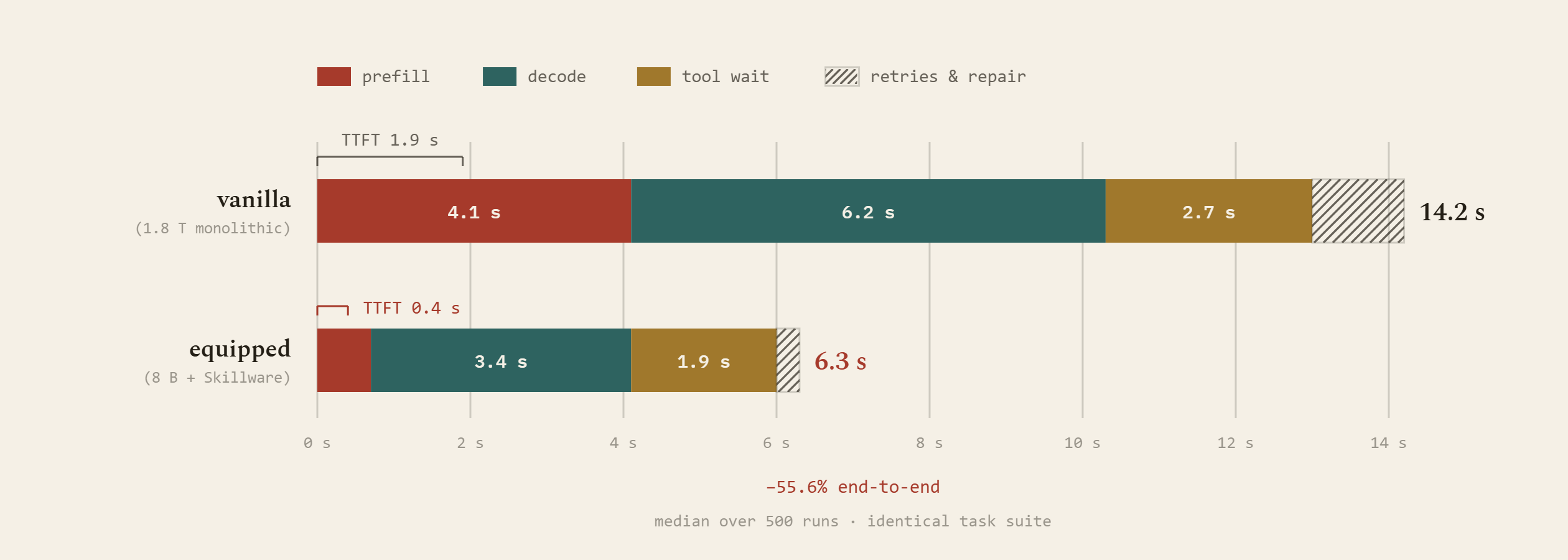
Latency anatomy across execution stages: JIT context excision shrinks prefill latency, compact model routing accelerates decoding, and deterministic host validation eliminates error-retry loops, cutting end-to-end median latency by 55.6% and collapsing time-to-first-token (TTFT).
Mission-critical enterprise workflows—such as financial transaction screening, regulatory compliance forensics, and sensor telemetry normalization—cannot afford prompt ambiguity, hallucinated edge cases, or non-deterministic event triggers. Security is embedded directly into the framework: isolated credential providers prevent ambient process leakage, AST audits prohibit runtime code synthesis, and hardware execution gates protect physical substrates. Executing pre-verified code paths replaces erratic model behavior with tight, deterministic score distributions essential for CI/CD release gating.
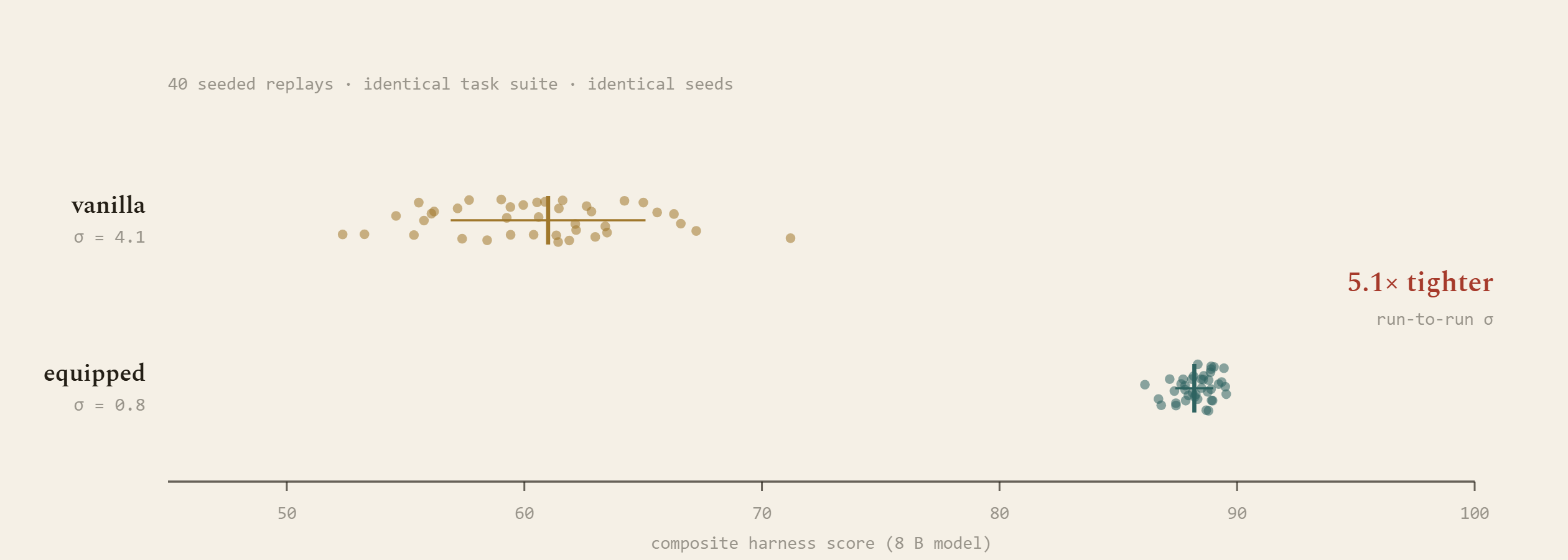
Run-to-run determinism across 40 seeded replays: Unassisted script generation scatters across an erratic score distribution (mean 61.0, σ = 4.1). Skillware contracts run-to-run variance by 5.1× (mean 88.2, σ = 0.8), establishing the reproducibility needed for regulated enterprise production.
To see how Skillware architecturally compares against MCP, Agent Skills, Antigravity, and LangChain, read COMPARISON.md. For empirical telemetry, stress crucibles, and 23-model benchmark evaluations, visit the Skillware-Bench repository.


PyPI download counts measure install activity from public aggregators (including CI and mirrors), not unique users. Use the badge links above for charts and version breakdowns.


If you use Skillware in research or products, please cite it using CITATION.cff (GitHub Cite this repository) or the Zenodo concept DOI above (DOI S). That DOI is stable across releases. For reproducibility, also record the Skillware version you used (PyPI or Git tag, for example 0.6.1). For citing the paper, use the arxiv DOI above (DOI P).
For questions, suggestions, or contributions, please open an issue or reach out to us:
- Email: [email protected]
- Enterprise: [email protected] — enterprise skills, chaining, and forward deployed engineering
- Security: [email protected] — report bugs, vulnerabilities, or other sensitive issues (see SECURITY.md)
- Issues: GitHub Issues
For skill-specific questions or reaching a skill's maintainer, check issuer and author details on the skill card, in the repo Skill Library, or on our website's skills catalog ↗.

Built & Maintained by ARPA Hellenic Logical Systems & the Community