
Apple Music–style Canvas artwork, Spotify Canvas, synced lyrics with romanization, a built-in equalizer, crossfade between songs, Last.fm scrobbling, Spotify → YouTube Music playlist transfer tool for YouTube Music and many more.



ViviMusic Xten is a browser extension that reskins music.youtube.com with animated Canvas-style backgrounds (like Apple Music/Spotify Canvas), word-synced lyrics, an audio equalizer with crossfade between songs, SponsorBlock skipping, Last.fm scrobbling, and a dark, glassy theme — without needing a separate desktop app .
This extension is not published on the Chrome Web Store. It's distributed as source from this repository and loaded manually as an "unpacked" extension. Follow the installation guide below — it takes about a minute.
🔴This extension require good amount of ram and some graphics for example if you have a littlebit gpu even windows intregated gpu thats also can run this just make sure that graphics acceleration is turn on in your browser its very important .its actively themeing live website so system resource is essential-think of it like you running a software basically

Click the preview above to watch the full video


Note: The Chromium build works on Chrome, Brave, Opera, Edge, Vivaldi and other Chromium browsers . Please use the Download ZIP button above and follow the quick Local Installation guide below.
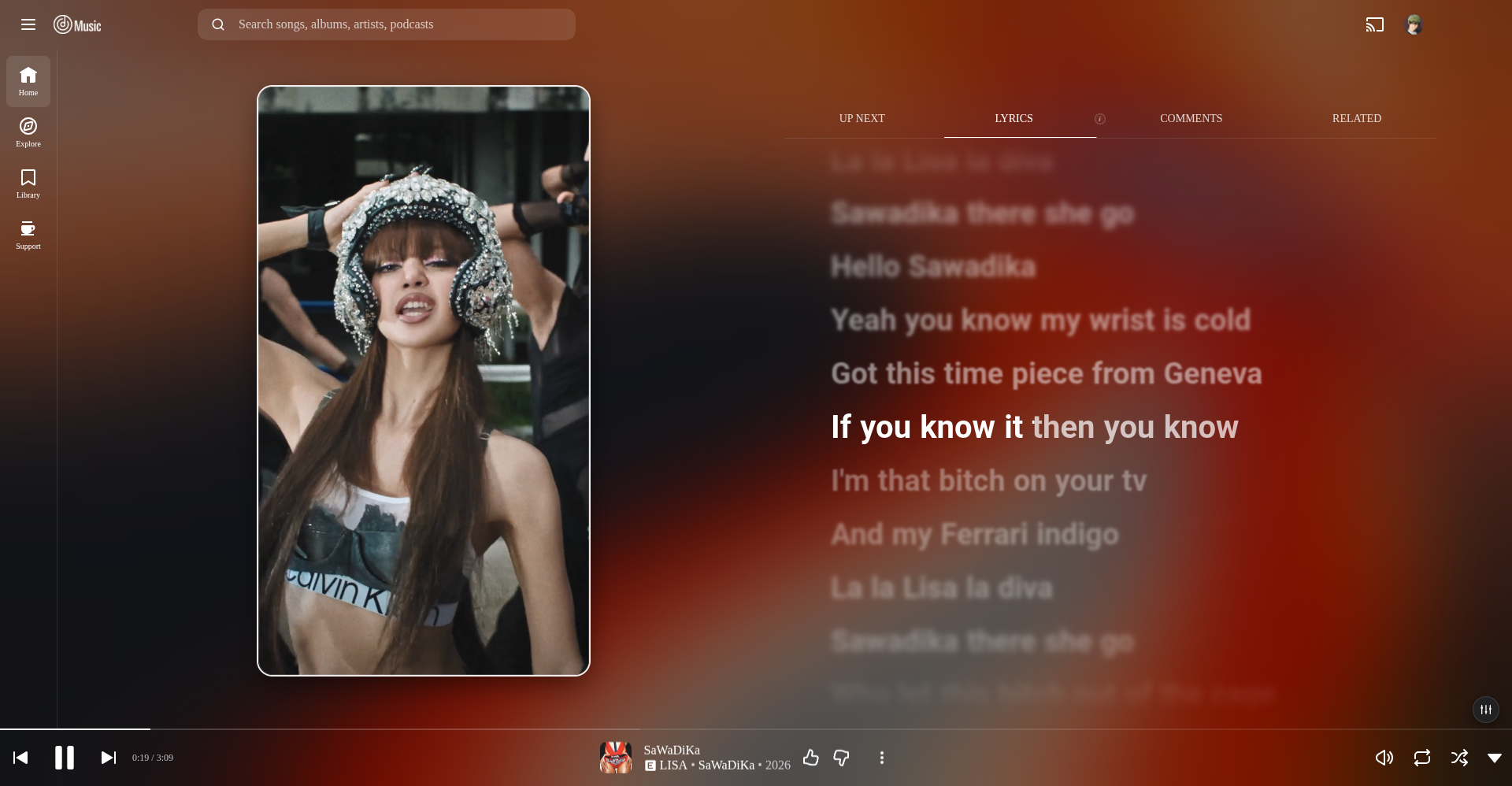
Spotify Canvas & synced lyrics — Looping Spotify Canvas video behind the player, with word-by-word synced lyrics and animated highlighting.
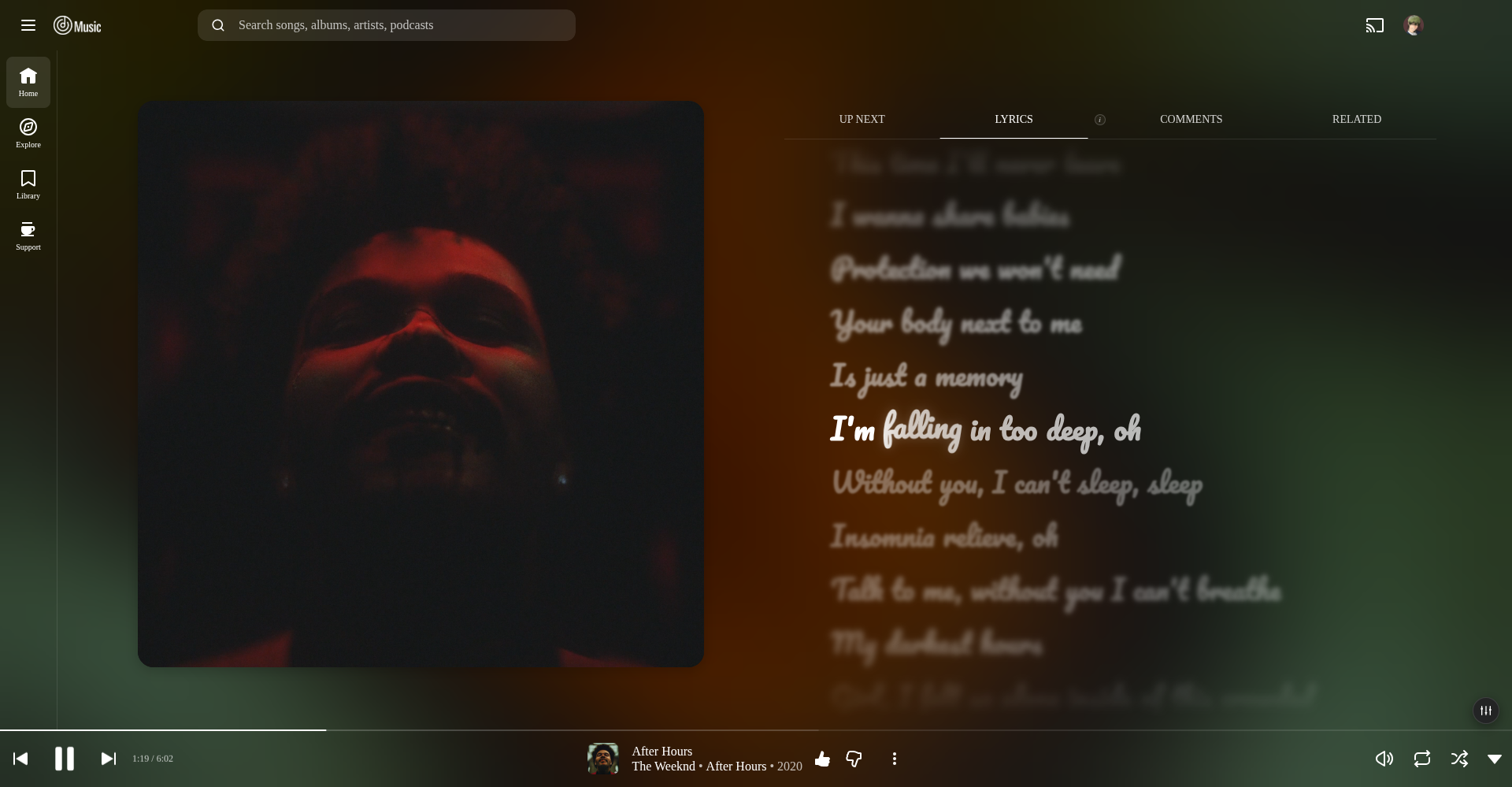
Lyrics fonts & animations — Pick from bundled fonts and switch between highlight styles such as Fill sweep, Glow, Word bounce, Smooth zoom, Apple Music and Fluid flow.
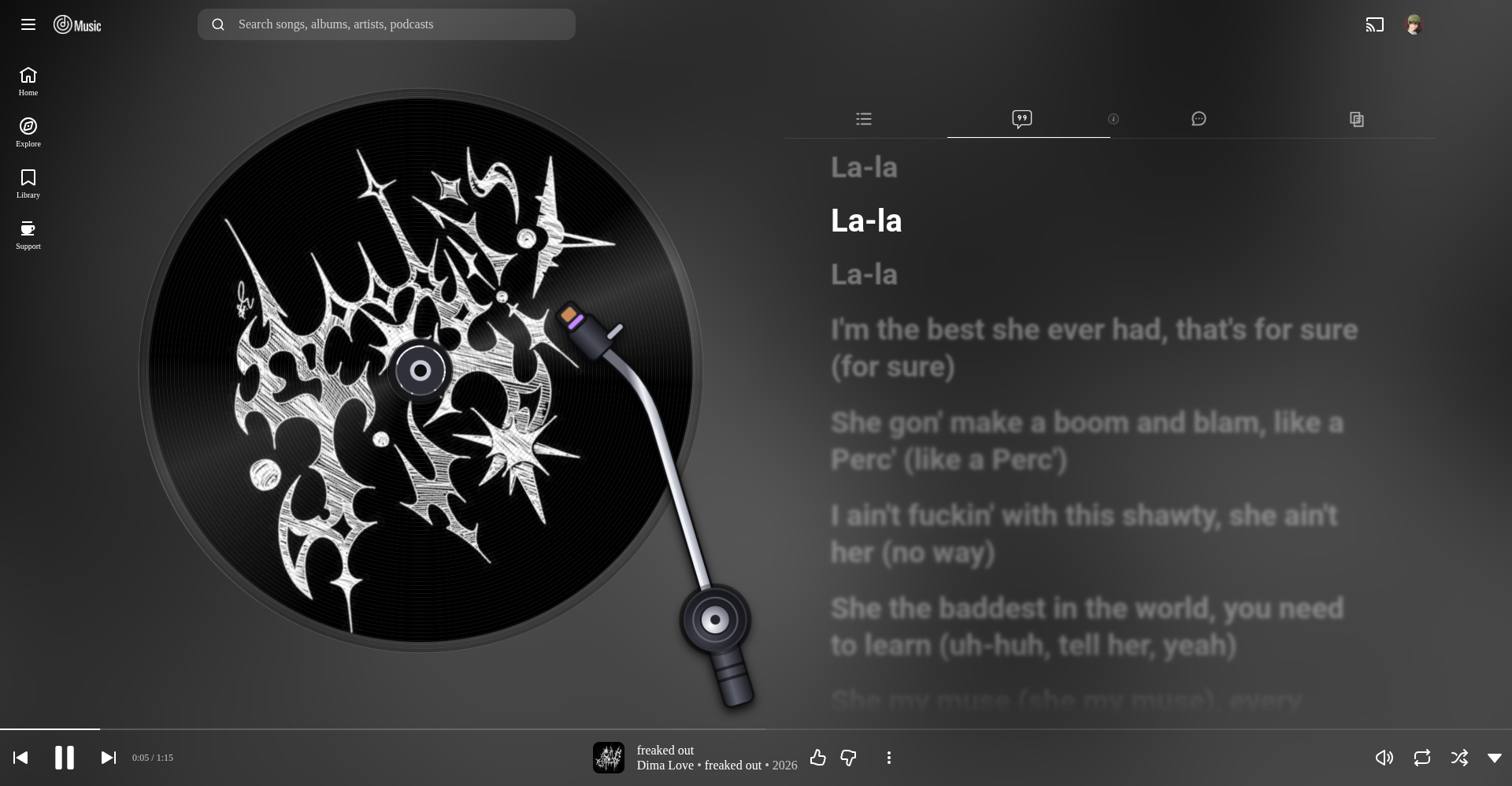
Vinyl disc appearance — Show the artwork as a rotating record with a tonearm that parks on pause, plus an optional shine effect.
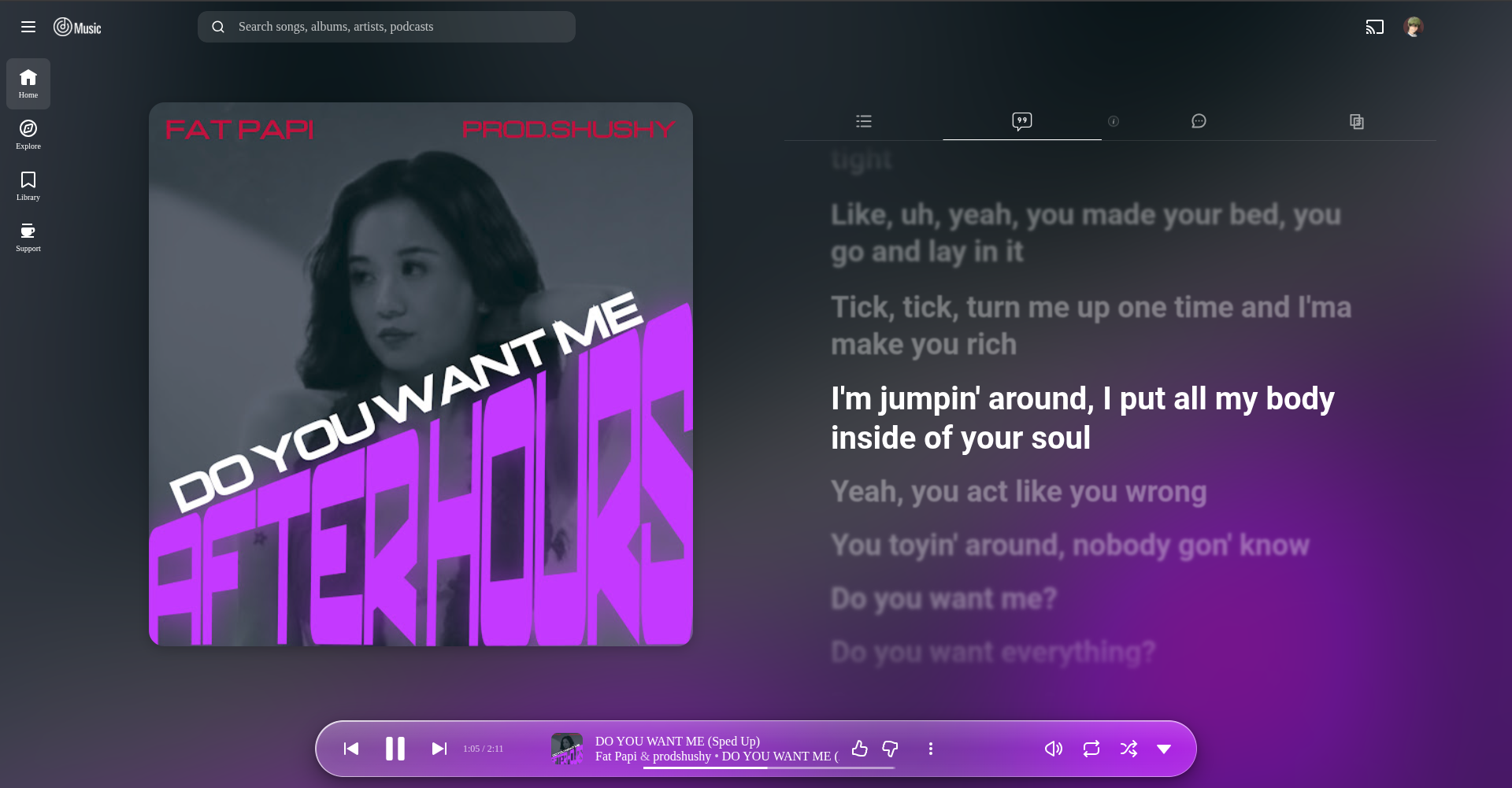
Glass floating mini player — A floating liquid-glass pill player bar, with icon-only player tabs instead of text labels.
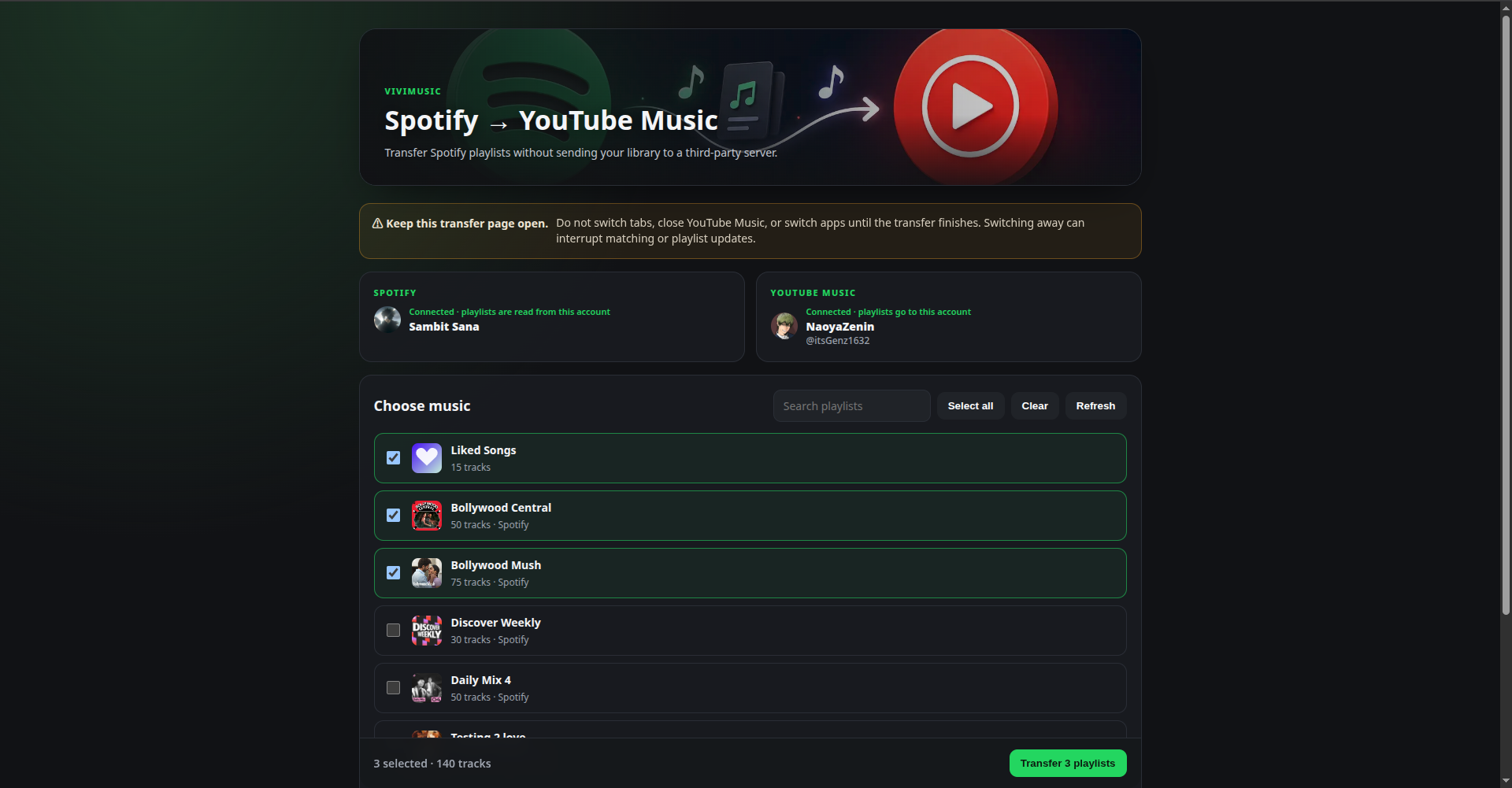
Spotify → YouTube Music transfer — Move liked songs and playlists from Spotify to YouTube Music in a few clicks from a dedicated transfer window.
- Watch the Extension in Action
- Screenshots
- Features
- Installation Guide
- Updating
- Settings
- Spotify Canvas Login
- Spotify → YouTube Music Playlist Transfer
- Last.fm Scrobbling
- SponsorBlock
- Star Verification
- Permissions & Privacy
- Troubleshooting
- Credits
- License
- 🎨 Canvas Artwork — Fetches animated, Apple Music–style Canvas videos (or high-res artwork as a fallback) for the currently playing song and blends it into the player thumbnail and page background. If a track has both Apple Music artwork and a Spotify Canvas, you choose which one is preferred.
- 🖼️ Spotify Canvas — Spotify Canvas support for YT Music songs. Connect with a one-click Spotify login or by supplying your
sp_dccookie locally. - 🔄 Spotify → YouTube Music Playlist Transfer — Transfer your Spotify playlists and Liked Songs directly from the browser into YouTube Music without sending your library to a ViviMusic Xten server. The transfer page shows which Spotify account and which YouTube Music account are connected, lets you search and multi-select, shows live per-playlist progress with a Stop button, and finishes with a results summary (links to the new playlists and a list of tracks that were not found). See the transfer guide.
- 🎨 THEME — A full dark, glassy visual reskin of YouTube Music, toggleable independently of Canvas and Lyrics.
- 🌊 Kawarp Background Engine — The animated Canvas background is fully tunable from the popup: opacity, warp intensity, blur passes, saturation, brightness, dithering, animation speed, and transition duration all have live sliders, plus a "pause when inactive" toggle and a one-click Reset to defaults button. There's also an "artwork/image-only" mode if you'd rather skip the warped background animation entirely and just show static art.
- 💿 Vinyl Disc Artwork — Show the player artwork as a rotating record. The tonearm parks when playback pauses and returns when it resumes. (Turning this on switches off Apple Music artwork and Spotify Canvas.)
- 🏷️ Icons-only Player Tabs — Replace the Up next / Lyrics / Comments / Related labels with icons; the active tab glows.
- 🎶 Crossfade (Beta) — Blend the end of one song into the start of the next instead of a hard cut. Choose a length from 1 to 12 seconds in the Audio playback card. It is off by default, uses smooth equal-power fades, and is automatically skipped for ads, repeat-one and very short tracks.
- 🎚️ Built-in Equalizer — A toggleable 3-band equalizer (low / mid / high) with a room-reverb send and one-click presets (Bass Boost, Clear Vocals, Empty Room), available from the full player screen.
- 🎤 Synced Lyrics — Syllable-synced lyrics when available, then word-synced, then line-synced, then plain lyrics. Pulled from multiple providers so you almost always get something.
- 🔀 Multiple Lyrics Providers — Toggle individual sources on or off:
- lrc.red
- Better Lyrics (one toggle; tries syllable/word-sync sources first — TTML and QQ Music "Portato" — then falls back to Kugou "Legato" and "Legacy" line-sync)
- Better Lyrics Unison
- BiniLyrics
- Musixmatch
- LRCLIB
- Spotify (needs a connected Spotify account)
- 🔠 Lyrics Romanization — Show lyrics in Latin letters, written the way they sound (not translated), either instead of the original or as a small line under each original line. Korean, Japanese kana, Chinese (pinyin), Hindi, Punjabi and Georgian are converted on-device. Other scripts (for example Japanese kanji, Arabic, Cyrillic, Greek, Thai and several Indic scripts) are looked up through Google Translate only if you tick them, and only the lyric text is sent. You choose which languages are romanized.
- ✨ Lyrics Alignment & Highlight Animations — Align lyrics left, center or right, and pick the current-word animation: Fill sweep, Glow up, Word bounce, Smooth zoom, Apple Music style, or Fluid flow (modelled on the Better Lyrics engine: lines glide up together with a soft ease, and the current word lights up letter by letter).
- 💃 REZE Dance — An animated dancer plays when no lyrics can be found for a track, toggleable in the popup.
- ⏭️ SponsorBlock — Automatically skips non-music segments (spoken intros, skits, outros) of music videos using community data from SponsorBlock, and keeps the lyrics timeline in sync after each skip. See SponsorBlock for how it works and the required attribution.
- 🎧 Last.fm Scrobbling — Sign in through Last.fm's browser authorization page (or with username and password), scrobble what you listen to, send Now Playing status, and sync Likes/Unlikes as Loves/Unloves.
- 💾 Local Artwork Cache — Previously fetched artwork/Canvas links are cached locally so repeat plays load instantly. View, search, preview, export, import and clear them from the popup.
- ⌨️ Cache Overlay Shortcut — Press Alt+C on the YouTube Music tab to see the artwork cache and the current track's live cache status without opening the popup.
- 🔋 Optimized & Resource Saving Mode — One switch on the popup's home screen that pauses the heaviest effects and background work: the fluid background and Apple Music artwork lookups, the equalizer and crossfade, SponsorBlock and the no-lyrics dancer, Last.fm scrobbling, and artwork fetching/caching. Your settings are kept and apply again when you switch it off.
- 🔔 Update Checker — Since this isn't on the Web Store, the popup can check this GitHub repo's Releases page and let you know when a newer version is out. It does not auto-install updates.
Because this extension isn't listed on Chrome webstore , your browser will warn you that it's an "unpacked" / "developer mode" extension. That's expected and normal — it just means you installed it from source instead of a store.
- Download The Zipfile From Releases
- Extract it to a folder you won't move or delete later (e.g.
Documents/ViviMusic Xten). Chrome loads the extension directly from this folder, so if you delete it, the extension breaks. - Open your browser and go to:
(For Edge:
chrome://extensionsedge://extensions· For Brave:brave://extensions· For Vivaldi:vivaldi://extensions· For Opera:opera://extensions) - Turn on Developer mode — the toggle is in the top-right corner of the extensions page.
- Click Load unpacked.
- Select the folder you extracted and open the folder you will see icon and src folder when you see these two folders dont click on them just click open to select (the one that directly contains
manifest.json). - ViviMusic Xten should now appear in your extensions list and in your toolbar. Open music.youtube.com, play a song, and you should see the new theme and Canvas artwork kick in within a second or two.
Click On the image below for extension installation guide video :-
Firefox addon is currently available in official firefox addon store install the extension directly from there .
To update ViviMusic Xten For Chromium Builds Specially :
- Open the extension popup — if a newer version is available, you'll see an "Update available" notice (checked automatically twice a day, or manually via Check for updates in the popup).
- Download the latest release from the Releases page (or pull the latest
mainbranch). - Extract it and again load unpack it then it will be updated . That's it — no need to remove and re-add the extension.
All settings live in the extension popup (click the ViviMusic Xten icon in your toolbar):
| Setting | What it does |
|---|---|
| Apple Music Animated Artwork | Turns the animated artwork/background feature on or off. |
| Image-only mode | Shows static artwork instead of the animated looping Canvas video (less data and CPU). |
| Fluid Background (Kawarp) | Enables the animated warp effect, with an expandable panel of fine-tuning sliders: opacity, warp intensity, blur passes, saturation, brightness, dithering, animation speed, transition duration, plus a "pause when inactive" toggle and a Reset to defaults button. |
| Audio playback → Equalizer | Shows or hides the floating equalizer button on the full player screen. |
| Audio playback → Crossfade (Beta) | Turns the blend between songs on or off (off by default). A Crossfade length slider sets it from 1 to 12 seconds. It needs a little normal playback before the end of a song to prepare, so if you drag the seek bar, avoid landing within the last minute of a song. |
| Synced Lyrics | Turns the custom lyrics panel on or off. |
| Auto-open Lyrics tab | Automatically switches to the Lyrics tab when a new track starts. |
| Romanization | Off, Romanized only, or Original + romanized. |
| Languages to romanize | Choose which scripts are romanized (all, none, or individual languages). |
| Lyrics alignment | Left, Center or Right. |
| Highlight animation | Fill sweep, Glow up, Word bounce, Smooth zoom or Apple Music. |
| Lyrics font | Changes the font of the lyrics lines only. Lyrics in scripts a font doesn't cover (Hindi, Bengali, Korean…) fall back to the default font. |
| Show lyrics for video songs | Shows the synced lyrics panel for tracks played as music videos, not just audio. |
| Show dancer when no lyrics found | Plays the animated dancer when no lyrics can be found for a track. |
| Skip non-music sections (SponsorBlock) | Automatically skips non-music segments using SponsorBlock data. |
| Lyrics providers | Toggle individual lyrics sources on/off. |
| Customize provider priority | Enables custom priority ordering (1st / 2nd / 3rd), with a "wait for priority source" toggle. |
| Theme | Toggles the full visual reskin independently of Canvas/Lyrics. |
| Vinyl disc artwork | Shows the player artwork as a rotating record with a tonearm. Turns off Apple Music artwork and Spotify Canvas while on. |
| Player tabs: icons only | Replaces the Up next, Lyrics, Comments and Related labels with icons. |
| Spotify Canvas | Enables Spotify Canvas videos for YT Music tracks; connect via login or sp_dc cookie. |
| When both are available, prefer | Chooses Apple Music artwork or Spotify Canvas when a track has both. |
| Playlist transfer | Opens the client-side Spotify → YouTube Music transfer tool (Beta). Select playlists and/or Liked Songs and transfer them into private YouTube Music playlists. |
| Last.fm scrobbling | Turns Last.fm integration on or off entirely. |
| Send Now Playing | Sends a "Now Playing" update to Last.fm as soon as a track starts. |
| Send Likes/Unlikes | Mirrors the YouTube Music like button to Last.fm Love/Unlove. |
| Min. song length (sec) | Tracks shorter than this are never scrobbled. |
| Scrobble delay (%) | Scrobble once this percentage of the track has played. |
| Scrobble delay (min) | Or once this many minutes have played — whichever threshold is reached first. |
| Artwork Cache | Shows how many songs are cached locally, with search, preview, Export, Import and a one-click Clear all. |
| Check for updates | Manually checks this repo's latest release against your installed version. |
| Optimized & resource saving mode | Pauses heavy effects and background activity (see the feature description above). Settings are kept. |
| Notification bell | Opens developer announcements. |
| Report an issue (warning icon) | Opens a new GitHub issue for this project. |
To get Spotify Canvas videos on YouTube Music tracks, connect a Spotify account from the popup in one of two ways:
- Connect Spotify — click the button and log in normally.
- Paste
sp_dccookie — if the one-click login doesn't work for your browser (this is common on Brave, due to its cookie/shield handling), paste your Spotifysp_dccookie value into the field and click Save sp_dc locally. It's stored locally in your browser only.
Once connected, you'll see your connected account shown in the popup with a Disconnect Spotify option to revoke access at any time.
ViviMusic Xten can transfer Spotify playlists and your Liked Songs into YouTube Music directly from your browser. The transfer runs client-side: playlist metadata and track information are processed by the extension in your browser, and the extension talks directly to Spotify and YouTube Music using the sessions you already have open.
- Pick one or many Spotify playlists, or your Liked Songs, with a search box and Select all / Clear buttons. The action bar shows how many playlists and tracks you have selected.
- Shows the Spotify account (name and profile picture) and the YouTube Music account (name, handle and picture) that will be used.
- Search YouTube Music for each Spotify track using title and artist information.
- Create a matching private YouTube Music playlist for each selection and add the matched videos in the same order as the Spotify playlist. Liked Songs are created as a playlist named "Liked Songs".
- A live progress view with an overall progress bar, matched / not-found counters, elapsed time, a status for each playlist, and an activity log.
- A Stop button that ends the transfer after the current track. A playlist that was stopped before it was created is not created.
- A results screen with a summary for each playlist, an Open in YouTube Music link for each new playlist, and an expandable list of tracks that could not be matched.
- If one playlist fails, the remaining playlists continue. Playlists where nothing matched are skipped instead of creating an empty playlist.
The YouTube Music account is read from YouTube Music itself and re-checked whenever you return to the transfer page. If you switch accounts in YouTube Music, the page updates and shows a notice. The account is checked again when you press Transfer and before each playlist is created; if it changed mid-transfer, the transfer stops so nothing is added to the wrong account.
This feature does not require a Spotify Developer account, Spotify Client ID/secret, Google Cloud project, OAuth app registration, ViviMusic Xten server, Render deployment, database, or separate transfer application. It uses the user's existing logged-in browser sessions.
Spotify: Open Spotify and sign in normally. ViviMusic Xten reads the existing Spotify Web Player sp_dc session cookie and uses Spotify's own Web Player session flow to obtain the session needed to read playlists. The extension never asks for or stores your Spotify password.
YouTube Music: Open music.youtube.com and sign in normally. The transfer uses the logged-in YouTube Music page and its own browser session/configuration to search, create, and update playlists. The extension never asks for or stores your Google password.
The transfer feature uses internal web interfaces exposed by Spotify and YouTube Music rather than their public developer APIs. This is why no developer application credentials are required, but those internal interfaces are not stable public APIs and can change without notice. A future Spotify or Google web-client change may require an extension update.
There is no ViviMusic Xten transfer server in the data path:
Spotify session
      ↓
ViviMusic Xten extension (your browser)
      ↓
YouTube Music session
      ↓
Private YouTube Music playlists
The extension does not upload your Spotify library to a ViviMusic Xten backend. Spotify and YouTube Music still receive the requests required for the transfer because they are the services being read from and written to.
Keep the transfer page open until the operation finishes. Do not close the YouTube Music tab, switch apps, or intentionally interrupt the browser while matching and playlist updates are running. The current implementation uses a page bridge inside the logged-in YouTube Music tab, so keeping that environment intact reduces the chance of an interrupted transfer. The browser will warn you if you try to close the transfer page while a transfer is running.
ViviMusic Xten can scrobble what you listen to on YouTube Music straight to your Last.fm profile.
Logging in — two options:
- Open the popup and switch on Last.fm scrobbling.
- Sign in with Last.fm: a Last.fm tab opens, you approve access there, and the popup shows you as connected. Your password is never entered in the extension.
- Or use username & password instead: enter your Last.fm username and password and click Connect Last.fm account. Your password is sent once, directly to Last.fm's own API, and is never stored.
- In both cases only the session token Last.fm returns is saved locally, and it can be revoked any time from your Last.fm account's Applications settings.
How scrobble timing works: A track is scrobbled once it has played past whichever comes first:
- the configured percentage of its total duration, or
- the configured number of minutes,
as long as the track is longer than the configured minimum song length. These three thresholds are all adjustable in the popup.
Likes/Unlikes: When enabled, liking or unliking a song in YouTube Music sends a matching Love/Unlove to Last.fm.
ViviMusic Xten can skip the non-music parts of music videos — spoken intros, skits and outros — using community-submitted segments from SponsorBlock.
How it works
- When a track starts, the extension asks SponsorBlock's API for segments in the Non-Music (
music_offtopic) category with the Skip action only. - Lookups use SponsorBlock's privacy-preserving hash-prefix endpoint: only the first 4 characters of the SHA-256 hash of the video ID are sent, and the exact video is matched locally in your browser.
- Each segment is skipped once per track. Segments longer than 2 minutes are ignored as probably mislabeled, and the synced-lyrics timeline is shifted so lyrics stay aligned after a skip.
- Results (including "no segments found") are cached locally for 6 hours, for up to 500 videos.
- It is controlled by Skip non-music sections (SponsorBlock) in the popup. When it is off, no SponsorBlock requests are made.
- ViviMusic Xten is read-only here: it does not submit or vote on segments. To contribute segments, use the official SponsorBlock extension.
Attribution and licensing
This product uses data from SponsorBlock (https://sponsor.ajay.app/), created by Ajay Ramachandran and contributors, used under the Creative Commons Attribution-NonCommercial-ShareAlike 4.0 International license.
- SponsorBlock's API and database are licensed CC BY-NC-SA 4.0 unless its author gives explicit permission.
- The SponsorBlock browser extension is licensed under GPL-3.0. No code from the SponsorBlock extension is used in ViviMusic Xten. The small API client in
src/sponsorblock.jsis original code that only calls the public API, so ViviMusic Xten's own license is unaffected. - SponsorBlock data is fetched live and cached locally for each user. It is not bundled with or redistributed in this package.
- Because the data is licensed for non-commercial use, anyone who redistributes or forks this extension commercially should check SponsorBlock's license terms, or contact its author, before keeping this feature.
ViviMusic Xten asks you to star this repository on GitHub once before it unlocks. This is what the check does, so there are no surprises:
- When you press the verify button, the extension uses GitHub's OAuth Device Flow: it shows you a short code, and you approve it on
github.com. The extension never sees your GitHub password. - The resulting GitHub token is used for one thing only: asking GitHub whether your account has starred
Archimetrix/VIVIMUSIC_XTEN. It does not read your repositories, and it does not star or change anything on your behalf. - The token and the result are stored locally in your browser (extension storage). They are sent only to GitHub, never to a ViviMusic Xten server.
- Not forced. The verification screen has a Show it later button. It hides the screen for that browser tab only; opening a new tab shows it again until you verify. New installs also get a 10-minute head start before it first appears.
- Verify once, unlocked for good. After a successful check there are no re-checks, even if you un-star later.
- Already verified? You won't be asked again. Updates never show it, and a small "verified" flag is kept in browser-synced extension storage so removing and re-adding the extension on a profile with extension sync turned on doesn't ask again either. (Without profile sync, removing the extension erases it and you would need to verify once more.)
ViviMusic Xten's content scripts only run on music.youtube.com. Everything else listed below is contacted by the extension's background service worker (or, for lyrics, the page script) only for the feature that needs it.
| Permission | Why it's needed |
|---|---|
storage, unlimitedStorage |
Saves your settings and caches artwork and SponsorBlock results locally, in your browser only. |
activeTab, tabs |
Detects the current track and communicates between the popup, the transfer page and the YouTube Music tab. |
alarms |
Schedules the twice-daily update check and the short polling used while you sign in to Last.fm through its browser page. |
cookies |
Used only for Spotify login (reading/managing the sp_dc session cookie needed for Spotify Canvas, Spotify lyrics and the playlist transfer). |
declarativeNetRequestWithHostAccess |
Adds the request headers (such as Origin/Referer) that Apple Music's and Spotify's web players require for the artwork, Canvas and playlist requests the extension makes on your behalf. |
scripting |
Runs the YouTube Music page bridge used by the playlist transfer inside your logged-in YouTube Music tab. |
| Host access | Why it's needed |
|---|---|
music.youtube.com |
Where the extension actually runs and injects its UI. |
api.betterlyrics.org, lyrics-api.boidu.dev, unison.betterlyrics.org, unison.boidu.dev, lrclib.net, lrc.red (and *.lrc.red), apic-desktop.musixmatch.com, apic-appmobile.musixmatch.com, apic.musixmatch.com, www.musixmatch.com |
Lyrics providers. Also contacted for lyrics: lyrics-api.binimum.org (BiniLyrics). |
*.apple.com, *.itunes.apple.com, *.mzstatic.com, *.cdn-apple.com, *.aaplimg.com, api.deezer.com |
Apple Music animated/static artwork, and ISRC lookups (Apple, with Deezer as a fallback) used to find lyrics by ISRC. |
open.spotify.com, api.spotify.com, api-partner.spotify.com, spclient.wg.spotify.com, apresolve.spotify.com, clienttoken.spotify.com, canvaz.scdn.co |
Spotify's own endpoints, used for Spotify Canvas, Spotify lyrics and the Spotify → YouTube Music playlist transfer, all through your logged-in Web Player session. |
code.thetadev.de |
Community-maintained Spotify web-player secrets (ThetaDev/spotify-secrets) needed to obtain a Spotify web-player session. |
sponsor.ajay.app |
SponsorBlock's API — used only if SponsorBlock is enabled, to fetch skip segments for the currently playing video. |
translate.googleapis.com |
Optional romanization lookups for scripts that can't be converted on-device. Used only for languages you tick, and only the lyric text is sent. |
api.github.com, github.com, raw.githubusercontent.com, avatars.githubusercontent.com |
Update check (read-only release lookup), developer announcements (a read-only JSON file in this project's repository), and star verification (GitHub's device flow, your token, and your avatar on the verification screen). |
ws.audioscrobbler.com |
Last.fm's API — used only if you enable and log in to Last.fm scrobbling. Sends the current artist/track (and your login once, to establish a session) directly to Last.fm. |
Nothing is sent to a ViviMusic Xten-owned server. The extension communicates directly with the external services needed by the enabled features: Spotify, YouTube Music, Apple Music and Deezer, the lyrics providers, GitHub (updates, announcements and star verification), SponsorBlock if enabled, Google Translate if you enable romanization lookups, and Last.fm if you opt in to scrobbling. For the Spotify → YouTube Music transfer, Spotify playlist data is read locally by the extension and YouTube Music receives the search/playlist-update requests needed to perform the transfer. No analytics and no tracking.
Nothing changed after installing.
Make sure you're on music.youtube.com (not youtube.com/music or the mobile site), and refresh the tab after loading the extension for the first time.
"Manifest file is missing or unreadable" when loading unpacked.
You selected the wrong folder — make sure you pick the folder that directly contains manifest.json, not its parent folder or the src subfolder.
Extension disappeared / shows an error icon after a browser restart.
The folder you extracted the extension to was moved, renamed, or deleted. Re-extract it somewhere permanent and reload it via chrome://extensions.
Spotify → YouTube Music says Spotify is not connected. Open Spotify and make sure you are fully signed in. Then return to the transfer page and click Refresh. Vivimusic uses the existing Spotify Web Player session rather than a separate Spotify developer login.
Spotify playlists appear, but a transfer stops or the YouTube Music bridge times out.
Keep the transfer page open and make sure a YouTube Music tab is also open and signed in. Do not close the YT Music tab or interrupt the browser while the transfer is running. Reload music.youtube.com and retry if the page was left idle for a long time.
A Spotify playlist cannot be transferred because some songs are missing. The matcher searches YouTube Music and selects the best candidate from the returned results. Ambiguous, region-specific, live, remix, cover, or otherwise unavailable tracks may not match correctly. The transfer continues with the remaining tracks and reports the final results.
Lyrics aren't showing for a song. Not every song has synced lyrics available from any provider. Try toggling different providers on/off in the popup — coverage varies per source.
Last.fm login fails. Double-check your username and password (not your email, unless that's what you normally log in with). If it still fails, your Last.fm account may have two-factor or app-specific restrictions — try generating the connection again after a few minutes.
Scrobbles aren't showing up on Last.fm. Check that Last.fm scrobbling is switched on and you're shown as connected in the popup. Remember scrobbles only send after your configured percentage/minutes threshold is reached, not the instant a song starts (that's what "Now Playing" is for).
The GitHub star screen keeps appearing.
Make sure you finished approving the code on github.com and that you starred Archimetrix/VIVIMUSIC_XTEN with the same GitHub account, then press the check again. You can use Show it later to keep listening for that browser tab in the meantime. Once verification succeeds it stays unlocked.
Crossfade isn't blending songs. Check that Crossfade is switched on in Audio playback and click once anywhere on the YouTube Music page after enabling it (browsers only start audio processing after a click or key press). The first song after switching it on or reloading the tab plays normally; blending starts from the next one. It is skipped for ads, repeat-one, very short tracks, and when you seek to within the last minute of a song.
SponsorBlock isn't skipping anything. Skipping only happens for music videos that SponsorBlock contributors have marked with Non-Music segments, so most tracks will have none. Make sure Skip non-music sections (SponsorBlock) is on in the popup.
Something looks visually broken after a YouTube Music redesign. YouTube Music's own layout changes occasionally, which can break selectors this extension relies on. Open an issue on this repository with a screenshot and the URL/page you were on.
Project
- Built and maintained by Archimetrix
- Theme design foundation: the "Dynamic Background" theme by chengggit
Data and services
- SponsorBlock — non-music segment data by Ajay Ramachandran and contributors, used under CC BY-NC-SA 4.0. See SponsorBlock.
- Lyrics — Better Lyrics (BetterLyrics, Unison, Portato, Legato, Legacy), LRCLIB, lrc.red, BiniLyrics, Musixmatch, and Spotify
- Artwork and track lookup — Apple Music / iTunes, Deezer, and Spotify Canvas
- Scrobbling — Last.fm
- Romanization lookups — Google Translate
- Spotify web-player secrets — ThetaDev/spotify-secrets
- Special thanks to VIVIMUSIC for providing the Musixmatch foundation and artwork-fetching path.
Open-source components bundled with the extension
- Kawarp (fluid background engine,
@kawarp/core) — © 2026 Better Lyrics, MIT License - hls.js — © 2017 Dailymotion, Apache License 2.0
- pinyin-pro (Chinese pinyin romanization) — © 2022-present zh-lx, MIT License
- Lyrics fonts — Playfair Display, Cormorant, DM Serif Display, Lora, Poppins, Montserrat, Outfit, Space Grotesk, Caveat, Dancing Script, Pacifico and Bebas Neue, SIL Open Font License 1.1, Latin subsets via Fontsource
Full copyright notices and license texts for the bundled components are in THIRD_PARTY_NOTICES.md.
Disclaimer
ViviMusic Xten is an independent project and is not affiliated with, endorsed by, or sponsored by Google, YouTube, YouTube Music, Spotify, Apple, Last.fm, Musixmatch, Deezer, GitHub, SponsorBlock, Better Lyrics or any other service named here. All product names, logos and trademarks are the property of their respective owners.
Copyright (c) 2026 [Archimetrix]. All rights reserved.
This software and associated documentation files (the "Software") are proprietary and confidential. No part of this Software may be reproduced, distributed, transmitted, transcribed, stored in a retrieval system, or translated into any human or computer language, in any form or by any means, without the prior written permission of the copyright owner.
Third-party components. The terms above apply only to the original code and assets of ViviMusic Xten. The bundled third-party components listed under Credits remain under their own licenses (Apache-2.0, MIT and SIL OFL 1.1), and nothing above restricts the rights those licenses grant. Services the extension connects to — including SponsorBlock, whose data is licensed CC BY-NC-SA 4.0 — are not part of the Software and are governed by their own terms. See THIRD_PARTY_NOTICES.md.