


A work-in-progress decompilation of Super Mario Galaxy 2.
This repository does not contain any game assets or assembly whatsoever. An existing copy of the game is required.
This project is not meant to be an effort to create a PC port. Join the Discord server to learn more and ask about our work-in-progress PC port "AstroCore".
Note
This is a community-focused project that would like to remain as human as possible. AI-generated or otherwise automated contributions will be rejected. Contributors should be able to explain and justify any work they submit.
Supported versions:
SB4E01: Rev 0 (USA)
On Windows, it's highly recommended to use native tooling. WSL or msys2 are not required.
When running under WSL, objdiff is unable to get filesystem notifications for automatic rebuilds.
- Install Python and add it to
%PATH%.- Also available from the Windows Store.
- Download ninja and add it to
%PATH%.- Quick install via pip:
pip install ninja
- Quick install via pip:
-
Install ninja:
brew install ninja
wibo, a minimal 32-bit Windows binary wrapper, will be automatically downloaded and used.
- Install ninja.
wibo, a minimal 32-bit Windows binary wrapper, will be automatically downloaded and used.
-
Clone the repository:
git clone https://github.com/SMGCommunity/Garigari.git
-
Using Dolphin Emulator, extract your game to
orig/GAMEID.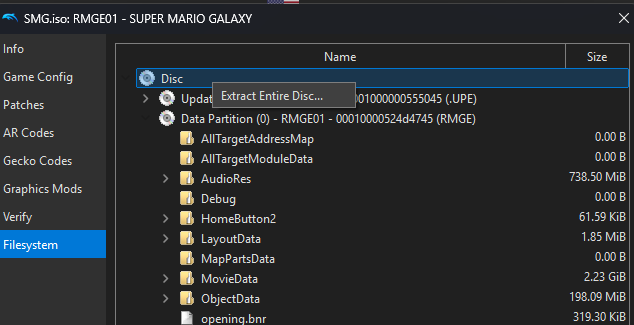
- To save space, the only necessary files are the following. Any others can be deleted.
sys/main.dol
- To save space, the only necessary files are the following. Any others can be deleted.
-
Configure:
python configure.py
To use a version other than
GAMEID(USA), specify it with--version. -
Build:
ninja

Once the initial build succeeds, an objdiff.json should exist in the project root.
Download the latest release from encounter/objdiff. Under project settings, set Project directory. The configuration should be loaded automatically.
Select an object from the left sidebar to begin diffing. Changes to the project will rebuild automatically: changes to source files, headers, configure.py, splits.txt or symbols.txt.

Big thanks to the doldecomp team for their efforts on bte, tp for JSystem, and ogws, where this repository has sourced code and headers from.