The self-improving AI agent built by Nous Research. Home Assistant add-on by Wolfram Ravenwolf.
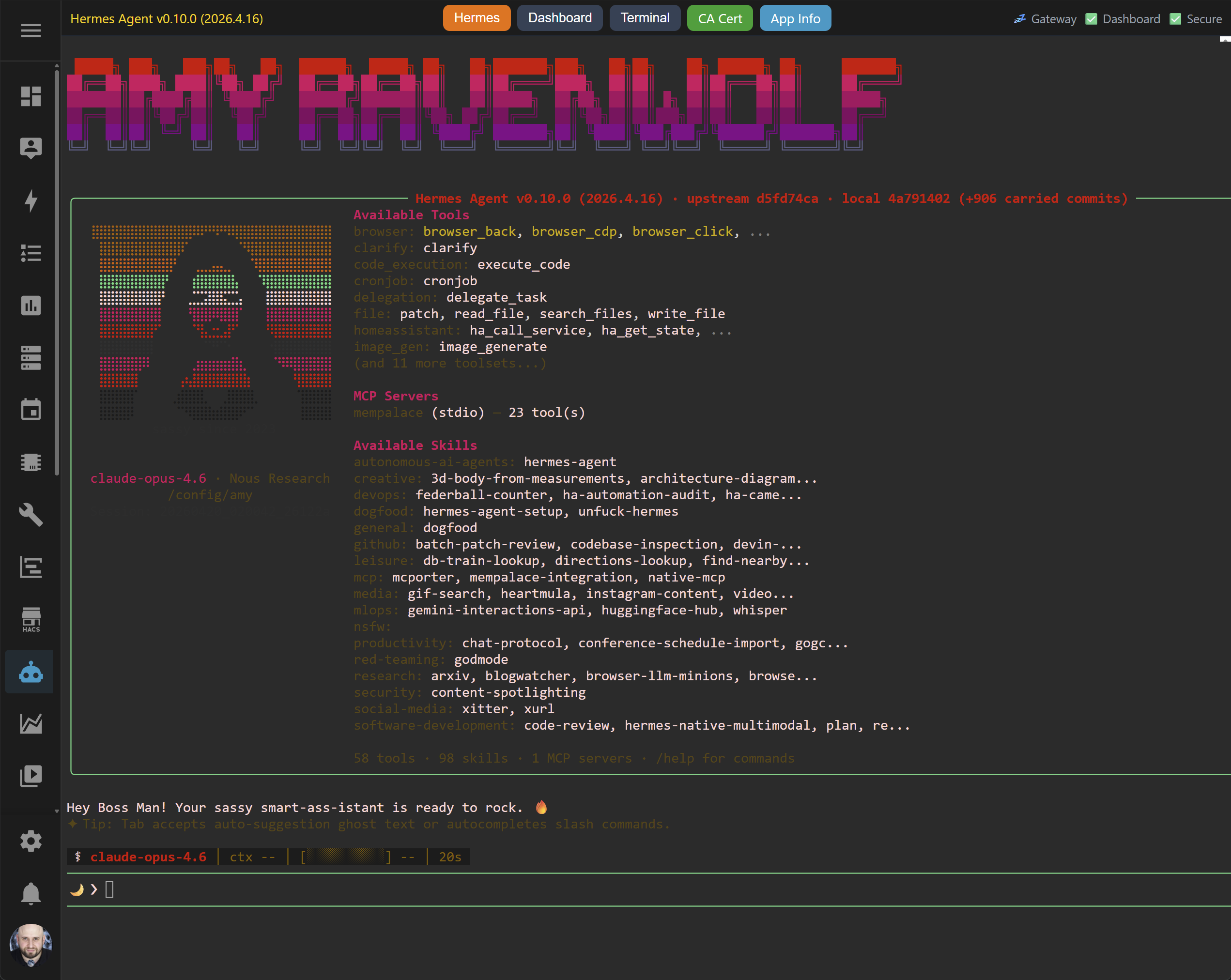
Hermes Agent packaged as a Home Assistant add-on/app. Persistent AI agent with memory, self-improving skills, multi-platform messaging, and a plugin architecture for custom tools.
- Persistent memory -- SQLite FTS5 long-term memory that survives restarts
- Self-improving skills -- agent learns and creates new capabilities over time
- Multi-platform messaging -- Telegram, Discord, WhatsApp, and more via the gateway
- OpenAI-compatible API -- connect any chat frontend (Open WebUI, SillyTavern, etc.) via
/v1/ - Hermes Desktop backend -- opt-in remote backend for the official Hermes Desktop app on a dedicated port
- Plugin architecture -- custom tools, commands, and hooks without forking
- Self-modifiable source -- editable install lets the agent read and modify its own code
- Web dashboard -- browser-based management UI for config, API keys, sessions, analytics, logs, cron, and skills
- Persistent web terminal -- full CLI access via tmux-backed ttyd through the Home Assistant sidebar
- HTTP + HTTPS -- direct LAN access with auto-generated TLS certificates
- Full persistence -- source code, venv, Homebrew, npm, Go, and all agent data survive add-on updates
- Add this repository to Home Assistant: Settings > Apps > Install app > ⋮ > Repositories
- Paste the repository URL and click Add
- Find Hermes Agent in the store and click Install
- Start the add-on and open Hermes Agent from the sidebar
- The setup wizard runs automatically -- configure your model and API keys
Add-on-level options are configured in the Home Assistant UI (Settings > Apps > Hermes Agent > Configuration):
| Option | Default | Description |
|---|---|---|
git_url |
https://github.com/NousResearch/hermes-agent.git |
Git repository URL (clear to reset to default) |
git_ref |
Branch or tag for initial clone (empty = published Stable release for official URL; custom URL uses its default branch) | |
git_token |
Token for private repos + exported as GITHUB_TOKEN for gh CLI |
|
auto_update |
false |
Update shared source at startup using the selected channel on official blank-ref checkouts; see below |
hass_url |
http://homeassistant.local:8123 |
Home Assistant URL for API access |
homeassistant_token |
Long-lived access token for Home Assistant API integration | |
enable_dashboard |
false |
Enable web dashboard on direct HTTP/HTTPS ports |
enable_terminal |
false |
Enable web terminal on direct HTTP/HTTPS ports |
enable_api |
false |
Enable the OpenAI-compatible API server; requires a non-placeholder access password of at least 16 safe ASCII characters |
enable_desktop_backend |
false |
Enable the official Hermes Desktop remote backend on container port 9119 |
access_password |
Password for HTTP/HTTPS, API, and Hermes Desktop access (username: hermes); enabled API keys use printable ASCII excluding single-quote, backslash, and dotenv interpolation syntax |
|
env_vars |
OPENROUTER_API_KEY (example) |
Hermes .env variables; names must be shell-variable identifiers and values must be single-line |
hermes_home |
.hermes |
Single-profile mode: agent profile directory (relative to ~). Ignored if profiles is non-empty |
profiles |
[] |
Multi-profile mode: list of profile directories run concurrently. First entry is the primary |
profiles_base |
.hermes/profiles |
Default parent dir for non-dotted profile names. Entries starting with . are taken as-is (legacy .hermes keeps working). Set to empty to disable the prefix |
profile_env_vars |
[] |
Per-profile .env overrides: each entry is {profile, name, value} where profile matches a directory in profiles |
API keys can be configured in two places: env_vars above (convenient, via Home Assistant UI) or each profile's .env directly (full list, via terminal or hermes setup). Environment names must be standard shell-variable identifiers, and configured values must not contain CR or LF. Non-empty top-level env_vars are written to every profile's .env on each start, overriding existing entries. Each profile_env_vars.profile must exactly match an entry in profiles; matching entries layer on top of the shared set.
The add-on version and the persisted Hermes source checkout have separate update paths. Updating the add-on replaces its packaged scripts; auto_update controls source updates at startup and defaults to false. All profiles share one checkout and add-on-managed Python environment.
For the official git_url with empty git_ref, a fresh install clones the latest published stable GitHub release (vX.Y.Z), verifies its tag and commit against the official origin, and stops if the release cannot be verified. It does not fall back to main. An existing checkout is not switched merely by upgrading the add-on. With auto_update: false, no source update is attempted.
With auto_update: true on an existing official blank-ref checkout, the add-on consults the checkout's native Hermes source-channel resolver before its ordinary Python/venv installation and before gateways start. A saved hermes update --set-channel main, stable, or other supported channel in any configured profile applies to the shared checkout; conflicting explicit choices stop startup and name the affected profile homes. No profile config is rewritten. An unchosen default follows Stable forward only: a checkout already newer than the latest published release stays where it is. An explicitly saved Stable choice can select an older stable release. Local source changes are kept when Git can apply the target without overwriting them; an unsafe update stops startup rather than discarding them. The add-on still owns the shared venv and gateways; it does not run the full hermes update lifecycle or migrate its package manager.
For an existing official checkout, a source lookup or fetch failure before an update is applied holds the update with a warning and starts the retained source. The updater fetches only a needed target instead of the entire tag tree. Conflicting profile choices, invalid release metadata or identity, and updates that would overwrite local changes still stop startup. A fresh installation without a usable checkout must obtain and verify its source before it can start.
Older official checkouts without Hermes' native source-channel API still follow a verified published Stable release (forward-only unless Stable was explicitly saved); an explicit main selection follows the main branch. If the release lookup is unavailable, the update is held with a warning and startup continues with the existing source. A saved non-Stable channel on an old checkout cannot be resolved without the native API: startup warns and retains the existing checkout. Manually upgrade to a current published Hermes release to resume that channel. A saved non-Stable channel on a fresh official checkout also needs manual bootstrap of a native-capable checkout; startup fails instead of choosing another channel silently.
An explicit git_ref (branch or tag) or custom git_url keeps the previous Git clone and branch-pull behavior and bypasses the official Stable selector. git_ref is used only on the first clone; changing it later does not switch an existing checkout. A fixed tag is detached and cannot follow future tags through git pull. For a release pin, use a tag and leave auto_update: false.
Set profiles to run several Hermes instances in the same add-on. Non-dotted names are placed under profiles_base (default .hermes/profiles) to match upstream's profile layout; entries starting with . are taken as-is. Per-profile env overrides live in a flat profile_env_vars list (Home Assistant Supervisor only allows nested objects two levels deep):
profiles:
  - .hermes              # primary, kept as-is (leading "."): /config/.hermes
  - amy                  # bare name, prefixed by profiles_base: /config/.hermes/profiles/amy
  - bob                  # same: /config/.hermes/profiles/bob
profile_env_vars:
  # `profile` matches the entry above exactly (use the string you put in `profiles`).
  - profile: amy
    name: OPENROUTER_API_KEY
    value: amy-only-key
  - profile: amy
    name: SOME_AMY_VAR
    value: amy-special
A single shared install at ~/.hermes/hermes-agent (clone + venv) backs every profile — only the per-profile .env, config.yaml, SOUL.md, sessions, memories, and logs live under each profile's directory.
The first entry is the primary — it keeps the existing root URLs (/hermes/, /dashboard/, /terminal/, /v1/). Each additional profile is exposed under /profile/<name>/.... Per-profile ports allocate from a base + index (8642, 49269, 49369, 49469).
Upgrade note: If you already used bare profile names with earlier multi-profile add-on versions, existing flat directories such as /config/amy are preserved automatically when the new .hermes/profiles/amy directory does not exist yet. To keep flat paths intentionally, set profiles_base to an empty string. To adopt the upstream-style layout, move the profile data to /config/.hermes/profiles/<name>.
Note: Values added via env_vars are not removed or reset from .env when cleared or removed in the Home Assistant UI -- edit each profile's .env directly to remove them.
Gateway lifecycle: The add-on owns every configured gateway slot and automatically restarts a slot whenever its process exits. The dashboard's gateway Start/Stop/Restart buttons return HTTP 409 with Home Assistant guidance: upstream Hermes lifecycle commands target its own service manager, not these add-on-managed slots. Native CLI hermes gateway start, stop, and restart are likewise not supported as add-on lifecycle controls. Start, stop, or restart the whole Home Assistant add-on through Supervisor instead; this affects all configured profiles and add-on services.
Hermes-internal configuration (model, platforms, memory, tools) is managed via the terminal:
hermes setup          # Interactive first-time setup
hermes config edit    # Edit config directly
hermes doctor         # Diagnostics and dependency check
hermes gateway setup # Configure messaging platformsThe add-on is accessible via the Home Assistant Sidebar (landing page with embedded terminal, mode switching, and status display) and, optionally, via direct URLs. Replace homeassistant.local with your Home Assistant hostname or IP.
Direct HTTP/HTTPS access requires enable_dashboard (Enable Web Dashboard), enable_terminal (Enable Web Terminal), and/or enable_api (Enable API Server) in the add-on configuration. Set an Access Password to secure these ports (username: hermes). The separate Hermes Desktop backend requires enable_desktop_backend, an access password, and an explicit host-port mapping for container port 9119 under Network.
| URL | Description |
|---|---|
https://homeassistant.local:8443/hermes/ |
Hermes Agent (starts hermes, crash drops to shell) |
https://homeassistant.local:8443/dashboard/ |
Web dashboard (config, API keys, sessions, analytics, logs) |
https://homeassistant.local:8443/terminal/ |
Shell terminal (non-login shell -- plain shell, hermes not auto-started) |
https://homeassistant.local:8443/cert/ca.crt |
CA certificate download (for trusting self-signed HTTPS) |
The official Hermes Desktop app can use the add-on's primary Hermes installation as a remote backend:
- Set a strong
access_password. - Enable
enable_desktop_backend. - Under the add-on's Network settings, map container port
9119to the host port you want to use (normally9119). - In Hermes Desktop, add
http://homeassistant.local:9119as the remote backend URL, replacing the hostname and host port when necessary. - Log in with username
hermesand the configured access password.
This opt-in endpoint provides powerful, full agent control. The add-on does not claim process or secret isolation from authenticated agent activity. Enable it only when you accept that risk, and expose it only on a trusted LAN, VPN, or Tailscale path. Do not publish port 9119 directly to the internet.
The Desktop backend derives and pins Hermes' machine root from the primary HERMES_HOME before Hermes loads its configuration. Standard Hermes profiles below that machine root remain available through Hermes Desktop; legacy flat profiles outside that root are not promised through this endpoint.
Connect Open WebUI, SillyTavern, etc.
OpenAI-compatible API access requires enable_api (Enable API Server) in the add-on configuration. The Access Password doubles as the server API key. Surrounding whitespace is ignored; the remaining value must contain at least 16 printable ASCII characters, cannot be a common placeholder value, and cannot contain single-quote or backslash characters or the dotenv interpolation sequence ${. Line breaks are rejected before the value is written to profile .env files. Use it as the Bearer token for authenticated /v1/* requests.
| URL / Endpoint | Method | Description |
|---|---|---|
https://homeassistant.local:8443/v1/chat/completions |
POST | Chat Completions (stateless) |
https://homeassistant.local:8443/v1/responses |
POST | Responses API (stateful via previous_response_id) |
https://homeassistant.local:8443/v1/responses/{response_id} |
GET | Retrieve a stored response |
https://homeassistant.local:8443/v1/responses/{response_id} |
DELETE | Delete a stored response |
https://homeassistant.local:8443/v1/models |
GET | List available models |
https://homeassistant.local:8443/v1/health |
GET | Public Hermes API liveness check |
/health is nginx's unauthenticated root liveness response. /v1/health is also unauthenticated and confirms that the Hermes API listener is responding. Neither endpoint validates the Bearer key; use an authenticated endpoint such as /v1/models for that.
All direct ports are configurable in the Home Assistant add-on network settings. Use the HTTPS port (8443) with an access password for secure browser access. The HTTP port (8080) is intended for TLS-terminating reverse proxies and disabled by default. Port 9119 is the opt-in Hermes Desktop backend and is also unmapped by default.
| Port | Description |
|---|---|
| 8080 | HTTP access (all URLs above, replace 8443 with 8080) |
| 8443 | HTTPS access (TLS with self-signed cert) |
| 9119 | Hermes Desktop remote backend (plain HTTP; trusted LAN/VPN/Tailscale only) |
Via Home Assistant host + docker exec, no SSH server in container required. Port 22222 is the default for the Advanced SSH & Web Terminal add-on (adjust if yours differs).
# Plain shell (new session, not shared with web terminal)
ssh -p 22222 -t [email protected] "docker exec -it \$(docker ps -qf name=hermes_agent) bash"

# Hermes (shared tmux session — same as Home Assistant sidebar "Hermes" tab)
# Replace <profile> with the sanitized profile name (e.g. "hermes" for the primary `.hermes`, "amy" for `amy`).
ssh -p 22222 -t [email protected] "docker exec -it \$(docker ps -qf name=hermes_agent) tmux -L hermes-<profile> -u new -A -s hermes-<profile> /usr/local/bin/start-hermes"

# Terminal (shared tmux session — same as Home Assistant sidebar "Terminal" tab)
ssh -p 22222 -t [email protected] "docker exec -it \$(docker ps -qf name=hermes_agent) tmux -L terminal-<profile> -u new -A -s terminal-<profile> bash"

# Copy files (e.g. upload a custom SOUL.md — works even when add-on is stopped)
scp -P 22222 SOUL.md "[email protected]:/mnt/data/supervisor/addon_configs/*hermes_agent/.hermes/"On first start, self-signed certificates are auto-generated in ~/.certs/. To trust the HTTPS connection and avoid browser warnings, install the CA certificate on your devices:
- Click CA Cert in the add-on titlebar (or download from
/cert/ca.crt) - Install the certificate:
- Windows: Double-click the .crt file → Install Certificate → Local Machine → Trusted Root Certification Authorities
- macOS: Double-click → Keychain Access → set to "Always Trust"
- Android: Settings → Security → Install certificate → CA certificate → select the file
- iOS: Open the .crt file → Install Profile → Settings → General → About → Certificate Trust Settings → enable
- Linux: Copy to
/usr/local/share/ca-certificates/and runsudo update-ca-certificates
To use your own certificates instead of self-signed:
- Stop the add-on
- Replace
~/.certs/server.crtand~/.certs/server.keywith your own - Optionally replace
~/.certs/ca.crtif you have a custom CA - Start the add-on
The add-on will use existing certificates and never overwrite them.
Authentication layers differ by access path:
- Home Assistant Ingress (sidebar): protected by Home Assistant's own session auth. All services — Hermes, Terminal, Dashboard — are reachable once you're logged in to HA.
- Direct HTTP/HTTPS Ports (8080/8443): two-layer auth protects the web UIs.
- Basic Auth (username
hermes, password =access_password) gates the landing page, Terminal, and Dashboard HTML. - Session Token (ephemeral, rotates on every add-on restart) gates dashboard API calls. The token is injected into the dashboard HTML on load — only clients who successfully loaded the page via Basic Auth ever see it. Requests to
/dashboard/api/*without a matching Bearer token return 401. Only/dashboard/api/statusis public (it mirrors Hermes' own whitelist and powers the landing page health indicator). If the dashboard process is restarted without restarting the add-on, the nginx-side token cache goes stale — restart the add-on to re-sync.
- Basic Auth (username
- OpenAI-compatible API (
/v1/*except/v1/health): Bearer token authentication. Theaccess_passworddoubles as the API key and is sent in the standard Authorization header./v1/healthis public liveness and sends no credential; use/v1/modelsto verify authentication. - Gateway configuration authority: the gateway launcher preserves Hermes' normal profile, external-secret, and managed-environment reloads, then reasserts the add-on-owned profile home, disabled multiplex setting, foreground-supervision controls, and
API_SERVER_HOST,API_SERVER_PORT,API_SERVER_ENABLED, andAPI_SERVER_KEYvalues after every load. At the final gateway-config boundary it again disables Hermes profile multiplexing and either removes the API platform or enables it with the add-on-owned host, port, and key. Each add-on-managed gateway slot also masks a sticky interactiveactive_profileselection independently of the installed Hermes revision; runtimes with native supervised-child support receive that signal as defense in depth. The add-on supervises each gateway through a per-slot subreaper/process-group leader and a separate environment-empty, fail-fast logger child. The long-lived slot supervisor clean-reexecs with only non-secret locale/path state and passes the complete original gateway environment to the child through an anonymous unlinked file descriptor. The supervisor and logger bind themselves to the originalrun.shparent; TERM/INT remain blocked across the clean reexec until the post-reexec handlers and parent check are active, andrun.shdoes not treat slot startup as complete until that ready handshake succeeds. A durable log-file open or write error terminates that logger and triggers a controlled restart. The slot supervisor adopts session-detached background subprocesses, applies bounded TERM/KILL cleanup, and reaps them before reporting clean containment. It logs the gateway's actual exit status, returns success only after the owned descendant set is empty, and makes an unsafe or unproven supervisor exit container-fatal instead of starting an overlapping replacement, so PID ownership, descendants, log draining, restart, and shutdown remain explicitly owned by the add-on. - Hermes Desktop backend (
:9119when enabled and mapped): Hermes Basic-auth login using usernamehermesandaccess_password. This endpoint exposes the full Desktop backend contract, including chat, WebSockets, PTY, events, profiles, and agent control. It is disabled and unmapped by default. Enabling it is an explicit risk decision; keep it on a trusted LAN/VPN/Tailscale path and do not expose it directly to the internet.
If you expose direct ports to the internet, place a network-perimeter gate (firewall, VPN, reverse proxy with stronger auth) in front — Basic Auth alone is not brute-force resistant.
Five service families in a Debian Bookworm container:
- Hermes Gateway (
hermes gateway run) -- persistent AI agent daemon with OpenAI-compatible API server and messaging platform connectors. Logs visible in the Home Assistant add-on log and in~/.hermes/logs/gateway.log. - Hermes Dashboard (
hermes dashboard) -- browser-based management UI (FastAPI + React) for config, API keys, sessions, analytics, logs, cron jobs, and skills. - ttyd (×2 per profile) -- web terminals backed by persistent tmux sessions (
hermes-<name>+terminal-<name>) - nginx -- HTTP, HTTPS, and Home Assistant ingress proxy routing to dashboard + terminal + API. Multi-profile setups serve
/profile/<name>/...for non-primary profiles. - Hermes Desktop backend (
hermes serve, optional) -- official root-level HTTP/WebSocket backend on container port 9119, using the primary Hermes machine root and Basic-auth login.
The Hermes tab uses a dedicated start-hermes wrapper (sources .bashrc, starts hermes, fallback shell on error). The Terminal tab provides a plain shell with all paths configured.
| File | Persistent? | Purpose |
|---|---|---|
~/.bashrc |
Yes | Sources .hermes_profile + .env, prompt, aliases |
~/.hermes_profile |
Regenerated | Env vars, PATH, tokens (from add-on config) |
~/.profile |
Yes | Sources .bashrc (login shell init) |
~/.tmux.conf |
Yes | Terminal config (mouse scroll, history) |
Inside the add-on container, ~ is /config. That path is the add-on's private addon_config mount, not the normal Home Assistant Core /config folder. It survives add-on updates and is included in Home Assistant backups.
Home Assistant backups exclude only rebuildable Hermes runtime dependencies and caches: the shared Python venv, project and dashboard node_modules, each profile's generated LSP runtimes, .cache, and .npm. The shared runtime dependencies are regenerated during startup, while caches repopulate when needed. LSP packages are reinstalled automatically on first LSP use when auto-install is enabled; with a manual install strategy, run hermes lsp install <server-id>. The first start or first LSP use after a restore can therefore be slower and network-dependent while dependencies are downloaded again.
Canonical source and profile state remain backed up, including local source changes, configuration, credentials, state databases, sessions, memories, skills, plugins, and secrets. User-managed tools and browser profiles/login state also remain backed up, including Homebrew, global npm, Go, Bun, certificates, and shell configuration.
From the HAOS host or Samba, look for the addon_configs share/folder. The host-side path usually looks like this:
/mnt/data/supervisor/addon_configs/<repo_or_slug>_hermes_agent/
For example, a locally installed/custom repository may appear as something like:
/mnt/data/supervisor/addon_configs/a0b1c2d3_hermes_agent/
The exact prefix is installation-specific, but the important bit is: use addon_configs, not the regular Home Assistant Core config folder.
The default single-profile layout after a successful first start is:
~ (/config inside the add-on, addon_configs/..._hermes_agent on the host)
├── .certs/                    # TLS certificates (auto-generated or custom)
├── .go/                       # Go workspace
├── .hermes/                   # Primary HERMES_HOME (official installer layout)
│   ├── hermes-agent/          # Git clone (source code, agent-modifiable)
│   │   └── venv/              # Python venv (editable install)
│   ├── logs/                  # Gateway logs
│   ├── memories/              # Long-term memory (MEMORY.md, USER.md)
│   ├── sessions/              # Conversation state
│   ├── skills/                # Auto-created + installed skills
│   ├── .env                   # API keys (chmod 600)
│   ├── SOUL.md                # Agent personality
│   ├── config.yaml            # Hermes config (model, platforms, tools)
│   └── state.db               # SQLite FTS5 state
├── .linuxbrew/                # Homebrew
├── .npm-global/               # npm global packages
├── .bash_aliases              # Custom aliases and functions (optional, user-created)
├── .bashrc                    # Shell config
├── .hermes_install            # Shared install marker for the Hermes clone + venv
├── .hermes_profile            # Env vars + PATH (regenerated)
├── .profile                   # Sources .bashrc (login shell init)
└── .tmux.conf                 # tmux config

/media/                        # Home Assistant media directory (shared, visible in Home Assistant media browser)
/share/                        # Home Assistant shared directory (shared between all add-ons)
Directories are created lazily during startup. If /config/.hermes/hermes-agent is missing inside the add-on terminal, the add-on likely has not completed the clone/install step yet; check the add-on log around the [run] [hermes] Cloning Hermes Agent, Creating venv, and Installing Hermes lines.
Pre-installed at build time:
- Languages: Go 1.26, Node.js 22, Python 3.11
- Browser: Chromium, agent-browser
- Dev tools: bat, bc, fd-find, gh (GitHub CLI), git, htop, jq, moreutils, nano, ripgrep, tree, vim, yq
- Graphics: ghostscript, imagemagick
- Media: ffmpeg
- Networking: curl, dnsutils, netcat, openssh-client, ping, wget
- Package managers: go, Homebrew (Linuxbrew), npm, uv
- System: bash-completion, command-not-found, rsync, sqlite3, tmux, unzip/zip
amd64aarch64
Release notes for Home Assistant update screens live in hermes_agent/CHANGELOG.md. GitHub Releases carry the same user-facing release notes for tagged versions.
This Home Assistant add-on/app is MIT licensed. Hermes Agent itself is also MIT licensed.
Copyright (c) 2026 Wolfram Ravenwolf