


English | 中文
A curated list of plugins for DeepSeek Harness (
dsh).
DeepSeek Harness is DeepSeek's open-source agent harness — a runnable coding agent (Web and headless), built on a framework where everything is a plugin: models, tools, sandboxes, session storage, UI, even the agent loop itself. Plugins can extend the official coding agent, swap out its core parts, or assemble something entirely different.
This list collects community plugins that are installable via dsh plugin add (each declares a dsh.bundle manifest). PRs welcome.
📡 This list is also a plugin market index. On dsh 0.2.1+, open Plugins → Discover → Index sources and add
https://cdn.jsdelivr.net/npm/dsh-plugin-catalog/index.json. That is this list as a format-1 index, served from npm so it loads quickly everywhere: dsh gives a source 15 seconds, and the GitHub Pages copies of the same document —https://awesome-dsh-plugin.com/index.jsonand its mirrorhttps://dshmarket.com/index.json— can exceed that from some networks. The Discover tab and theplugin_marketagent tool then search the same entries. The index covers plugins published on npm with a known version; GitHub-only entries still install with the command beside them.
🛒 Recommended: dsh-market (optional) — the plugin market inside DeepSeek Harness, with every plugin on this list. Simple, friendly UI: one-click plugin install and upgrade, one-click theme switching:
dsh plugin --profile web add dshmarket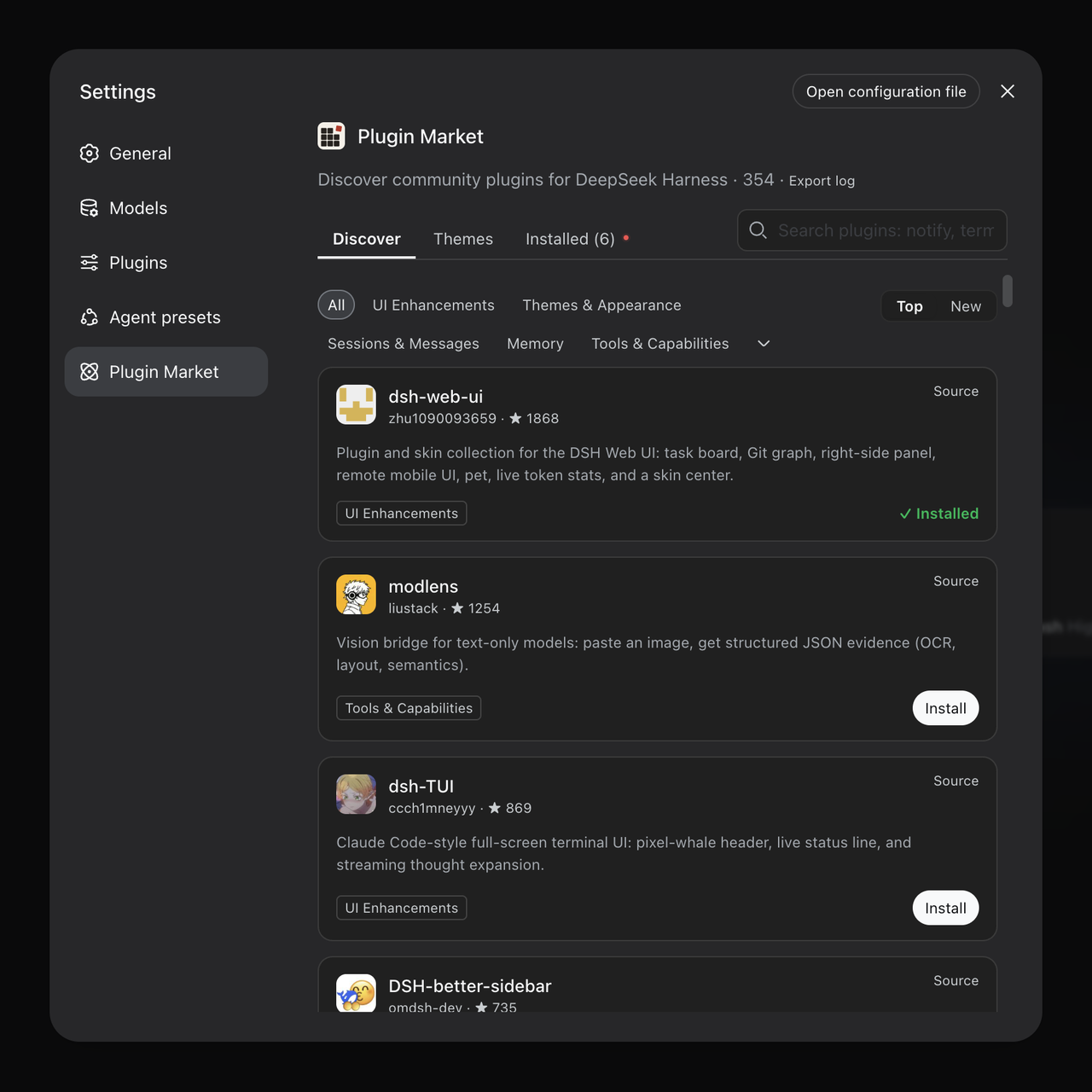
The plugin market inside Settings — click to enlarge.
💡 Prefer chat? dsh-find-plugin lets your agent find plugins for you (
dsh plugin --profile web add dsh-find-plugin).
ℹ️ On desktop clients. This list is client-agnostic. A plugin is listed because it follows the official protocol — it declares a
dsh.bundlemanifest and installs withdsh plugin add— not because it adapts to any particular client.Clients worth a look: dsh-desktop, deepseek-harness-desktop, and deepseek-harness-desktop by anywhere-labs — all ship dsh-market built in, so everything on this list is one click away. Any other good third-party client works too.
Warning
Installing a plugin runs third-party code on your machine with your own permissions — it can read your files, use your credentials, and reach the network. Tool approvals don't sandbox plugin code. Being on this list is not a security review: check the source before you install, and try unfamiliar plugins somewhere that doesn't hold your keys. See the full disclaimer at the bottom of this page.
What it takes to be listed here
An entry is added when the plugin installs with dsh plugin add, does what its one-line description says, sits in the right category, and is maintained. Every submission is checked against its own source before merging — if a description claims "46 tools", someone counts them.
That is the whole bar. This list doesn't rank plugins or judge their quality, and we don't want to. Plenty of good software will never appear here, and a slot here proves nothing beyond meeting those rules. They exist so that whatever you pick installs and behaves the way the line said it would.
A listing isn't permanent either: entries whose repos go away, stop being maintained, or turn out to be broken get removed. Full criteria and the review checklist: how submissions are reviewed.
- Plugins
- AGI Architecture Exploration
- UI Enhancements
- Usage & Billing
- Themes & Appearance
- Models & Providers
- Identity & Communication
- Sessions & Messages
- Memory
- Tools & Capabilities
- WSL & Windows Interop
- Browser & Web
- Vision & Multimodal
- Voice & Audio
- Docs & Rendering
- Skills
- Workflow & Automation
- Git & Code Review
- Notifications & Integrations
- Development & Runtime
- Security & Permissions
- Remote & Mobile
- Plugin Markets & Managers
- Just for Fun
- Badge
- Disclaimer
- Anmulzhao/DSH-AGINT - Self-evolving agent framework on DeepSeek Harness (dsh): 40 Cordis plugins and 4 presets covering memory, reflection, gates, metrics and an auditable evolution loop. Not a one-command install. Clone the repo and run install/install.sh --profile=web (needs bash, Node 20+, python3, DSH 0.1.7-rc.1 or newer with an initialized profile), then restart.
- AnonyJcy/dsh-j-space - J-Space Cognition Suite SV1 native agent preset and standalone Cordis plugin: 13 modules, persistent controller and decoupled workspace.
- anticbv/dsh-preset-deep - A fifth DeepSeek Harness work mode that requires a falsification design (at least two pieces of evidence that could disprove the plan) in every plan and tags each factual claim with its source ([文件]/[检索]/[记忆]) or [未知]; evidence grading follows the project's AGENTS.md.
- Asiu-x/dsh-harness2 - Harness² recursive self-improvement for DSH agents: Propose–Probe–Compose, isolated probes, anonymous selection, and a per-domain experience library.
- benrong2048-boop/dsh-prompt-polish - Turns a one-line DSH draft into a complete task brief (role / goal / constraints / output format). The engine is a byte-verified port of linshenkx/prompt-optimizer (three modes, 10 templates identical to upstream); history is consent-gated with version chains and structural comparison; every run reports its token usage. Nothing is written back or sent without a click.
- buaaflyaway/dsh-progress-nudge - Counts the assistant rounds that call tools without writing anything to the user, then inserts a short progress reminder as a visible user message at the next model-request boundary, so a long silent tool loop reports what it has done before continuing. A Settings page adjusts the silence threshold (default 10), the reminder wording, the language (en / zh-CN / zh-TW), whether the reminder repeats every further threshold of silent rounds, whether subagent sessions are counted, and whether Agent Teams nudges the lead only or every member.
- burning-frappuccino/dsh-turbo - Per-session execution gears for the DSH composer: an OVERDRIVE toggle turns Turbo on for the current session only, the Fast and Max gears swap the agent's planning and verification policy and may lower the request's reasoning effort, and the Host keeps the authoritative mode plus per-turn latency, step count, tool calls and whether a verification command ran.
- dsh-answer-reviewer - Agentic answer reviewer for DeepSeek Harness: each final assistant turn is re-reviewed by a separate LLM graded 1-100; below-threshold scores steer the agent back with concrete feedback. The score is shown as a chip on the answer's action row (green pass / red needs-work, with retry count and reason on hover). Live gate config from the Reviewer 配置 tab in the conversation view ring above the composer (对话 / 轨迹 / 记忆系统 / Reviewer 配置), from a 127.0.0.1 HTTP server, or from an optional right-sidebar tab via dsh-better-sidebar.
- CAI-MH/dsh-quality-review - Audit each finished assistant turn with an independent reviewer model and steer the agent to fix failed output, with at most 2 review rounds per turn and SOP-folder standards injected as an extra review dimension.
- CanaryJing/dsh-big-fat-whale-maid-adaptive - Agent preset with adaptive tool presentation and environment-aware shell routing. Ports modules from yjh051108/dsh-routing-suite and xiaobright/dsh-anchored-standard (the former is listed here), so do not enable it alongside those presets.
- ccll/dsh-advisor-flow - Executor/advisor workflow ported from pi-advisor-flow: the executor calls ask_advisor for a second opinion at key decisions, after repeated failures and before completion; equivalent repeated tool calls are intercepted before execution for an advisor review with a proceed/revise/blocked verdict, and hard mode force-reviews every turn before it closes. Per-call token and cost ledger with /advisor status readout, privacy tiers for repo context and file contents, six-shape secret redaction, and a web settings card; advisor failures never stall the main loop.
- Clearailhc/clearai-dsh - An agent preset for evidence-checked research: every step advances only through system-verified observations, L3+ claims go to an independent evaluator, and the session folds into a replayable ledger that grows into a browsable domain ontology. Requires DSH >=0.1.7-alpha.1.
- DDL095/dsh-moa-native - Native generation-time Mixture-of-Agents: every turn, reference models run the same session context in parallel as pre-run drafts and one aggregator executes with full tooling; config-as-model recipes, F mirror / R trimmed views, enforced subagent gating (dual-shape session indexing), derived per-recipe vision (vision refs relay image reads to text-only aggregators), tiered cadence with separate steering and patrol rosters plus frozen reuse between beats, degeneration guard dropping degenerate reference output, anonymized model face (failure notices carry no provider identity), and cache-friendly guidance placement (the rehearsal record is pinned where it was produced instead of appended to every request, so the cached prefix covers it and each step pays only for what was added since - on by default across every cadence).
- DoreiHime/dsh-help-me-to-ask - On the first real work message of each chat window, asks for the missing goal, deliverable, constraints and acceptance criteria, then turns the answers into a short task sheet and injects it into the chat. Pure greetings are ignored.
- FelixJiashengFu/dsh-force-collab - Forced collaboration: a composer picker sets 0–6 sub-agents, and while it is on every hands-on task must be split across exactly that many child agents through a collab_fanout tool that has no count parameter, then merged by the main agent.
- FelixJiashengFu/dsh-muse-code - Meta's Muse Code CLI inside DSH: a composer switch starts muse serve, a right-sidebar panel and five chat tools (muse_open, muse_prompt, muse_read, muse_status, muse_interrupt) share one Muse session, approvals are decided only in the panel, and a local spend guard hard-stops at $10 by default. Windows only; needs the Muse Code CLI installed and signed in. The $10 cap is a local estimate for the muse serve this plugin starts.
- ff66ccff/dsh-ATN - Adaptive topology multi-agent preset for DeepSeek Harness with peer messaging, task handoff and live network visualization.
- Funny1Potato/dsh-outsourcing-expert - Agent presets whose leader does no work itself: every non-management tool call is denied at the harness boundary so the task has to go to a subagent, after a one-time lookup of the available subagent models and a per-task model choice; a second preset deliberately picks the model least suited to the task.
- FuRongJun-1999/dsh-memory - White-box AGI architecture exploration: metacognition (self-cognition loop), continual learning (knowledge flywheel), world model (condition space, spatiotemporal memory graph), self-improvement (bootstrap discipline), zero-LLM white-box pipeline, and auditable trust guardrails.
- highho/dsh-game-studio-presets - Eleven game-development agent presets cut by workflow stage — concept, design, build, art and audio, QA, release, narrative, level, engine — plus one orchestrator that delegates across them, carrying 37 bundled skills. Regroups the 48 agent prompts of Claude Code Game Studios (MIT) by stage so each preset loads only the skills its stage needs. Installs with dsh plugin add; run node install.mjs once afterwards to deploy the skills the presets reference.
- HYClub/deepseek-harness-game-studios - DeepSeek Harness port of Claude Code Game Studios (CCGS v1.1.2, MIT): 76 skills, 49 agents, hook bridge.
- icyaaaww/dsh-soul - Records recurring task corrections and tool failures locally, then compiles them into changes to eight harness components through explicitly started evolution, paired baseline/candidate checks, trial activation and rollback. Includes a budget and audit ledger; requires Node.js 24+ and a compatible DSH 0.2.1-rc.2 or later 0.2.x host.
- JiewiW/dsh-cot-anchor - Injects conclusions already established in the previous reasoning block after each tool result, so the model continues from them instead of re-deriving the same conclusions.
- jiuaiwo/dsh-expert - Expert roster for DeepSeek Harness: 636 experts across 22 divisions with full Chinese names and bios, summoned as subagents from the @ menu or by the model through list_t_experts / summon_t_expert / summon_t_experts, plus custom experts and a skill on/off switch.
- dsh-proactive - Host-level proactive wake-ups for DeepSeek Harness: the model schedules its own alarms (once, recurring interval, or cron, with optional random jitter), cold sessions are woken on time by session resume, model-initiated follow-ups are gated by quiet hours and a daily delivery budget, silent wake turns end with proactive_reclaim and fold out of model context as tombstones, declared schedule files glob-sync JSON schedules into host alarms idempotently, min_idle_seconds defers wakes until the destination session quiets down, and a web panel (settings section plus per-session tab, SSE live refresh) manages alarms and wake history — the heartbeat engine for AI companions and roleplay characters with their own daily routines and world evolution.
- john-walks-slow/dsh-simulated-life - Simulated life context for DeepSeek Harness: every turn injects the past 24h of simulated life events from the workspace .life/ directory (sliding-window filter, session-level deduplication with delta updates, world summary) as a collapsed context notice, and the life_react tool lets the agent record feelings, thoughts and actions back into its life log for the next round of world evolution — turning a DSH agent into a roleplay character with a persistent daily life.
- Jonah-Wu23/dsh-gungnir#dsh-plugin - Evidence-driven goal verification plugin for DeepSeek Harness. Locks goals via /ultragoal and verifies completion against command exit codes and generated artifacts, preventing the model from falsely reporting task completion.
- Kanadego/dsh-heartbeat - An agent that wakes up on its own schedule: by default every 60 minutes, ±20% (48–72). It browses the interests you set, drops what it finds into a local pool of notes, and keeps a profile of what you like. When it has enough worth sharing it hands the session you linked a short package of notes — whether to speak, and which note to use, is that session's agent's call in the moment. Quiet hours, busy windows, a daily limit and a cooldown are decided in code; when the answer is no, the decision and expression phases after the gate call no model at all — browsing runs before the gate and is counted separately. Windows, Linux and macOS (Linux and macOS are minimal support).
- kenz1117/dsh-engram - Cross-session long-term memory as a local SQLite store: dual scopes (user + per-git-origin project), hybrid FTS5 + local-vector retrieval fused with RRF, an evidence gate that forces an explicit sufficiency judgement, provenance audit chains, SM-2 spaced-repetition review, consolidation distillation and decay forgetting, and a nine-view "Memory Palace" sidebar panel. 22 narrow-parameter tools, no external service, no API key, no Docker.
- leeyoung1/dsh-advisor-plugin - Pairs the running executor with a stronger reviewer model through zero-parameter advisor() calls and step-based patrol checks, returning plan, correction, or stop guidance.
- liangzz1998/dsh-thinking-language - Injects one system-prompt section that makes the agent reason and answer in a chosen language (Simplified Chinese by default), with separate thinking and answer settings, a custom extra line, and support for standard, PTC and custom presets; the minimal preset is not affected.
- lifangjin/dsh-maoying - Web-novel writing assistant preset for DeepSeek Harness: the main agent acts as editor-in-chief and delegates outlining, drafting, review, lore-keeping and research to five helpers across a seven-phase workflow, with the whole novel kept as a structured markdown/YAML novel/ directory (character cards, a foreshadowing state machine, timeline, narrative memory), plus a sidebar creator panel and six zero-dependency CLI commands.
- LittleAlety/dsh-team-conductor - Control plane for the harness's own Agent Teams: members are ordinary independent sessions created through the same seam the GUI uses, each with its own model, so they open and continue like any other conversation while a sidecar roster and task board coordinate them. Task entries carry a definition of done, a member's completion is submitted and waits for the Lead's review, and availability tells idle apart from awaiting-review or a failed last turn. With delegationEngine=auto it uses independent sessions, continuable subagents, or the kernel roster depending on what the composition provides.
- mazov2love/dsh-remote-control - Let Agents directly control independent local DSH instances with zero intrusion—no plugins or components required on the target. Isolated environments enable autonomous configuration and testing, while Agents with different models and personalities can chat, role-play, or form nested control chains. Supports conversational setup, user-like operations, incremental reading, saved references, and remote session/workspace search.
- MichengAI/dsh-pua - Adds /pua to steer the agent to try another approach and verify results before claiming completion, with 15 company styles, persona modes, global and per-conversation settings, and an optional loop that continues until a verification command passes, the iteration limit is reached, or the user cancels.
- mrzturn/dsh-switchman - Old conversation is folded into short summaries by a side model before the window fills (on-disk ledger survives restarts and re-anchors after host compaction), so long sessions stop getting more expensive every turn — one real full-day session: 6 folds replaced 209 old messages and the live context stayed in the tens of thousands of tokens. The session model picks the model per subtask across six pools (economy/mechanical/main/hard/vision/review); or pick Auto and a small intent classifier routes each message itself, switching only past a confidence threshold to keep prompt caches warm. A three-line watermark ends in an automatic four-step handover (fork backup, handover doc, compact, wake) without losing in-flight subagents; /ctx-pause, /ctx-resume and /ctx-handover keep it manual when wanted. Optional Agent Teams mode adds teammates and a shared task board; /vision gives text-only models eyes via the vision pool; tiered verification sends bigger diffs to a tester plus an independent reviewer. Settings UI, READMEs and language preferences cover the same 11 languages. Bundles three skills: read-only MySQL/Redis verification, commit-message generation, and a requirements/design document convention.
- NEINC1/muche-dsh-plugin - Chat panel for the MuChe companion with per-user backend settings, plus an outbound bridge that runs tasks on the user's local dsh.
- nlflora/dsh-empty-turn-guard - Recovers a DeepSeek Harness turn that ended with reasoning only, with no text and no tool call, by steering the same turn one more step. Structure-only detection, so it costs no extra model call.
- panando/dsh-pua - Fork of @michengai/dsh-pua that removes the upstream global kill-switch so the composer entry is always visible while the feature stays off by default and can be toggled per session; the entry is a dropdown (Turn on / Turn off / Options) with a more compact options panel.
- penghao73551/dsh-prompt-balance - Measures what your assembled system prompt is actually made of - rules, identity, workspace policy, tool descriptions - in bytes and percentages, then moves the operating protocol ahead of the rule block so the model reads who it works for before it reads the prohibitions. Config-driven via ~/.dsh/prompt-balance.json; two hooks, no build step, no dependencies.
- pf-sjtu/dsh-early-stop-guard - Keeps a DSH agent turn open when the model ends it by narrating work it has not done: on agent/turn-stopping the guard replays the turn log and classifies the trailing message with regexes — in the default mode wait / ask / done / gray end the turn with no model call, and only a promise of pending work reaches the judge — then has a judge chain of four dialect kinds (System One three-question noul, OpenAI-compatible, OpenAI Decisions, or the session LLM) rule on whether the turn is really over, and steers the same turn with agent.steer when it is not.
- pk14742952-AD/dsh-host-rsi - Reflective self-evolution plugin for local Qwen3.8 27B/3.8 Flash and online APIs: a coding-loop convergence steerer curbs Qwen3.8 27B/Flash repeated-verification deep-thinking to converge faster and cut thinking time; a five-state delivery guard detects and corrects stuck turns and infinite loops; model-agnostic host logic, mostly compatible with online APIs; per-use continual self-improvement with counter-reason self-checks, critic escalation, inverted-index memory retrieval, coding-loop convergence steering, and a five-state delivery guard.
- qian-dsh/dsh-as-mcp-server - Exposes DSH as an MCP server so another agent can watch its thinking, tool calls and file writes in real time, share intent, take a floor lock that denies DSH's write/edit/git tools, inject mid-turn alerts, and delegate reviews.
- qian-dsh/dsh-outer-brain - A philosopher's way of thinking made executable: dialectics and practice-testing to govern hallucination and long-session drift, so done is a verifiable fact rather than a claim.
- Qulierm/orbital-agents - Persistent Endeavour and Challenger peer sessions for DeepSeek Harness that plan, execute sequential tasks, and verify reported results.
- rootsbymenda/dsh-second-angle - Checks each claim in a finished answer against the tool output that same turn read: a contradiction whose quote is found in that output steers one correction in the same turn, and claims the output does not back are flagged in the session log and on stderr. A free scan for absolute words and unmatched numbers runs first, and a turn that ran no tool never reaches the model.
- samirliu/dsh-goalloop-agentteams - Deterministic goal-completion gate for DSH: a contract-first AC grammar with named failable check commands, a gate that re-runs every check itself (zero model trust), verdicts bound to a tree digest so file changes void passing verdicts, and a hard deny on false completion at update_goal via tools/pre-execute with a false-complete counter that blocks after two catches; scope-aware task-level claim handling (strict or goal-only) keeps multi-task Agent Teams loops from deadlocking.
- shiliuyu316/dsh-optimization-2027 - Five-tier reasoning protocol injected into the system prompt — off / light / standard / deep / multi-agent, 0 / 3 / 9 / 17 / 19 rules — with the tokens each tier adds per request shown beside it. Alongside it: a claim ledger that marks a load-bearing claim with no evidence or check as unsupported, read-only analyst briefs, JSON-declared custom tools that work in the same turn, one persistent PowerShell session, and re-injection of host context after a configurable message gap. Tier 0 injects nothing and mounts no tools. A derivative of husongan/dsh-deepseek-2027 (MIT); do not install both — each injects its own reasoning-protocol section into the system prompt.
- sososilencing/dsh-network-engineer - Standalone Network Engineer Assistant agent preset plus a bundled 32-doc command knowledge base skill for DPtech, H3C, Huawei and Ruijie switches and routers: KB-first retrieval, cross-vendor command translation, topology and CLI-output screenshot reading, online manual lookup with cited sources, and mandatory risk annotations for dangerous commands; answers networking topics only.
- STARDUSTLC666/dsh-dream - Experience memory and reflection for DSH agents: automatically extracts candidate lessons after tasks and recalls user-reviewed lessons in relevant later tasks. Supports source provenance, project-scoped retrieval, conflict handling, usage feedback and expiry review; capture and recall have separate controls, and writing lessons to AGENTS.md requires preview and explicit application. A step-by-step first-run guide (4 steps) now opens inside its settings panel.
- starkingcn/dsh-story#story-mode - Story Mode preset for DeepSeek Harness: role-play GM persona, three-way choices, .md character cards and world book, context distillation and prompt wrapping.
- StarsHarryZhu/dsh-assistant - General-purpose chat agent on a parent agent + worker sub-agent split, for DSH Desktop only: a sidebar row opens each assistant's long-running conversation, where the parent chats, records schedule, lists, memos, logs, profile, persona and projects as plain files in that assistant's workspace folder, and hands other work to background workers through the bundled complete-subagent, picking each worker's model from the ones you enable and approving their write access. A heartbeat wakes it for reminders, a daily brief and wake-ups it sets itself, and holds back during quiet hours. Through the bundled im-robot it chats over WeChat: the model decides per reply with im_route whether the reply also goes to WeChat, and images and files sent from WeChat appear in the conversation and stay in the workspace's IM/WeChat folder for a set number of days. Its tools never appear in normal sessions.
- StellaryToucher/dsh-muse-code - Adds a
musesubagent provider and thesubagent_musetool to DeepSeek Harness, so the main agent can hand one self-contained task to the Meta Muse Code CLI and get back only its final report. A patched fork of@pascapone/dsh-muse-codethat loads on DSH 0.2.1: it carries local equivalents of the removedsettleRunexport andsubagents.startmethod, and documents an optional proxy for the gateway stream-phase bug. Needs themuseCLI installed. Install either this fork or the upstream @pascapone/dsh-muse-code, not both: both register the same subagent-muse loader row. - sxwpskd/dsh-milieu - Prepares a workspace management protocol for an agent — three libraries (cognition, tools, external information), an optional preloaded session that has already read the workspace, and a re-read card when the workspace has changed enough.
- syyr1987/dsh-linghun - A judgment core for DeepSeek Harness: a cognition loop that gives every decision a source and attribution and drives planning to a close, hippocampus memory that condenses running experience into knowledge (journal ledger, episodic archive, low-confidence decay), judgment identity responsibilities in the architecture (consistent rubric, judgment bound to its source), and an A2A memory-management team via dsh-linghun-assembler. Requires DSH ^0.1.0-rc.7 (rc.2 supported).
- syyr1987/dsh-linghun-assembler - Memory-assembly team for DeepSeek Harness: every message triggers a five-step cognition loop (judge, retrieve, assemble, feedback, calibrate) carried by role-playing subagents (judge, retriever, archivist, advocate, editor, scribe), using BM25 retrieval, time-ordered material, and LLM assembly to build useful material packs injected into linghun. Works with dsh-linghun.
- Tests4gptplay/deepseek-servant - Autonomous AI assistant and multi-agent collaboration for DSH: discuss goals, plan work in the background, coordinate multiple Workers to execute tasks and review results, pause and resume work, recover after interruptions, keep task history and deliverables, and build working memory and skills; offers a standard local mode and optional experimental private-Git collaboration.
- Tisitan/dsh-my-go - Multi-agent orchestration preset: a lead agent dispatches subagents from a built-in role roster over separate read and write lane pools with per-role model binding, and collects each subagent report on a shared board; adds go_work/continue/need_help/forward tools, a tree-view panel and a settings page.
- tyr1105/dsh-buddy#dsh-buddy - Persistent named AI teammates that watch your sources, wake only when there is a reason, decide their own next check, and bring you questions, approvals and alerts in chat threads.
- WDahah/portable-dsh-multi-agent-plugin - Route each task to one model and its review to a different one, with qualification evidence, failover and a durable journal.
- ws1234567891011/dsh-interim-narration - Makes the agent narrate its process: every turn opens with how it reads the message and what it will do first, then short interim notes between tool-call batches, with in-app settings for style, sentence cap and toggles.
- wuanthony397-hash/dsh-codex-peer - Peer collaboration between a DeepSeek Harness agent and the local Codex CLI: split a goal into a shared work list, hand tasks over, review what comes back, and keep every prompt, event stream, and answer on disk.
- xfgil/dsh-second-opinion - Expose a second-opinion tool: when the main agent is stuck it hands the problem to an independent session, receives a plan back, and continues — without waking or impersonating the user.
- xingyanghaifu/dsh-reqtrace - Requirement-to-evidence audit for DSH sessions: maps each requirement to tool calls, files and commands, records per-requirement verification, and sends missing items back to the agent.
- yunxiyang/dsh-loop-continue - Resumes an agent turn that ended after narrating its next action without calling a tool: the guard replays the turn log on agent/turn-stopping, asks a judge model one true/false question, and steers the same turn to run one more step.
- ZekaiShi/Orivii - Animated personal assistant with independent chats, shared conversation memory, natural-language reminders and background tasks.
- zhoulvyuan/dsh-plugin#dsh-claude-code-web - Claude Code-style workbench in DSH: workspace/session sidebar, streaming document-style transcript with unified tool cards and thinking, Markdown and Mermaid rendering, dark theme, and a draggable overlay panel backed by an in-host HTTP/WebSocket service.
- 01men/DeptAI-UI-DSH - A collaboration front-office for AI agents and humans — department boards, tickets, approvals and industry calculations run inside the DSH conversation and panel, so agents do the work in chat while humans stay accountable in the panel. It calls the 01men/ybkkasi governance base over existing contracts (asset ledger, IAM, OIDC SSO, RBAC and scene-level authorization) instead of re-implementing governance. Ships as a Cordis bundle and mounts at /gate01; the selftest suite is green on every push. Do not install this and 01men/ybkkasi as dsh bundles in the same profile: both register the ops-platform-core / ops-iam / ops-authn rows. Requires DSH >=0.1.0-rc.7 <0.2.0.
- 01Virex/dsh-status-rotator - Rotates the dsh turn-status label through 1059 bilingual phrases with typewriter output, an animated rainbow gradient, danmaku, 12 toggleable theme packs, live placeholders and tab-title rotation. Two star packs ship disabled by default; the stargazer pack carries one phrase per stargazer, refreshed weekly by a workflow.
- 0imzero/dsh-workspace-menu - Workspace/chat context menu for the DSH home page: pin, rename, open in file explorer, archive, fork, copy, and open in a new window.
- 0x7A7A6572/dsh-forge-studio#plugin-notes - Sticky-notes board for DeepSeek Harness: a sidebar entry opens a Markdown note panel with auto-save, colors, image paste and task-list rendering.
- 0xsline/dsh-spotlight - Keyboard-first command palette for the DSH Web UI.
- 1010n111/dsh-about - Adds an "About" settings page to the DeepSeek Harness web interface, showing the running DSH version and recent release notes.
- 1070296335-create/dph-taskboard - Session-based task board in the sidebar: drag sessions into todo/doing/review/done columns, create sessions with model and reasoning-effort selection, trash with restore, notes, export/import.
- 1186258278/dsh-zh-ui - Chinese frontend UI design spec for dsh: injects the zh-ui-design skill and prompt rules (section-name headings, no filler copy, one signature element), plus a 10-rule UI copy/style linter.
- 1207291706/dsh-restart-foot - A restart button at the sidebar foot, just above the account entry, for the DSH desktop app on Windows: two clicks stop the app and bring it back, with no console window.
- 1250589385/dsh-quick-send - Shortcut buttons in the composer row that send preset text into the current conversation in one click. Button label, size, opacity, shape and payload are editable in place, and the whole group moves left or right of the context meter by right-click dragging, persisted in localStorage. The group takes only the width it needs, so the context meter and the usage area stay clickable.
- 13071301808/dsh-composer-expand - Composer expand/collapse toggle for the Web UI: a ⬆/⬇ button in the composer tool row grows the input to a tall 70vh writing view for long drafts.
- 1314521gjy/dsh-wujie-canvas - Adds a 无界画布 page to the DSH left sidebar with a bundled front-end, local workbench status/start, and DSH Agent tools that read and edit the open canvas; the canvas has no built-in Agent. Requires a local 无界工作台 installation with ComfyUI; the plugin bundles neither ComfyUI, CUDA, models nor API keys.
- 1321928757/dsh-prompt-polish - Input-bar prompt optimizer: rewrites drafts with 6 strategies × 3 languages plus custom instructions, optional goal/todo/compaction-summary/tool-result and chat context, a confirm dialog, last-5 history and three-tier settings persistence.
- 13520rygvv/dsh-restart-button - Restarts the DeepSeek Harness desktop app from three places: a Settings row, the account menu above Sign out, and a configurable keyboard shortcut. Asks before interrupting running tasks. If a newer update is already downloaded and waiting, restarting installs it first. Windows desktop app only.
- 1420079678-ctrl/agent-body#dsh-anatomy-panel - Anatomy panel for the Agent-Body organs: serves a live vitals dashboard at /anatomy inside the harness itself - organs, heartbeat, healing ledger, self-training counters and the real pulse stream - read straight from the runtime files rather than retyped. Host-only, no client bundle and no build step.
- 1497105876/dsh-text-inject - Adds a "Text Injection" section to the DSH Settings sidebar: user-maintained blocks in a standalone Markdown file are injected into the system prompt every turn or into session context with keyword gating, with hot reload and automatic history backups.
- 1700563146/dsh-plugin-rightbar-divider - Restores the DSH right sidebar divider drag after whole-interface zoom shifts the host handle off it, and widens the hit area to 12px with a hover affordance.
- 1700563146/dsh-plugin-ui-zoom - Whole-interface zoom for the DSH Web UI from 70% to 160%, driven by Ctrl+wheel, DSH's shortcut center or an inline pill, with content-width compensation so zooming out fits more text instead of narrowing the column.
- 1834395550/dsh-session-tabs - Browser-style Session tab bar for the DSH Web GUI - one tab per Session in a full-width strip at the top of the window, Sessions grouped per Workspace in collapsible boxes, tabs created only for the Sessions you actually open.
- 18569663yz-web/dsh-plugin-crypto-ticker - A live crypto ticker card in the DeepSeek Harness sidebar footer, above the balance and Settings, showing BTC, ETH, SOL and JUP prices, 24-hour change and 24-point sparklines, with a pulse on each price tick, zero dependencies and no API key.
- 18840024879/dsh-float - Windows desktop floating assistant for DeepSeek Harness: an always-on-top chat panel with streaming answers, model switching, and region-screenshot questions.
- 1985899182/dsh-harness-chat-control - Adds ChatGPT-style stop, edit-and-resend, native quote annotations, and an independent sidebar follow-up chat with model and image input for DeepSeek Harness Desktop.
- 1DAdidi/dsh-memory-brain-plugin - A 3D neural memory map panel for the meow-memory store inside DeepSeek Harness. Sidebar entry + desktop embed, with 8-region memory classification and retrieval. Requires the meow-memory plugin (it reads .dsh-meow/memory.db) and Node 22.5+ (node:sqlite).
- 1jincheng/dsh-first-paint - First-paint splash for DSH: pushes a branded splash page into the boot HTML as an index-injection row, so the desktop window opens already showing the splash instead of a white/loading flash. Fades out and hands over once the startup-animation plugin starts (checked via
window.__DSH_STARTUP_RUNNING__), with a 6-second fallback (configurable viamaxMs) so it can never trap the app behind the splash. A normal dsh.bundle plugin: no host changes, no app.asar patching. - 2002XiaoYu/dsh-session-diff - Session-scoped diff view for the DSH Web right sidebar: opening a file the current conversation changed renders it in place with git-style added/removed line backgrounds, +/− gutter markers and dual old/new line numbers under syntax colouring, a header with +added −removed counts, a Changes only / Whole file toggle and a Re-read button, plus a companion tab that lists every file the session changed and opens each one in the same view. Files the conversation did not touch keep the shipped text viewer.
- 2026heshao/dsh-draft-attachments - Persists unsent composer attachments per session, so images and files pasted into the input box survive page switches, conversation switches and app restarts: the bytes are mirrored in IndexedDB and handed back through the official createDrafts/addAttachments channel, and are dropped as soon as the message is sent or you remove them.
- 2370998716-jpg/dsh-turn-eta - Shows elapsed time, tokens, tokens per second and a shrinking countdown estimate in the chat header for the running turn, and estimates output tokens, context size, cost and duration above the composer before you send.
- 2384418321/dsh-integration-settings - Adds two visual pages to DSH Settings. MCP servers are kept as a JSON source of truth that rewrites the profile patch managed block, with YAML validation and timestamped backups, plus import of a pasted mcpServers JSON that first lists what will be added or overwritten. Thinking unlock probes each OpenAI-compatible gateway for the reasoning efforts it really declares and writes the per-level config back while leaving other hand-written YAML byte ranges untouched; the available model list syncs from a separate button that previews additions and removals, then writes levels and models in one atomic pass, and can also run on the page schedule.
- 2404376192/dsh-dian-du - Marks paragraphs or a single code line in an answer and asks the model about it in a docked right-hand column, leaving the conversation itself unmodified.
- 2768651338/dsh-effort-slider - A Claude Code-style reasoning-effort slider for the DSH Web UI: stepless drag, snap-on-release, a WebGL fire trail, and real, working thinking-effort control for any custom third-party model or provider.
- 2nd1st/dsh-plugin-open-app - Runs open-mcp-apps inside DSH: every MCP app gets its own sidebar container with a separate workspace, session, and App mode, an agent status strip under the app, and inline app rendering in ordinary chats.
- 3361805598-gif/dsh-workspace-archive - Batch-archive or restore all conversations of a workspace from a sidebar panel or its row menu, hide a workspace from the sidebar once every conversation in it is archived, and pin workspaces to the top. Hiding never deletes logs, moves directories, or changes membership.
- 3450892121/dsh-task-monitor#dsh-task-monitor - Right-side overlay panel for DSH sessions showing git status, background jobs, skills and MCP usage, artifacts and visited pages, with a commit/push dialog and one-click GitHub publish.
- 379385796-sys/dsh-chat-comfort - Adjust chat bubbles and message spacing with comfortable or compact density on verified Windows Desktop RC2/RC3/RC5/0.2.2-rc.1 layouts, retaining native styles for unknown host fingerprints.
- 3Tiga3/dsh-plugin-namecards - Icon, Chinese display name and a one-line note for every DSH plugin, organized with folders, favorites, drag or pinyin ordering, list and grid views. Icons are auto-assigned to all installed plugins and can be overridden; import and export cover icons, names, notes, folders and order. Display-only: plugin files and cordis config are never modified; enable switches call the official plugin manager.
- 439436269-ctrl/dsh-blend-preview - Opens .blend files in the right-Sidebar document preview: Blender headless exports a cached GLB with scene statistics, rendered by a dependency-free WebGL viewport. Requires Blender 3.6+ on PATH (or set blenderPath).
- 439436269-ctrl/dsh-file-explorer - Sidebar file explorer and file previewer for DeepSeek Harness: a lazy workspace tree with in-panel preview for text, Markdown (tables included) and images, an action that opens the file in the conversation's right-hand document pane, and one that hands it to the system default app. Read-only, confined to configured roots.
- 439436269-ctrl/dsh-pinned-sessions - A pinned-sessions group in the sidebar, above the workspace list: every pinned session across all workspaces in one collapsible, searchable list, with click-to-open and a hover-revealed unpin button.
- 439436269-ctrl/dsh-preview-blender - Open .blend files in the right-Sidebar document preview: cached Blender headless GLB export plus a dependency-free WebGL viewport and scene statistics. Requires Blender 3.6 or later installed locally.
- 439436269-ctrl/dsh-preview-media - Play video and audio in the right-Sidebar document preview, streamed over an authenticated HTTP Range route with desktop seek.
- 439436269-ctrl/dsh-preview-stl - Open STL meshes in the right-Sidebar document preview: browser-side binary/ASCII parsing, a WebGL viewport, and size/volume/surface-area/watertightness statistics.
- 439436269-ctrl/dsh-sticky-notes - A tiled sticky-notes board for the DSH sidebar (a notes plugin): per-row density, colours, pins, search and colour filters, a trash with restore, Markdown export, and note_* tools that read and write the same notes.
- 439436269-ctrl/dsh-stl-preview - Opens STL meshes in the right-Sidebar document preview: binary/ASCII parsing in the browser, a WebGL viewport, and size, volume, surface-area and watertightness statistics.
- 456erddgr/dsh-lag-guard - Clamps the session history page request to 120 messages and replaces request/header tool schemas larger than 200k characters with an empty array before React renders them, so long sessions open without freezing the transcript.
- 5101good/amoji#amoji - AI-native expressions for two-way chat: people see images, while text-only models read fixed meanings; includes a picker, custom expressions, import/export, and two visual styles.
- 514006234/dsh-weekly-check#dsh-weekly-panel - Sidebar panel for a weekly, human-curated Chinese ranking of the DSH ecosystem: 31 tracked projects (17 installable plugins plus tools/skills) ranked by live GitHub stars with week-over-week deltas, and a real-call availability survey of the "free" models. Sponsor slots are labelled and sit outside the ranking.
- 534119219/chicheng-peak - Edge breathing border showing DeepSeek peak/valley hours, with flowing light and scheduled push reminders.
- 534119219/chicheng-quickinput - Vault button beside the DSH composer: save keys, servers, phone numbers, addresses and URLs, auto-collected from conversations, password-protected with WebDAV backup; click to insert, Ctrl+click to send.
- 535408248-oss/dsh-douyin-webview - An embedded Douyin window docked in the DSH sidebar: a real Electron webview guest, so douyin.com's X-Frame-Options: DENY no longer applies.
- 64511982lin-hash/dsh-swap-enter - Swap Enter and Shift+Enter in the chat composer: Enter inserts a line break and Shift+Enter sends. Works with no configuration; menu-open, IME composing, read-only and modifier-key presses are left to the app.
- 654970/dsh-typing-studio - Bilingual Chinese and English typing practice with timed passages, IME-aware scoring, per-character feedback, and locally stored records.
- 66-zhimeng/dsh-chart-lab - Interactive chart cards in the conversation: the host loads a workspace dataset, and the browser card switches chart type, dimension, aggregation, filtering, Top-N and colour scheme, then exports CSV or PNG — all locally, with no model round-trips.
- 6pofx/dsh-tool-explorer - Skills and MCP management console in the settings panel: merged skill catalog across every provider (hierarchical browse by source, online create/edit, independent model and user invocation switches, recoverable trash), GitHub install with multi-select batch install and update checks, MCP server add/edit/remove and enable/disable through the profile patch layer, cross-agent import from Claude Code, Cursor, Codex, Cline, Roo Code, Continue and Windsurf, and an independent SDK connection probe.
- 6shenhonghong9/dsh-startup-screen - Rhine Lab-style boot animation for DeepSeek Harness: six acts from a black title plate through irradiated white-out to a warm dossier panel, five access-authorization steps (the first two can wait for a click or Enter, and Esc skips), real-voice recordings for the first five lines, and a settings page that switches between warm-light and dark themes and live-edits 33 playback, identity, voice and visual options.
- 764475881/dsh-chat-width - Drag-to-resize the chat content width in the DeepSeek Harness web UI: a handle on the column right edge overrides the built-in 748px width (default 1040px, 520-2400 range, persisted per browser, double-click resets).
- 778672151/dsh-session-turn-eta - Live progress bar under the composer with a percentage and an estimated time left for the current DeepSeek Harness turn; the estimate re-anchors as the turn runs and never reads 100% until the turn ends, and the bar turns red when the turn fails or is interrupted.
- 7AAAAAH/dsh-restart-app - A restart button in the window title strip, right of the sidebar toggle, that stops every process the desktop app owns (Electron shell, Host, renderers and tool subprocesses) and starts the executable again, then reloads the page once the new instance answers. Windows desktop app only, and it hides itself on any other Host.
- dsh-my-plugins - See what you actually installed: a chip shows how many plugins your profile really loads, and a searchable panel lists every one with its version, its author-written one-liner, and whether it is built-in or third-party. Read-only, zero config.
- 822376583-hub/dsh-works-gallery - A right-sidebar gallery of every image and video in your workspace, newest first, with thumbnails, type filters, search, and a lightbox.
- 9426Haruka/dsh-markdown-live - Live Markdown rendering inside the DSH composer plus Markdown-rendered user messages; the submitted text stays literal Markdown.
- 978064659/dsh-restart-button - Adds a restart button to the Windows title bar, left of the minimize control, that stops and relaunches the desktop shell together with its Harness Host so a newly installed plugin takes effect.
- A-f-ish/dsh-emotion-feedback - Judges the working model's own emotion each turn and silently re-injects it before the next turn, closing a self-observation → state carry-over → behavior shift loop. Ships a host plugin plus a composer-dock panel, a read-only emotion_status tool and an optional read-only HTTP route.
- a1073097082/dsh-model-search - Adds searchable filtering to the model selector by provider, model name, and model ID; spaces act as wildcards.
- a179-sanae/dsh-auto-collapse - Codex-style workflow auto-collapse: finished turns fold into a single "processed in Xs" row leaving only the final answer; tool calls and think blocks collapse into live-summary chips that follow streaming; expand level by level, fully reversible on uninstall.
- A2chitect/dsh-openviking-enhance - OpenViking in the DSH web GUI: a Studio panel, a per-session memory-commit status pill with its commit timeline, and a right-sidebar tab showing what the current session retrieves.
- a735624258/dsh-skill-picker - WorkBuddy-style skill picker: a button beside the composer opens a searchable list of installed skills; picking one inserts the official /skill-name gesture, so the skill loads with your message.
- a792883583/dsh-chat-toc - Interactive chat table of contents with bookmarks, turn pinning, global shortcuts, and heading extraction.
- a903067276-rgb/dsh-file-mentions - Clickable file paths in DSH replies: Codex-style inline open, reveal in file manager, and a mentioned-files chip list at the turn tail.
- a903067276-rgb/dsh-hud - HUD status panel: Git status, MCP servers, skills, model and token usage in a floating side panel.
- a903067276-rgb/dsh-plan-switch - One-click enter/exit Plan mode for the DSH web input bar, a quick-click shortcut for /plan.
- aa2246740/dsh-better-display - A calmer reading view for DeepSeek Harness: native process details, live reasoning, and clean final answers.
- aa2246740/dsh-dragndrop-attachments - Adds drag-and-drop attachments for local files, folders, ZIP archives and Office documents.
- aa2246740/dsh-watcher - Read-only session work-path observer: fold turns into stage, run, duration and tok/s summaries, then expand parallel branches, tool results and vendor-visible reasoning.
- aadmin61-design/dsh-selection-chat - Adds text-selection quote cards above the composer and temporary native sidebar chats, with a Save button to keep a chat in its source workspace.
- Aafff623/dsh-callout - GitHub-style alert cards for DSH assistant Markdown: a qualifying
> [!NOTE], TIP, IMPORTANT, WARNING, or CAUTION blockquote becomes a theme-aware card. Stored session content is left unchanged. - Aafff623/dsh-keyboard-manager - Keyboard shortcuts for the DSH Web UI: Ctrl+Q toggles the left sidebar, Ctrl+E toggles the right panel, and Ctrl+S opens Settings. Physical key codes can be overridden in the profile patch.
- AaronOhO/dsh-plugin-selection-comments - Selection comments on assistant output plus an independent side-chat window in the DSH Web GUI: annotate model output with floating comments, send those comments with the next message, and continue a question in a separate forked conversation that stays out of the sidebar.
- AaronOhO/dsh-plugin-wenkai-font - Bundled LXGW WenKai (霞鹜文楷) typeface plugin: switches the Web GUI interface and conversation text to the kai-style font with no configuration, using a system-installed copy when present and otherwise serving the packaged offline web font.
- abbccdd/dsh-panel-tint - Add independent opacity controls for the sidebar, message panels and composer in dsh web.
- AbelKeithsun/dsh-question-nav - In-session question navigator for the DSH Web UI: a dot minimap on the conversation edge (left or right, configurable in settings), one dot per user question — hover shows the full question text, click jumps to it.
- acdsh4869/dsh-deepseek-web-relay - Adds a native sidebar menu item in DSH that opens chat.deepseek.com in a standalone browser window with persistent login, and supports bidirectional text selection transfer between DSH and the web page.
- ACGNnsj/dsh-conversation-find - Adds a Ctrl+F-style find bar to the DSH interface: highlights every match in the conversation or on the current page, and steps between them.
- ACGsu/dsh-sidebar-panel-fold - Folds the DeepSeek Harness sidebar's global panel list into a single row, with a popover to switch panels.
- AcidGr/dsh-web-mobile-fix - Mobile layout fixes for the Web UI on narrow screens: full-screen settings panel, one-row plugin nav, full-screen sidebar, centered popups, icon-only session-log button.
- adcx222/dsh-enhance-prompt - Adds a sparkle button to the DSH composer that rewrites the current draft into a clearer, more specific prompt with a single tool-free LLM call, then writes the result back into the input.
- addie-ace/dsh-livebench-rankings - LiveBench leaderboard for DSH — discovers the release the official site currently publishes, then reads its CSV and category JSON, and renders model rankings in an isolated same-origin iframe opened from a button beside the composer. Search, organization / open-weight / reasoning filters, per-category sorting, task-level detail, up to four models side by side, CSV export; refreshes every 60 s by default (configurable 30–3600) and caches only to the plugin's own .cache/rankings.json.
- AdilAlmahmoud/dsh-rtl-chat - Right-to-left reading mode for the conversation answer area, with a button to switch back to left-to-right.
- adithyanraj03/dsh-verbose - A session-header 3-dots menu: download the session log, switch each chat's transcript between Normal and Verbose, and define what Verbose expands (thinking blocks, tool calls, terminal output).
- Admilkk/dsh-sidechat - Temporary side conversations seeded from the main context, with quoted questions, main-task status updates, and replies returned to the main draft.
- adrian-atlas/dsh-avatar-balance - DeepSeek account balance in the sidebar foot, directly above the account avatar. The row shows the top-up balance plus any bonus, turns amber with a warning mark below an adjustable threshold and green above it, and refreshes when a task finishes.
- adrianleb/dsh-tmux-cc - Persistent tmux control-mode cockpit for DSH Web that mirrors native panes in a dock.
- advance-lion/dsh-brand - One-click brand replacement for the DSH web GUI — logo, product name, version badge, hero headline, tab title and favicon.
- Aealen/dsh-coding-workspace - Coding workbench for DSH: docked workspace panels, a grouped project sidebar, split editor tab groups with hibernate/resume, file preview and diff views — built on parallel git worktree development with cross-session collaboration primitives.
- Aeroscis/dsh-workspace-manager - Sorts the DSH sidebar workspace list: the workspace you last sent a prompt in rises above the first non-running one, with pin, drag-to-reorder, name filtering and one-click tidy; also removes empty workspaces and relocates a workspace folder to a new path while carrying its conversations over.
- afawfawffaf/dsh-plugin-lx-music - Shows the lyrics LX Music is playing in a floating panel on the right of the DSH conversation page, with previous / play-pause / next controls. Scroll the lyric window to read ahead, double-click a line to start the song there, and if the player is not running, pressing play starts it in the system tray. Windows only, and LX Music has to be installed with its local Open API enabled.
- afoxsss/dsh-conversation-map - Conversation minimap docked on the right edge of the dsh Web chat: colour-block and to-scale thumbnail modes, drag-to-resize (10–320px), hover loupe preview, click-to-jump and drag-to-scroll with a live viewport indicator, and collapse to a 4px strip.
- ags-neto/dsh-status-telemetry - Adds a session status pill to the composer dock that expands into a panel of turn, token, performance and context readings.
- AhaCrazy/dsh-nav-history - Global back/forward navigation for the DeepSeek Harness Web UI: remembers every session and whole-page panel you visit, shows a configurable 1-7 entry history strip you can click, and supports browser-style shortcuts plus mouse side buttons.
- AhaCrazy/dsh-stock-quotes - Watchlist panel for A-share, Hong Kong and US quotes plus Eastmoney boards, with intraday sparklines and an agent stock_quote tool.
- Ai-design-001/-DSH_mod- - Adds a delete entry to every session row in the dsh sidebar, including the blank New Session row, plus a settings section for font sizes and per-region colors. The entry archives the session (recoverable from Archive) rather than erasing it.
- ai-eks/dsh-docking-layout - Dockable DSH Web UI layout that organizes conversations as tabs across draggable split groups.
- Aicksion/dsh-clean-desktop-shell-pro - Enhanced desktop shell for DSH: auto-starts the local backend on launch (no browser tab), asks before closing the backend on quit, and starts the backend in parallel with Electron for faster cold start. Fork of dsh-clean-desktop-shell.
- Aik358/dsh-anchored-monitor - A whip for DeepSeek V4 Pro: it watches the reasoning fingerprint of every thinking block and pulls the model back when it slips from focused "We will / I will" mode into scattered "let me" mode.
- AikawaNaya/dsh-agents-md-editor - Left-sidebar panel that views, edits and saves ~/.dsh/AGENTS.md live, with version-guarded saves and atomic writes.
- AikenFra/dsh-alive - Zero-token online status indicator for the DeepSeek Harness web UI: an always-visible online/offline dot in the conversation header, auto-refreshed every 15 seconds with no LLM calls.
- AIMentalModel/prompt-manager - Prompt manager for DSH: imports prompts from JSON or Markdown sources and DSH's own system sections, then controls what is injected into the system prompt — per prompt, or per agent preset — with title editing, drag ordering, LLM translation and the option to inject either the original text or its translation.
- AirPineApplea/feiyu-chat-companion - Desktop companion for DeepSeek Harness: a Win32 layered window that keeps a whale-girl above other applications, speaks through a bubble, comments on its own when you stay on one window for ten seconds, and answers a single question typed into a right-click input box.
- Aisland-SJL/dsh-worktable#01_content - Workbench plugin for the DeepSeek Harness web UI: collects your own projects and mounted plugin entries with rename, icon, sort, show/hide, project-to-session binding and a per-project file cabinet, adds a split-pane workspace engine with draggable panes, tabbed windows and built-in Explorer, terminal, browser, animation and custom panes, and auto-mounts an agent output into the matching window when it writes widget-result.json.
- aiyacharley/dsh-at-sider - Enhances the native right-sidebar Files tab rather than replacing it: each row gets an @ reference button that inserts the canonical path mention into the composer, plus a size column, a sortable modification-time column, and a status dot for untracked, unstaged and staged files. Below the tree a git bar shows the branch with ahead/behind counts and expands upward into the 20 most recent commits, with a repository selector when a workspace has independent repositories in subdirectories. A header search box walks the workspace recursively and can open a result or expand the tree at it, preview tabs offer reveal-in-tree and one-click @, the tree is keyboard navigable with ARIA tree semantics, and a right-click entry on the Files tab switches back to the native tree at runtime.
- AK-blank/dsh-plugin-offpeak-badge - Shows whether the DeepSeek API is currently billing at the off-peak or peak rate in the sidebar brand row, with the Chinese statutory-holiday calendar built in and zh/en copy.
- akilonewbility/dsh-workspace-optimize - Redraw the left-hand workspace sidebar to add color highlighting, sorting, status indicators, and system notifications. You can also switch back to the original sidebar, which likewise implements some of these features.
- AkiNoYo-desu/dsh-effort-slider-universal - Reasoning-effort slider in the model menu for DeepSeek Harness that also appears for providers and models with no declared effort metadata. Based on Microqian2th/dsh-codex-effort-slider — uninstall that upstream plugin before installing this one.
- AKIRACOD/dsh-drag-and-drop - File-drag fork: drop documents as removable chips above the composer, send without typing.
- aklnaaw/dsh-xiaoke-widget - A Claude-persona desktop pet pinned to the bottom-right corner of the DSH web GUI — shows balance, today's usage, peak/off-peak pricing and per-turn cost, with editable bubbles (text, balance, usage, pricing, images, random lines and weighted choices), per-line styles and fonts, a floating quick editor, sound effects, and custom character/audio. Ships animated roles that breathe and blink, plus a balance-alert variant that switches to a crying face when the balance falls below the alert line; 256/384 animation tiers and an optional 512 HD pack installed from the resource manager. 63 Claude-flavored lines. A derivative of MeteorNOX/DeepSeek-Balance-Whale-Widget (MIT).
- AKS1st/dock - VSCode-style workbench shell for the DSH Web UI: activity bar, side bar, editor area, panel and status bar, with a registry service (ctx.workbench) for mounting panels, views and commands.
- AKS1st/dock-editor - Text viewer and editor for the dock workbench: undo/redo, Ctrl+S save, unsaved-change confirmation and binary detection, registered as the default file viewer.
- AKS1st/dock-files - File explorer for the dock workbench: tree browsing of the session workspace with create/rename/copy-paste/delete, drag-and-drop import and paste of local files and clipboard images.
- AKS1st/dock-git - Git history visualization for the dock workbench: swimlane commit graph, branch and tag management, stage/commit/push and remote operations.
- AKS1st/dock-images - Image viewer for the dock workbench: PNG, JPEG, GIF, WebP, BMP, SVG, ICO and AVIF, with SVG rendered as image data only.
- AKS1st/dock-markdown - Markdown viewer for the dock workbench: GFM rendering with DOMPurify sanitization, document outline and relative-path image/link resolution, with one-click switch to editing.
- AKS1st/dock-spreadsheet - Read-only XLSX, XLS, ODS, CSV and TSV viewer for dock-files with worksheet tabs, sorting, filters, search and cell links.
- AKS1st/dsh-sysmon - System status floating widget: live CPU/memory/disk usage in the bottom-right corner of the DSH Web UI with threshold colour warnings.
- AL-Yichen/dsh-fullscreen-input - Adds a full-screen panel to the DSH composer for writing multi-line text, movable and resizable, sharing one draft with the composer; Enter inserts a newline and only Ctrl+Enter sends, so an IME cannot turn Shift+Enter into a send.
- AL1ghtm3ter/dsh-right-click-menu - Adds a right-click menu to the DSH web UI for files and for links: a file-tree row, a file path or file mention in a chat message, or a hyperlink opens a menu that previews a file in DSH, opens it in the default application or a chosen associated one, reveals it in the file manager, copies the path, the workspace-relative path, the file name, the link address, the link text or the file contents, saves a copy elsewhere, and opens an HTTP(S) link in the sidebar browser or in the system browser, while a right-click that is not on a file or a link keeps the browser's own menu.
- AlannerFranklin/dsh-cutout-pet - Turns an uploaded picture into a floating desk pet by cutting out its background in the page, with idle animation and a live account-balance bubble.
- alccs/dsh-visual-intelligence-engine - Render interactive diagrams, charts and staged learning visuals alongside native prose in DeepSeek Harness.
- AlexPeng07/dsh-custom-plugin - Web GUI convenience suite with appearance controls, timeline navigation, project folders, prompts, conversation export, Mermaid rendering, quote reply, and DeepSeek balance and daily token usage.
- AlexYin-Tongji/dsh-ui-enhancer - Desktop-style UI enhancements for the DSH Web client: adaptive wallpapers, a desktop pet companion with an activity feed and feeding economy, @file workspace references, and the resizable file/preview right panel.
- Aliboder/dsh-prompt-forge - Composer prompt refinement: rewrite the draft through the harness LLM, preview the result, then apply or send it, with style presets, model-aware reasoning effort, cost estimate and a settings page.
- AliceLJY/dsh-thumb - A phone shell for the web GUI - the sidebar becomes an overlay drawer that closes when a session is tapped, the settings sheet goes full-screen single column, and the transcript is retuned for phone reading.
- alingalingling/ui-status-label - Customize the "deep diving" thinking status label to anything you like.
- Aliuyanfeng/dsh-soul - Personalization for the agent: a Web UI panel (about-you, reply style & tone, traits for headings/lists and emoji, output language, custom instructions) and
/soulcommands, with nickname/occupation/bio/style/traits/language compiled into a system prompt and re-injected into active sessions. ExposessoulConfigfor other plugins and aset_personatool the agent can call. - ALIve114514awa/dsh-prompt-optimizer - Refine prompts with guided questions and editable previews using Harness AI or native Codex across Web, desktop and TUI, applying drafts only after user confirmation.
- All3nCN/dsh-better-sidebar-N23 - Full workbench fork of dsh-better-sidebar: explorer, editor, terminal, Git, browser and split panes, plus a VSCode-like shell refactor with a full-width compact header and activity rail; publishes as @all3cn/dsh-better-sidebar-n23 on npm.
- AlLHHH/dsh-perf-boost - Performance optimization and smoothness enhancement for DSH Desktop (renderer-side only; host code untouched, no on-disk config): skips offscreen message rendering, stops frames and timers while the window is hidden, lazily loads media, coalesces session-list repaints and pre-warms large session files; shows the measured main-thread saving in settings. A lightweight speed-up for lag, dropped frames, slow large-session opening and background CPU use.
- Alone-show/dsh-quick-keys - Two composer actions for the DSH Web UI: /new in the slash-command menu starts a new conversation without sending anything to the model, and Shift+Tab toggles plan mode while the conversation has focus.
- AloneFu/dsh-calendar-plugin - Obsidian daily notes, tasks and Day Planner time blocks in the DSH sidebar: a Monday-first month grid with per-day word-count and task dots, a compact timeline for HH:mm time blocks, the selected day's diary excerpt and task list, and write-back of checkbox state, task text and times to the Markdown files; a first-run wizard detects the vault or accepts a path.
- AlseFum/dsh-pluginlet - Turns every .pluginlet file under a repo's .dsh/pluginlets/ (directories configurable) into its own sandboxed Conversation View tab, gated by a capability grant bound to the file content hash.
- altamkp/dsh-middle-click - Middle-click closes a session or a sidebar tab in the DeepSeek Harness Web UI. A session closes through the row's own archive action, so the confirmation for running work and the undo notice stay exactly as the Harness renders them; a tab closes through its own close control, leaving the rule that a lone guide tab cannot be closed untouched. The gesture settles on press-and-release on the same element, so a middle drag never closes anything. Two switches on the plugin's own Settings tab turn each half off, remembered per browser.
- Altermoe/dsh-model-logos - Model brand marks in the composer model selector; vendor and model marks across Settings → Models (provider rows, model rows, the add-provider dropdown); and a per provider/model icon picker that stores overrides in the DSH user settings document.
- altmanWang/dsh_plugin_btc_dashboard - DeepSeek Harness plugin adding an OKX perpetual-futures price dashboard: BTC/ETH candlesticks at 1m/3m/15m/1h/4h/1D, EMA overlays, line/Fibonacci/ruler drawing tools, close-line alerts through desktop notification, sound or email (email delivery additionally needs the dsh-qq-email plugin), and an in-panel backtester. Market data comes from OKX public endpoints and no API key is required.
- AlyceStocking/hover-glossary - Shows local glossary definitions when hovering over terms in chat messages.
- amazing-fish/dsh-piano-nav - Conversation navigation with full-history turns, collapsible process steps, final-result and structured question-and-answer keys, and pointer-following piano interaction.
- Amengclass/dsh-settings-hub - Unify third-party plugin settings in DeepSeek Harness. Auto-discover, group, and reorder plugin settings under one collapsible nav entry with drag-and-drop support.
- amstlkqp114514/dsh-desktop-tweaks - Desktop tweaks: F11 fullscreen toggle; enables Ctrl+C / Ctrl+V copy and paste in the terminal, both switchable in the General settings.
- an-an-618/dsh-hook-followup - Adds a lightweight follow-up row under each DSH answer: one anchor question plus 1-3 user-voice quick replies, so the next turn is one click away; supports always / balanced / conservative strategies and optional refusal or emotional-context skips.
- an-an-618/dsh-intelligent-ui - Declarative interactive cards for DSH: the model writes a spec, the Host compiles it into a JSON program, and the client renders forms, tables, charts and lists with local state and explicit submit.
- Analoty/dsh-auto-click - Mouse gestures for files in the DSH Web GUI: Ctrl+click a file-tree row, a file mention in a chat message or a file link to open it with the desktop default application; right-click opens a menu with open, the operating system own Open With chooser, save a copy, copy the absolute path, copy the file contents and reveal in the file manager, while a right-click on an ordinary hyperlink offers Copy Link. A plain click is left to DSH own sidebar preview and directory rows are left to the page. Open and reveal go through DSH own sessionController, the Open With chooser is the operating system dialog (Windows Shell verb, open -a on macOS) rather than an application list kept by the plugin, and file reads stop at 8 MiB.
- Ananpng123/dsh-disk-manager - Windows disk manager for the DeepSeek Harness right sidebar: volume overview with usage bars, a session-grouped list of the documents each conversation produced, drag files straight into the chat composer, multi-select with batch delete to Recycle Bin, an expandable folder tree with real app icons, workspace documents no session touched, on-demand folder sizes, and an explorer-style context menu. Delete goes to the recycle bin.
- Andor-Z/dsh-turn-outline - Adds a sidebar tab that folds a session into user turns (input, tool steps, output) with one-click jump back into the conversation.
- androidly/dsh-restart-control - Adds a restart control at the DSH Web sidebar foot: the host exits through its own graceful path and the detected supervisor (systemd, Kubernetes or Docker) boots the replacement, or the plugin starts one directly when it finds no supervisor; a frame-wide notice polls the host pid until a new process answers.
- AngleNaris/fanframe - FanFrame (繁界, “Fanxing’s realm”) lightly polishes the DeepSeek Harness Desktop UI for a more comfortable everyday experience.
- angls4/dsh-window-drag - Restores title-bar window dragging and double-click zoom in DeepSeek Harness Desktop on macOS.
- anitman/dsh-plugin-video-player - TikTok-style video feed in a floating sidebar window: swipe local or SMB-NAS folders, or paste online video URLs (yt-dlp, bilibili/YouTube, cookies.txt login state); the window auto-fits the video aspect ratio, with fullscreen, drag-resize, Range streaming and an agent video-queue endpoint.
- AnJiaqi0926/dsh-plugin-switchboard - Toggles installed plugins from a sidebar panel, groups them by origin (official, marketplace, local), flags changes that need a Host restart, and installs curated plugins from a Discover tab.
- ankesu/dsh-live2d-pet - Live2D companion for DSH: a floating Cubism model with state-driven expressions and mouse tracking; config-driven geometry (size/position from the plugin config); official Haru sample bundled (© Live2D Inc.).
- Anna-la/dsh-simplify - Clean-mode for the Web GUI: hover any element and right-click to remove it; removals survive reloads and are restorable from the settings page.
- anneheartrecord/dsh-desk-pet - macOS desk pet that lives outside the DSH page: a real always-on-top window that clears fullscreen Spaces, six states driven by local DSH, a native right-click menu with quiet mode and a session list, and a bundled skill that turns one photo into a full eighteen-pose skin on your own image tool and credentials; system Python and ctypes, no Electron and no dependencies.
- anonamerjaxon-dev/dsh-model-grid - Responsive card grid for the DeepSeek Harness composer model picker, grouped by provider. Host-only: injects a stylesheet through webserver/index-inject without rebuilding the client bundle, and supports both the stock picker and the dsh-peakrate menu.
- antnesswcm/dsh-shell-card-plus - Replaces the stock bash/pwsh terminal rows in the DSH web UI with shell command cards: long commands soft-wrap with line numbers instead of truncating, plus separate copy-command and copy-output buttons.
- anye-99/dsh-next-step-suggest - Next-step suggestions for the DSH composer: after each completed turn, one auxiliary call on the session's current model returns 3 clickable follow-up suggestions above the input box, and clicking one fills the draft.
- anzhaohao/DragView - Drag-and-drop file attachments as Codex-style cards, with in-app PDF/text/video/audio previews and system-default opening for other formats.
- AomiRaku/dsh-accountDisplayName-edit - Customize the username (phone number or email) and avatar shown at the bottom-left account row — for personalization, or to keep screenshots from exposing them. The editor opens from the menu you get by clicking that row.
- apanzinc/dsh-no-preview-badge - Removes the Preview badge on DSH.
- AppliedYuu/dsh-WallpaperAndCost - Merged plugin: wallpaper customization (original-resolution uploads, crop editor, per-area opacity, MP4/WebM dynamic wallpapers) + Steam Workshop wallpaper extraction (parses scene.pkg/.tex via a bundled Python script, preview/download) + DeepSeek balance & usage widget + OpenCode Go plan usage (rolling/weekly/monthly percents in a top header pill; expand for progress bars & reset countdowns). API keys are read from DSH's credential store by the host — never stored in source or the browser.
- appthin/dsh-mcp-manager-plus - MCP management page in DSH Settings: list, enable/disable, restart and delete MCP servers, edit them in form or JSON mode, expand a server to see the tools it registers, and paste-import MCP configs from 14 tools (Claude Code, Cursor, Codex, VS Code and more) in one go.
- AprilCrystal/dsh-client-ui-font-scale - Conversation font-size controls for the Web UI: a stepper in the composer row, keyboard shortcuts, and Ctrl+wheel zoom, all writing through the theme service setFontSize.
- AprilCrystal/dsh-client-ui-gpt-helper - ChatGPT-desktop-style model picker whose thinking-level slider carries a particle trail, plus a visual-only fast-mode toggle and a hold-to-lock for it.
- Arc-huangjingtong/dsh-restart - Adds a restart button to the macOS DSH desktop sidebar that fully quits and reopens the app; on other platforms the button hides itself.
- ArcaneOrion/dsh-model-selector-search - Session model selector with search: two-stage loose matching (normalised substring first, subsequence as fallback, so glm53 finds GLM-5.3 and ds finds DeepSeek), providers with recent successful calls pinned first, and a reasoning-effort pane that remembers each model's last explicitly chosen effort.
- ArcaneOrion/dsh-teaching-board - Teaching board view: agent-generated self-contained HTML is projected into a sandboxed iframe as a board, annotated by hand (brush, four colours, eraser, undo), extended in place across several tool calls, and screenshotted back into the conversation as a real user message.
- Archaofan/dsh-source-deck - In-conversation source deck for DSH Desktop (supports DSH 0.2.2-rc.1): the current chat model runs LLM search rounds, candidates render as GitHub-aware cards, and keep/exclude feedback, favorites, and the selected sources stay in the same conversation.
- arcnapan/dsh-chat-answer-anchor - Freezes the DSH chat scroll position: new replies no longer drag the viewport to the bottom — it stays where you left it. Only after you send a message does it follow to the bottom so you can see your own input, then it locks again once the answer starts streaming. Each session remembers its own position (persisted across reloads), a settings toggle turns it off, and it never intercepts your own scrolling.
- ardesp0630/dsh-work-progress - Persistent work-progress row in the band below the composer: task completion, a progress bar, and what the agent is doing right now (generating a reply or running a tool), expandable into the full task list with turns, steps, timings and context usage.
- Arfrsa/dsh-sidebar-sections - Split the DSH sidebar workspace list into Active, Session tasks and Inactive sections with manual pins and an activity threshold, keeping the official search, archive filters, row menus and drag and drop, with a one-click switch back to the shipped list. The Session tasks section uses a fixed Windows workspace at D:\files\history-tasks; other platforms must create that directory manually.
- Ariakage/dsh-claude-effort-slider - Replaces the composer Effort switch with a Claude Desktop-style five-level slider (Low/Medium/High/Max/Ultracode): a pill opens a popover above the composer, dragging snaps with a spring and writes once, and Ultracode maps to the model's maximum reasoning effort. Ships the Ultracode WebGL2 energy grid, a per-session Ultracode mode, and passes modifier-click through to the shipped level list.
- ArimaKana-Akane/dsh-whale-tools - Replace the dsh-whale-widget mascot with your own image through a built-in cutout pipeline, plus a session-header restart button, a browser heartbeat, and an opt-in patch self-heal that is off by default.
- Arrosam/dsh-better-workspace-file-manager - Adds upload, download, new folder, delete, drag-to-move, drag-to-chat and in-place text editing with auto-save to the workspace Files tab and file previews.
- Arrosam/dsh-smart-prompt - One-click prompt refinement for the DSH composer: the ✦ button next to Send rewrites the draft into an agent-ready prompt in Standard or Light mode, with Revert and Retry; asks follow-up questions through the question card when the draft is missing information; checks that paths, identifiers, numbers, URLs, inline code and @mentions survive the rewrite and adds back any that were dropped; runs on the conversation model or a dedicated model chosen on the Plugins page.
- Arvin-work/dsh-plugin-file-annotate - Annotatable file editor for the DSH right sidebar with a lazy file tree, inline annotations, cross-file annotation navigation, Markdown preview, and composer-draft handoff.
- asd13006/dsh-multi-lang-ui - Add six languages (繁體中文, 日本語, 한국어, Français, Deutsch, Español) to the DeepSeek Harness Web UI language options, with hand-polished per-language translations and automatic fallbacks (Simplified-to-Traditional conversion for zh-TW, English for the others) covering upstream updates and third-party plugins.
- asfre/dsh-mcp-global-manager - Scans MCP configs from the tools it knows (28 built-in sources plus custom ones), syncs diffs into DSH, and lets you import, write back, or edit MCP servers from the DSH sidebar.
- ashz555/dsh-term-glossary - Select a term in a DeepSeek Harness conversation and press the Search button beside it to read the explanation in place: basic meaning, purpose and usage, with the token cost of that answer. The call is auxiliary — it writes nothing to the session log.
- Asterlyra/dsh-panel-organizer - Hides unused panels in the left rail grouped by origin, and turns the rail More button into an expand/collapse toggle that lays out every panel.
- Asteroid-Code-Channel/dsh-workspace-atlas - AGENTS & Skills Studio: edit AGENTS.md, create spec-compliant SKILL.md files with structured frontmatter, manage and rename skill folders, and install from Anthropic, OpenAI, Cursor, and Matt Pocock catalogs.
- asukasec/dsh-message-preview - Right-edge user-message navigator with an adaptive block layout that fits the available height, plus hover previews, keyboard controls, and click-to-jump navigation.
- asun-labs/dsh-plugin-agent-switch - Adds interactive agent-switch CLI terminals with tab and grid layouts, Codex delegation cards, and live or saved task output in the right sidebar. Requires agent-switch on PATH, at least one target coding CLI, and a node-pty build allowlist; implemented and tested on Windows.
- asxiuxiu/dsh-quick-open - Quick-open palette for the Web GUI: Ctrl+P fuzzy-searches an in-memory index of the session workspace (about 51k entries, median query 5 ms) with per-segment path anchoring, dir: and file: prefixes, Tab directory drilling and :line jumps, opens the picked file in the native right sidebar, and drops a file reference into the conversation draft with Ctrl+Enter. Also adds in-file find (Ctrl+F) and a selection-to-reference action to the built-in file preview.
- Asza-other/dsh-narrator - Watches a turn for long silences and, once the threshold passes, injects a user message asking the model to state in prose what it is doing before carrying on, so the turn keeps going. The same text is mirrored in a lower-left overlay above the composer. The silence threshold and the minimum gap between reports are set in minutes, the prompt can be replaced wholesale, and it runs with no runtime dependencies. Requires DSH 0.2.1+ and Node.js 18+.
- atrestandbed-bot/dsh-agents-viewer - View and edit the AGENTS.md / CLAUDE.md instruction chain in a native right-sidebar tab — global, shared, and every project directory down to the session working directory — with in-place save that creates missing files, a chat-header toggle, and an /agents command that works without the panel.
- Audrey-cn/dsh-bot-codex-ui - Unified install for DS Bot and the Codex-style sidebar: one package that mounts both and fixes their layout conflicts (composer alignment, sidebar footer, account entry, conversation width).
- aug-245/dsh-plugin-market-entry - Adds a plugin market entry button to the left sidebar that opens the installed market in a main panel.
- AumiSatori/dsh-ui-beautify - Personalize DSH with glass surfaces, independent light and dark themes, image/video/HTML backgrounds, particles, custom greetings, overlay sidebars, task and Artifact cards, message bubbles, smooth answer streaming, and settings import/export.
- AvenYQ/dsh-clipforge - Video workbench for DeepSeek Harness that parses a link, downloads the source, transcribes it, trims or merges clips and exports GIFs. Requires ffmpeg/ffprobe and yt-dlp; whisper.cpp plus a model is optional for videos without subtitles.
- AvenYQ/dsh-quiet - A grey ASCII ocean behind the whole window: whales swim continuously across the sidebar and the chat area, so a creature can drift from one column into the other. Once a conversation starts, every creature leaves through its own edge — up, down, right, or left — while the sea calms, and the sidebar keeps one frosted surface whose height follows its content, so a passing whale becomes a soft shadow behind the labels; an empty conversation brings them back in from the edges. Streaming replies reveal from blur to clear, and reduced motion falls back to a still frame and the native renderer. Neutral ink only, with day and night palettes.
- AvenYQ/dsh-rigui - A personal life workbench as a sidebar panel: sleep, meals, workouts, spending, weight, schedule and to-dos share one page of cards that react to one another, and one sentence typed at the top is turned into structured records by the model configured in DSH. Records and card layout stay in local browser storage.
- AvigatorC/dsh-conversation-width - Pins the conversation column of the dsh UI to a fixed width — a pixel value or a percentage of the column — from a row in General settings, and hides the built-in drag handles so the width stays put.
- awaYFawa/dsh-plugins-folders - Folders for the DSH Plugins page: group installed plugins, toggle a whole group, batch move with undo, search across groups, long-press drag to reorder, reinstall removed plugins from their record, and restart Harness with one click.
- AWL-MC2/DSH-Plugin_awl - Wallpaper-aware readability repair for the DSH Web GUI: it lifts the three low-contrast secondary text tokens with color-mix plus an adjustable text halo, adds content rules (bold, permanently underlined or recoloured links, tinted headings and body text) scoped to conversation Markdown only, offers adjustable rainbow-edge and gradient-fill heading effects, loads custom fonts from the plugin folder or the DSH home, and ships a draggable WYSIWYG preview with a WCAG contrast badge.
- Awu12277/dsh-sleep-send - Schedule-send button and panel to the right of the composer, with smart time slots, a custom date/time picker, several queued sends at once, and localStorage persistence that restores pending tasks after a page reload.
- ayachinene285/dsh-composer-resize - Adds a drag handle above the chat composer so its height can be set by hand at any content length, with double-click to restore auto-grow capped at 168px.
- ayahunter/dsh-trail#bundle - Replaces the Web GUI trajectory tab with a new-user-friendly round-by-round storyline, plain-language tool labels, category filters and fuzzy search.
- ayingQAQ/dsh-web-launcher - Windows desktop launcher bundle for DSH Web that creates a managed shortcut, then restarts DSH in the background and refreshes the existing browser page.
- ayuanxx-max/dsh-session-accordion - Chat turn accordion: every interaction folds into one row with a time pill and question summary, only the newest turn stays open, and switching sessions or starting a new turn resets the open state; the execution process opens only on its own click.
- AZ-666316/dsh-prompt-optimizer-button - Prompt optimizer inside the DSH composer. One click rewrites the current draft with the model you already selected: it classifies the scenario (paper / agent task / daily question / English writing), returns a compact three-check diagnosis panel (is acceptance testable? missing information or capability? raising depth or widening scope?), and lets you pin a scenario manually. The draft is replaced in place, with no extra chat turn.
- azazo1/dsh-deep-diving-back - Restores the blue shimmering Deep diving turn status row that DSH 0.1.6 and earlier showed at the end of the transcript.
- azazo1/dsh-reduce-effects - Adds a UI effects page to Settings that switches off DSH Web animations and transitions, loading and progress animations, backdrop blur, smooth scrolling, hover title scroll, shadows, gradients and JS motion one category at a time, to cut browser rendering cost.
- Azetus/dsh-quorfloat - System-level desktop floating-window plugin for DeepSeek Harness (DSH): a global hotkey opens a floating window; the plugin supports workspace and session switching, approval and follow-up handling, and export of its own diagnostic logs for plugin troubleshooting.
- azkbzxf/dsh-account-balance-pill - Shows the signed-in DeepSeek account's remaining balance in the DSH composer bottom bar, next to the shipped turn/step and token-usage pills, and refreshes it periodically and after each turn.
- azkbzxf/dsh-vscode-scrollbar - Gives the DSH conversation the Visual Studio Code editor chrome: a 14px always-visible scrollbar with a flat, translucent thumb, plus a VS Code-style minimap in the right margin (half-window column, media not painted, hover-only minimapSlider, click/wheel scrolling) and auto-expanded older pages.
- AzureSkyHuHu/dsh-chinese-mode-modern - Adds a Chinese-mode toggle beside the composer that opens a panel for switching reply, reasoning, and tool-narration language, persisted in the profile.
- B612wang/dsh-ui-transparency - Whole-window opacity for the DSH desktop window from one button at the sidebar foot: a 0-90% slider whose value is remembered between runs. It only sets the window alpha - no restyling, no extra panels, and no other feature is touched. Windows only.
- bagpipe1289/dsh-paperflight#plugin - PaperFlight is an experimental future-retro DSH Web workbench with session management, file previews, approvals, and optional preset-scoped browser and terminal tools.
- Bai-2008/dsh-better-panel - Replaces the model button in the DSH composer with its own two-level panel (provider list, then a searchable model list) built around a continuous draggable reasoning-effort slider: blue-to-violet fill, nebula and star particles on higher levels, and a distinct color per level. Picking a model keeps the panel open and moves the slider to that model's middle level. The implementation started from Microqian2th/dsh-codex-effort-slider 1.0.0 (credited in the README); the panel, the seat takeover, the offline test suite and the docs are new here.
- baifagg/dsh-plugin-busy-workspace - Ranks workspaces holding a session that wants attention to the top of the sidebar session list - waiting on you first, then running, then finished-but-unopened, then just read - and draws those rows with a state bar, tinted surface and coloured title, plus a one-shot settle pulse when a run stops. Every colour is taken from the active theme's own tokens, and the three windows that decide how long a finished session stays promoted are settings.
- bainianlaoyao/easy-archive - Two-step inline archive on workspace sidebar rows — one click arms a red confirm, the second click archives; the archive entry is removed from the ⋮ menu.
- baisama-cloud/dsh-composer-history - Command history for the DSH composer: press Up/Down to cycle through previously sent instructions, then restore the draft at the end of the history; works in the official desktop app and web-profile builds.
- Baisbt/dsh-GreaterClarity-plugin - Enhances the DSH web session view — one-click collapse of reasoning and tool chains, numbered history quick-jump, Markdown export, AI avatars.
- baitouwuya/dsh-super-cards - Native UI cards instead of Markdown: the assistant calls render_ui and the answer renders as a card in the conversation — 29 block types (metrics, tables, charts, timelines, kanban, flow charts, clickable actions), a content auto-layout mode, four placements (inline, process, dock board above the composer, turn-tail next-step card), a schema-backed settings form, and an optional automatic next-step card. Cards are rebuilt from the recorded tool arguments, so they survive replay and fork; 253 offline tests, no build step.
- BAIYE0303/dsh-ask-first - Adds a button to the composer that restates your draft, then asks a few questions with clickable options — every question offers an "I don't know, you decide" escape — and only then rewrites the draft into a request an agent can start on. The whole flow can be finished without typing, and it never sends for you.
- balue8246-maker/dsDragPasteALL - Drag or paste any local file onto the DSH page; it resolves the real absolute path (Spotlight + size/mtime + head/tail fingerprint match) and inserts it into the composer, with a content-cache fallback.
- BangBang-03/dsh-client-ui-quote - Turn any DSH selection into a reviewable quote — chat, file preview, terminal and diff; code quotes carry path#line. A sent quote keeps a source highlight and ordinal and jumps back, then joins a searchable review list with status, tags, multi-select insert, and Markdown/JSON export. Quotes collect above the composer as a 引用 ×N bar with per-chip edit and remove; side threads can bring their conclusion back to the main draft; a sent quote can be revised, with the old capsule marked superseded; replies can answer each quote by number.
- BaoBao1996121/dsh-huaci-pinglun - Selection comments and quoted conversations (dsh划词评论 / dsh-huaci-pinglun), based on the MIT-licensed BangBang-03/dsh-client-ui-quote 0.11.1 with attached textarea measurement, border-aware height and long-text scrolling.
- BaoBao1996121/dsh-restart-ui - Adds a restart button to the DSH Web UI through a loopback-only endpoint that requests a relaunch using the current process executable, arguments and working directory.
- dsh-keep-awake - Holds the OS wake lock while any agent, subagent, or background job runs, releases it after a configurable grace period, and provides a bilingual web settings page with live status, manual hold, and display-on options.
- Beership/dsh-download-progress - Live download progress in the DSH session header — percentage, transfer speed, ETA and phase per download, with file-size probing before a transfer starts and byte-range resume after an interruption. The progress cards render as a fixed overlay at the top-right of the chat window.
- BEIDAOU/dsh-boot-animation-custom - Customizable startup animation for DeepSeek Harness with eight bundled clips, random rotation, tail fade and time-of-day greetings. Based on lxj5820/dsh-boot-animation, so do not install it with the upstream plugin; bundled clips and the welcome voice carry their own media terms.
- BenHanks303/dsh-shortcut-extensions - Keyboard-driven quick switching for DSH — model palette with colored provider tags, suffix tags and pins, a two-column session palette with per-question prompt preview and archived-session restore, recency-ordered session cycling, find-next-answered jump, composer focus, and configurable permission cycling, managed from a sidebar control panel.
- BestQ-A/dsh-session-tree - Hierarchical session tree for the sidebar - native subagent trees plus an optional organization-derived hierarchy, with collapsed branch counters and orphan/cycle defense.
- better-er/dsh-classic-coding - Slides out a Monaco editor plus a lazy-loaded file-tree panel in the DSH Web conversation, so you can edit the local workspace inline without switching to an external editor.
- better-er/dsh-edit-diff - Client-side re-render of edit/write tool cards with a near-linear line-level diff that drops duplicate unchanged lines and underlines the actual changed characters inside replaced lines.
- better-er/dsh-mobile-drawer - Below 1024px the sidebar collapses to a 44px floating square and expands into a 280px overlay drawer; picking a session collapses it again and the focus grab that would raise the soft keyboard after a session switch is suppressed.
- better-er/dsh-tool-autoexpand - Auto-expands newly arrived tool-call cards in the DSH Web UI, with a sidebar toggle cycling no-op/expand/collapse and the state persisted to localStorage.
- BeyondandSharp/dsh-plugin-scaling - Independent per-pane zoom for the DSH web shell: Ctrl+wheel over a pane, Ctrl+± / Ctrl+0 for the focused pane. Works with the official look and every skin.
- bf185003/dsh-favicon-status - Browser tab status indicator for dsh web: paints the document favicon from the session list (blue spinning while work runs, amber while waiting on the user, green when finished).
- big-head-pigeon/dsh-session-menu - Adds mark-unread, copy session info, reveal in Finder or open with your IDE, and permanent delete (with child sessions) to the DSH sidebar session menu, plus error and unread status dots, hover-card details, one-click delete for archived rows, and a settings panel that switches each menu item on or off; the interface is available in English and Chinese.
- bigbigman-001/dsh-quote-to-composer - Select text anywhere in DeepSeek Harness, click the quote pill next to the pointer, and the selection lands in the composer as a small quote chip; hover the chip to read the full quote.
- bigfatorangecatjohn/opening-free-0.21.0#dsh-opening - Full-screen boot animation for DeepSeek Harness: a wave sweeps the screen, a whale assembles from particles inside three breathing dot rings, and a four-language salute lands over a segmented progress bar; ships an 18-second cut and 3.8-4.5-second short cuts, a language picker in settings, and a four-language preview queue.
- biggerboy/dsh-conversation-anchors - Codex-style left-gutter tick rail for each user turn, with hover preview and click-to-scroll.
- bilbillm/dsh-steam-startup-animation - Steam Big Picture-style six-second Canvas startup animation for DSH Desktop with a variable-width terminal-to-whale transition, optional stereo startup audio, volume controls, preview, Escape skip, and reduced-motion support.
- bill9109/dsh-drag-and-drop - Cross-platform file drag-and-drop with raw path insertion, no file copying.
- 图片缩放查看器(dsh-image-zoom) - In-chat image viewer for DeepSeek Harness: wheel and trackpad pinch zoom at the pointer, two-finger and drag panning, gallery navigation, downloads named from the image description and timestamp, and opening workspace originals in the system default app.
- 便签墙(dsh-sticky-wall) - A sticky-note wall in the DSH sidebar: nine paper colors, categories, search, archive, to-do checklists with stable item ids, and agent read/write tools.
- bitterSmilezzz/dsh-model-selector - Enhanced model selector for the DSH composer with searchable provider groups, keyboard and accessibility support, and an inline reasoning-effort slider.
- bitxeno/dsh-github-picker - Composer GitHub picker: click the GitHub icon at the bottom-right of the input box to search the workspace repository's issues and pull requests via the gh CLI, and insert the reference as a URL or @owner/repo#number mention.
- Biu-Bong/dsh-menu-hidden - Lazy Menu for DSH — hide the duplicate DeepSeek account / official API entries in the model picker, in Settings → Models and in the subagent model list, plus sidebar and account-menu items (14 toggles); auto-fill reasoning levels (low / medium / high / max), context window and image input for new models; on DSH Desktop, add Reload / Restart to the application menu with a one-click patch to the app shell main.js (backup and one-click restore included; needs an app restart, and a DSH update reverts the patch).
- BlackBearCC/dsh-pet-sprite - A pixel companion living in the chat area: hatches from an egg into one of three sprites or an LLM-drawn custom one from a text description, platform-jumps over message bubbles on its own, WASD controllable, chats in character through the models you already configured, and carries a nurture system (mood/power/health, levels, shop) driven by real token usage.
- Blackman99/codsh#codsh-bundle - Terminal coding agent for DeepSeek Harness with a full-screen alternate-screen UI, turn-aware session navigation, and a gated /ship workflow that takes one-line requirements through specification, TDD, and rerun acceptance checks.
- blacktaoK/dsh-skill-zh-overlay - Chinese summaries for the dsh-skill-mcp-panel skill cards: each expanded card gets a short Chinese overview, a category tag and a few bullet points, while the English description the panel already renders is folded behind a "原文" toggle. Skills missing from the bundled map are translated on demand by the host with your current default model and cached on disk, keyed by a hash of the original text, so a new skill needs no manual entry. Skills whose own description is already Chinese are skipped.
- BlazeNebula/dsh-todo-notes - A three-scope TODO board for DeepSeek Harness (user, workspace and session) with nested folders that can reference one item from several places, T0–T9 priorities, drag reordering, batch actions, a floating panel that also opens as a right-sidebar tab, Markdown preview windows that can stay open with autosaving title and body editing, and agent read/write tools, with every write gated by DSH approval.
- Blueteemo/dsh-audio-rail-macos - macOS 14.2+ only: the macOS counterpart to Lingwuxin/dsh-audio-rail — the DSH conversation rail pulses with whatever the Mac is playing, a real 12-band spectrum that only changes bar length, leaving the host state colours and lengths untouched. Requires the Audio Recording permission on first run. Do not install it alongside dsh-audio-rail: both drive the same rail and register the same /audio-rail/events and /audio-rail/status routes.
- blueziii/dsh-peakvalley - Composer-dock badge showing DeepSeek peak/off-peak pricing on a Beijing-time calendar whose China holiday schedule is fetched online at runtime (off-peak costs half the peak rate); auto-hides for non-DeepSeek models and cycles seven readouts on click.
- bmhty123/dsh-comfyui-rp - Local text-to-image automation for DeepSeek Harness: captures the conversation, sends it to a prompt session, renders with your own ComfyUI, and brings the images back to a sidebar tab, a floating frame and a gallery.
- Bobnemimimmi/dsh-visible-action-row - Pins each message's action row — copy/like/dislike/branch controls, timestamp, and third-party additions — so it stays visible without hovering.
- boogoo619/dsh-focus-overlay - Focus mode with a full-screen reading overlay that hides the header and composer and folds AI tool calls into summaries.
- breakc0re/dsh-yandex-music - Yandex Music inside the DSH sidebar: search, a draggable queue with repeat and shuffle, playlists with drag-and-drop editing, 700 My Wave stations plus a wave by any artist, karaoke lyrics with real timecodes and a Russian translation, volume, media keys, and playback that resumes where it stopped after a restart. Requires a Yandex account and a Plus subscription.
- BrianHIO-x/dsh-think-expand - Auto-expands every Think row after switching sessions, with a header switch to turn it on or off.
- BroCC57/dsh-pending-review-glow - Highlights sidebar session rows by state (pending approval, running, just finished) with color, animation and a matching status dot.
- btsd321/dsh-oh-my-terminal - Bottom terminal panel for the DSH Web GUI, providing multi-tab interactive terminals powered by node-pty (Windows ConPTY / POSIX openpty) with split panes, a side terminal list, and a dropdown new/split menu. Also compatible with DSH-better-sidebar — auto-detected at runtime, it switches to a bottom workbench tab so PTY sessions do not bind the DSH session write handle.
- buaaflyaway/dsh-question-note - Adds an optional note field under each selected option in the DSH Web UI ask_user_question popup; submitted notes travel to the model in the answer's custom field.
- BuildWithAIHub/dsh-boot-animation-plus - A fork of dsh-boot-animation that plays an intro clip when DSH opens, ships four embedded clips with an in-app library, and adds batch deletion for clips you added yourself. It reuses the same plugin id as upstream, so the two cannot be installed together.
- burningg/dsh-workspace-categories - Sidebar category groups for DSH workspaces: the flat project list becomes collapsible named sections, workspaces re-file by dragging a row onto a group or picking one from a dropdown, one toolbar button collapses every group at once, an appearance panel sets font size, text color and background tint for each of the three levels, and Ctrl+Tab cycles recently opened sessions.
- dsh-code-collector - Session code collector for DeepSeek Harness: a composer-side panel gathering every code block the model produced in the current session, with by-language / by-file views, per-file version history, live search, per-entry copy, copy-all, download-all as Markdown, and click-to-jump back to the exact turn (Alt+Shift+C).
- dsh-conversation-timeline - Conversation timeline dock bar for DeepSeek Harness: a turn-level timeline above the composer with user-prompt hover tooltips and click-to-jump back to the exact chat position.
- byf1999/dsh-plugin-workspace-split - Split view for the Web UI: tiles 1-3 columns x 1-3 rows of live sessions from several workspaces in one grid, with draggable dividers, sidebar-follow routing, an in-pane file preview and an in-pane changes review.
- CAI-MH/dsh-agent-group-panel - Feishu multi-agent robot console: start, stop and reconnect the daemon, view status and recent activity, and jump to the task workspace.
- caimc21069065-prog/dsh-my-music - Full-page NetEase Cloud Music player for DSH: daily recommendations, playlist browsing by category, charts, new releases, search, playlist/album/artist pages, QR-code login, synced lyrics, queue and downloads, plus four agent tools for search, song URLs, lyrics and playlist tracks.
- caisiyang123/dsh-tick-rail - Tick-rail conversation navigator: one tick per message you sent, a lit peak that follows the mouse with an even falloff, hover previews, click or keyboard to jump.
- Canary-Builds/dsh-mobile-ui - Adds touch-friendly navigation, layout refinements, and standalone PWA styling to the existing DeepSeek Harness web interface.
- CAOGGL/dsh-port-token - Puts a key badge in the bottom-right corner of the dsh Web GUI that shows the port this instance is listening on and the remote-access token printed by dsh web at startup, with a copy button per value; clicking the badge rotates the key into a cross, and clicking it again or anywhere beside it collapses the panel.
- captainyufei/dsh-dock - UI plugin for DeepSeek Harness with a persistent customizable left Dock, cross-workspace pinned chats, a draft-first home, global search, a completion inbox and right-panel video previews.
- CarrotFish/dsh-file-and-terminal - Adds host file management and an interactive Bash terminal to the DSH WebUI.
- CaT-Hode/DSH-app - Windows Electron companion sharing the DSH Web profile, conversations and plugins, with startup logs, update recovery and diagnostics.
- CatLollipop/dsh-composer-draft-cache - Composer enhancements: caches unsent drafts per workspace for new sessions and per Session id for existing ones, restoring them after switching away and dropping them once sent or cleared; adds an @plugin completion group that mentions an installed plugin so the agent receives that plugin's metadata as runtime context for the turn.
- causebefore/dsh-pomodoro - Pomodoro focus-and-break timer for DSH Web with configurable cycles, a draggable mini panel, and in-app, sound, and browser notifications.
- cayan0x/dsh-fold-context - Auto-fold context/system messages in DSH conversation — collapse think blocks, tool calls, and tool results into grouped expandable bars.
- ccch1mneyyy/dsh-TUI - Claude Code-style full-screen terminal UI: pixel-whale header, live status line, and streaming thought expansion.
- ccfeeling/dsh-host-file-explorer - Left-sidebar panel that browses the filesystem of the machine the Harness runs on: directory listings with sizes and modification times, text and image previews, file downloads, file uploads into the open directory, and folder creation. The panel speaks twelve languages. Reads and writes run with the privileges of the account that runs the Harness.
- ccll/dsh-activity-pane - Activity overview pane for the DSH web UI: running, awaiting-response and recent sessions with child agents, progress, model and reasoning level in one sidebar pane.
- ccq1/dsh-side-panel - Side panel with file browser, terminal, and Git review for quick file previews.
- cdredfox/dsh-prompt-shortcuts - Pinned prompt shortcuts in a single row above the composer — one click replaces the draft with the saved text — plus a searchable panel for pinning, editing and deleting prompts, overflow collapsed into a "More" menu, storage in a Host-side JSON file, and a prompt_shortcuts agent tool that reads and writes the same file.
- Ceelog/dsh-plugins#dsh-plugin-setting-mcp - Manage MCP servers from the Web settings panel: view, add, edit, remove, enable or disable them, with hot reload on save.
- Celebrate-W/dsh-topic-trail - Turns each long dsh conversation into a three-level trail (topic to progress steps to milestone timeline) and shows it in a draggable overlay, where one click jumps back to the matching message in the transcript. Topics are distilled by the DeepSeek model with a zero-cost rule-based fallback, can be renamed, locked, merged by drag and drop, and support per-conversation notes plus a vector drawing board.
- Centaurea5547196/dsh-page-zoom - Page zoom for the DSH Web UI: Ctrl+mouse wheel scales the entire interface in 5% steps (30%-200%), remembers the zoom level locally, and shows a magnifier with the percentage in the bottom-right corner.
- Cerbur/clutch-dsh#clutch-dsh-office - Brings active DSH sessions into a 3D 'Overcooked' kitchen: AI agents work, whale-girls wander the kitchen, and you watch from the side; status bubbles show who's cooking, waiting, or done with one-click navigation — originally built to check progress, now you just can't stop watching the whales.
- CH4ACKO3/dsh-turn-fold - Codex-style turn folding for the DSH Web UI: keeps final answers visible, groups consecutive reasoning and tool activity, and shows configurable live duration, tool-call, and token metrics with multilingual summaries.
- Chaiyahang/dsh-scratchpad - Scratchpad panel for DeepSeek Harness: tagged notes, image/file attachments, Markdown task lists, send-to-chat, a wake-up shortcut, JSON export/import, and Agent tools.
- chaochaokongbai/dsh-beginner-hub - Beginner panel for DeepSeek Harness: routes a plain-language request into ready-to-use plans (prompt variants, matching skills, advanced moves) with a local keyword engine and fills the chosen plan into a new session in one click.
- chargeduck/xechat-dsh - Dockable side panel that keeps an XEChat chat session connected over a single WebSocket: markdown messages with images and emoji, server switching through #showServer and #login, an online member list, a full-screen panic overlay, and dock side, width and visibility persisted to localStorage.
- charliesbyte/dsh-workspace-activity - Shows a spinner on a sidebar workspace row while any of its sessions are running, and a short-lived finished mark after they stop.
- charrywhite/dsh-sticky-notes - Draggable sticky notes with 9 skins, image notes, and agent-readable to-do lists for DeepSeek Harness.
- CheeseFox259/dsh-better-composer - Markdown visual enhancement and session workbench for DSH Web Composer: live syntax presentation with caret-row source reveal (inactive-line markers can be hidden or faded), deterministic local completions, and list/quote continuation on line break with ordered-list renumbering; long pastes fold into persistent chips with inline context or file-mode delivery (@path across 50+ extensions) plus sidebar LLM rewrites (stop, preview diff, undo/redo); real-time context map with token gauge, composition breakdown, per-turn growth chart with anchor lines, in-place /compact, turn forking, and a Context Doctor workspace (overview, diagnostics, analysis, feedback).
- chen731215-dev/dsh-muv-engine - MUV engine for DeepSeek Harness: runs the regex_scripts from a character card against model output, tracks variables, renders a status bar, expands macros and LaTeX, and styles tagged code blocks such as letter, terminal, newspaper and phone. Needs dsh-muv-table installed as well, which is its companion plugin.
- chen731215-dev/dsh-muv-table - MUV variable table editor for DeepSeek Harness: a tree view of the variables being tracked, a macro test panel for random, pick and roll, a dice shortcut bar and pick-cache management. Companion plugin for dsh-muv-engine.
- chen8923/dsh-task-progress - Live progress for long-running DSH tasks: a script appends JSON lines to a per-session progress file, the Web UI draws them in a floating overlay and a right-sidebar tab that also lists background jobs which reported nothing, and
dsh-progress run -- <cmd>wraps a command that cannot report for itself. - ChendarCe/dsh-perf-hud - A transparent, draggable performance HUD for the DeepSeek Harness Web UI: CPU, GPU and memory usage in three compact rows that float directly over the interface without any card background, snapping to the nearest window corner so resizing or maximising keeps them in place; CPU package temperature comes from an optional elevated helper (LibreHardwareMonitor + PawnIO) and the plugin itself stays at a fraction of a percent of CPU. Windows only.
- chendefine/dsh-composer-markdown - Markdown editing aids for the DSH web composer: ordered and unordered list continuation with continuous renumbering, Tab-nested list levels, inline-code styling, and code-fence auto-closing, with the sent draft kept as literal Markdown.
- ChengX0721/dsh-client-ui-skin-alice-greyrat - A pale rose-and-gold Mushoku Tensei skin for the DSH web GUI: an arcane sigil and two full-body Eris figures behind the conversation, a young Eris standee and gilt plugin glyphs in the sidebar, and its own settings card.
- chengzhi43/dsh-file - VS Code-style file manager: browse the conversation workspace in a sidebar tree and edit files in the center column with Monaco, with theme import/export and Markdown preview.
- chengzhicao/llm-capture - Web UI for capturing and reviewing raw LLM requests, streamed responses, token usage and tool calls.
- chenxiachan/thoughtdag#dsh - Adds an editable conversation canvas to DeepSeek Harness, where graph connections select context for canvas requests, with branching, merging, and local agent session imports.
- ChenYiming-aaa/dsh-ui-ux-pro-max - Offline-first UI/UX design intelligence library for DeepSeek Harness: design_recommend, design_review and design_search tools with a built-in database of 84 design styles, 192 color palettes, 74 font pairings, 99 UX guidelines, 25 chart types and 22 tech stacks, Chinese-first with zero runtime dependencies.
- ChiffonOwO/dsh-diff-review - Change review for a turn's edited files: a pill above the composer counts this turn's files and lines and floats the file list up on hover, and a right-sidebar page shows each file's diff with syntax highlighting and a one-click revert.
- china-wkz/dsh-window-state - Remembers the DSH desktop window position, size, and maximized state on Windows, and restores them on the next launch.
- ChineseRyan/dsh-plugin-workspace-archive - Adds an Archive workspace item to the workspace row menu: archives the sessions under that workspace through the official command, leaving the one you are currently viewing open, and refusing the batch while any session is still running. The host hides archived sessions but keeps the emptied workspace row in the sidebar; this plugin hides that row too, and restores the whole group from a footer panel backed by a ledger under $DSH_HOME/storages written behind a cross-process lock. Its count badge can be set to always, on-new-only, or never.
- CHNAQW/dsh-app-row-brand - Custom text and image in the Windows desktop title bar, with multi-item rotation, per-item fonts, colors, alignment and shimmer, and a Settings page. Renders nothing outside the Windows desktop shell.
- choco9527/dsh-add-to-chat - Adds lightweight selected-text references to DSH assistant replies: selections stay outside the editor as removable draft contexts, remain marked beside the source, and render as hoverable annotations after submission.
- choco9527/dsh-product-preview - Browse local image, video, and SVGA artifacts from conversation nodes in a Finder-style column view.
- Choi-Peng/dsh-footer-order - DSH sidebar footer ordering: forces the sidebar.footer.action slot into a vertical stack and lets users configure the top-to-bottom order of its entries.
- cholot-Zhou/dsh-ui-overrides - File-based CSS overrides for the DeepSeek Harness Web UI — edit ~/.dsh/ui-overrides.css and reload to restyle any plugin's elements, for example making the quote bar fully opaque.
- chongfengdy-dev/dsh-message-outline - Current-session message outline rail for the DSH web UI — your messages show as slim bars on the left edge; hover to expand the full outline (line number + text), click to jump instantly to that message. Pure frontend, zero external service dependencies, sessions-snapshot driven with zero polling.
- chopperH0824/dsh-annotate-sync - In-place HTML document preview annotation: pick elements, leave notes saved per file, send batches to the conversation, and let the agent apply changes directly.
- ChuanTianML/dsh-chat-tidy - One stylesheet that retypesets the DSH conversation to measured Codex metrics: 14/22 px body, tighter headings, lists and blocks, a rounded quote bar, and Tidy Tables with a themed header, row/column rules, full-width short tables and contained scrolling for wide tables; no settings or DOM rewriting, with real before/after captures.
- ChuanTianML/dsh-open-with - Open the current registered Workspace from the Session Header or Workspace menu in a detected or configured editor, with hot re-detection and a remembered browser preference.
- ChuanTianML/prompt-for-me - Context-aware next-message suggestions in the DSH composer, with repeated Trigger cycling and explicit user review before sending.
- chumoe/dsh-file-manager - Replaces the sidebar workspace Files pane with a file manager that adds real composer chips for "@" file mentions, word and line selection across syntax highlighting, archives in and out, upload and download, and a jump menu to any directory on the machine.
- chzisnull/dsh-file-finder - File search palette for the DSH workspace: find files by name or content, open results in DSH's native right-sidebar preview, and edit text files inline with version-conflict checks.
- CIBUDAYI3906/dsh-prompt-trove - Composer prompt library: reusable global and per-project prompts are stored as Markdown files and appended to the draft on click or @ mention; the global library works out of the box, while project groups appear only after "config.root" is set in the profile patch.
- Cieux/dsh-zoom-scale - Whole-interface zoom from 75% to 200% in 5% steps via a Settings row, a session-header stepper or Ctrl/⌘+wheel, with a shim that converts rects, viewport units, media queries and pointer coordinates so fixed overlays stay anchored to their triggers.
- cinewave0/cinewave0-dsh-quick-panel - Windows companion window for DSH Desktop: todos, reminders, live session messages, approval handling and quick input. The standalone window reuses the Electron binary at %USERPROFILE%.dsh\electron\electron.exe (usually installed by dsh-pet) and fails to open when it is missing.
- cjjchina3088191870-sudo/dsh-plugin-ekko-skin-manager - Switch installed Rose and Miku themes and customize artwork, background opacity, and phone navigation in DSH settings.
- cjm-m/dsh-paste-code-block - Cherry Studio-style paste: multi-line/indented/fenced text or code pasted into the DSH Web composer collapses into a bordered, collapsible, language-tagged card and is restored as a fenced code block on send.
- Cjrrrrrrrr/dsh-plugins#dsh-sidebar-tidy - Sidebar layout fix for the DSH Web UI: caps and scrolls the plugin-action area, shrinks the inline pairing QR code and tightens the brand row, so the workspace and session list stays clickable when footer plugins grow tall.
- clarag0d/dsh-locale-multilingual - Adds four extra UI locales to DeepSeek Harness — Traditional Chinese (zh-TW), Japanese, Korean and French. All translation data is bundled, so it works fully offline.
- ClockworkParrot/dsh-prompt-optimize - Adds an optimize-prompt button to the left of the composer's send button; it rewrites the draft with the session's own model route and writes the result back through the normal editor path, so a single undo restores the original.
- Cloud017/dsh-prompt-reforge - Adds a reforge control to the DSH composer that rewrites the current draft into a sharper prompt in place, as one undoable edit, with one-click revert and cancellation.
- cloudatlasx/dsh-pet-plus#dsh-pet - An enhanced fork of PC2005-cloud/dsh-pet (do not install it alongside the upstream dsh-pet): a desktop pet for DSH with schedule reminders, approval and question bubbles you can answer in place, a 20-entry history ledger, double-click corner cycling, a configurable data directory, a step/elapsed progress line, snooze and one-hour mute, a right-click menu whose order and hidden items you can edit in settings (chat first by default), and a task-queue progress bar inside the work bubble.
- clown139880/dsh-live2d-avatar - Live2D avatar stage and desktop companion for DSH: bundled Haru sample, custom Cubism 2/3+ model loading with scale and position controls, a draggable in-page pet, an optional transparent always-on-top desktop pet window, per-conversation expression prompt control, and opt-in voice with self-hosted ASR/TTS.
- cm860712ch-cloud/dsh-quick-input - A 3×3 pad of saved phrases sitting to the left of the composer and tracking the input box's height: clicking a cell inserts its text at the caret as one undoable edit. Presets are editable in place, 9 cells per page up to 12 pages, and the UI follows the DSH language setting. Falls back to a panel above the composer when the window leaves no room.
- CMoyuer/dsh-cad-viewer - Adds a 3D model library in its own conversation tab, where agents store models built from CadQuery scripts or supplied as tessellated meshes; the library previews them with three-cad-viewer, organises them into folders and exports them to 10 formats including STEP, BREP, STL and DXF.
- CNSeniorious000/dsh-generative-ui - Lets the AI insert streaming-generated UI into the conversation or a side panel, written in TSX — already one of the model's native languages, so there is no JSON schema to teach it. Rendered without flicker, state kept across frames with no hard remount, and a click in the card driving the next chat turn. Inline is where streaming matters most; the side Canvas is the more agentic shape. Cards get agentic capabilities of their own — run bash, curl, call the model, read and write files.
- coii08o0o/dsh-bot-board - A floating board over the chat for DS Bot's team: who is running and on which tool, who is waiting for another Bot to hand work back, who needs your approval or answer, and who failed, with a hand-off table grouped by sender, a per-Bot drawer showing the pending command or question, and a collapsed one-line pill. Read-only — it never writes to DS Bot's data. Needs the DS Bot plugin installed (built against 0.1.7 and 0.2.0); the panel stays hidden without it.
- ComlaiGonnann/dsh-codex-rail - Transforms DSH into a dual-column Codex workspace with an integrated Activity Bar, unified topbar, avatar quick access, session history navigation.
- Como44/dsh-zh-more - Chinese-first UI enhancement: translates slash-command names and plugin-inventory cards with three display modes (Chinese only / Chinese + English / off), switching instantly without losing English.
- constraint21/dsh-long-message-fold - Folds a user message whose body renders taller than 360px in the Web chat down to 360px with a fading bottom edge and an Expand/Collapse toggle. Short messages keep their exact original look, and the expanded state is remembered per message while the page stays open.
- converk/dsh-tweaks#git-bash-terminal-tool - Replaces the terminal tool on Windows with Git Bash.
- converk/dsh-tweaks#prompt-history - Recalls prompts sent earlier in the current session with the up and down keys in an empty composer, and shows a position badge while browsing.
- converk/dsh-tweaks#smart-list - Continues numbered and bulleted lists in the DSH composer, so Shift+Enter after "1. item" starts a new line with the next marker.
- cookiesheep/whale-on-desk - Pixel-art whale desktop companion with 29 frame-audited states — taps the glass and flashes the tab title when an approval waits, speaks a completion report when a turn ends, and adds a slash-command palette to the web client.
- Coprexist/Copree#dsh-copree - Embeds Copree (formerly AIsChat) into the DSH web UI as a native sidebar board. Copree is an open-source framework for AI group chat and programmable worlds: the AIs are residents, not tools — each has its own memory, state and personality, they talk to each other on their own, and you can watch or join in. Group World goes further: every group chat can bind a living world (its own web page + world AI + code + clock) that the world AI builds and edits through DSH workspace tools. This plugin ships the native sidebar board (contacts, pinned DMs and groups), real-time chat over a same-origin HTTP/WS proxy, Markdown/LaTeX rendering, group invites and image messages, immersive full-frame pages, and one-click mirroring of your worlds into DSH workspaces (folder + DSH session + world_* tools). Front end only: it proxies to a Copree backend you run yourself (default 127.0.0.1:5228, same repository).
- copylee711/dsh-better-display - Renders assistant replies with numbered citation chips and a sources panel for web-search results, inline pictures with their source captions, and KaTeX formulas, Mermaid diagrams and highlighted code in streaming Markdown.
- cosmoliu2002/dsh-prompt-enhancer - Adds a ✨ button and an /enhance command to the composer that rewrite the draft into a structured prompt, flag open questions below the input, follow the current session model, and offer an undo.
- cozylove-girl/dsh-appearance-master - Manage skins, themes, backgrounds, and widgets in separate layers and save appearance presets for DeepSeek Harness.
- crisvollerei/dsh-persona-shell - Re-speaks each assistant report in a chosen persona outside the working prompt, with four built-in presets, per-session switches, and the original available on demand.
- Crosery/dsh-drop - Drag or paste files into the Web composer with one image-and-file preview rail; native PNG/JPEG/WebP/GIF keep the image attachment path, while other files reuse a matching local path or stream to Host staging and become @ references only at send time. Includes browser media/PDF and bounded text previews; Office and archives show identity cards, and unsent file entries are page-local.
- Crosery/dsh-viewer - Model-facing display_file tool that renders 36 file extensions inline in the web UI: images with a click-to-zoom lightbox, seekable video, audio, PDF, Office and OpenDocument files converted to PDF on the host via LibreOffice, and local HTML in a sandboxed frame; bytes stream from a signed HTTP route with range support, and PNG/JPEG/WebP/GIF also enter model context on image-capable routes.
- CsBpRd/dsh-split-view - Splits the DSH main area into vertical columns, one live conversation per parallel task, with mouse-wheel paging past four columns, draggable dividers, a split toggle on every session-list row, a progress-only compact view and a one-click exit.
- cshengyi023-collab/dsh-deepsea-echo - Arknights-flavoured startup animation for the DSH Web GUI: a PRTS terminal boot, sonar scan, hologram lock-on and an operator-file splash that end in a deep-sea lockup, about 4.6 seconds, with four selectable original score presets (or sound off), skippable with a click or Esc and switchable, re-timed or replayed from Settings.
- cshengyi023-collab/dsh-pet-companion - Adds a low-key companion panel with a pomodoro timer, a todo list, drink-water and stand-up reminders, plus lesson explanations and homework tutoring through the installed desktop pet.
- cspyz/dsh-terse-mode - Four adjustable terse levels plus independent switches for reasoning effort, web search and subagents, on the conversation header and in the Settings page. No output ceiling.
- CTX666666/dsh-prompt-polish - Polish button in the composer that rewrites the draft with the model the current conversation already uses: four styles, a fidelity guard that keeps every concrete fact verbatim, one-click revert, and no API key of its own.
- cuhaitiang0405-collab/dsh-indexbookmark - Conversation question index for the DSH Web UI: every question you asked in a session, searchable, paginated, with one-click jump to the exact message.
- cxv117793-blip/dsh-sidebar-overflow - Puts a More row at the end of the sidebar main panel list and lets you decide, entry by entry, which panels stay visible and which move into it: a menu lists every entry with a one-click switch in either direction, a search box filters long lists, and a single Restore all clears both kinds of key. Also hides the footer action buttons, keeps the plugins entry un-collapsible, and writes each choice to the profile config so it survives a restart.
- CXZAAA/dsh-radio - Adds a 24px capsule to the composer status row that plays seven preset internet radio stations, with a live spectrum, now-playing metadata for Nightride FM and Radio Paradise, and remembered volume and station.
- cyh3436332528/dsh-float-chat - Pops the DSH side chat into a frameless, always-on-top Windows desktop window that can sit over any other application, with its own settings page for appearance, pinning, remembered geometry, opacity, ephemeral threads and cache cleanup.
- cyjyyd/dsh-ssh-tui - Terminal UI for DeepSeek Harness on jump hosts and high-latency links: plain ANSI, incremental repaint, and a session that survives a dropped SSH connection (resume it from the log).
- cyrus123456/dsh-johari-cognition-quadrant-dialog-composer - Johari cognition-quadrant dialog prompt composer — adds a button above the composer that opens a 2×2 quadrant panel (known/unknown × AI-known/AI-unknown) to groom conversation context into a structured prompt written back into the draft.
- czxgg0630/dsh-html-annotate - Preview local HTML in the right sidebar, annotate elements or regions, and send the selections with current and target styles into the current session.
- CZY1326/dsh-restart-button - Adds a circular restart button to the session header, plus an optional app.asar patch that also puts a Restart row in the tray menu.
- d0ublecl1ck/dsh-flow - Small DeepSeek Harness affordances for everyday actions — locate the current session from the sidebar header (Cmd/Ctrl+Shift+D), copy a session ID from the session row menu (Cmd/Ctrl+Shift+C), open links in the system default program including localhost, open or copy inline code from a context menu, open changed-file cards with a local IDE or reveal them in the file manager, swap Enter with Cmd/Ctrl+Enter, recall sent messages with Up/Down, and show the current workspace name inside the header open button; every one of them has its own switch in a Flow settings page.
- d0ublecl1ck/dsh-hide-empty-workspace - Auto-hide a sidebar workspace the moment its last unarchived session is archived, and add a "隐藏工作区" entry to each workspace row's own "..." menu. The restore entry sits at the bottom of the sidebar. It only toggles display and never archives, deletes or rewrites a workspace.
- d0ublecl1ck/dsh-scratchpad-plus - Workspace-free chats that promote real files into their own project workspace - a maintained fork of dsh-scratchpad, kept working on current DSH.
- d0ublecl1ck/dsh-search-enhance - Search inside the New-Session workspace picker: pinyin initials and full pinyin spelling for Chinese titles, substring matching anywhere for English titles, and separator-insensitive matching.
- Da0Mine/dsh-hide-update-badge - Hides the built-in DSH Desktop update badge (the download-arrow "新版本" pill beside the account button): a CSS rule for the current build plus accessible-label matching with a throttled MutationObserver, so it keeps working after a DSH upgrade. Update checking, the manual "Check for updates" menu item and the connection indicator are untouched.
- dadazhangn/dsh-prompt-snippets - Save reusable prompt snippets with categories and {{placeholders}}; manage them with /snippet commands (add, list, rm, optimize) and insert into the composer from a draggable dock panel, with one-click AI refinement through the default model.
- dadgrand/dsh-agent-teams-dashboard - Adds a Teams sidebar dashboard that lists every Agent Teams chat with its roster and task roadmap, token spend in USD and RUB, work and online time, and an archive of older teams. Requires the Agent Teams plugin.
- daetz-coder/dsh-multi-chat - Multi-window wall for the DSH Web UI: run and monitor N conversations side-by-side in one screen, with auto-discovery, per-window controls, and an authenticated LAN gateway for phone/tablet access.
- damlys99/dsh-morning-paper - A newspaper-style front page for a session you left running, as a Conversation View tab beside Chat and Trajectory: a per-turn timeline (duration, steps, tools, tokens, outcome), file churn counted per file, where the wall clock went and how much of it was the model rather than tools, which single turn ate the spend, failures nobody retried quoted with their failing command, and a context-pressure gauge measured against the routed model's own declared capacity. The briefing is folded from the durable session log and never generated by a model, so it costs no tokens, cannot hallucinate, and is byte-identical for the same log and clock; it appends nothing to the session and reaches no model, and it reports a pending approval without ever answering it. Pages are offered only when they have content, and the tab refreshes itself on turn settle and on a two-speed poll backed by a metadata-only tail probe.
- damlys99/dsh-queue-reorder - Reorder the messages queued while a DSH agent is busy, from inside the official queue dock: a drag handle and per-row ↑ / ↓ buttons on the dock's own rows, applied on the host as one concurrency-checked inbox splice. The dock is decorated rather than replaced, so previews, inline editing, steering, removal and attachments stay as shipped. A move is refused when the queue has changed since the caller last saw it, when the row is not a user prompt (a goal round prompt, for example), or when the queue belongs to a subagent session.
- DamonKoy/dsh-web-ui#dsh-aionui-panel - Right-panel system for the dsh web GUI: a pixel-faithful AionUi Explorer + Preview (file tree, diff view, preview).
- DamonKoy/dsh-web-ui#dsh-liangshen - LiangShen (梁神) agent preset for the dsh web GUI: a two-phase anchored-standard preset.
- DamonKoy/dsh-web-ui#dsh-task-board - Task board for the dsh web GUI: a sidebar entry plus a multi-column kanban view with local persistence.
- DamonKoy/dsh-web-ui#dsh-web-ui-settings - Web UI plugin group card in the dsh settings page: enable switches and config for the dsh-web-ui family.
- Daneel0001/dsh-plugin-zh-cn - Renders installed DSH plugin titles and descriptions in Simplified Chinese: at startup it translates the plugins the local JSON cache lacks through the harness LLM service, then projects { en, zh } metadata for resolveText() to render — no DOM changes, no third-party API.
- DanZai233/dsh-webask - Adds a button beside the composer and a global hotkey palette (default mod+shift+k) that hand one-off questions to a web chat instead of into the harness context: the draft is lifted out of the composer, copied to the clipboard and opened in the templated URL. Ships target-site presets (DeepSeek, Kimi, Qwen, 豆包, 腾讯元宝, GLM, Gemini), a local question history that can be re-opened, copied, or inserted back into the composer, and a settings tab for site, URL template, hotkey, clipboard and history.
- datit309/dsh-live-inspector - Real-time inspector of the files the agent reads and edits, with a file tree, in the DeepSeek Harness right sidebar: M/A/R badges, side-by-side diffs and live agent activity tracking.
- day-day-dream/dsh-page-refresh#dsh-page-refresh - Adds a refresh button and a power menu (restart / close DeepSeek Harness) to the conversation header. Client-only, zero tokens, no dependencies. The power menu is Windows-only.
- dayutech/dsh-handy - Adds a per-session notebook with autosave, a draggable key-information panel with collapsible items and queue injection, notebook and key-information inheritance for native and /fork forks, workspace-scoped session groups, session highlighting, running-workspace prioritization with a blue spinner, and close-current/left/right/all actions on every right-sidebar tab.
- dbcaskml183-dotcom/dsh-prelude - Optimize prompts in the DeepSeek Harness composer: identify missing requirements, insert a sentence from 90 method cards, or compare and edit a full rewrite before you send.
- Dcmwfg/dsh-deepseek-sidebar - Opens chat.deepseek.com in the right sidebar pane from one row in the left sidebar, leaves the current conversation untouched, expands to fullscreen on demand, and shares the sidebar browser cookie jar; a bundled script makes the login survive restarts. Desktop (Electron) only; keeping the login across restarts needs the bundled PowerShell patch, which is Windows-only and must be re-applied after every DSH upgrade.
- Dcmwfg/dsh-screenshot#windows - Region screenshot for the composer on Windows: a full-virtual-screen selector frames the region (drag the frame, eight grips, Ctrl+drag to annotate), and the finished PNG lands in the composer as a pending attachment.
- dcrzsy/dsh-enhance-tool - All-in-one UI enhancement layer for DeepSeek Harness web: prompt library with quick-insert and management, two-step AI polish, predicted-reply dock with click-to-send, MCP tool management, scheduled automation, smart session titles, adjustable chat width, full-width AI messages without gray background, auto-collapse for long user messages with smooth expand/collapse animations, and scene-specific entrance animations across all plugin surfaces.
- DDSG-X/dsh-workspace-dir - Shows the current conversation's working directory in a draggable directory panel with adjustable opacity.
- ddy-007/dsh-client-resume-button - Adds a Continue button left of the model selector: after a turn ends aborted by the user, interrupted by a crash or errored, one click sends notices asking the model to pick that turn back up, and the button collapses while you type or attach a file.
- deanzhang2026-max/dsh-lived-pet#dsh-pet-bridge - Writes the harness agent live state (thinking, working, waiting, done, error) to a state file that a bundled Electron Live2D desktop pet polls, so the pet bubble and face follow what the agent is doing.
- DedsecLemon/dsh-obsidian - Your real Obsidian vault in the DSH right Sidebar: vault tree, full-vault search, read-view typography, wikilinks and heading anchors, properties, backlinks, highlights, in-place editing, an outline, and a right-click menu for handoff, rename and .trash.
- deepseekbluefish/dsh-screenshot-plugin - WeChat-style in-app screenshot button: drag a region, fine-tune with 8 resize handles, Enter to capture and Esc to cancel; auto-numbered PNGs plus a [Shot N HH:mm] marker written into the composer. Windows-only, tested on DeepSeek Harness Desktop.
- delaydai/dsh-jumpbar - User message jump bar for the DSH web GUI: a minimap-style dash strip on the right edge of the conversation, with hover preview, click-to-jump, drag-to-scrub and a viewport marker.
- demacia1314/dsh-airdrop - ⭐ Drag-and-drop uploads of any file or whole folders, anywhere in the window; remote-safe — bytes go straight into the session workspace on the server, so a DSH deployed on a remote machine works exactly like localhost.
- dengsixue-stack/dsh-file-context-menu - Right-click menu for file links in chat: open with registered apps, save as, copy path or content, reveal in Finder or Explorer.
- dengyinxi100-crypto/ai-calendar-deepseek-harness - Embeds a full calendar app as a sidebar panel and adds a draggable, resizable scheduled-task widget on the DSH page. Registers six agent tools (status, list, create, update, delete, summarize) that read and write the same SQLite database. The calendar's own AI is routed to the DeepSeek route already configured in DSH, and each reply shows token usage and cost, accumulated per day.
- Dengzi555/dsh-quotalk - Select response text or code to ask contextual follow-ups with streaming replies in a native sidebar.
- dennisrongo/dsh-plugins#dsh-weather - Draggable weather bar in the shell overlay with forecast and geocoding from Open-Meteo; the position persists across sessions.
- DeveloperYe/dsh-local-files - Local file manager served by the DSH web server itself: whole-disk browsing, previews for images, PDF, video and audio, text, Markdown, JSON, CSV, sandboxed HTML, docx and xlsx, Range downloads, folder ZIP, drag-and-drop upload, copy/paste, conflict-checked text editing, create/rename/delete-to-trash, and xlsx cell editing saved as a copy.
- Devin-AXIS/deepseek-design#deepseek-idesign - Visual design studio for websites, app prototypes, posters, cards, reports, and magazines, with templates, direct element editing, selection-aware AI draft handoff, and export.
- Devin-AXIS/deepseek-design#deepseek-ivideo - Visual video studio with an editable timeline, animation and media controls, 27 templates, whole-video and selection-aware AI draft handoff, validation, preview, and export.
- DevinMx520/dsh-selection-translator - Adds a right-click menu to selected text in the Harness Web UI that replaces it with a Simplified Chinese translation in place, and restores the original on a second right-click.
- devome/dsh-panel-layout - Sidebar panel menu layout: switch between a button row and a list, cap the button row at one to three rows, drag any entry to reorder it, hide the entries past the cap and list them in the shell More menu, and absorb Settings, Feedback and Sign in from the bottom-left launcher. Based on ruanimal/dsh-sidebar-panel-buttons; the two cannot be enabled at the same time.
- devzer0o0/dsh-grok-buddy - Puts Grok Bot's own face in the DSH sidebar session list: each row's status dot becomes a living GrokBot avatar whose six motions read as idle, working, waiting, blocked, thinking and done — color marks the project, motion marks the state.
- dgy970516/dsh-status-turbo - A status bar in the composer footer showing the current phase, how long it has been running, the current step token count and a no-progress warning, projected from session logs without polling the host, plus a detail panel that opens on click.
- dhb861832993-star/pbr-render - PBR 3D model preview for game art: GLB/GLTF with textures, IBL environment lighting, orbit controls, and a material channel inspector (baseColor/normal/roughness/metallic/AO/emissive/wireframe); scalar channels shown as grayscale per PBR spec, via the pbr3d fence and pbr_render tool.
- dhdkfkfkf/dsh-pull-to-send - Send by dragging instead of clicking. Press the composer and pull up to arm the gesture; releasing sends, dragging back into the composer cancels, and dragging outside the conversation area cancels on the spot. Mouse and pen only.
- dhdkfkfkf/dsh-qbuddy-prompt-enhance - Button beside the composer that rewrites the current draft into a more executable prompt in place. Ships four built-in presets spanning light polish to aggressive expansion, accepts user-defined presets, and switches preset, prompt model and reasoning effort directly from the button without leaving the composer. The button appears only when the draft has content, shows a running timer while enhancing, and surfaces failures with a retry.
- DIAG5/dsh-better-input - Input experience enhancement: voice input, AI polish, anti-overwrite, prompt optimization with diff preview, and auto locale switching following DSH UI language.
- dialling/dsh-galaxy-view - Draws workspaces and conversations as a 3D star map in the stock panel slot: eight layouts (spiral, rings, armillary sphere, solar system, double helix, irregular web, cubic lattice, radial tree), eight colour themes, a memory-library map of instruction files, skills and skill calls, star-to-star fly-throughs, and a 中/EN switch. Links are drawn only where a workspace owns a conversation or one conversation descends from another.
- diexianxiang/dsh-custom-splash - A customizable video splash screen plugin for DSH. Replace the default startup with your own local video.
- dingchenhui0618-arch/dsh-market-sidebar - Adds the dshmarket plugin market to the DSH sidebar as a panel of its own, ordered above the built-in Plugins entry. Clicking the entry renders the market through the client service dshmarket publishes for hosts, so the catalog, category filters, comments and install and update flows are the ones dshmarket ships rather than a copy of them. Nothing to learn or configure: the panel is the market, with its own sidebar entry, label in Chinese or English to match the interface language, and icon. If dshmarket is not loaded the panel says so instead of failing client composition, and its locale keys, slots and style tag are released when the plugin unloads.
- dingchenhui0618-arch/dsh-signal-pet - A small pet in the corner of the interface that reads the real event stream instead of guessing: it drifts when idle, speeds up while the agent is thinking, draws a flowing line per running tool call, turns red and shakes with the error summary on a failure, and celebrates a turn that ran longer than ten seconds. The same widget is the at-a-glance busy and error indicator, so there is no spinner to stare at. The host half folds real harness events into a snapshot and the client half only draws it; it performs no content recognition, and it positions itself away from the composer so it never sits over what you are typing.
- DingL0312/dsh-long-input-window - Adds a full-screen dialog for writing long messages: Markdown on the left rendered live by marked on the right, with a draggable splitter that remembers its ratio. Confirming writes the text back to the composer draft, keeping command tokens and @-reference chips as a fixed prefix; Esc asks whether to discard or write back before closing.
- dingyi580/dsh-conversation-rail - Left-edge conversation rail for the Web UI: one bar per turn, length scaled to the turn text, hover for a question and answer preview, click to jump; bars come from a host-side outline of the whole session log, so turns outside the loaded window are drawn too and history is paged in on click.
- djs326/dsh-plugin-width-slider - All-in-one UI plugin for DSH Desktop (Windows): conversation-width slider with fullscreen preview and follow-window mode, thinking-block enhancements (forced Chinese, expand/collapse, Markdown rendering), an Open With header button, UI label localization, a resizable settings dialog, session delete, and workspace tabs.
- Dkrillex/dsh-macos-pet - macOS desk pet forked from anneheartrecord/dsh-desk-pet, in a real always-on-top window that covers fullscreen Spaces: the pose follows whatever the local DSH is doing across six states, the right-click menu is a real AppKit one carrying quiet mode and a session list, and seven skins ship with it. Two of the seven are drawn from geometry by a script in the repo rather than generated, so making a skin needs no image model and no API credits; the bundled skill still expands one photo into all eighteen poses on your own image tool and credentials. There is no Electron and nothing to install alongside it: the window is driven through ctypes on the Python that ships with macOS.
- dmscode/dsh-peak-valley - Tints the strip above the composer green or red to match DeepSeek's off-peak and peak billing windows, shows the remaining time of the current window as a progress bar, and ships six themes plus a custom-CSS hook.
- dmscode/dsh-rightbar-tab-gestures - Closes right-sidebar tabs with a middle click or a left double click, reusing the built-in close button so the native rules (such as the last docked guide card being unclosable) still apply.
- Dogwind221/img2img-studio#dsh-img2img-config - Adds two UI surfaces: a composer image editor (numbered marks with per-mark instructions, background removal, brush-mask erase, resize with crop/padding preview, keyboard-accessible markers; results return as attachments plus a version-1 manifest) and a Settings → vision/generation provider panel (explicit provider picker, providerId normalization, ChatGPT-web accounts synced into channels, per-channel test/try-run/copy-command, script readiness scan, save validation with .env preview, probing that only disables on explicit quota errors, Chinese/English UI) that writes providers back to the skills .env files.
- domitor-syh/dsh-ui-skin-switcher - Replaces the model button with a Claude Desktop-style model and reasoning-effort switcher, with per-model effort memory, theme-aware styling, smooth slider feel, rounded track, hover highlight, and pixel-dot animation.
- domparent/OLEDCare - OLED burn-in care for the Web GUI with pure-black surfaces, gamma-aware text dimming on an idle/focus ladder, a true-black nap screensaver with live agent status, and slow accent-hue rotation.
- dongasai/dsh_editor - A file editor in the DSH web GUI right sidebar: open any text file, edit it, and save in place, with a version gate on every save — if the file changed on disk during the edit it stops and asks instead of overwriting. The document preview gains an edit button and a two-step delete button, and a separate File editor sidebar tool brings its own file tree for create, rename or move, copy, cut and paste (including a file taken from the system clipboard), delete and drag to reorganize. Two renderer bands cover 107 plain-text, config and source extensions; the second is offered only as an open-with choice, leaving the shipped Markdown and highlighted-code views as the default. All mutations run through the plugin's own trusted host routes, behind the connection trust fence, the workspace containment check and the sandbox policy.
- dongasai/dsh_setting_pro - Enlarges the DSH web settings dialog (default 1180x920, 20px steps, remembered per browser) and adds an Advanced Settings page that resizes it and hosts Host operations: restart dsh with a 3-second delay and a busy confirmation, restart once all sessions have been idle for 10s (cancellable, repeat clicks idempotent), last start time with uptime, and a dsh version/update check that compares npm dist-tags across selectable channels without upgrading. The same bundle replaces the sidebar brand area with a machine name, adds a read-only provider, model and thinking-level cell beside the composer stats pills, and a switch that registers or unregisters the three dsh_restart_* agent tools at runtime. Zero dependencies, no build step; all routes sit behind the connection trust fence.
- DONGBIN007/dsh-sidebar-restart - Adds a Restart row to the desktop app's sidebar foot beside Settings that restarts the app and reloads the page onto the newly installed plugin bundle.
- dongfangxy/dsh-agents-md-settings - Adds a Settings → General row that opens ~/.dsh/AGENTS.md in the system editor, so the instruction file can be opened without hunting for it. On Windows it launches Notepad and raises the window.
- dongfangxy/dsh-open-project - Adds a Windows Explorer folder context-menu entry that registers the folder as a DSH project, with a switch for the menu entry in Settings → General. Windows only, and nothing extra has to be installed.
- dongwenxiu83-web/dsh-friendly-steps - Folds Think and tool-call rows into a floating summary pill with red failure counts, for a cleaner writer-friendly chat view.
- donyue7/dsh-aoci-panel - AOCI cognition panel for DSH: multi-workspace AOCI overview, per-repo index and governance view, MCP binding diagnosis, and guided or batch initialization. Governance, verification and guided/batch initialization require the external aoci CLI on the host; index browsing works without it.
- DQS-PUBLIC/dsh-price-chip - Sidebar chip showing the current DeepSeek price period (peak or off-peak), the selected model's price per million tokens for cache hits, cache misses and output, the account balance and today's spend.
- dreamfarer-space/deepseek-harness-intelligent-ui - Generative, interactive UI for DeepSeek Harness: the agent picks per reply between 26 validated native components and sandboxed streaming HTML widgets, patches a rendered UI in place by component ID, restores tabs, sorts, filters and form values after a reload, and computes slider and filter changes in the browser without another model call.
- DreamLoomStudio/dsh-primitive-pulse - A floating panel that lights up which HowNet semantic primitives the current answer touches, as a brain-shaped node graph, EEG-style channel traces and a composition card.
- dreammaker2016/dsh-file-menu - Right-click menus for the DSH Web UI — copy, cut, paste and select all on text and input areas, plus copy path, reveal in the file manager and open with the default app on file references and links.
- drliuhuan/dsh-plugin-zoom - Manually zoom the Harness Web UI from 75% to 200% via a Settings row, Ctrl+wheel, or a Session-header control, keeping text crisp and readable on high-DPI displays.
- drowsylazy/dsh-thinking-effort-rheostat - A Claude Desktop-inspired composer slider for adjusting model reasoning effort with click, drag, or keyboard controls.
- drscrewdriver/dsh-arrowkey-nav - Arrow-key navigation for the DSH Web GUI: Up/Down switch sessions inside the current workspace and Left/Right switch workspaces, reading session identity from the client controllers rather than the DOM, and yielding the keys back to the composer while a draft is being edited.
- drscrewdriver/dsh-brief-sidebar - A dsh-better-sidebar tab that renders a session brief — a todo board read from the
todosprojection plus a deliverables section listing the files written this turn — and hides the official todo panel above the composer while it is mounted. - drscrewdriver/dsh-canvas-tsx-sidebar - A dsh-better-sidebar tab that statically parses Qoder Canvas
*.canvas.tsxfiles into structured pages in the DSH right sidebar (the source is never executed: no eval, no bundler, no sandbox iframe), with a file-viewer takeover for.tsxand a bundled Skill for authoring the format. - drscrewdriver/dsh-input-traffic - Three-tier now/next/later input planning dock for the DeepSeek Harness web GUI: a red/yellow/green priority strip replaces the busy-Enter queue, plain Enter queues to later, with in-place multi-line editing, drag reorder, and session-isolated freeze/resume; the freeze button bridges a separate plugin, dsh-session-guard (installable from dsh-market), via stopNextTurn/resume RPC + composer lock for a real per-session lock, pairing with its global peak-hour auto-pause to stop sessions during DeepSeek's high-cost windows and resume off-peak.
- drscrewdriver/dsh-paste-dock - Turns large text pastes into pastes/*.txt attachments with a dock above the composer and a minimal, recognisable badge in the draft.
- drscrewdriver/dsh-sidebar-fold - Folds the sidebar's add-on panel rows (schedules, agent teams, plugin market, context pages, …) under the shipped "More" row: a 28x28 chevron toggle on that row collapses them into a single header line and expands them back, the fold state persists per window, the rows kept visible are chosen with per-row switches read from the live sidebar, and each managed row's icon + label can be aligned left, centre or right. Client-only plugin: adds DOM, patches no host bundle, and uninstalls back to the shipped sidebar. Requires DSH 0.2.1-rc.3 exactly; other versions install but stay inert.
- drscrewdriver/dsh-tidy-display - Honest merge of two community plugins into one calmer display: the streaming reading view from dsh-better-display (fork) and the message rail from dsh-tidychat. For theme lovers it wraps reasoning prose and tool-call output in translucent message bubbles, so text no longer sits directly on busy wallpapers or skins where it is hard to read. Cross-version rc adaptation attempted across DSH 0.1.0-0.2.0 (all rc); no obvious problems so far.
- dsh-blue/blue#blue - Plugin-tree terminal UI for DeepSeek Harness — streaming markdown transcript, tool cards, fuzzy slash commands, and live theming, with every component a hot-swappable Cordis plugin.
- dsh-niao/dsh-niao-quick-open - UI enhancement suite for DeepSeek Harness: one-click workspace open (copy path, reveal in Finder, open in an auto-discovered editor), DeepSeek-web-style user-message nav rail, session to-do marks, flat-list polish, and a hard-restart button.
- dsh-plugin-collection/dsh-group-status - Aggregated status badges on collapsed sidebar groups in DSH: a folded folder row shows in-progress / awaiting-approval / done / scheduled / review-pending counts, with numbers and hover detail. (sidebar badge / group status / aggregate)
- dsh-plugin-collection/dsh-suggest-ghost - Input prediction for the DSH composer: your next prompt suggested as ghost text after each turn, accepted with Tab. (autocomplete / input prediction / prompt suggestion)
- du-u-uck/DSH-Prompt-Optimization - Adds a one-click prompt optimization button to the DSH composer, with undo and an optional dedicated optimizer model.
- duanyunlun/dsh-session-actions - Sidebar conversation actions: open the row menu on right-click, rename by double-click, copy the session id, and delete a conversation together with its storage after a confirmation.
- Duanyy0813/dsh-prompt-clarifier - Adds a prompt-refine button to the DSH composer and, when auto mode is on, refines the prompt before the agent starts by rewriting the text with recent session context through a side-channel model call, asks on the native question card when the rewrite cannot be decided, reports each stage as a command card in the chat, and keeps the original text when analysis fails.
- dungcsnd1133/dsh-dl-brand - Replaces the sidebar brand mark with a custom one and registers a Vietnamese locale covering 45 namespaces and 1897 interface strings, falling back to English for anything untranslated.
- dustcpu/dsh-geometric-splash - Page-level startup splash: a Penrose triangle light sweep over a living isometric diamond ocean, where the frame itself is the progress gauge, paced by the intro but capped by real DSH boot milestones. Any bare key skips it, ten palettes come from Monument Valley and Geometric Islands, and when the intro ends the triangle stays on as a small mark beside the composer that reflects what the agent is doing.
- Dusty-Dustin55/dsh-file-context-menu - Right-click files, folders, web links, and workspaces in the DeepSeek Harness chat and sidebars to reference, copy, preview, open in a chosen app or browser, reveal, or save.
- DWJZ/dsh-restart - Adds a Restart page to the DSH Web settings panel. The page shows the PID, port, start time and uptime of the running host and restarts it through a detached helper that waits until the port stops answering before replaying the same launch invocation; the page reloads itself once the replacement host answers with a new boot id.
- dygin/dsh-recover-context - Roll back to before any of your questions or edit the last one and resubmit, with the workspace files of the discarded turns restored.
- e2mcc/dsh-popout-sidebar - Pop-out sidebar: lists artifacts and a file tree with multiple preview formats, pops out into a separate browser tab you can drag to another monitor, and coexists with other sidebar plugins simultaneously.
- EastMG/dsh-gacha-calendar - Gacha banner and event schedule lookup for anime games: sidebar button with current banners, events and countdowns for 28 gacha games, with auto-refresh, search, Windows expiry reminders and .ics export.
- ecbob/dsh-window-size-keeper - Keeps the DSH desktop window the size you left it: records the last outer frame of the main window in physical pixels and restores it, centred on the work area, on the next start - and it acts before the window is ever shown, so the boot animation plays at the right size. The settings page offers 12 presets (1024x768 to 3840x2160), free-form custom width and height, a centre-on-restore switch and an apply-now action; a choice takes effect immediately and persists. Resizing goes through a small helper executable compiled on the user's own machine: the C# source ships inside the plugin, is built on first run with the in-box Windows csc.exe (measured ~110 ms once, cached next to the state file, ~90 ms to start), and falls back to a short-lived powershell.exe process when that is not possible. The package ships no binary, declares no npm dependencies and makes no outbound network request. Windows only.
- EchoTint/dsh-notes-wall - A sticky-notes wall pinned to the sidebar: one click opens a full-page wall, notes save as you type, and writing #tags in the text turns them into one-click filter chips. Six paper colors, pinning, search, JSON export and import.
- ECNU/EduWork#dsh-annotation - Select reply text, edit numbered annotations, and send several with a question using native DSH composer references, draft persistence, and submission; requires DSH 0.2.1-rc.2 or later within the 0.2.x series.
- Edge-HH/GrokBot_in_DeepseekHerness - Bring GrokBot into DeepSeek harness.
- EdwardXiao-bit/dsh-run-button - Adds a Run button to shell code blocks in replies, executing the snippet through the host shell service and showing its output in a floating bottom-right dock, or in one bottom-panel tab per run.
- el16z3c/dsh-think-ux - Smooth think-row experience for the DSH Web UI: think rows expand as a capped 24-line preview that glides to the bottom while reasoning streams, collapse with a short height animation on settle, and the main conversation view follows with a reader-safe smooth chase (no snaps, no yanks).
- elangan1997-cmyk/canvas-workbench#canvas-workbench - Pluggable design canvas inside DSH — standalone Excalidraw board, session image tools (edit, erase, background removal, OCR, vectorize, PSD/text rebuild), project asset library, and a Photoshop/Illustrator ⇄ canvas bridge.
- Elefseus/dsh-pet-progress - Folds the durable todo and goal events the dsh pet ignores into a percentage bubble on the pet, and falls back to a one-line activity summary for a session that never wrote a todo list. Requires the dsh web pet plugin (@linxin666/dsh-pet >= 0.4.0).
- eloimovo/better-dsh-codex-effort-slider - Takes over the model button in the DSH composer and opens its own two-level panel (provider list, then model list with search) built around a continuous draggable reasoning-effort slider: the fill runs blue to violet, higher levels add nebula and dust particles, and every level has its own color. Drag moves one level at a time, and picking a model keeps the panel open and repositions the slider to that model's middle level.
- Elycheng/dsh-article-annotator - Article Review page in DSH's native right sidebar: turns Markdown, Word, PowerPoint and PDF articles into sentence-addressable text, lets you comment on any sentence, and hands the open review to the agent as a composer draft. Six agent tools let the model read every comment, revise the article (in place for Markdown, as a sibling .revised.md for binary formats), resolve the comments, and record recurring wording preferences into a long-term writing-style memory injected into later prompts. Extraction includes a dependency-free DOCX/PPTX reader; PDF text extraction runs locally through the host's Python + pypdf (or poppler's pdftotext) and is unavailable without one of them. No network calls, no telemetry.
- enteguo/dsh-plugin-quick-chat - Adds a Quick Chat entry to the Web UI sidebar that opens a floating chat window with its own model and reasoning-effort picker, optionally seeded with the current session's transcript, and keeps every side conversation in a resumable, renamable, deletable history.
- enterhalf/dsh-session-colorful-unread-pin-jobs - Colors each DSH sidebar session title by state: unread (blue while the model is running, green once it has finished) and pinned (yellow, read from DSH's own pinned set), composed into one left-to-right gradient. Pinning, archiving and ordering stay with DSH itself — the plugin reimplements no pinning and rewrites no official bundle — and a settings section lists every unread session.
- eomis/packhub-workbench-assistant - Adds quick installation and switching for workbench templates in DSH Desktop.
- Ephemeral-AI-Lab/mayfly#mayfly - Interactive terminal UI for DeepSeek Harness: tables, Mermaid and chart rendering, side conversations, and the same Cordis plugin model as dsh Web.
- Ernesto-yuan/dsh-conversation-tools - A floating in-conversation find bar docked over the DSH composer (Ctrl/⌘+F or the magnifier beside the input): hits list with a match counter as you type, Enter jumps to the next hit, hovering a hit pops a scrollable full-text card with a one-click copy of the whole message, the up arrow in an empty composer recalls previously sent messages one at a time with their image and file attachments restored as drafts, hovering any image in the conversation shows a copy button that writes it to the clipboard as PNG, and every finished answer gains a regenerate button while the newest also gets continue. Client-side only, searches the messages already loaded in the conversation, and never jumps.
- EternalNight996/dsh-theme - Theme skin plugin for DeepSeek Harness — built-in themes / static image / dynamic 360°-follow video, one-click from the sidebar & Settings; imports persist, default skins protected.
- EternalNight996/dsh-ui-agents-pixe - Adds a "Work Roles" tab and a pixel-art office overlay to the DeepSeek Harness Web UI: 508 built-in role cards (The Agency 255 + agency-agents-zh 253) with search, EN/ZH toggle and department filter; draggable Canvas 2D pixel characters that stand, type and pace, with idle chat that can plug into AI. One-command npm install, no dsh source changes.
- EternalNight996/dsh-ui-three-body - Adds a sentient floating eye to DeepSeek Harness — injects a taming kernel that makes the AI truly understand you, with 11 dynamic eye skins, ghost mode, and zero token cost when AI mode is off.
- Ethan1999991231/dsh-sidebar-dock - Docks the workspace and session list to the left, right, top or bottom edge, optionally folding it into a 5px edge band that expands on hover, with the reveal zone and the left rail width adjustable in Settings → General; the plugin rail, brand row and settings button stay where they are.
- EugeneVl/dsh_session_folders - One-level session folders for the web sidebar - group sessions per workspace, move them by drag-and-drop or context menu, archive and restore, server-side persistence.
- EventHorizonXT/dsh-model-navigator - Replace the model picker with global search, favorites, recent selections, model-family navigation, and reasoning effort selection.
- exoticknight/dsh-better-left-sidebar - A clearer DeepSeek Harness sidebar with separate navigation and conversation regions and built-in widgets.
- exoticknight/dsh-just-chat - One-click native conversations with independent workspaces for DeepSeek Harness.
- Eyeing0721/dsh-cot-en2cn - Shows a Chinese translation under each English thinking block in the DSH web chat, without modifying the session transcript; per-chunk caching, a configurable translation model, and a settings panel.
- Faide-cyber/dsh-model-in-use - Marks models in use by other running sessions in the DSH model menu, and restores the remembered reasoning effort and group collapse state for each model.
- Fakek0f3sT/dsh-mcp-diff - Renders every file mutation in the web chat as one collapsed diff card with per-line highlighting — MCP filesystem edit_file/write_file and the built-in edit/write.
- FallenWings27/dsh-provider-card-release - Plays a character entrance card beside the composer when you switch model: identity name, six scored axes (intelligence, coding, speed, stability, cost, context), quota hint and a dialogue line. 23 curated cards across 15 providers; models without a curated card fall back to a data card derived from public benchmarks, or a generic card when no benchmark data exists. A web client plugin with no dependencies and no hooks.
- fan56/dsh-tui-pi - Full-featured TUI for DeepSeek Harness: streaming conversation, powerline status bar, real-time think/tool/todo panels, subagent dual-view, theme hot-switch — all as pure cordis plugins with zero upstream patches.
- fangwen9527/dsh-composer-ux - Configurable send and newline keys, a composer context menu with three sources (leave it to DSH and other plugins / browser menu / plugin-styled custom menu), a quick-command panel with categorized prompt lists where each prompt can append on every send or only on the first message of a session, a create-and-move row at the bottom of each category, a prompt optimizer that rewrites the draft with a separate model call, settings-panel size memory, and automatic x-opencode-session header injection for OpenCode routes. Prompt lists live in a global ~/.dsh/quick-prompts.json that is independent of the session and the project.
- Fantasy421/dsh-whiteboard - Shared editable Excalidraw whiteboards with per-session multi-board management, quick navigation, incremental AI edits, curves, polylines, and image exports.
- FanXi1230/fanxi#dsh-nova - A cosmic reasoning-effort slider for the DeepSeek Harness composer. Off, Low, High, and Max each have their own starfield and aurora, with smooth cross-fades and real per-session model selection.
- FAVKTOXIC/dsh-caption-bar - Moves conversation views into the Windows caption row and header utilities into a compact right rail on DSH Desktop with Codex UI, reclaiming a full row of vertical space while preserving the session title, fullscreen control, dynamic status counts and menus.
- faxble/dsh-model-picker - Model quick picker for DeepSeek Harness: a button left of the model dropdown opens a full model-selection dialog with provider grouping, live search, provider filter, capability tags read from the user's own input config, reasoning badges, recent-model shortcuts and a reasoning-effort picker; the choice writes back to the native dropdown immediately.
- faxble/dsh-open-with-vscode - Adds a button left of the built-in Open In... in the session header that opens the current workspace directory in VS Code, fixing the desktop ELECTRON_RUN_AS_NODE environment leak that makes the built-in open-in-app fail with HTTP 502. Windows only: it locates Code.exe, so macOS and Linux are not supported yet.
- Fayelin12/dsh-office - Office workspace & session dashboard: a floating 6-column sprite panel visualizing workspaces, sessions, token usage and subagents, plus Agent Mail and an office log tab. Feishu/Lark views (message feed, meeting schedules, transcripts) additionally require the
@larksuite/clitool installed and authenticated separately. - FeatherHunter/dsh-im-companion - IM Companion for dsh-im: groups Feishu/WeChat/QQ bots by Agent in DSH workspaces and enhances DSH native session states (blue/orange/red rail markers for running, needs-review and error), with left badges, one-click filter, fleet overview and drag-to-move. Clean uninstall.
- FeatherHunter/dsh-prompt - 🌹 Save every repetitive, tiresome templated prompt — one mouse click injects it into the composer and spares you the effort.
- FeatherHunter/ilife#dsh-life-pack -
⚠️ Internal beta, do not download⚠️ iLife: one DSH settings card for the iLife home-life suite — memo, calorie, chef, home, schedule and bill in a tab bar — covering every part of your home life. - feiyaochang123-sys/dsh-starred-turns - Right-click a dash in the conversation's right-edge turn rail to bookmark that turn: the dash grows to the rail's full width and takes the accent colour so it stays easy to find, and right-clicking again unbookmarks it. Bookmarks are scoped per conversation, keyed by the selected Session id, and persisted so they survive reloads. No layout shift - the rail keeps its fixed pitch.
- Feizhaiqianqian/dsh-email-board - Read-only unread-mail board for the accounts configured in dsh-email — unread messages appear as per-account cards in the DSH right sidebar (sender, subject, time) and refresh on demand.
- FeiZhuNiU-INFJA/dsh-stock-ticker - A floating, semi-transparent market ticker for DeepSeek Harness showing real-time level and change percentage for the Shanghai Composite, ChiNext, STAR 50 and Hang Seng Tech indices.
- FelixJiashengFu/dsh-recent-deliverables - Draggable recent-deliverables panel for DSH Web that merges declared deliverables with recently modified workspace files, with filename search, type filters, inline PDF/HTML/image/text previews, and desktop open or reveal actions.
- feng-yifan/dsh-plugins#dsh-ask-highlight - Highlights answered ask blocks (question n/n answered) in the conversation with a soft card style; pending asks and other tool blocks keep their native look; optional expand-by-default and a settings page.
- feng-yifan/dsh-plugins#dsh-pwa-icon - PWA icon: sets the icon (and manifest app name) used when the Web GUI is installed or added to the desktop; ships a default icon set and accepts a custom image.
- feng-yifan/dsh-plugins#dsh-vertical-layout - Portrait layout for desktop windows: navigation takes the full left column, the file/terminal panel moves above the conversation, and a draggable splitter sets its height; touch devices are unaffected.
- fengb3/dsh-session-icons - Sidebar session-title icons: an auxiliary model call on the same route as title generation draws a 24x24 monochrome SVG metaphor shown before each session row title, with disk caching.
- fengMax1997/dsh-line-select - Line-range selection: browse workspace files, preview code with line numbers, visually select a line range, and write a
@path:start-endreference into the composer; the agent receives the exact selected lines on send. - fengzhaoy/dsh-web-ide - IDE tab in the dsh web client: a Monaco editor with the Dark Modern theme plus a file tree, git source control (stage/commit/push), an integrated xterm terminal and ripgrep workspace search, opened as a conversation view tab.
- ferrisching/dsh-prompt-predict - Predicts the user's next prompt after each assistant reply and shows it as gray ghost text inside the composer; accept it whole with Tab, accept it piece by piece with Alt+→, reroll it, or dismiss it with Esc.
- fewoot/dsh-whale-particles - Dot-matrix backdrop for the DSH Web UI: the dots form the DeepSeek whale or a transparent PNG you import (alpha-masked), each dot carries its own low-frequency force and follows the cursor in manual mode, while an auto screensaver mode sweeps 360-degree waves and full-screen breathing across the artwork; sliders and toggles live under Settings > Plugins.
- FFFFFFcn/dsh-intent-translator - Adds a composer control that turns a plain-language draft into a structured, terminology-precise prompt, shows the professional term behind selected colloquial phrases with a one-line explanation, and offers a terms-only mode that returns professional terminology without rewriting the draft.
- FideFeiPlane/dsh-auto-maximize - Maximizes the DeepSeek Harness desktop window automatically on startup, equivalent to clicking the maximize button once. Cross-platform (Windows/macOS/Linux), best-effort, host-only.
- fightingFirefox/dsh-web-terminal - Claude-styled terminal panel for the DSH web GUI: agent shell commands run in a persistent real PTY with a genuine prompt, echo and exit codes, auto-open in the right sidebar and are scoped per conversation; optional live_terminal_* tools for reading, searching and screenshotting. Fork of Lancang-hzau/dsh-live-terminal (MIT); it shares its live_terminal_* tools and right-sidebar panel, so do not install it together with the upstream plugin in the same profile.
- FinalLawer/dsh-native-code-workbench#dsh-code-workbench - Code workbench in the right sidebar: a workspace file tree and a multi-tab Monaco editor with syntax highlighting and version-guarded saving, Tab completion from DeepSeek fill-in-the-middle, per-save checkpoints with rollback, codebase search (plus a codebase_search tool for the agent), and reference chips that insert a selection into the chat as an @path mention.
- Findly-qwb/dsh-model-picker - Two-pane model picker that replaces the composer model menu with a searchable provider-grouped list on the left and a detail card on the right showing the selected model's context window, output cap, capability tags and reasoning-effort levels, all read from that model's own provider. The npm name dsh-model-picker belongs to another author; install through this GitHub source.
- Firefly-TheHerta/dsh-boot-video-manager - A companion playlist panel for the dsh-boot-animation intro-video plugin: add clips without leaving the app, order them, and switch between sequential, random and single-clip playback. Sequential order is made deterministic by parking every clip except the one due to play in a disabled/ subdirectory of the same asset folder and rotating it back in on each boot, leaving the upstream plugin unpatched. Also supports recycling instead of deleting, pinning one clip for every launch, per-clip opt-out, and .mp4/.webm/.m4v/.mov files including non-ASCII names.
- fishcg/dsh-input-prediction - Input prediction: the likely continuation of your draft appears as grey ghost text after the caret and Tab accepts it, and after each assistant turn 1-3 clickable follow-up suggestions appear above the input box and send on click. Ghost completion, suggestions and the suggestion count can be toggled in Settings, Built-in plugins.
- fishcg/dsh-recent-tasks - A collapsible Recent tasks folder at the top of the sidebar above 工作区: the most recently updated sessions, pinning that ignores recency, running-state spinners, and a per-row menu with rename, fork and archive.
- flowers-59f/dsh-petpal - Download pets from petdex.dev and keep one on the desktop, following the DSH session status; the appearance is adjustable and an enterprise WeChat bot can push a notification when the agent needs confirmation or finishes a turn. Desktop mode needs macOS 12+ or Windows 10 1903+; the bundled companion is prebuilt.
- flycucu/dsh-icon-changer - Replaces the DeepSeek Harness desktop app icon (exe, tray and Start Menu) with any uploaded .ico, and restores the stock icon on demand.
- flyfly6/dsh-panes - Full-screen workspace panel for DSH: a project sidebar with per-project tabs for session, files, explorer, project search, terminal, browser, source control and a Markdown notes vault.
- flyhigao/dsh-file-transfer - Adds download buttons to the document preview toolbar and the Files tree, packs a folder download into a streamed ZIP, and adds a Files-tree upload button that streams to the Host one file at a time, capped at 1 GiB and renamed with an (n) suffix instead of overwriting.
- flyhigao/dsh-sticky-notes - Workspace sticky notes for DSH, saved as multiple Markdown files under the current workspace.
- foooold/dsh-message-nav - Adds a Codex-style message navigation rail for quickly locating earlier prompts in long DeepSeek Harness Web UI conversations.
- foreee/dsh-app-restart - Adds a Restart application section to the desktop app Settings; quits gracefully and relaunches the whole application.
- foreee/dsh-net-dashboard - Live network inspection dashboard in the sidebar: interfaces with IP/MAC, traffic rates, TCP/UDP session counts and latency curves, refreshed every 3 seconds. macOS only (the collectors run ifconfig, netstat, scutil and /sbin/ping).
- ForsakenDelusion/dsh-branchnest - Project canvas for DSH sessions, with linked conversation cards, text-selection follow-up branches, notes, and a document-style reader.
- fountainhead-gq/dsh-weread-gather - Digital Study: a private WeRead study in the DSH sidebar. The shelf folds into ten categories, and highlights and thoughts page through, copy per item, and export as front-matter Markdown (one file per book or a cross-book batch) into a folder you choose; the whole study backs up and restores as a single JSON bundle. A reading heatmap and a year-switched KPI dashboard sit on top, and search covers shelf, books, highlights and thoughts with type filters and Cmd+K. Reads WeRead through the official agent gateway using your own API key, keeps everything in local JSON and never writes back. Requires DSH >=0.2.2-rc.1.
- FragrantLotus/dsh-plugin-chinese - Fills in a Chinese description for every installed DSH plugin that ships only an English one, at startup and again after each plugin change, and never rewrites a plugin name. Plugins that already export a locale folder show the new text on refresh; the rest are patched too — the in-memory layer shows Chinese immediately, and the on-disk locale pack it writes needs one restart.
- FragrantLotus/dsh-sidebar-entries - Sidebar overhaul for the dsh web UI: long-press drag to reorder the panel icon rail, one arrow to fold it away, whole-row height caps on both the panel list and the pinned section (30% of the rail, rounded down to whole rows), a pinned-session section that mirrors the shipped row's live status (spinner, waiting-for-reply, relative time), drag-to-reorder conversation view tabs, archived Sessions sunk to the bottom of each group newest-first, forked child Sessions following their parent into the pinned section, and a generic lift that moves any plugin's sidebar-footer entry up into the rail. Each subsystem starts behind its own guard, so one that fails returns null and the rest of the plugin still mounts.
- framefutura/dsh-mode-seat - Persistent agent-preset (mode) selector docked in the composer input bar: switch the mode for new tasks, and set the new-task default from any running session.
- Free-corner/dsh-chat-tools - Chat column width and alignment control, numbered question history with keyboard navigation and auto-load of older questions, and markdown outline rails for both the conversation and the file preview.
- Friedeggrice/dsh-stealth-reader - Reads a few lines of a txt or epub novel inside the sidebar bottom panel, styled to pass for scratch notes; pages with Ctrl+Alt+J/K and keeps progress locally. Requires dsh-better-sidebar 0.26+ - the reader exists only as a tab in its bottom panel.
- Frog755/dsh-prompt-vault - Prompt library above the DSH composer — a 📚 button expands a searchable panel to insert saved prompts into the draft with one click (appends, never overwrites), persisted in a host-side JSON file.
- Frog755/dsh-wallpaper - Persistent image or MP4 wallpaper for the DSH Web profile: a wallpaper card under Settings -> General selects a local image or MP4 (up to 300 MB), tunes surface opacity and blur, compresses video locally to H.264 when ffmpeg/ffprobe are on PATH, stores media under ~/.dsh/wallpapers, and pins the Web server to port 9191 so the saved wallpaper survives restarts.
- FrontierMindLab/dsh-quick-compact#dsh-quick-compact - Context ring gauge in the DSH composer toolbar: view usage, open a breakdown panel, and run /compact from the panel, with a fireworks animation.
- FSMargoo/dsh-at-file - Codex-style
@filementions: search workspace files in the composer and attach their contents to prompts. - fu-silent/dsh-sidebar-home - Adds a Home panel to the sidebar for choosing a workspace; focus mode then shows only that workspace's sessions and folds the other workspaces below, and exiting focus restores the shipped sidebar.
- FujiwaraReisen/dsh-live2dwaifu - Shows a Live2D character in the bottom-right corner of the DSH web UI: blinking, breathing, lip-sync while talking, seven moods, and a speech bubble with its own chat, memory, corpus and stickers. Models are never bundled; every user drops in their own folder.
- functy23/dsh-fullscreen-settings - Opens the DSH settings dialog as a full-page screen and moves the close control to a back row at the top left.
- FunnyDiodio/dsh-workspace-picker-path - Adds a General settings row choosing where the Add-workspace directory picker opens: a fixed custom path (typed, pasted, or picked visually) or the last directory you confirmed. Quoted and CJK paths are accepted, and a This PC level reaches other Windows drives.
- funswe/dsh-resizable-settings - Makes the DSH Settings dialog resizable from its edges and corners and movable by its top strip, remembering the chosen size across opens.
- FuqiangCraft/dsh-desktop#packages/dsh-desktop-plugin - Desktop-grade companion: browser native notifications for user questions and approval interactions, screen capture model tool, multi-agent tiling grid view, and lightweight Tauri desktop shell.
- FurinaEsE/dsh-ui-zoom-regions - Per-region UI zoom for DeepSeek Harness — Ctrl + wheel sets independent zoom levels for the conversation header, the left sidebar, the conversation body and the right sidebar (sidebars 25%-300%), and dragging the header bottom edge makes that header shorter or taller, growing by height only so label size stays unchanged.
- FurinaLiF/dsh-tab-complete - Predicts the next user message as composer ghost text using the configured DSH model; Tab fills the draft without sending, with time-aware context and cached suggestions.
- FuriousKinght/dsh-restart-button - Adds a Windows-only button at the foot of the sidebar that restarts the DSH desktop app and reloads the page when it comes back.
- furkancak1r/dsh-composer-plus - Composer and sidebar helpers in one plugin, each switchable in Settings: a git Changes panel (uncommitted / unstaged / staged / branch diffs), Turn rollback (chat only, or chat and files), Project memory (notes per project that later chats read, off by default), a Task board (kanban board of chats by their live state), Assistant (one lasting chat that sets reminders with dsh scheduled tasks and reads your other chats; it changes a chat only after your approval), Remote computers (the dsh of another Mac over Tailscale in the same window, off by default), One-click Continue, Auto Review "Allow for this chat", 11 extra UI languages and Automatic updates from GitHub releases.
- FurryBear2025/dsh-session-drag-move - Drag a session onto another workspace in the DSH sidebar and it really moves: the session-log header cwd is rewritten and the log directory is re-homed under the target project, with a progress bar while it runs.
- future007s/dsh-peak-indicator - Session header badge showing DeepSeek peak/off-peak status, per-model token prices on hover, and real session/turn costs from actual usage.
- Fyerl/dsh-2d-model-picker - Select a model and its reasoning effort in one drag with a two-dimensional grid.
- fyisgod/dsh-selection-tools - Select text in any Windows app to explain or translate it with the Harness agent, answered in a native always-on-top overlay.
- fysh1010/mcp-server-fanqie#deepseek-harness - Fanqie reader for the DeepSeek Harness sidebar: search book and media metadata, browse covers and chapter lists, read website-visible chapters, and view your bookshelf and saved highlights after QR sign-in.
- g-yixuan/dsh-sidenote - Side chats and selection annotations for DeepSeek Harness, preserving full conversation history and bringing findings back to the main thread.
- G57651/dsh-diy-layout - Customizes the DSH home sidebar plugin entries without harness source changes: one- or two-column panel list, icon-only mode with 500ms hover tooltips, and per-entry ordering, hiding, and a settings page for the upper panel area and the footer plugin row.
- gaog88666-boop/dsh-legal-workbench - A right-sidebar workbench for legal practice backed by a folder of Markdown notes: SOP lookup, recordings with live transcription and line-level annotations, an inline glossary, and full-text search. Optional email rules library, Pkulaw points and usage badges. Notes, recordings and annotations stay on the local machine; live transcription needs your own Volcengine key and sends audio to Volcengine.
- gaor0605-kq/dsh-workspace-explorer - Adds a Chats/Files switch to the left-sidebar Workspace header that swaps the session list for a lazily loaded tree of the current session's workspace. Files and folders can be dragged into the composer as @path references; clicking a file opens the built-in preview; the right-click menu reveals a file in the system file manager or copies its path; entries carry VS Code-style Git status (modified, untracked, added, deleted, conflict, ignored) relative to the last commit.
- gaoyinxin/dsh-mode-switcher - Adds a Plan/Build mode toggle to the composer, switched with the Tab key or a toolbar button, and remembers a separate model for each mode from the native model selector.
- garrisonz/dsh-sidebar-width - Control the Web UI left sidebar width: lower the 264px drag minimum and optionally tune the drag maximum and the expanded default width, applied by a startup patch of the ui-layout bundle.
- gbeta/dsh-token-speed - Draggable ring gauge showing live model output speed (tok/s) with an expandable per-step detail panel (exact speed, TTFT, cache-hit rate, cache read/write, reasoning and input tokens, model, cumulative tokens).
- GeekRicardo/dsh-balance - Composer-dock balance/usage readout for DeepSeek, Kimi Coding, OpenCode Go, Zhipu, MiniMax, OpenRouter and OpenAI Codex — provider-based, 2s polling, 5min cache.
- GeekRicardo/dsh-convmap - Conversation-map rail down the left edge of the transcript: one tick per user turn, read from the full session log on the host rather than from the rendered page, so long sessions are covered end to end. Hovering fans the neighbouring ticks open by pixel distance and floats a scrollable preview of that turn prompt and its last reply; clicking scrolls to the turn, paging older history in first when it has not been rendered yet; the tick for the visible turn stays highlighted while you scroll.
- geguanming/dsh-office-plugin - Renders live multi-agent session activity as a pixel-art office in a Web UI side panel - each session is an ox/horse worker typing at its desk when busy or wandering off when idle, with click-to-view work monitors and in-place approval cards.
- GEMLZC/dsh-font-studio - Typography settings page: text, code and terminal font size and family, plus interface, conversation and code text colour, weight, italic, letter spacing and line height, with a live preview.
- genius-alray/dsh-model-picker - Requires DSH 0.1.5-rc.2+. Dialog-style model picker for the DSH Web UI: fuzzy search, collapsible provider groups, favorites with a favorites-only filter, and a thinking-level dropdown, replacing the built-in model selector with official UI primitives and DSW tokens.
- GeniusHu-tgty/dsh-prompt-better - Adds a button to the composer that rewrites the current draft into a clearer, more specific prompt through a one-shot LLM call, with one-click revert and cancel.
- germyGao/dsh-select-assist - Select text in any Windows app to explain, summarize, translate, or read it aloud with DeepSeek Harness — answered in a streaming always-on-top overlay with a horizontal capsule menu.
- gezi-wen/sage-reminder - A time module in the DSH session header: current time, time since your last message, reminders, and countdowns. Pure browser-side - data lives in localStorage and the host half registers nothing. Alerts are a border glow plus an in-app toast; no system notifications.
- gf691271/dsh-quote-reply - Quote and reply the way Claude Code does it: select text, answer it in a popover, stack the pairs as blocks above the composer, send them as one message.
- gghyoo/dsh-download-image - Adds a Download PNG button next to the assistant message copy button in the DSH Web UI.
- Ghidorahchaos/dsh-cherry-quote - Quote selected text from a DSH message into the composer as a blue chip, hover to read the full quote, and remove it with X or Backspace; sent quotes reach the model as a blockquote.
- giiiiiithub/terminal - Real PTY terminal panel for the DSH Web UI: host half spawns shells with node-pty (cmd.exe default on Windows), rendered in the browser with xterm.js; multi-tab sessions, dock/floating window, clipboard support.
- GinoXiang/dsh-dailyboard - DailyBoard — a daily work task board for the DSH Web GUI with a one-month calendar of colored timeline bars and day tasks, a daily checklist, a seven-day week view with completion checkboxes and drag-to-reschedule, a draggable 24-hour day timeline, ordered per-day subtasks, weekly and every-N-days recurring tasks with per-occurrence result records, a long-term progress view opened from the calendar header, per-day completion for long-term tasks, tasks that can be marked “For others” by choosing one of the added recipients (shown as note + email), a collapsible daily email reminder that can be pushed to WeChat and can remind other people such as partners or relatives (each extra recipient has an email, a note and its own send time), and AI task extraction from natural language with smart date parsing: a single date such as “today” becomes a day task, “this week/month” starts from today unless the text says the work already happened, and pressing Enter in the input box extracts immediately.
- GinoXiang/dsh-output-style - Two split composer controls for output style: a tone switch with its own preset menu, and an output-form switch with its own preset menu; each session's system prompt follows the selections, with a preset settings page.
- gitByteFree/dsh-pomodoro-pet - Pomodoro timer with four-quadrant tasks: bind focus rounds to a task, grow a desktop pet with EXP and achievements, and let the agent start rounds or propose tasks.
- gjj-star/dsh-conversation-navigator - Conversation navigator panel: turn-folded outline of the current session with per-step kind badges (assistant, tool, command, compaction, error), a hover bubble showing the full user question, a minimal mode that hides turn numbers for an all-badge view, keyword filter over user questions and assistant replies, click-to-jump with reading-position tracking, and load-earlier/load-all history paging. Host >= 0.1.2-rc.1; legacy hosts install @legacy/0.2.5.
- GLFzr/dsh-file-upload - Codex-style drag-drop: drag any file into the DSH web GUI, it lands in ~/.dsh-dropbox, and the path is inserted into the composer as a whole blue chip.
- GnaneshKunal/dsh-menubar#plugin - The menu bar app itself is a separate AppKit build from the repo's app/ directory (swift build -c release on macOS); the plugin only provides the host bridge.
- GodLike2020/dsh-mqtt-tools - MQTT client and embedded broker for DeepSeek Harness: one sidebar panel with saved connections, a live message log and a local broker, plus nine mqtt_* agent tools.
- golddream-y/ratel-dsh-lumina - Make development more fun. A subtle layer of motion for DeepSeek Harness, with customizable effects and reduced-motion support.
- GoldenLoaf24h/dsh-prompt-suggestion - Predicts your next message after each turn and shows it as gray ghost text in the composer: Tab takes the whole line, Alt+Right takes one word at a time, Enter takes it and sends, Esc dismisses, and Alt+R asks the model again without repeating the old one. Typing a few characters completes from prompts already sent in the session, Up in an empty composer recalls the last one, and a plugin-page form sets the provider, model, reasoning effort, per-key toggles and generation limits.
- gongstudent/dsh-quote-to-agent - Quote text selected in a DSH Web conversation, then either attach it to the current composer or dispatch it to a subagent session: the quote sits on a bar above the composer, or opens that subagent in a new pane on the right. When the target has no subagent yet, the quote is held and the composer is seeded with a spawn request, then picked up automatically once the new session appears. Client-only.
- GooDAnDReaDY/dsh-russian-lang - Adds Russian as a native option in Settings - General - Language for DeepSeek Harness, covering both the core UI and companion plugins. Localized Markdown export, in-message translation, live typography, slash-command aliases and an Alt+L layout fix, plus a settings card, all applied through a runtime locale snapshot rather than by modifying core files.
- goodboys155/dsh-github-radar - Right-sidebar GitHub panel with four rising-repository lists — created within 2 days, 7 days, 30 days, and 20k+ stars still pushed — where the first three are ranked by star velocity (stars per day) rather than total stars, so repositories that gained traction fast surface above older ones with more stars. Each row shows the repository name, its own description, language, the stars-per-day rate and up to two topics, and links to the repository. A keyword search box queries the GitHub Search API directly, debounced and IME-aware so a Chinese or Japanese composition costs one request instead of one per keystroke. Reads the public GitHub Search API anonymously: no token, no login, no account, nothing else contacted. Lists cache for 30 minutes and search results for 5; outbound requests go direct first and fall back to a listening local proxy port only if direct fails.
- GooodWei/arcana - A floating command deck that lists every slash command in DeepSeek Harness as runnable buttons, sorted by usage.
- gorban/dsh-job-stop - Stop a running background job from the session-header job list, with a confirmation dialog that restates the full command.
- gordan-code/dsh-jev-advisor - Adds human-facing TypeSafe Jev advice to DSH multiple-choice prompts, on demand by default with optional automatic requests, recommendations, probabilities, confidence, close-call warnings, copyable suggestions, one-click adoption, profile-scoped card layouts, temporary decision preferences, optional request previews with common-credential masking, and local health checks with sanitized diagnostic exports.
- Gorkaseto/dsh-effort-picker - Adds a sticky effort slider inside the composer model menu to select reasoning levels, with generic stops for custom models.
- Grampusworld/dsh-prompt-optimizor - Rewrites the composer draft into a tighter prompt in one click and restores the exact original in another, running on Harness's own models by default or any OpenAI-compatible endpoint, with an editable polishing prompt.
- GraptK/dsh-composer-enhance - Rewrites the composer draft, or only the selected text, with one model call that uses the recent conversation as context, with cancel, revert, fidelity and length checks, and an optional preview.
- GraptK/dsh-quick-restart - Adds a Restart item to the DeepSeek Harness desktop account menu, with confirmation, progress and failure reporting.
- gu040303-ai/dsh-prompt-enhancer - One-click plain-text prompt enhancement with optional local checks and sentence review in DeepSeek Harness.
- GuanYang14700/dsh-hermes-panel - Hermes in the DSH sidebar: start and stop the gateway and dashboard, watch the dashboard beside the chat, and bridge DSH to Hermes. Windows only; requires an existing Hermes install.
- guchang/draw2code - An Excalidraw prototyping tab for dsh-better-sidebar with structured product clarification, conflict-aware human and Agent board updates, and prototype-guided frontend generation.
- guhanfei-ai/dsh-mindmap - Conversational Markdown mindmap workspace: edit complete documents step by step, keep a live right-side visualization synchronized, and open, manage, and export mindmaps from the working directory.
- GuihaiHU/dsh-temp-note - A temp note in the DSH right sidebar with session, workspace, and global scopes, browser-local autosave, one-click copy, and one-click LLM polish through the default model.
- gulagala001/dsh-deepseek-workbench - Desktop only. DeepSeek web chat, temporary side conversations, the API platform and conversation migration in DSH.
- gulagala001/dsh-intelligent-ui - Native interactive answers, editable cards and on-demand UI skills for DSH.
- guo-ziao/dsh-interrupt-button - A green interrupt button beside the send box: silently stops a running agent, which then summarizes its progress and asks for your new requirements, with a customizable interrupt prompt.
- guoliyuan97-png/dsh-game-hud - Game-style floating HUD: balance HP bar, context MP bar, official peak/valley pricing with countdown, auto-compaction under 5% remaining, and memory-carrying new conversation.
- H1Kariiiiiii/dsh-icon-console - Icon console for the DSH desktop app: import one icon and apply it to the desktop and Start Menu shortcuts (immediately), the application window image and the system tray image (after a restart), with automatic backup, one-click restore, a named icon library, and restart/exit controls.
- hadesybil-hub/dsh-restart-button - Adds a restart button next to the shutdown button in the bottom-right of the DSH Web GUI; the server comes back up and the browser reopens.
- hahajing233-source/dsh-sticky-wall - Sticky notes on a wall, with five paper stocks, five inks, seven typefaces, four text sizes and your choice of pin, tape or clip.
- HAN-050917/dsh-plugin-dsweb-harness - Use DeepSeek's web chat inside DSH: real chat history in the leftmost sidebar, a Chat/Work switch beside the agent mode, plus streaming answers, thinking, web search and file uploads.
- Han-1413141/dsh-jev-thinkout - Shows JeV-selected task plans, progress updates and stage summaries in DSH chat, with native translation or lightweight summaries. Requires a JeV key; the Jev service is called externally and may bill. and hierarchical serial/parallel task flows.
- Han-1413141/dsh-sticky-disclosure - One-click collapse of every expanded section (Think rows, tool cards) with a live-count pill and a customizable hotkey.
- Han-1413141/dsh-ui-hub - UI butler for every plugin UI: official/plugin categories, per-widget toggles, drag move/resize, collision avoidance and one-click auto arrange.
- han8421/dsh-desktop-ball - Windows-only desktop floating ball with a bilingual WebView2 quick-chat window, including in-window question and approval cards.
- HanaAyane/dsh-reasoning-effort - Adds an animated DeepSeek Chan reasoning-effort slider to DSH's native model selector, following model-declared levels with a running animation that speeds up while dragging.
- hanbernate/dsh-save-button - Adds a Download button to DSH Web GUI delivery cards, so files delivered with present save straight from the browser.
- HandsYe/dsh-input-history - Persistent prompt history for the DSH composer — Up/Down recalls sent prompts across restarts, Up with text typed filters by prefix, and cleared drafts are not recorded.
- Hanmiao33/dsh-bubble-explain - Select any text in a conversation and tap the Explain button to get a streaming Markdown explanation bubble, with recursive follow-up questions.
- hanrr92/dsh-code-quote - Composer code-quote collapse for the DSH Web UI: pasting a
path:lineheader followed by code folds the input into one compact inline quote chip, and at send time theagent/pre-stephook injects the full pasted snapshot to the model as a separate context message. 0.5.x also folds sidebar file-selections that insert only apath:linesline (large selections), fetching the code from disk by session cwd, and preempts Ctrl+V paste interception. - HansHuang2683/dsh-quote-annotate - Select any passage in a DSH conversation to annotate it in place; the quoted text, the turn it came from and your comment are folded into the message on send, so the model can tell exactly what each remark refers to.
- hansomgar/dsh-settings-resize - Resize the Settings dialog and set its transparency from three sliders in General settings; the choice persists across restarts.
- HanYu-me/dsh-project-kanban - A kanban board in the dsh sidebar. Every project gets its own section with four fixed columns (todo, in progress, feedback, done); add, rename, recolor, reorder and delete projects and tasks, advance a task with one click, reorder by drag and drop or with the card menu, undo a deletion, and collapse a project. Colors, radii and shadows come from the dsh theme, so it follows light and dark, and the layout reflows from four columns to two to one.
- HaoyueQin/dsh-diff-stat - Inline +N −M badges on edit/write tool rows and a collapsible per-turn file-change summary card with aligned diffs, review and undo — covers native edit/write, str_replace_editor and Code Dispatch sub-calls, no git required.
- HapyRain/dsh-router-laya - Auto thinking-effort routing for dsh: a locally fine-tuned 7-question classifier (ModernBERT, 842MB, <1s CPU inference) picks low/high/max for no-intent messages; in-session retries escalate the tier (low to high to max) under exclusion constraints; the judge service fails safe to low if unreachable. A tier chip in the input bar shows the live tier and the last 20 judgments. All inference is local - task text never leaves the machine.
- Harzva/dsh-superterminal - Native terminals for DSH 0.1.1-rc.2 on macOS, with local terminal AI sessions, SSH terminals that reconnect to the same remote task, bounded Terminal Group discussions, and handoffs with acceptance and rework.
- hatsuyuki0103/dsh-at-any - Codex-style
@filementions for the web GUI: search and reference workspace files of every format (.java, .vue, PDF, images, extension-less, hidden) with no index truncation. Replaces dsh-at-file. - hawkongz/dsh-chat-locator - Turn-rail settings for the DSH conversation locator: tick thickness, rail on the left or right, a curved length gradient on the hovered tick, and a plain-text hover preview with adjustable line count, font size and width.
- HaydenSmith1121/dsh-wallhaven-wallpaper - Searches wallhaven.cc from a settings page and sets any wallpaper as the DSH web GUI background, with opacity, blur and scrim controls, a sidebar shuffle button and one-click original download; all fetching runs in the host process, so the browser never needs to reach wallhaven.
- He2way/dsh-task-console - Flip the DSH page over to a glass task board showing live jobs, subagents and session state, with an infinite canvas that unrolls a card into draggable controls, embedded web-app frames, and a conversation box that edits the canvas.
- HEArtattaCK2332/dsh-text-explain - Select a passage in a DSH conversation and read a plain-language explanation in a floating panel, which carries the surrounding message as the context. Three explanation depths (plain / general / pro) that re-explain on the spot when switched; optional web search and local file lookup (the model decides by default, and a button can force one lookup that reports only what is new); follow-up questions; and a button that hands the whole exchange to a new session in standby mode - the background is queued without waking the model or spending tokens. Settings live on the host in settings.json, and nothing is written until you press save. The repository also ships an OpenAI-compatible endpoint and a browser extension (source).
- Heeweelee/dsh-prompt-suggestions - Composer suggestions for the DSH chat input: Up / Down step back and forth through every prompt sent in the current session — read from the session event log, so a message accepted from a prediction or sent by queueing counts too — Ctrl+Up opens a searchable history picker, and grey ghost text predicts the next message, accepted with the Right arrow. Every key only edits the draft; nothing is ever sent automatically.
- heiheiha798/dsh-plugin-response-window - Web UI plugin that folds each staged response's think and tool calls into per-segment bounded, scrollable slide windows with a configurable height, keeping every intermediate response visible.
- heiyedehen/dsh-whale-whispers - A tab in the conversation view bar that keeps the lines your agent wanted to keep, with tools that let it add, list and remove them.
- hellmage/dsh-chat-lanes - Splits the DSH chat window into two columns: your messages pinned in a clickable left rail and the model replies flowing on the right, with Enter-to-search across the conversation.
- hellofuture2068/dsh-simple-view - Declutters the DSH chat: hides agent execution-log rows, tightens spacing and fonts, wraps messages in bubbles, and injects an editable reply-concisely system instruction.
- helloworld010234/dsh-fluid-chat-width - Fluid conversation width for the DSH web UI: the chat column follows the window minus a 64px margin, capped at 1560px and floored at 640px, while the built-in drag handles still override it.
- HelmsmanOfDesire/dsh-countdown - A workday countdown shown as an hourglass on every DSH page. The sand volume follows the elapsed fraction of the current work period; periods can be added, removed and edited, including ones that span midnight, and when the clock is outside every period the panel says so instead of counting.
- 逐段翻译 · dsh-bilingual - Adds paragraph-by-paragraph translation and a bilingual view to assistant replies in the DeepSeek Harness desktop app: each Chinese paragraph gets an English translation underneath and each English paragraph gets a Chinese one underneath, behind a session-header toggle; code blocks and formulas stay untranslated, and tables get a translated copy underneath. Translations come from the DeepSeek API (the plugin reuses DSH's saved DEEPSEEK_API_KEY, or a key you paste in its settings), so it needs network access and each uncached paragraph is a billable request.
- HengryLiang/dsh-plugin-ai-drama - AI short-drama workspace for DeepSeek Harness, with a dedicated drama agent preset, 35 agent tools and 10 bundled skills covering outline, characters, script, storyboard and export.
- HERO476/dsh-sidecard-ask - Select text in the DSH Web GUI and ask about it in place (floating button, or the Alt+Q shortcut): an independent subagent that inherits no parent context answers, streaming into a side card hosted by the native right sidebar, dsh-better-sidebar, or a built-in overlay — and the question can be routed to the main conversation instead.
- HeShen-1/dsh-composer-enhance - Composer prompt enhancement for DSH Web: a ✨ button rewrites the current draft in place after asking only about genuine ambiguity, and an empty composer shows a grey next-message ghost that Tab or a click fills into the draft without sending.
- heshuren371/dsh-music-player - Local music player: scans a folder for audio and video files, plays them in a Music tab with crossfade, a 10-band EQ and ReplayGain, and can write matched tags, covers and filenames back to the files with atomic replacement.
- hg1048596-pixel/dsh-ppt-canvas - Element-level PowerPoint canvas that edits the opened .pptx in place: click, marquee-select or pick a whole slide, describe the change, and the AI writes byte-preserving OOXML patches with undo and redo.
- hg1048596-pixel/dsh-recall-unread - Adds a strip above the composer that lists sent-but-unread (steering) text messages and recalls them before the model reads them, one by one or all at once.
- hiJoeLee/dsh-suggest-actions - Up to 5 clickable next steps under every reply — one click sends that sentence as your message. No extra model call, duplicate angles dropped, the recommended one moved to the top, and hovering shows the full text. A small button on the right fills the composer (clearing it first) so you can edit before sending.
- hiJoeLee/dsh-whale-brand - Puts your own animated vector logo over the DSH brand mark in the sidebar and beside the start-page headline, taking over the three single slots sidebar.brand.mark, sidebar.brand.name and conversation.hero.brand.mark. The bundled patch only inserts the plugin into the loader — the official brand plugin (@deepseek-ai/dsh-client-ui-brand-official) holds those slots too, so you must disable it in the profile's cordis.patch.yml and restart. Ships a swimming whale that follows light and dark themes through currentColor and is tuned to stay legible at the sidebar's 24 px.
- Hilbert-beinghappy/seektty - Terminal workspace for DeepSeek Harness with local VS Code JSON/JSONC theme import, inherited terminal background effects, mouse text selection, structured tool and diff views, Session/Profile/plugin management, and Skill/MCP browsers.
- Him666233/dsh-inline-diff#plugin - Inline diff cards for every edit, write and str_replace_editor call: old/new line numbers, character-level highlighting, 57-language detection with a red/green-safe syntax palette, a side-by-side viewer, Read-row line ranges, and a settings page for display style and highlighting.
- HimA6652/dsh-client-ui-model-seat - Merges AprilCrystal/dsh-client-ui-gpt-helper and zszz3/dsh-model-provider-prefix — two composer model-seat plugins that cannot be installed together — into one control: a Provider / Model trigger opening a two-column card where hovering the provider column swaps the models without moving the card, a separate reasoning-effort trigger with a particle slider, and a search that spans every provider while the card keeps its size.
- himeope/dsh-queue-first-enter - Pressing Enter with an empty composer steers the first queued message into the running turn while the agent is busy.
- hiocobueno653-pixel/dsh-ui-polish - UI polish layer for the DSH web client: frosted-glass menu surfaces, a draggable reasoning-effort slider that replaces the level radio list, and model-menu navigation that reaches the model list in one click and closes on a single Esc.
- hj9178/dsh-throwtomatoes-plugin - Turns the composer send button into a tomato button while a task is running and the draft is empty. One or two taps hand the model a hidden note on its next step asking it to reflect on the approach and to finish by asking the user how to continue; three taps within a second stop the run first and send the same kind of note. Thrown-tomato animations and sound can be switched off in settings, which also counts every tomato thrown.
- hjj345/dsh-sm-context-piano - A Codex-style conversation navigator for the DeepSeek Harness Web GUI.
- hmr-BH/dsh-round-rightclick - Radial right-click menu on conversation turns in the DSH web GUI for forking a session from a chosen turn, interrupting generation, copying the working directory path or session ID, opening the working directory, and exporting session logs.
- Hobartoakes/dsh-model-shelf - Replaces the chat model picker with a collapsible provider-grouped list (640x720 max) that shows each model name, provider name, provider ID and exact model ID, plus a manually managed uncommon list and a separate favorites list. Classification is user-driven only: no usage tracking and no auto-sorting. Search covers model name, model ID, provider name, provider ID and account notes.
- hongcha-dsh/dsh-watchlist - Follow list above the sidebar conversation list: a status dot per conversation (unread, waiting for you, running, failed), newest reply first, running ones last, and a follow toggle beside the model selector.
- HongMing-Huang/dsh-file-upload - Claude-style drag-and-drop/paperclip file upload with content sniffing, document-to-Markdown via Microsoft MarkItDown (built-in JS fallback), text inlining, and a read_document tool for agents.
- hongxin/dsh-tvision - Turbo Vision-style character-cell window manager for dsh agents: overlapping framed windows with drop shadows, a Borland menu bar, a function-key strip, mouse drag and resize, approvals as modal dialogs, and five skins including the classic Borland blue.
- honlnk/dsh-input-assist - Ghost-text completion for the composer: FIM suggestions stream in inline after a typing pause (SSE, first token rendered immediately), Tab accepts one word at a time and Shift+Tab takes all, in-flight requests are truly cancelled on retyping or Esc. Plus two-layer typo checking: a browser-local dictionary scan (Chinese wrong phrases, English misspellings and proper-noun capitalization, user-defined per-browser entries) with a debounced LLM context pass, underlined in red in the text with per-item navigation and click-to-fix.
- Hope2023Dcr/dsh-gallery - Output gallery in the DSH sidebar, built to fix DSH reporting produced files only after a task ends: it watches your on-disk output folders and shows files as they appear, so you can verify and intervene mid-task instead of after. Auto-refreshing image thumbnails with zoom and pan, documents, code, data, archives and links that open in DSH native preview, per-conversation filtering, and multi-folder support for sessions whose cwd is outside the default output folder. Zero dependencies.
- houdinicc/dsh-raindrop - Read-only Raindrop.io dashboard in the sidebar with collection and tag distribution, top source domains, content types, a 12-month trend and a cleanup backlog, plus two read-only agent tools for analyzing saved bookmarks. Requires a Raindrop.io API token (create an app and paste the token).
- houdinicc/dsh-todos - Todoist-style todo management in the sidebar with projects, labels and priorities, CJK-aware natural-language quick-add, repeat rules, a stats dashboard, import and export, seven agent tools and due-time reminders.
- houyanchao/dsh-timeline - DSH productivity plugin: timeline navigation, prompt library, conversation export, quick notes, and more.
- hoyyang/dsh-improve-prompt - One-click prompt improvement for the DSH composer: press the sparkle button to rewrite the draft into an agent-ready prompt, replaced in place and undoable, with a deterministic fidelity check that keeps every path, identifier, number, URL and backticked token verbatim, plus a length ceiling that blocks inflation.
- HPNY/dsh-portfolio - A-share and OTC fund dashboard forked from SuCriss/dsh-leekbox (MIT): indices, market boards, limit-up sentiment thermometer, dragon-tiger list, full-market search, a watchlist with in-place position editing and price alerts, a stock detail window with K-line, money flow and F10, a signal screener, 7x24 news, AI stock analysis, and an OTC fund tab with NAV, estimated NAV and a fund detail window showing stage returns, a NAV chart and the disclosed top-10 holdings with live quotes. It keeps upstream's /api/leekbox/* routes and $DSH_HOME/.leekbox-*.json data files, so install it instead of SuCriss/dsh-leekbox rather than alongside it.
- HsiangNianian/dsh-auto-continue - Auto-resumes interrupted DSH Web requests: sends a queued 「继续」 after network, timeout or host-crash failures, with error classification, adaptive backoff, templated continue text and browser notifications.
- hsthanb4/dsh-magpie-usage - DeepSeek Harness (DSH) plugin: Embeds upstream quota and usage progress rings from your local Magpie gateway (127.0.0.1:3425) right beside the composer context meter, with session-aware active model tracking and 5-hour limit reset tooltips.
- Htao-uu/dsh-mobile-shell - DeepSeek App-style mobile shell for the DSH Web UI with drawer navigation, app-like composer and settings; best paired with the dsh-android app, which supplies the native Android back key (standalone use works but is not recommended).
- hu669293657/dsh-turn-tools - Adds deliverable-file buttons to the end of each agent turn (opens files with the OS default app) and a floating dot rail for jumping between conversation turns.
- Hu9956/DSH-model-controls - Switch providers and models, adjust reasoning effort; each model remembers its own level.
- huaguoxingkong/dsh-prompt-rewriter - Adds one button beside the composer that rewrites the draft into a more complete prompt in place, with no preview step, plus undo, a stop action, and optional conversation context.
- huahuazz/DSH_question_map - Select text in a conversation to ask a context-free side question in a floating card, and browse every question as a network graph.
- hualidan42-beep/dsh-plugin-task-radar - Monitor workspace sessions, subagents, todo progress and token usage in a floating panel.
- huang-chunc/dsh-user-message-timeline - User Message Timeline - floating pill rail with hover preview, click/drag jump and pagination, switchable left/right.
- huangfuren/dsh-conversation - Conversation outline panel for the DSH web surface: user questions as root nodes (index, time, tool count and text volume per turn) with the Markdown headings of assistant replies hanging beneath them, plus level slider, search scope, bookmarks, copy and export as Markdown, section jump, keyboard navigation, a right-edge density rail and per-session reading-position memory. Read-only UI: it never touches prompts, tool results or provider traffic, and writes nothing outside its own localStorage keys.
- huanghai-lab/dsh-custom-instructions - Manage global AGENTS.md in DSH Web with Markdown preview, reusable templates, version history, import/export, failed-import rollback, and revision-conflict protection.
- huanglianqi/dsh-math-render - Renders LaTeX in the chat — formulas inside your own message bubble, plus a live preview of the composer draft while you type.
- huanglianqi/dsh-math-snippets - LaTeX snippet expansion in the composer, built from Obsidian LaTeX Suite's own defaults — 138 triggers expand as they are typed, Tab walks the tabstops, and the table of 142 is editable in one JSON file.
- huangxp12/dsh-plugin-search - Search field on the DeepSeek Harness Plugins page that filters the installed and official plugin cards as you type, matching each card title, description and package name; space-separated keywords must all match.
- huanleyabo/dsh-selection-translate - Select text in the DSH web client and a translate button appears at the end of the selection; clicking it translates that text in place. Translation goes through the host llm service, so it reuses the model the current session already has selected and needs no separate API key; an OpenAI-compatible endpoint can be configured instead. The result opens in a popover that stays inside the viewport, with one-click copy, a row of language buttons for instant retranslation, and smart Chinese-to-English / other-to-Chinese as the default. Configuration is stored host-side and its API key is never sent to the browser.
- huaxiren6/DSH-QrPairing - Floating phone-pairing QR button for the DSH WebUI. One click opens the dsh-remote-link pairing QR (image + 6-digit code + TTL) in an in-app overlay — works in both browser and DSH Desktop (same-origin img, no iframe).
- Hudson-Junior-Wang/dsh-search-switcher - One-click search-engine switcher beside the DeepSeek Harness model picker; changes the dsh-free-search provider, handy on overseas university networks that block the DeepSeek Official search endpoint.
- hufeide/dsh-sidebar-assistant - A sidebar assistant plugin for the Web interface, allows users to select any text, displays the model’s reasoning process and final answer in a floating panel.
- huhu23333/dsh-plugin-subagent-model-route - Annotates every subagent with the model route it actually ran on: a badge line in each parent-catalog row and a readout in a child session's own header.
- HuiHuangDDFS/dsh-codex-mini-pet - Adds separate Chat and Work modes to DeepSeek Harness, embeds DeepSeek's official chat page, and provides an animated desktop companion with quick chat and task-completion notifications.
- huihuangdi/dsh-model-provider-badge - Shows the provider behind a session's current model as a compact badge in the DSH Web composer tool row, left of the model selector.
- huiliyi37/dsh-tianshu-tui - A terminal UI (TUI) for DeepSeek Harness.
- HUITianYi/dsh-whale-desktop-launcher - Windows desktop launcher for DSH with a whale-girl icon, background server startup, and a Chromium app-mode window without browser chrome.
- hulibuld/dsh-lifecard#plugin - Local-first character archive in the DSH sidebar: it interviews you about someone and writes the answers into Markdown cards, imports SillyTavern character cards, writes a novel chapter by chapter, and roleplays with a card plus its world book; anything written into a card has to be quotable from material you wrote.
- hulibuld/dsh-reading - Reads EPUB, MOBI, AZW3, TXT and PDF books in a side panel with pagination, table-of-contents jumping, highlights, notes, bookmarks, full-text search, anchored AI questions, per-chapter distillation, Legado-compatible book-source search that adds online books chapter by chapter, and a bundled reading-coach skill. PDF support is text-based only; scanned or encrypted PDFs are rejected.
- hulibuld/dsh-refresh-restart - Adds two buttons beside the sidebar toggle at the top-left of the DSH desktop UI, on macOS, Windows and Linux. Reload refreshes only the UI layer while a turn already generating keeps running; restart asks for one confirmation, quits the whole app and reopens it with sessions and workspaces intact. Restart is a POST that must carry a random per-boot token read from the plugin's status route. The plugin makes no network calls, reads no session content and has zero runtime dependencies.
- hulibuld/dsh-salary-flap - A split-flap salary board for the DSH Web UI. Enter monthly salary, hours per day, working days per month and a start time, and the board settles today's earnings every 2 seconds on eight flip cells (currency symbol, four integer digits, decimal point, two decimals). Shows 0.00 before the shift, caps at the daily wage after it, and handles shifts that cross midnight. Six color schemes, drag anywhere (the position is kept on this machine), and a close button that collapses the board into a pill in the session header. Pure client-side bundle: no network calls and no dependencies.
- HumXC/dsh-nestquay - Workspace groups for the DSH sidebar with group navigation and session status indicators.
- huningsong/dsh-todos-diy - Work todo reminders in a sidebar panel with four stage tabs (not started, in progress, overdue, done) plus separate recurring and paused filters, priority derived from the end time in real time, pinning that survives overdue, and enable/disable for recurring tasks. Recurrence covers workdays (following China's statutory holidays and make-up workdays), selected weekdays, monthly dates with month-end rollover, and 5-field cron; one-off tasks default to start and end reminders (start optional, end required); meetings can disable the end reminder. Alerts appear in a page overlay with optional browser notifications, snooze and quiet hours. Twelve agent tools; weekly/monthly reports, natural-language quick add, and cross-view search; data is a single local JSON file with completed tasks archived per quarter.
- hunter118/dsh-s7r - A retro macOS System 7-style workstation UI for DeepSeek Harness with desktop windows, Workspace and Agent management, Finder, Terminal, Monitor, context tools, and desk accessories.
- Huuuuung/dsh-artifact-index - The missing backend for the dsh-artifacts sidebar tab — serves the /report artifact index and the artifact bytes it renders.
- huzhengcai471-crypto/dsh-startup-secret - Full-screen Changzhengji-themed boot animation for DSH with a six-step authorization sequence, seven built-in real-voice packs, two switchable emblems, five switchable character portraits, and an optional access-password gate.
- HwFee/HwFee-dsh#genui - Generative UI: the model calls render_ui with a React snippet and the answer renders as an interactive card in the conversation. The snippet runs in a sandboxed iframe with an opaque origin, so it cannot read the host page, its storage or its cookies, and the frame CSP blocks the network; a message from a card is only sent after the user confirms it, and a failing card shows its error with the source behind a toggle.
- HwFee/HwFee-dsh#predict - Next-prompt suggestions: after each answer it predicts your next message as grey ghost text in the composer. Tab fills it without sending, and the prediction model is selectable.
- HwFee/HwFee-dsh#system-fonts - Separate font slots for content, code and terminal text, plus an interface font, an interface-size stepper and an inline-code size stepper, with line-height and letter-spacing controls. Typography only — it never touches colour.
- hyperion2144/dsh-desktop-tauriapp - Tauri 2 desktop app for DeepSeek Harness (macOS + Windows; installers on the repository's Releases page) with a built-in dsh runtime: tray-resident launcher with per-profile ports and windows, a process guardian that auto-heals up to three times, local or remote dsh, task-completion notifications with a Dock badge, and a live startup console. This plugin is the app's in-page half — its desktop chrome and notification bridge only take effect when DSH runs inside the desktop app; added to a regular DSH with
dsh plugin add, it provides the bundled skill for packaging a DSH Web GUI as a Tauri app. - hyrinx/dsh-plugin-open-with - Adds a capsule split-button to the conversation header: launch VS Code, terminal, or File Explorer at the current workspace directory in one click.
- hytime/dsh-client-ui-shortcuts - Profile-aware keyboard shortcuts for DSH Web: supports Question and Approval cards, Standard/Vim/Custom profiles, and capability-gated Session and Workspace navigation.
- hyzyn/dsh-plugin-kit#kit-settings - Host page for kit plugin configuration in the DSH Web GUI: registers a "Plugin configuration" section in Settings — peer to the built-in General section — through the official settings.section slot and declares a settings.kit.item child slot, which dsh-plugin-kit plugins render their own config cards into. Installing it alone shows an empty page; cards appear as slot-registering kit plugins are installed.
- hyzyn/dsh-plugin-kit#tty - Terminal panel for the DSH Web GUI: a sidebar "Terminal" entry opens a multi-tab xterm.js interactive terminal over a real PTY (node-pty), with SSH remote tabs (ssh2, agent / key / password auth), a cwd following the current session, and tty_list / tty_capture / tty_send agent tools.
- hzys7/dsh-prompt-expander - Adds a sparkle button beside the model picker that rewrites the current draft into a spec sized to the draft — two or three steps for a small ask, a longer checklist only when the request has several parts — and puts the original text back when pressed again. Greetings and small talk pass through untouched without calling the model.
- Iambatman1928/dsh-lawagent-ui - Legal training workbench: three-pane academic UI that reads the "Minglü" (lawagent preset) learning profile (case dossiers, flashcards, wrong-answer book, notes) and sends instructions into a Minglü session with one click.
- Iambatman1928/dsh-lawkb-ui - Legal knowledge-base workbench: hybrid keyword/statistical/vector retrieval over local statute .doc/.docx corpora, faceted filtering, charge-name and civil-cause trees, a document editor, and four AI tools (citation check, contract review, AI analysis, AI drafting).
- Iambatman1928/dsh-xingye - Chat agent for a DeepSeek Harness session: create characters and write their personas, keep several archive threads per character, undo or rewind the locally stored transcript, and record story beats in an event book.
- Icather/dsh-clean-desktop-shell - Clean desktop shell for DSH: launch by double-clicking a desktop shortcut like any normal desktop app, live backend monitoring with one-click tray start/restart/stop (progress dialogs), offline auto-reconnect, single instance. Reuses your existing web profile, no restyling of the web UI. Windows + macOS.
- ice5kysl/dsh-file-explorer-kit - In-session "Files" tab (conversation.view, order 20) for dsh Web that browses the active session's workspace directory with breadcrumbs and previews files inline — sanitized Markdown (marked + DOMPurify), images, line-numbered text and PDF — served by read-only /dsh-files host routes registered on ctx.webServer; no write endpoints. Bilingual zh/en.
- ice5kysl/dsh-workspace-kit - Workspace-first enhanced sidebar for dsh Web that shadows the built-in workspace browser at low priority (one-click toggle back to the official one) and adds soft workspace archive/restore, per-workspace SVG icons and accent colors, drag reorder and title/path/session-content search, plus a ⌘K Spotlight palette fuzzy-searching workspaces and sessions; the host half ships read-only workspace_find/workspace_list model tools and /workspace-find /workspace-list slash commands. Bilingual zh/en.
- iceriverlin/dsh-session-upload - Composer attach button for DSH Web: multi-file picks become inline draft capsules, files are stored under the workspace uploads root with an auto-extracted UTF-8 .txt sidecar (txt/docx/xlsx/pptx/zip/odt, zero dependencies), and sent messages carry only the file name — never a raw path.
- IDKURLOVE/dsh-reset-button - Adds a Restart button beside the permission control in the composer toolbar that relaunches DSH in one click, so freshly installed plugins apply without closing and reopening the app.
- idoall/dsh-quick-replies - Manageable one-tap text chips above the session composer; idle sessions queue the message and running sessions steer at the next safe boundary without rewriting the draft.
- idoall/dsh-update-status - Read-only DeepSeek Harness Web sidebar version chip that shows the running DSH version, npm latest/next/alpha channels, compatibility labels, and a copy-only upgrade command.
- iimaguest/dsh-contradictions-indicator - Shows a 0-100 conversation coherence badge and commentary by running parallel contradiction analysis on the live DSH session, with a manual trigger and interval-based auto-analysis (on by default, editable per session or globally).
- ikun1031/dsh-effort-dial-plus - A merge of the dsh-effort-dial card structure and the reasoning-slider gradient/particle effects: a Codex-style reasoning-effort card in the composer with one control for model and effort, per-level accent colors, a quota line on the top level, and a blue-purple gradient with drifting particles. It takes over the composer model slot, so it cannot be enabled alongside dsh-effort-dial or reasoning-slider.
- imkingjh999/dsh-shorts-wall - Adds a docked-first vertical shorts wall to the DSH Web UI with YouTube Shorts and Bilibili sources, keyword rotation, four-corner resizing, and Alt+S/Alt+M shortcuts.
- Imnotndesh/dsh-peak-pricing-warning - Shows DeepSeek peak/off-peak pricing status, a countdown to the next rate change, and the estimated session cost as inline text beside the model selector.
- imwhatiam/dsh-mosaic - Renders a dsh-view fence in an assistant reply as cards — text, tables, charts, Mermaid diagrams and sandboxed HTML widgets — with an editable model prompt, a render_view tool and a bundled skill.
- IndieXiaoLong/DSH-Enhance - Adds conversation naming, file drag references, edit-and-resend, a message timeline, and a floating settings panel to the DSH Web GUI.
- ingeb0rga/dsh-sidebar-hover - Claude Code-style sidebar for the macOS desktop app: hovering the collapsed sidebar toggle peeks the sidebar over the content, selecting a session collapses it, clicking the toggle pins it; plus back/forward session history arrows (⌘[ / ⌘]).
- Inoue-Cyrene/dsh-ctrl-wheel-zoom - Hold Ctrl and roll the mouse wheel to zoom the whole Harness Web UI around the pointer, 50-200% in 10% steps; Ctrl +/- and Ctrl 0 from the keyboard; a bottom-right chip and a Page zoom row in Settings → General show and reset the level.
- iqingyoung/search2chart-mcp#dsh - Native DSH plugin that renders structured data as inline charts directly inside the conversation, with zero runtime dependencies.
- Isilsolme/dsh-splash-launcher - Windows one-click launcher with a borderless WPF startup animation (stroke-by-stroke HARNESS lettering) that starts dsh web in the background and fades into the GUI once ready, plus a desktop_launch tool.
- it-glen/dsh-custom-fonts - Fonts and code-font settings for the UI with an English-only glyph scale (100-160%), a -4..+8 px content-size offset that actually applies, and settings kept across refreshes - a maintained fork of lsh2002/dsh-custom-fonts.
- itchenshi/dsh-keys-setting - Configures from the settings window's General page whether Enter, Shift+Enter and Ctrl/Cmd+Enter send the message or insert a line break; the engine default is kept until you change it.
- ivanant/dsh-workspace-sidebar - Shares one right-sidebar across every conversation in the same workspace, so you don't have to reopen it when creating or switching conversations, with a switch in Settings → General.
- ivanlebedvideo/dsh-pushups - Counts the prompts you send in the Web GUI and turns them into a push-up debt, shown as a chip under the composer with one-click pay-off, partial payments and a day streak.
- iwanant/dsh-emotion-ball - A 44x44 always-on-top desktop ball for DSH that reflects what the agent is actually doing (thinking, searching, web fetch, error, waiting for input) and shows an exclamation or question-mark badge when a task finishes or needs an answer while you are away. Windows only; it downloads its own Electron runtime on first use.
- Iwctwbh/dsh-flowglass - Live flowgraph visualization for DeepSeek Harness sessions, including tool calls, parallel groups, subagent branches, and drill-down details.
- j62268781-alt/dsh-skills-mcp-manager - Manage skills and MCP servers from one DSH settings panel. Skills are read from disk: browse, search, preview the body, create, rename and delete, with a backup written before every removal. Global MCP servers are the real cordis.patch.yml loader rows; per-project entries mount only for sessions in that project. Each expanded card lists the tools that server actually registered, and a per-server allow/deny rule keeps only the ones you need — a blocked tool never enters the tool registry, so it costs no context on every turn. Every MCP card carries a connection status tag (connected with a tool count, retrying, gave up, activation failed) plus a one-click reconnect, so a server that fails at startup is visible instead of silently missing its tools. Imports existing configs from 26 other MCP clients.
- JackEngineer/dsh-quick-screenshot - One-click screenshot button that floats over every DSH page, with a second one in the composer tool row: it captures the DeepSeek Harness window (or the whole desktop with a modifier) using the host capture tooling and puts the PNG where it is useful — straight into the composer draft as an attachment, or on the clipboard when no composer is mounted. Windows-verified, with macOS and Linux backends; no dependencies and no build step.
- JackieJam/dsh-iridescent-model-selector - Replaces the composer model button with one panel holding a provider-grouped model list with search, pinned favorite models, and a reasoning-effort slider with one stop per level the model advertises, whose aurora gradient and glow grow with the level; the last effort used with each model is restored when switching back, and the built-in selector stays registered underneath as a fallback.
- jackma5477001/dsh-system-monitor - Displays real-time CPU and memory usage for the machine running the DSH Web server.
- JackWoods-code/dsh-bot-toggle - A floating Bot / ADE switch for the DSH web UI. One click moves between ds-bot's Bot surface and the classic DSH Agent surface, while ds-bot keeps running with its data untouched.
- jaikensai888/dsh-drawio - A draw.io editor as a .drawio file viewer in the DSH sidebar: diagrams are ordinary workspace files (new ones default to docs/diagrams/), edits autosave, and a file changed outside the editor is refused with a conflict bar instead of being overwritten; the editor is downloaded once from a pinned upstream release with a SHA-256 check and then runs fully offline.
- jakehemmerle/dsh-mermaid - Renders mermaid code blocks in dsh web chat as diagrams. Each block gets a toggle in its header to switch between the diagram and the source; blocks still streaming stay as code until the message settles. Mermaid loads lazily the first time a diagram is shown. The terminal UI is unaffected.
- jameswatt139240-crypto/dsh-ATLAS - Beyond the built-in @: line ranges (@src/a.ts:12-40), skills, plugins and any git repo — with the token cost of each reference shown before you send.
- jan0107/dsh-compact-window - Small-window mode for DSH NEXT on Windows: a 425px-wide always-on-top sticky window with a drawer sidebar and animated transitions. Requires DSH NEXT; the other desktop client (dsh desktop) is not supported.
- JanEickholt/dsh-inline-diff - Renders edit and write tool calls as always-expanded side-by-side diffs styled like git diff, with optional syntax coloring and word-level highlighting.
- Jason25417/dsh-composer-tweaks - Composer tweaks for the DSH input box: a Markdown source/view toggle, Markdown rendering for user messages, one mixed file-and-folder picker backed by the macOS open panel, a GenUI prompt switch inside the plus menu, an open-in-new-window action on sidebar Session rows (needs the separate
dsh-popout-windowhost plugin), and a collapsible subagent tree. Requires DSH 0.2.x. - jasondu/dsh-ui-mobile - Mobile-first DeepSeek Harness UI with an installable PWA, responsive navigation, and Web Push notifications when an agent completes successfully.
- JasperPengC/dsh-agent-blackbox - Flight recorder panel for DSH sessions: live monitoring, timeline replay with a tool waterfall and event inspector, per-agent cost attribution, and a cross-session cost overview.
- JasperPengC/dsh-mcp-skills-board - MCP server and skill management for DeepSeek Harness: a sidebar panel and a plugin-page config section with search, status lights, per-row switches, expandable details, and an add-server form following Codex mcp_servers fields.
- JAYCou/codex-history-rail - Codex History Rail adds a Codex-style turn rail to the left gutter of a DSH conversation, with hover previews, click-to-jump, and saved favorites.
- JayYuen666/dsh-dir-prep-organize - Two buttons beside the chat input: one rewrites the draft with the current directory in view, the other inserts a role template from 85 curated entries generated from the bundled
agents/role library, which the settings card can extend with your own.mdrole files. - jcx3915-pixel/dsh-subtopic - Select any text in a DSH conversation and tap Ctrl to get an inline sub-topic card: streaming answer, follow-up tree, and drag-to-quote reference chips.
- jediliu005/dsh-fairy-zzz-for-jediliu - Fairy III (Zenless Zone Zero) H.D.D skin for DeepSeek Harness: boot video, an eye-core dock that can be dragged vertically so it never covers text, and time-of-day greeting voices written by a model every day (5 lines, each <= 20 characters) and synthesized locally with GPT-SoVITS, with a fallback chain of today -> latest -> bundled audio so there is always something to hear. Replies can be spoken: a trailing marker line takes priority over length heuristics, and long replies can be compressed into one sentence first. The reader hashes the utterance it just played (MD5) so each reply is voiced exactly once, and switching sessions stays silent. Personal fork of dsh-fairy-zzz with its own package, route and storage namespace, plus a rate-limited summarize endpoint, POST-only engine control and bounded TTS and greeting caches. Two diagnostic logs (client revision, decision trace) are written next to the plugin and stay on the local machine. A personal fork of AssassinVIX/fairy-zzz-plugin (upstream package dsh-fairy-zzz): install this fork or the upstream, not both - both mount the full-screen skin on the same DSH surfaces. Dynamic greetings and spoken summaries need a DeepSeek-compatible API key in ~/.dsh/fairy-tts.json (or DEEPSEEK_API_KEY); without it only the bundled greeting audio plays.
- jediliu005/dsh-sim-folder - Folder-style session panel: organize sidebar sessions into your own folders with drag-to-assign, per-session aliases and archived dimming. Display-only — it never touches DSH grouping.
- jeffreyren1/dsh-custom-js - Load, edit, manage, and hot-reload trusted JavaScript and TypeScript userscripts in DeepSeek Harness.
- jh0oo/dsh-desktop-restart-button - Adds a restart button to the Windows desktop app title bar and replaces the cold-start "loading settings" overlay with an animated boot sequence.
- jhuanxx44/dsh-paste-path - Finder clipboard paste for macOS: Cmd+C files or folders in Finder, then Ctrl+V in the DSH composer inserts their absolute paths; ordinary text paste with Cmd+V is untouched.
- jiahui-huang1/dsh-latex-formula-editor - Free LaTeX formula editor in the DSH sidebar with offline MathJax/PDF.js rendering: ten symbol tiles with hover palettes, ten template groups, live preview, colour/font/size/environment controls, favourites with titles and search, and nine export formats (SVG/PNG/JPG, LaTeX/AsciiMath/Typst/HTML/MathML/OMML) with escaping and share links. Image and PDF OCR need a vision-capable model in DSH or your own OpenAI-compatible vision endpoint; everything else runs offline.
- jiangnanquan/dsh-ux - Solarized light theme, compact layout, think/tool-chain collapse capsules, and balance, session cost, and usage dashboards for the DSH web UI.
- JianGuo396/dsh-control-bar - Pins an always-on-top progress bar while the agent runs a turn — the percentage is estimated from tool calls and filled to 100% when the turn ends — and badges the DeepSeek peak/off-peak pricing window so large token operations ask for confirmation only during peak hours. The bar runs as a separate Electron process and is skipped when no Electron binary is found.
- jiangyinluwei/dsh-plugInOne - Gathers custom plugin settings pages and cards into draggable top tabs under a unified Plugin settings navigation row.
- JianhangLy/dsh-prompt-boost - Prompt enhancement for the DSH Web GUI composer: pick a style before generating (logic-only, structured, or concise), or supply or clear a custom system prompt in settings; a sparkle button or Shift+Tab rewrites the current draft through the harness model, streams the result into an inline preview (original vs enhanced) with a live thinking timer, fills it back with one click, keeps an undo bar, and offers settings for model route, temperature, length limits, context awareness, undo-bar behavior and shortcuts.
- JianhangLy/dsh-prompt-library - Composer-side prompt library: a button next to the input opens a picker with group chips and word-split AND search over saved snippets, inserting one into the draft or appending it, filling {{variables}} before insertion, with 13 built-in templates. Snippets live in one local JSON file behind a rev lock, a per-save backup, and whole-library JSON import/export; a settings page handles editing, grouping, pinning and a 6-second delete undo.
- jianjianzhu/dsh-harness-ui - A full-page console panel opened from the sidebar, with eight tabs: an overview; a session list read from the sessions service (title, directory, running state, updated time, with filters); installed bundles and Loader entries from pluginInventory and pluginManager, with per-bundle enable switches; a plugin market listing public topic:dsh-plugin repositories from the GitHub search API; a model and provider editor that writes the llm-pi-ai settings namespace through remote.settings.mutate (switch a session model, add or edit providers and their model lists, and store API keys via remote.credentials, merging over the stored profile so fields the form does not expose survive an edit); MCP and skills tabs; and a usage tab that reads the host's loopback /api/dsh-usage/overview document. Services are declared through ctx.inject, so a deployment that omits one mounts without the console rather than crashing.
- jianlong-ww/dsh-explorer-editor - Edits workspace text files in place inside the DSH file preview, with Monaco highlighting and project-typed completion.
- JianYiAG/dsh-prompt-enhancer#dsh-prompt-enhancer - Composer prompt enhancement for DeepSeek Harness: a button beside the model selector rewrites the draft through one auxiliary LLM call and writes the result back in place, with composer undo left intact; a /prompt-enhance slash command returns the rewritten prompt as a command result line without touching the draft; the enhancement call can be pinned to its own fast provider and model in the profile patch; the rewrite policy is faithful - original intent, language and information are kept, code, commands and paths are preserved verbatim, and nothing is invented or padded with placeholder text.
- JiayuREN1127/dsh-file-drag - Drag files and folders from the sidebar Files pane into the message composer. A dropped file becomes an inline chip inside the sentence, an uploaded attachment card, or a plain @ path, switchable in Settings.
- jide315/dsh-reasoning-language - Uses a configurable system-prompt section to request a chosen reasoning language (Simplified Chinese by default), and expands thinking rows by default while preserving rows the user manually collapses.
- jidekaixin2dian/dsh-file-actions - Right-click any file reference in the chat to open it, open it with an associated application, reveal it in the file manager, copy its path or contents, and save it.
- jin1254/dsh-annotations - Select completed assistant text, add comments, and send compact annotation labels with source navigation in official DSH 0.2.1-rc.2 Web; no host patches required.
- Jingxuan-WH/dsh-model-rank - Sidebar leaderboard for DeepSeek Harness (DSH): LMArena blind-test ratings, Artificial Analysis intelligence index, LiveBench 2.0 capability, OpenRouter weekly/monthly usage and market share, price, speed and context — plus a local token-usage dashboard built from your own session logs (tokens, estimated cost, per-model ranking), model detail drawers and CSV export. Daily snapshot, instant open, no API key; locally configured models are highlighted.
- JinYihang1011/dsh-plugins#dsh-refresh-button - Windows only; needs PowerShell and the bundled install.ps1. Adds an interface menu to the left of the model selector with three actions that run immediately: reload the interface, restart DSH, and close DSH. The Windows build ships no built-in reload or restart entry, so this adds one.
- JinYihang1011/dsh-plugins#dsh-ui-tweaks - One stylesheet plus two small DOM patches that line third-party sidebar entries up with the host: matching row height, padding and icon size, one consistent active background, and mutual exclusion so the cron panel and the host panels never overlap.
- jiongboy/dsh-table-copy - Adds a hover toolbar to every Markdown table in DSH Web: one button copies the table as Markdown, the other copies a 2x PNG of it taken with the current theme background.
- JiuRiWu/dsh-restart - Adds a Restart button to the DSH Desktop sidebar. It opens the same native confirmation dialog as the tray Exit item and, once approved, shuts the app down gracefully and relaunches it. This plugin only draws the button: it also needs the companion shell patch shipped in shell-patch/ in the same repository, which has to be applied from outside DSH while the app is closed. Installed on its own, the button stays disabled and a tooltip explains why. The companion shell patch is Windows only and rewrites the installed app.asar.
- jiuyuechuwuhao/dsh-canvas-preview - Conversation Canvas tab: live-preview workspace HTML artifacts and export PNG/JPG/SVG locally (
npx dsh-canvas-preview). - Jiyr0119/dsh-workspace-explorer - Standalone workspace file-tree panel for the DSH web UI: a session-header icon opens an animated popup of the current workspace tree; click or drag a file to insert its reference into the composer, with search, inline preview, live settings, and zh/en i18n; single-purpose, zero-config, one-command install.
- jjoni12/dsh-locale-ko - Korean UI language pack that adds 한국어 to Settings → General → Language through the official language-pack API.
- jjt98118-beep/dsh-moss-boot - Plays an intro full-frame when you open DSH, when you open a new conversation, or every time you open the one you pinned. The built-in footage is themed on a Wandering Earth-style space station and the quantum AI MOSS (550W): a red single eye ignites while the Earth’s curve slides past the viewport. Four clips ship embedded in the code — no separate video files — and the library lets you tick any number to rotate at random (never the same clip twice in a row), preview the rotation, or swap in your own videos. Sound plays without a click; the pin button sits beside Settings.
- jjxjjjjiik-bot/dsh-chat-timeline - 1:1 port of DeepSeek's official web right-side chat navigation rail (ScrollNav): hover-expandable rail, reading-position highlight, click-to-jump.
- jkamkk/dsh-liquid-glass-input - Liquid Glass refraction input card for the DSH web GUI, with coupled-spring press animation. Published on npm: dsh plugin --profile web add dsh-liquid-glass-input.
- JNNarrator/dsh-deckseek - A calmer reading view for DeepSeek Harness with auto-collapsing process, a minimap-style message navigation rail, in-page search, unified failure cards, and generative MCP Apps (SEP-1865) in sandboxed iframes.
- JoblessJoe/dsh-vitals - Live btop-style CPU/memory/temperature/GPU monitor tab for the DeepSeek Harness web GUI.
- joeseesun/qiaomu-home-dsh - Add a Harness start page with session search, recent conversations, daily tasks, and a focus timer.
- john-walks-slow/dsh-qol - Mobile-first Web UI quality-of-life pack for the DeepSeek Harness: a Chrome-style active-session tab bar, full-screen sidebar swipe open/close, overlay sidebar, collapsed-sidebar recents, keyboard-suppressing session switching, viewport/IME keyboard adaptation, touch feedback, code/table inner scrolling, hidden permission dropdown, a full-screen settings rewrite with tab memory, and a compositor-driven status pulse, no-touch-drag long-press protection — 14 features, each independently toggleable from the Settings QoL section with instant effect, persisted per browser in localStorage; pure client-side CSS/JS, mobile rules locked to viewports of 768px and below so desktop stays untouched.
- john-walks-slow/dsh-zen - Zen Mode view tab and foreground time tracker for DeepSeek Harness: while the agent works, a calm conversation view shows running/done status, your latest user message, live activity hints and the final AI reply in markdown with one-line turn stats, plus screen-watching (focus) time tracking with daily/weekly Zen scores, a chat-hide toggle that hides tool calls and reasoning rows, auto enter/exit Zen on task start/complete, an Alt+Z shortcut and a Zen settings panel — pure client-side, stored in localStorage, no network.
- johnnycls/dsh-no-setup-mode - No-setup mode for the DSH web UI: hides advanced surfaces, auto-applies best defaults (chat mode, full access, account balance), and one-click role-play personas (maid/butler).
- JohnshyCY/dsh-multi-window - Windows desktop only (Windows 10/11, DSH desktop 0.2.1-rc.5 or newer; not available in
dsh web). Open any DSH conversation in its own native window, so several conversations can be shown at once. - JosephHy/dsh-md-plus - Markdown display enhancements for the DSH Web chat, applied on top of the host renderer rather than replacing it: code blocks become cards with a language label and icon-only wrap and copy buttons, long code blocks, tables and Mermaid diagrams fold behind an expand control, Mermaid fences render as SVG with a diagram and code toggle, a fullscreen viewer with wheel zoom, drag and double-click to fit, and SVG or PNG export, tables get a sticky header and CSV or Markdown copy buttons, and a settings panel adjusts the diagram palette, code font size, the default diagram view and the three fold thresholds.
- joshua05100413-cmd/dsh-AcidCore-plugins#dsh-composer-meter - Composer meter for the DeepSeek Harness Web UI: a pill under the input shows draft character count, estimated tokens and this session's estimated cost from DeepSeek's published prices (peak/off-peak, Flash/Pro or custom rates), and opens a panel with the token breakdown, a six-snapshot per-session draft vault and a draft cleaner; every write goes through the host setDraft API instead of touching the editor DOM.
- Js2Hou/dsh-mcp-manager - Visual MCP manager for the DSH web UI: inspect, add, remove, enable/disable MCP servers and view their live connection status from Settings → MCP.
- jsdvjx/dsh-strata - Session minimap in the scrollbar gutter: to-scale bands coloured by event kind, anchor dots for user messages and failures, auto-loading history at the top, a hover wall of every prompt in the session, and a three-step map scale switcher.
- jue5hen/dsh-window-size - Set the startup window size of DeepSeek Harness Desktop from a settings page, with 4:3, 16:9 and 16:10 presets and up to 12 custom presets.
- juliankang4/dsh-locale-ko - Adds Korean (한국어) as a native option in Settings - General - Language and translates all 2,775 Web UI strings of dsh 0.2.0-rc.2 and 0.2.1-alpha.2, experimental features included. Works in dsh web and the desktop app.
- juliankang4/dsh-ui-scale - Scales the whole DeepSeek Harness interface from 50% to 200%, menus and pop-ups included, set from Settings - General with a slider, a percent field or presets. Works in dsh web and the desktop app, which has no zoom of its own.
- JupiterWalker/dsh-section - Cross-project session grouping for the DSH sidebar: define named sections, assign sessions from any project into them, then collapse, rename, archive or move a whole project in one action; a toggle in the Sections panel swaps the host session browser for the section tree and restores it on demand, and each row flags live work or a completion you have not looked at yet.
- Justin-Mai/dsh-stock-view - A collapsible, draggable popup in the top-right corner of the DSH web interface for watching A-shares, ETFs, Hong Kong and US stocks and OKX spot crypto side by side: real-time quotes, intraday and daily/weekly/monthly candlestick charts with moving averages, buy/sell target prices, group switching with drag-to-reorder, rename and delete, cross-market search, and light/dark themes. A fork of Awu12277/dsh-stock-watch that adds US quotes via Eastmoney and crypto via OKX.
- JuYueYe/dsh-personal-model-picker - Switch providers from the left column and choose a model from the right; hover, focus or click a provider to update the model list.
- jy007/dsh-calendar-board - Month calendar panel in the DSH main column: add and edit a day's entries inline, overlay the Host's scheduled reminders for today and tomorrow coloured by run state, and merge iCalendar subscriptions with the calendars already synced into this Mac's Calendar.app; a calendar_board tool exposes the same entries to any agent session.
- k-ying/dsh-vsceditor - Embeds a real VSCode editor (code-server, or your local desktop VS Code via the bundled bridge extension) as a GUI tab: agent file edits open turn-scoped red/green diffs that survive tab closes and page reloads, files lock while the agent writes, and a watchdog supervisor keeps zero orphan processes.
- Kadima-code/dsh-subagent-fold - Folds the built-in subagent dropdown into History / Today / Previous / Current groups by usage batch, keeping the current batch expanded; the original header is left untouched.
- Kadima-code/dsh-subagent-toolkit - Subagent Toolkit: folds the built-in subagent dropdown into History / Today / Previous / Current groups by usage batch, adds per-row and whole-group deletion of subagent sessions, and keeps the subagent model allowlist live per delegation. The original header is left untouched.
- kahomesl/dsh-chat-diff-summary-legacy - A per-turn change bar above the composer showing which files the turn changed and the line deltas, for DeepSeek Harness 0.1.5-rc.1 through 0.1.7.
- Kaiji-Z/dsh-plugin-lookatstudy - A study tab with course-map, tutor and blackboard columns that turns markdown files, local folders or GitHub repos into guided courses, with lesson unlocking, mastery tracking, spaced repetition and a tutor-designed course import.
- kaijia323/dsh-mobile-ui - Mobile web shell for DSH Web with drawer navigation, touch-sized controls, safe areas and a full-width conversation; the desktop layout stays unchanged.
- kang7897/dsh-account-glance - Compact card above the sidebar account avatar showing the signed-in DeepSeek account balance, the current peak or off-peak billing window with a countdown to the next switch, and the rate of both windows. The window is computed locally in Beijing time without a network request; the balance refreshes every 60 seconds and on window focus or visibility. zh/en copy, no runtime dependencies.
- kankezhiyan/dsh-awesome-fonts - Font switcher for DeepSeek Harness Web GUI: 99 UI fonts + 31 code fonts with CJK-Latin pairing.
- KannaKuron/dsh-better-workspace - Hierarchical workspace tree for the DSH sidebar: every slash in a workspace title becomes a virtual folder (arbitrarily deep), the add-workspace directory flow gains a parent-group popup, renames re-derive the tree instantly, sessions nest on the same rule with separate visual styling, and every row carries right-click actions plus per-row appearance customization (color, text-only glow, font weight, primitives-family icon).
- kanpengfei/dsh-prompt-sortable - Fork of FeatherHunter/dsh-prompt with draggable custom template ordering — drag the handle in Settings to reorder custom prompts (saved to the host); preset ordering unchanged. Do not install alongside upstream dsh-prompt: both register the same UI and /_dsh/dsh-prompt/ route.
- KDDKBD/DeepSeek-splash-animation - Plays a video while DSH opens, then dissolves over 0.3 seconds once it has played out. Ships with a default video so it works on install, and the path can be changed or cleared from the plugin settings page.
- kelearns/dsh-navigation-bar - Piano-key in-conversation navigation for the Web UI: one key per user message with hover ladder, message-preview tooltip, and active-message highlight; click to smooth-scroll.
- kenz1117/dsh-ui-rainbowspeak - RainbowSpeak — a flowing rainbow marquee border around the chat composer card, driven by a conic-gradient ring. Live settings for speed, width, seven color schemes, direction, sides and breathing, plus session-state awareness that reacts to running, attention, error and celebration moments.
- KevinZhangNothing/dsh-task-graph - Adds a Graph tab that renders one session's execution as an interactive DAG of turns, LLM steps, tools, skills, subagents, code changes and tests, with live status, retry aggregation, critical path and trajectory linkage.
- keyboard-leo/dsh-reading-workbench - Reading workbench for DSH: a cover-grid bookshelf and a paginated single/double-page reader for Markdown, TXT, HTML, EPUB, MOBI and PDF, with highlight notes anchored to text offsets and three agent tools for listing books, reading highlights and pulling text excerpts.
- kfat77/dsh-stock-ticker - Adds a ticker strip above the DeepSeek Harness interface that scrolls right to left, with a customizable watchlist of CN, HK and US stocks and indices, a configurable refresh interval and alert threshold, and a click-through quote card.
- kfirsch/dsh-hebrew-rtl - Hebrew RTL rendering for the web GUI: any line with Hebrew reads right-to-left (messages, GenUI, question cards, the composer and input fields), and RTL-aware Cmd+Left/Right line navigation.
- kgwdonkey/dsh-header-controls - Restart / exit power buttons in the conversation header.
- kialajin-l/DSH_Plus#dsh-quote-selection - Floating toolbar on text selection in conversations: add the quote to the composer, start a new discussion from it, or copy it; quotes collapse into a card aligned to the composer and double-clicking jumps back to the quoted turn.
- kiefeng/dsh-avatar-top - Moves the sidebar account avatar out of the bottom strip with four placements, including a zero-height inline mode in the brand row, and three heights down to an avatar-only row, with adjustable spacing and a settings card on the Plugins page, while other plugins' footer widgets stay pinned at the bottom.
- kingofpowers/dsh-chat-ctxmenu - Right-click menu for DeepSeek Harness conversation content: copy the selection or the whole message, copy message images and the preview lightbox to the clipboard as PNG (or save them), open file paths (absolute, relative to the session working directory, or ~/), reveal them in the file manager, open them with another registered application, and copy paths or links. Every candidate path is verified by the Host filesystem before an open action appears.
- Kirkice/dsh-plugin-makima-tui - A terminal workbench for dsh with streaming chat, tool execution, session management, provider management, and image input.
- kissear/dsh-splash-screen-haavk - Full-screen HAAVK-themed boot animation for DSH, rewritten from dsh-startup-secret 1.5.2 (which is listed separately): an intro video, a cold-blue console board and a five-step access sequence with recorded voice lines and a looping background track. Text and two accent colours are editable in DSH settings, and the intro video and BGM can be switched there; replacement media files go into lib/assets. Install it instead of dsh-startup-secret, not alongside it — the two share ~/.dsh/dsh-startup.json and the same settings section.
- kk112222/dsh-chat-index - Per-session question index for the DSH Web UI: a time-proportional dot rail on the right edge and an expandable chain panel showing every user question with its time, including branch/subagent sessions; clicking a node jumps to that message and highlights it.
- kkbsgg/dsh-balance - Shows the selected model provider's account balance next to the composer's model seat once a model and reasoning effort are selected.
- kkhsu/dsh-conversation-icons - Assign per-session duotone SVG icons and colors from the sidebar menu or a model tool, with browser-local persistence and cross-tab updates.
- kkisok0123/dsh-sidechat - Side conversations forked from the main session, with native conversation rendering, selection annotations and handback.
- KNGLOKIKO/dsh-plugin-approval-zh - Localizes the DeepSeek Harness approval panel in the web client and translates authorization reasons from English to Chinese, with a built-in phrase dictionary first and a model-router fallback for reasons the dictionary does not cover.
- Knight-Zjy/dsh-workspace-categories - Category tree for the DSH sidebar workspace browser: workspaces and their sessions nest under user-made categories (collapsed state remembered), rows drag between categories, a new workspace can be created straight into one through the directory picker, categories rename and delete in place, sessions archive and unarchive from their own row (the built-in browser's stop-active-work confirmation included) alongside a hide / show / only-archived filter, row buttons carry the app's own hover tooltips, and a footer toggle switches the panel back to the built-in list.
- kongbai-shike/dsh-novel-wallpaper - Renders a TXT novel as a dim text layer behind the DSH chat, with a draggable controller for table of contents, chapter paging, auto-scroll and reading settings.
- kongbaiming5/dsh-pet-button - macOS arm64 only; requires dsh-pet installed (the bundled binary is a closed prebuilt). Desktop switch for the dsh-pet pet: one click to show or hide it, and it can start DeepSeek Harness when that is closed.
- kongdexu/dsh-nav-pointer - Vertical message pointer rail on the left edge of the chat: one dash per user message, click to scroll to that message, hover for a preview bubble.
- kongkongya367-glitch/dsh-bingo-ren - Adds a draggable restart button and a plugin panel to the DeepSeek Harness desktop app: it prompts when the profile plugin list changes, records additions and removals per profile, tracks trials, reports host startup state, and offers rollback, minimal boot and recoverable cleanup.
- konglong87/dsh-input-list - DSH prompt library and reusable snippets plugin: save, edit, delete, and append prompt templates, workflow instructions, and reusable text from a button beside the composer without sending.
- konnga/dsh-hud - Read-only Git panel for the current workspace — branch, changed files, diffs and image before/after compare — plus three capsules above the composer (Git status, tool and skill activity, session running time) and per-session change attribution with review progress.
- kouyichi/dsh-tui-app - Interactive terminal chat app for dsh: streaming conversation, tool cards, jobs panel, full-text search, trajectory replay, multi-session tabs, and A2A dispatch (Ink-based).
- KouzakiUmi/dsh-code-pill - Renders inline code in DSH chat as pills with syntax colours and optional file badges, styles chat file paths, and offers optional folded-row tinting and thinking-text ink, with a settings page for six presets, colours and fonts.
- kouzerror/dsh-retry - Adds a native Restart DeepSeek Harness item to the Windows system tray menu and the account menu of the DSH desktop app: the plugin prepares a patched resources/app.asar at startup, a detached helper backs up the original and swaps it in after a normal exit, the patch is re-applied after each desktop update, and either item relaunches the app gracefully on the next launch. Windows desktop only; other hosts report 409 not_desktop.
- Kseleven/dsh-pomodoro-timer - A pomodoro timer docked below the composer in DeepSeek Harness, with focus/short/long cycles, a resumable countdown, chime, optional system notifications and bilingual settings.
- kuanfu0430/dsh-sidebar-branch-chat - Adds a Branch Chat tab to dsh-better-sidebar that opens independent archived sessions with a head/middle/tail context digest and the same tools as the main agent.
- KukaNo996/dsh-prompt-optimization - Composer prompt refinement for DSH: rewrites a rough draft into a structured, unambiguous prompt with one-click undo, reference-chip protection, three model sources (composer / account / any OpenAI-compatible endpoint) and disconnect-aware cancellation.
- kw12121212/writing-anything#dsh-writing-viewer - Read-only writing-workspace panel for projects that contain a .writing-anything/ workspace: per-work overview cards, a unit tree, YAML artifact views as semantic cards or highlighted source, the source list and the decision/review queues, and in-panel unit review whose feedback is written back by wa-cli.
- kw78/academic-agent#academic-dsh-ui - DSH sidebar and panel for courses, tasks, plans, connections, course materials, automation and settings.
- kyanray-dev/dsh-markdown-input - Markdown input for the composer that keeps the typed Markdown as the sent text while drawing bullets and checkboxes, styling bold, italic, inline code, strikethrough, headings, quotes and fenced code blocks, continuing lists on Shift+Enter, and wrapping selections with Cmd/Ctrl+B, I and E.
- KylinQ01/dsh-startup-animation - Startup splash for DeepSeek Harness: an animated avatar with aurora, stardust, pointer parallax and a module-assembly entrance, plus the same image as the main-UI wallpaper; both images can be swapped from a settings page that previews the animation live.
- kyoukisu/dsh-rich-ui - ChatGPT-style rich answers inside DeepSeek Harness: entity panels, KPI cards, series charts, sortable tables, nested layers, flow diagrams and local controls.
- kyrsieger/dsh-up-session - Adds cross-workspace pinned and recent session sections to the DSH sidebar, with status indicators and display settings.
- l541402398/dsh-file-uploads - Upload arbitrary local files from the Web composer, show pending cards, and manage stored files in Settings.
- Lacquervii/smooth-cursor - Smooth comet-mode animated caret for the DSH Web composer: a glowing comet trail replaces the native blinking caret and glides across the input as you type, with configurable accent color, thickness, and trail, IME-aware for CJK input.
- lakabuji-arch/dsh-model-accordion - Provider-folded model selector for the DSH Web composer with catalog-driven reasoning effort choices.
- lalalaleo/dsh-draft - A Markdown-based draft-board plugin for dsh: live-preview editing and local persistence.
- lamp23333/dsh-balance-simple - A simple, information-dense DeepSeek status display for the DSH sidebar: balance, usage, and peak/off-peak countdown. Requires the DSH Web GUI with a signed-in DeepSeek account.
- Lancang-hzau/dsh-live-terminal - Visible terminal panel that streams the agent's shell commands into an in-app terminal and lets the agent capture the terminal screen as text.
- LanFeng97/dsh-workspace-create-dialog - Codex-style Create Workspace dialog: name it and the folder is created for you, or pick one with a native chooser that remembers where you were (the native chooser is Windows-only; elsewhere use the name field).
- langyo/dsh-mobile-upgrade - Requires DSH 0.1.5-rc.1. Mobile UI fixes for the dsh web profile: narrow-screen drawer and settings tabs, a full-width model menu, a stuck-request network chip, and a narrow-header collector that folds the lineage, subagent and background-job chips into one tappable sheet.
- LaoganR/dsh-novel-reader - Local TXT novel reader in the DSH right sidebar: bookshelf with file, directory and path import, chapter table of contents with jump, click-to-turn or vertical-scroll paging, reading progress restored across restarts, and font, line-spacing, background and night themes.
- laoye666-6/dsh-plugin-media-wallpaper - Image and video wallpapers for the DSH web workspace: auto-detected GIF/APNG/animated WebP/PNG/JPEG/MP4/WebM backgrounds with blur, brightness and dimming, tint-following UI, per-component transparency, and one-click preset wallpapers.
- Laplace-bit/dsh-smooth-stream - Fluid streaming rendering and smooth scrolling for the DeepSeek Harness Web UI.
- Larliers/dsh-skill-prompt-injector - Adds a right-sidebar panel that lists the skills available to the current session, searches and tags them, combines them with your own saved prompts, appends the selection to the composer in one click, and can pin skills and prompts as always-on context injected through the system prompt.
- Larrtroffen/dsh-workspace-folders - Folder organization for the DeepSeek Harness sidebar: display-only Workspace folders (drag a Workspace onto a folder block to file it, nest and re-order folders, collapse with counts), durable per-Workspace nested Session folders, per-row icons chosen from 40 host icons or 48 emoji, and a Workspace-level "archive all sessions" cleanup. A fork of WSNMM3/dsh-session-keeper (MIT, itself derived from ht719/dsh-session-categories); it replaces the sidebar.workspaces region, so do not install it alongside the upstream plugins.
- laughmaker/dsh-enhance - DeepSeek Harness UI polish: one Markdown style across every renderer, select-text annotations with numbered pins, a sidebar that drags down to 214px and remembers its width, a first launch that fills the screen, sidebar panel and plugin icons collected into one top row of five, and a colour-cycling marker for running sessions.
- lavapapa/dsh-composer-layout - Web Composer placement for long prompts: keep it at the bottom or dock it in a resizable right column beside a long answer.
- LCQ-1024/dsh-prompt-enhancer - Adds a prompt-enhancement button to the DSH composer that rewrites drafts into agent-ready prompts.
- lcthe/dsh-skills-hub - DSH Skill Manager: browse, enable/disable, import from Codex/Claude Code/ZCode/WorkBuddy/QCoderWork, auto-discover skills with symlink support.
- lcthe/dsh-timeline-rail - Message timeline rail for DeepSeek Harness web chat: evenly spaced ticks for each user message on the right edge, click to jump, hover to preview.
- lczment/dsh-window - Window close behaviour for DeepSeek Harness Desktop — ask, minimise to tray, or quit, with a remembered choice editable in Settings, plus per-session and per-workspace child windows. Windows only: requires DSH Desktop 0.2.1-rc.5+ and a PowerShell installer that patches the app shell (resources/app); re-run it after every DSH upgrade, otherwise closing keeps DSH default behaviour.
- Ledas-as/dsh-claude-video-slider - Unofficial Claude UI-inspired model and reasoning-effort selector using the current model's available levels, with animated purple pixel effects.
- lee259/dsh-workbench - A right-side file workspace for DeepSeek Harness Web with source previews, captured DSH diffs, tabs, and a workspace tree.
- LeemanCheung/dsh-whale-animation - A 60-frame theme-aware monochrome whale-dive animation with reactive water for the DSH Web turn status: embedded assets, seamless closed-loop playback, a reduced-motion PNG fallback, and lifecycle-clean removal.
- LeeScenic/dsh-sidebar-sections - Collapsible section headers for the DSH sidebar: fold the functions list, the workspace list and the footer status area behind labelled header rows; sections are identified by position so cards the host or other plugins append to the footer join the status section automatically, and the account row stays pinned to the bottom (client-only DOM enhancement, no host patch).
- leexiaode4/dsh-launch-buttons - Multiple named launch targets in the DSH composer: left-click starts the default target, right-click opens the list.
- left0ver/dsh-file-review - Review agent file changes in a Diff panel, add comments for follow-up edits, and undo edited or newly created files.
- lemonorangeapple/dsh-effort-switcher - A Codex-like effort switcher for Deepseek Harness.
- lenrendre/dsh-screenshot-native - WeChat-style screenshot: freeze the desktop, drag a region or click a window, and the crop lands in the composer. A Windows-only fork of Durandalw/dsh-plugin-screenshot; do not install it alongside the upstream plugin.
- leogottadothebest/dsh-settings-beautify - Normalize the DSH settings UI onto one design language: unified typography, cards, controls, focus and motion across every settings page, including pages contributed by other plugins.
- lerwa2025-a11y/dsh-plugin-groups - Adds a My Groups tab to the DSH Installed plugins page: custom groups with drag reordering, colored text tags, Chinese notes, group locking, real enable switches, and two preset snapshot slots.
- Lessthinker66/dsh-open-native - Click a delivered-file card to open the file with the system default application instead of DSH's built-in sidebar preview; hold Shift to keep the original preview.
- levodoubt/dsh-longtext-input - Adds a Long text button to the composer tool row: write or paste the body in an editor overlay, and on save it is written to /.dsh-longtext/_<title>.md and an @ path reference to that file is appended to the composer, leaving the conversation free of the long text itself.
- lewisyoung0914/dsh-better-todo - Floating todo panel in the DSH Web UI — a draggable window that snaps to any screen edge, today/more grouping in the home tab, a separate all-items tab with uncompleted/completed filters and incremental loading, items that open read-only with an edit toggle in the corner, image attachments that zoom in place and other files that download, a pomodoro timer (15/30/45/60 or custom, with configurable rounds and break interval) that sends a Windows notification and waits for confirmation before the next phase, and five agent tools plus a /todo slash command for reading and editing the list.
- LHF198/dsh-prompt-optimizer - Improve the current chat draft before sending with a confirm-before-apply comparison.
- lhuans/dsh-genui - Renders OpenTiny GenUI charts, forms, calculators and mini apps inline in DSH replies via schemaJson fences, with user actions flowing back into the conversation.
- Li-Mingshuang/dsh-audio-control - Floating audio control panel in the Web GUI: play/pause/next/previous for Windows media sessions (SMTC) and the system master volume/mute, served by a Node route half that runs a PowerShell helper.
- LiangshouX/dsh-ide-workbench#workbench - JetBrains-style IDE workbench in the DSH sidebar: Project file tree, Commit panel, Git history with a swimlane graph, a real PTY terminal and an embedded editor with Markdown preview and Find in Files, plus chat file links and send-to-chat references. Code intelligence is a separate plugin, dsh-ide-codeintel.
- liangzz1998/dsh-workspace-session-drag - Moves a session from one workspace to another by dragging it in the sidebar: a confirmation dialog first, subagent sessions travel with the parent, the list auto-scrolls at its edges, and an open idle session takes the move immediately through a registry refresh; moving into or out of the ungrouped group works both ways.
- liaohongrao/dsh-session-dates - Groups the sessions of every workspace in the DSH sidebar by day, with explicit date labels, a live running indicator and date-based search.
- liaoyuqing/dsh-shutdown-idle - Runs a chosen power action (shutdown / restart / hibernate / sleep / lock / logoff) once every Agent session and background job has gone idle: the plugin samples in-process sessions once per second, counts running sessions as always busy, checks running background jobs through a configurable option (considerJobs, on by default, shown with its live count in Settings), waits a confirm window and then a cancellable countdown, and shows a draggable bottom-right card with the current phase and remaining seconds; the enable toggle never survives a host restart, any newly started session or Cancel aborts the countdown, and if the agents service is unavailable the machine is treated as busy so nothing ever fires. Windows only (the built-in shutdown / rundll32 actions); every action except none degrades to none elsewhere.
- lidongbei/dsh-session-view - Session-first DSH sidebar: pinned, active and recent sections, workspace grouping, focus groups, search and a session trash bin.
- liggest/dsh-alt-enter-newline - Adds Alt+Enter as a newline to the DeepSeek Harness (dsh) web composer.
- Light-EI/dsh-chat-perf-css - A long conversation that renders many LaTeX formulas at once can become laggy, because the browser keeps styling, laying out and painting content that is off screen. This plugin applies content-visibility: auto to the off-screen message bodies, so that work is skipped and the lag is reduced.
- liguobao/dsh-file-viewer - Read-only Web client file-preview panel with image, PDF, CSV/TSV, text, source-code, Markdown, JSON and YAML renderers, large-file range loading, and a provider API for non-local content.
- lihang-lh/dsh-moon-light - A marquee mood-light ring around the DSH web UI edge that reacts to session state, turning green while the agent works, pink when done, and yellow when something needs attention, with colors, ring width, rotation speed, and flash frequency configurable from the settings panel.
- lihang-lh/dsh-task-panel - Task panel for the DSH Web sidebar: publish tasks, auto-distill related sessions, and drive plan/develop/review stages with subagents plus in-panel acceptance.
- LihiHe/dsh-thinking-slider - Turns the composer's reasoning-effort menu into a draggable slider and takes over the stock model-and-reasoning-level chip. Dragging follows the pointer continuously; releasing snaps to the nearest level and submits one session update per drag. The track draws its own fill, tick marks and white knob, only the highest levels (xhigh, max, ultra) get a flowing brand-colour gradient, and both ends carry the lowest and highest level names. The same card expands into the official model list. Arrow keys step one level, PageUp and PageDown two, Home and End jump to the ends, and each move submits. A generation counter on the directory object discards late responses, and reduced-motion turns the animations off. All data comes from the stock modelDirectories directory; no new capabilities are added.
- lihongxu0221/dsh-workspace-browser - Replaces the shipped sidebar workspace browser with Recents, a project editor that adds extra source folders, and pin, rename, fork, and archive row actions.
- lijianbin2/dsh-subtitle-remover - Sidebar page that removes burned-in subtitles from a video with a local video-subtitle-remover checkout: frame preview with a start/end range, drag-drawn regions (up to six), automatic region detection reviewed by a DSH chat model, live before/after comparison, and open-file/open-folder on the result. Requires the video-subtitle-remover checkout with its models and a Python environment with torch, paddle and OpenCV.
- lijinhao315/dsh-question-index - Question index: an ordered, collapsible list of your asked questions floating on the right side of the conversation; click a question to jump the session to that point. Auto-indexes each session's full history on open, persists it locally, and jumps to older questions by growing the window on demand.
- likaileave/dsh-direct-open - Open delivered files, changed-file rows and inline file mentions in the system default app with a left click; right-click takeover is configurable: all menus, only where DSH has none, or never. Desktop app only: the Web client has no system-open capability, so clicks stay with DSH.
- lilcandi/dsh-continue-button - A continue button in the composer tool row, immediately left of the send key: one click writes an interruption-aware prompt into the draft and submits it, so an interrupted task resumes without retyping the context. The prompt names the interruption and appends the current task plus the tail of the last reply; Alt-click or right-click sends a bare 继续, and a non-empty draft is appended to rather than overwritten.
- lilcandi/dsh-music-on - A music dock for the DSH web GUI. A draggable capsule in the bottom-right corner opens into a player card with a queue, previous and next, a draggable progress bar, a volume knob driven by drag or mouse wheel, three loop modes and per-track cover art for resolved links (local files show a vinyl placeholder); audio files dropped onto the card play immediately. Paste a Bilibili, NetEase Cloud Music or QQ Music track or playlist link to resolve it: NetEase and QQ audio is signed by the host into an opaque HMAC token, so the browser never receives a plain CDN address and cannot forge one. A spectrum canvas along the page bottom reads a real AnalyserNode and draws in six styles (dots, bars, blocks, mirror, line, wave) with adjustable width, bar count, sensitivity, glow, height, frame rate and placement; the row is fitted to the container width, falling back to a slight overflow when the gaps would fall below half a pixel. Seven colour themes (whale blue-white, aurora, mint, sunset, rose, neon, mono). The settings section is grouped into interface, theme, playback, links and spectrum, and carries favorites and history tables.
- lilcandi/dsh-session-live - Live preview inside the sidebar session hover card: what the session is doing right now (running tool with elapsed time, thinking, last tool duration), an attachment thumbnail with click-to-enlarge, the latest user prompt and assistant reply with injected system scaffolding stripped out, a recent-tool icon strip, turn count plus token totals plus model name on one line, and a 12-item settings page (11 switches plus a slider) persisted to the profile.
- liliuCourier/dsh-chat-outline - Persistent conversation outline: per-turn questions and final replies, keyword filter, one-click jump, light/full history modes, and Ctrl/Shift+click to open the same position in the Trajectory view.
- lim1202/dsh-agent-theater - A conversation view beside Chat and Trajectory that turns a DSH session into a character stage, with Codex Pet sprites, comic bubbles and a completion report listing the files and attachments the turn produced.
- Limitinfinitude/DSH-Right-Sidebar - DSH Web right-side output dock: session-scoped tabs for reports, images, data, video, and audio, with inline previews, output quality checks, and a searchable per-turn history.
- Lin-AxiomSight/dsh-zh-layer - A bilingual overlay layer for DSH: it overlays Chinese names and functional descriptions for plugins, commands and skills, supports three display modes and manually-triggered AI translation, and does not modify a single line of DSH source code.
- linandadada-pixel/dsh-screenshot - Native, instant region-screenshot button for the DeepSeek Harness composer: one click freezes the screen, a WeChat-style overlay (gray mask, green selection) appears, and the cropped PNG is inserted into the current draft. An optional eye toggle hides the whole DSH window before capturing, then restores it. No ms-screenclip, about 10 ms per drag frame, coexists with voice input. Windows 10/11 x64 only; the first capture compiles a helper with the built-in .NET Framework csc.exe.
- linglanxin/dsh-feng-gu-lite - Offline Beijing-time peak/idle indicator below the conversation composer, with a 2026 calendar, uncertainty labels, and brief peak reminders; no API key or runtime network access required.
- LingMoe404/dsh-cot-translation-reader - Shows the official COT machine translation inside dsh-better-display's reading view, with a per-card original/translated toggle on better-display 0.3.12 and later.
- lingr7/dsh-reversed-chat - Moves the composer to the top of an active conversation and renders the transcript plus the turn navigator newest-first, so replies appear right under the composer.
- linhx1999/dsh-writing-pad - Session-scoped Markdown writing pad docked beside the conversation, with edit/preview modes, selection-based AI rewrites, diff review, undo, and draft recovery.
- LinJohn8/dsh-model-group-collapse - Makes the provider groups in the composer model menu collapsible, keeping only the provider of the current model expanded.
- linkbag/dsh-capyreporter - Always-on-top capybara task reporter for DSH Web — a transparent floating pet that narrates each trajectory step in a speech bubble, names the project it reports for, and alerts you when a task completes while you work elsewhere.
- linshufan21/dsh-boot-compass - Desktop full-screen boot splash. It covers DSH's loading card before first paint, plays a 4.5 s five-stage compass sequence, then hands off to the app; clicking anywhere skips ahead, and reopening the window from the tray replays it. The first cold start may hitch once, then runs smoothly.
- Lionad-Morotar/dsh-jump - Press a chord, then type a letter label to click or focus any visible target.
- liqiGeGe/dsh-plugin-execution-graph - Adds an Execution graph conversation-view tab that renders each turn's prompts, replies, and tool calls/results as a foldable timeline with a detail panel and PNG export.
- liqiming-whu/dsh-status-card - Adds a configurable dsh-ui status card before each DSH agent reply, with bilingual templates and a live settings preview. Requires @omdsh-dev/dsh-genui from dsh-market; without it, the card markup is emitted unrendered.
- lisihao/dsh-intelligent-UI - Optional source-preserving chat rendering with selectable themes, offline Uiverse component tools and a report-local evidence workspace. Preview for DSH 0.2.1-rc.2.
- lisniuse/dsh-modal-enhancer - Window-like controls for every Web UI modal: drag by title bar, eight-way resize, pin against outside clicks, maximize to the full viewport, removable backdrop blur, and per-dialog persistent state.
- littleboylittlegirl/dsh-community-hot - Floating community panel for the Web UI: 24h hot topics and hot plugins TOP10 with a draggable, always-on-top button.
- LittleLemonJam/dsh-quick-notes - A floating sticky-note pad for the DeepSeek Harness Web GUI with a note directory, text editing, pasted images and local persistence.
- liu19666/dsh-model-block-picker - Composer model selector grouped by provider: pick a provider card, then drill into that provider to choose a model, with cross-provider search and Reasoning Effort kept.
- liu19666/dsh-screenshot - Windows screenshot overlay: highlights the window, screen or taskbar under the cursor and dims the rest, then annotates (shapes, arrows, pen, text, mosaic) and drops the image into the composer without sending it.
- liu3734/jira-tasks-dsh-plugin - JIRA task panel under the DSH composer: per-workspace project key and optional JQL, listing the issues assigned to the current user with status, priority and issue-type chips, a total count, collapse and refresh, links to JIRA, plus a settings card for the base URL and token with a connection probe.
- liudapeng0311/dsh-pwa-launcher - Turns the browser PWA shortcut already on your desktop into a real launcher: it adopts that shortcut and keeps its icon, then starts dsh web silently on double-click and opens the app window; adds restart and dsh self-update (with rollback) controls to the web UI. Windows only.
- liufeicc/dsh-model-provider-label - Shows the provider name in the current-model button and its menu, so same-named models from different providers stay distinguishable.
- liufeicc/dsh-split-workspaces - Tiles several workspaces side by side or stacked in the Web UI, one conversation per pane, with draggable splitters and pane swapping.
- liuhaolong16/dsh-quote-reply - Keeps quotes out of the message body: quoting any passage from an assistant turn opens an editable quote tray above the composer, the quotes are injected into the next turn as system-prompt context (attributed with source and time), and an expandable quote row under that turn shows exactly which quotes were used. Quotes persist across page reloads and are claimed per turn; the host and client halves hand-shake on version and report a compatibility verdict.
- liuhusk/dsh-status-card - A permanent status card in the top-right corner of the DSH content area: one line for where this turn's time went (model, tools, waiting), plus collapsible to-dos with a progress bar, the session goal (edit/pause/resume/clear), submitted plans that open in the preview pane, the files this session changed, subagents with their token and duration figures, and this session's background jobs: running rows carry a two-step stop button, finished ones fold into a count line that stays collapsed until opened; it yields space to the content as the area narrows and folds into a round button at the limit.
- liujia-io/dsh-image-picker - Adds a paperclip image-picker button to the conversation composer - pick reference images through the system file dialog and feed them straight into the official attachment pipeline (thumbnails, limit checks, upload with message).
- liujiangnanchenjbguo/dsh-gufa-code - Cursor-style IDE mode for DeepSeek Harness: one click on a workspace menu turns the main panel into a VS Code-like workbench with a Monaco editor, file tree, Git panel (commit graph, push/pull, per-file revert), SSH hosts and a real PTY terminal on the left, while the official DSH conversation stays docked on the right so tool calls, file edits, approvals and session history keep working as you code. Built on a craft-first belief: write it by hand, understand every change, treat AI as an assistant and stay the first owner of your software.
- liujuntao123/dsh-mobile-keys - Adds a mobile hotkey mode to the DSH web composer that auto-detects touch and mobile devices and switches to Ctrl+Enter for send and plain Enter for a newline while leaving the desktop keymap untouched, with a Settings toggle, a /mobilekeys command and a window.__dshMobileKeys console API.
- liuming-dev/dsh-plugins#annotation-rewind-scroll - Annotate replies and documents for the next message, edit past user messages and rerun from that point, and use keyboard shortcuts to navigate user messages or recall previous inputs in the composer.
- liumorrisclaw/dsh-composer-input-history - Recalls messages you already sent in the DSH composer with ArrowUp; ArrowDown walks forward, restores the draft you were writing, and one more press discards it and clears the composer.
- LiuPack/dsh-beads-panel - Beads issue-graph panel in the left sidebar of the Web GUI: filter ready, in-progress, open, and all beads, read a bead's description, notes, dependencies, and comments, and create, claim, or close beads through the bd CLI. Requires the bd CLI on PATH and a workspace with a Beads database.
- liupengprivate-blip/dsh-baidu - A simulated search engine page in the DSH sidebar that queries the local web search API and lists the top 10 results.
- liushimu/dsh-workspace-detached - Windows x64 preview that detaches workspace/session navigation into a separate .NET Framework 4.6.2+/WebView2 Evergreen window, with grouped trees, overview/focused modes, logical drag-and-drop, activity/manual ordering and a resizable focused-view preview; no DSH Core patch and no Better Workspace runtime dependency. Derived from KannaKuron/dsh-better-workspace — do not install both.
- liushQAQ/dsh-prompt-optimizer - Smart prompt optimization & dynamic thinking effort adaptation with composer capsule, DSH/custom models, undo/re-optimize, and native settings.
- liushuchang-2012/dsh-boot-splash - Boot film for the web UI: a blue whale floods black from below as the page loads, then glides left and pulls the | deepseek HARNESS wordmark out of itself before the app appears.
- liuzwZYW/dsh-pwa-ui - Gives an installed dsh web app a native-looking window caption through Window Controls Overlay - the manifest route is served with display_override, the app's own sidebar brand row and session header become the drag region, and the app's own trailing controls are inset clear of the browser's caption chrome.
- liwangzimo/dsh-calendar-diary - A plain-notebook calendar in the DSH sidebar: a 70-day, Monday-first grid whose cells print that day's note; one note per day is stored in a .xlsx you choose, in the DesktopCal two-column layout (Excel date serial plus free text, newest date first). Clicking a day opens the editor for it, and import/export move that same format in and out, with a preview step and a conflict policy (keep, overwrite, concat or skip).
- liweidong1722/dsh-work-list - Local-first DSH Web work checklist with rich-text notes, categories, folding, drag reordering, search, JSON import/export, and a restorable trash.
- liyansong0015/dsh-sao-link-start - Adds a configurable SAO-inspired full-screen startup animation to DeepSeek Harness.
- liyutongzuishuai/plugin-organizer - Files the settings entries your installed plugins add below the ones dsh ships, behind a divider with a live count, and keeps up automatically as plugins come and go.
- lizilong1993/dsh-plain-talk - Composer toggle that shapes replies: conclusion first, inline quotes, no cross-turn references.
- lizilong1993/dsh-unlimited-effort - Composer infinity switch: while the highest reasoning effort is selected, one click appends a configurable notice to the system prompt.
- lizixuan200410-cmd/dsh-bright-text - Sets the UI text colour for light and dark themes separately, plus the body font size and the interface typeface, with system Kai/Xing/Li/Song families, four open-source calligraphy fonts and support for importing your own font file.
- lizixuan200410-cmd/dsh-ink-whale-leap - Plays a short ink-wash whale-leap animation over the DeepSeek Harness web UI when it loads, then fades out on its own.
- lj100886/dsh-team-canvas - Renders an Agent Teams swimlane canvas above the composer: lead centred with members below, tasks laid out in lanes by longest dependency path, and four SVG connector families drawn as dashed paths (task dependency as a cubic bezier from the upstream card edge to the downstream card edge, lead bus, peer bus, member-to-task tether). Cards are absolutely positioned DOM, connectors are one SVG layer sharing the same geometry constants. Layout constants and path algorithms are ported from cc-haha. Reads the live per-session agentTeam projection (roster, shared tasks, dependency edges, running state) and falls back to the session todo list when the session has no team; team messages are not part of the projection yet, so the communication panel shows an empty state. Body colours come from host theme tokens; the eight member identity colours are the deliberate exception — fixed hues mixed with the theme accent via color-mix, declared as CSS variables because the same values feed an SVG stroke attribute that rejects colour functions. Ships zh/en dictionaries with identical keys.
- ljxdsg12/dsh-composer-polish - Adds a Polish button to the composer tool row right of the permission control: it reads the draft you have already typed, has the current model infer your intent and rewrite the draft into a clearer prompt, then turns the button into Cancel so one click restores the exact pre-polish text.
- lk251066/dsh-tui-pro - A full-screen terminal workbench for DeepSeek Harness with a durable assistant, workspace-grouped project sessions, transcript-only scrolling, and structured thinking, tool, diff, plan, and subagent views.
- Lkrain821/dsh-pixelwhale - Turns the "deep diving" thinking status into a pixel font, with an animated pixel blue whale spouting and wagging its tail beside it.
- Lli-WenZe/dsh-model-console - Model console panel: switch the model for every conversation at once or one at a time, filter sessions by idle time, fold subagents under their parent session, and bulk archive or release sessions.
- lmmzss-jk/dsh-plugin-balance - Balance and live session usage for the DSH web UI: header balance button (left of the Session log), dropdown with account balance, real-time token breakdown (cache miss/hit, cache write, output), cache hit rate, and official-rate cost estimates with peak/off-peak auto-switch.
- LN334/dsh-netease-float - Full-page NetEase Cloud Music player for DSH, reworked from stardream-1/dsh-netease-float (it reuses that package name, so the two cannot be installed side by side): now playing, full-screen lyrics, playlists, search and account sign-in.
- lo2589/dsh-plugin-rightbar - A shared right sidebar for the DSH web client — other plugins register tabs into the
rightbar.tabslot instead of each pinning aposition:fixedpanel; ships arightbar-tabskill for agents and an opt-in mode that moves legacy fixed panels aside. - loadingvx/deepseeh-harness-ultra-slash - Separate slash-command group in the Web UI composer: /steer injects text on the agent's next step without interrupting the turn, /new starts a blank session, /skill and /docs wrap /steer with post-turn skill or docs tasks, and custom /steer aliases are configurable in Settings.
- loadingvx/deepseek-harness-workbench-plugin - Fills in the Web UI's missing IDE workbench: resizable chat / editor / files-and-Git columns in Conversation, multi-tab file editing with save and new-file, workspace Terminal, a file tree with name filter and open-in-external-editor, SCM (stage/commit/push/pull, branch switch, Git graph, inline diffs), a status bar, and git_* model tools.
- lof6yo/dsh-just-settings - Replaces the sidebar's More menu with a single button that opens Settings.
- lokih1028/dsh-plugin-canvas-pro - Adds a Canvas drawer and eight model tools to create, patch, version, and export HTML, Markdown, Mermaid, SVG, and React artifacts.
- lokih1028/dsh-prompt-optimizer - One-click prompt enhancement and structuring button for DSH composer.
- LoneLeave/aiplug#dsh-ai-import-ui - Web panel for the DSH AI history importer — a floating button and a three-column wizard to preview conversations, pick which ones to import, and file them into workspace folders.
- LonelyHerbivore/dsh-image-question#plugin - Ask the user a question about a local image; the DSH Web card offers zoom, pan, box, brush and lasso annotation, NG/OK/unsure verdicts and a note, and the agent receives annotations back in source-image pixel coordinates.
- long6177/dsh-markdown-input - Markdown live rendering for the DSH Web UI composer: typed Markdown (bold, lists, code fences) renders as you type in a CodeMirror-based takeover composer; sent user messages render as Markdown; pasted rich text becomes clean Markdown.
- Lostforest7/dsh-revise - Visual frontend revision workbench: point at a real page element, describe the change, send it into the current DSH session, then review fixed-viewport before/after screenshots (1280x800 and 390x844) beside a captured source diff, accepting each revision item by item. Revision records are kept per session under .dsh-revise/ and export as a single portable HTML report.
- lov0vo/dsh-composer-autopair - Auto-pairs brackets and quotes in the DSH chat composer, inserting the closing half with the caret in between; it also wraps selected text with the typed pair and handles brackets committed by an IME.
- LoveIrishCoffee/dsh-effort-ultra - A native reasoning-effort control for the composer: a blue-to-violet tier bar with a starfield and a sheen sweep. It owns the model seat and drives the official model-directories service, so the ladder comes from each model's own reasoning declaration and no other plugin is required.
- LoveStudyXin/dsh-sticky-notes - Sticky-note wall in the sidebar: six paper colors, pin and search, up to six images per note, local backups, and an agent tool that lets a session or an IM bot add a note without opening the browser.
- lovvvve/dsh-quick-actions#composer-quick-actions - Global Quick Actions beside every session-backed composer in DSH. One press sends a preset or your own saved text, with per-action send confirmation.
- loyalchiiina/dsh-artifact-linker - Turns every file artifact the agent names in chat into a clickable entry — and refuses to paint one that does not resolve. Hover resolves asynchronously, and only a file that really exists becomes a hand pointer with a dashed blue outline (30 s TTL cache, so repeated hovers cost nothing); confirmed non-artifacts stay plain text and the right-click falls through to the host menu untouched. Left click reveals the file in Explorer already selected (Shell.Application Explore plus SelectItem with SVSI_ENSUREVISIBLE, so the pane scrolls to it; explorer.exe /select is deliberately not used because it silently drops the selection when an instance is already running). Right click offers seven actions: preview in DSH's built-in sidebar, open with the default app, reveal in Explorer, save as, copy the file itself to the clipboard, copy the absolute path, or insert the path into the composer. Ctrl or Shift with left click opens with the default app, Alt with left click copies the path. Names resolve through the absolute path, the session workspace and every profile workspace, then a cached basename index built with a depth budget, shrinking from the left when a mention swallows leading words. The host half also keeps six system-prompt rules resident, so absolute paths stay in tool arguments while the body shows only file names, and every route is loopback-only.
- loyalchiiina/dsh-chat-image-lightbox - Full-screen lightbox for chat images: click any image to open the full-resolution original with zoom (wheel, buttons, shortcuts), drag panning, prev/next paging, filename caption and download, plus keyboard-arrow and touch-swipe navigation. One "image display control" popover next to the composer collapses every image in the conversation into a thumbnail grid whose column count (1-12) is configurable and remembered, or hides them entirely so the space closes up and restores them later; images are styled in place and no node is ever moved or reparented. The host-side display_image tool takes a local path or directory (TIFF/HEIC transcoded, originals still saved on download), a remote URL, or a keyword search over Bing, Huaban and Sogou that samples loadability before picking a source, re-saves images blocked by hotlink protection and drops dead links after a magic-byte check, returning paste-ready Markdown. It also keeps a system-prompt rule that every delivered image must appear in the reply body as
markdown, because collapsed tool rows are invisible to the reader.
- loyalchiiina/dsh-font-enhancer - DIY the DSH UI typography and colours: 10 built-in regions plus box-select region creation, each with its own Chinese and English font, size, line-height, weight (100-900), italic switch and text colour picker; 18 Chinese and 18 English fonts ship in the pickers, every region can be overridden by one unified setting, and named theme presets can be saved, applied, renamed and deleted. Random font assignment and random colour generation work for the whole UI or per region, and 8 fonts (LXGW WenKai, Smiley Sans, ZCOOL KuaiLe, Comic Neue, Baloo 2, Fredoka, Nunito, Caveat) can be downloaded and installed with one click (only Comic Neue ships in the package) alongside your own .ttf/.otf files, with a factory-default reset that restores the shipped palette. A 字 floating ball opens the panel, which carries a collapsible quick-start guide, and position and settings persist across restarts. The ball is shown or hidden from the DSH settings floating-ball section together with the other two balls, which share one 130-skin catalogue with a per-ball sync switch.
- loyalchiiina/dsh-lobsterai-daddy - Turns the LobsterDaddy multi-account console into a floating ball in the DSH window: drag it anywhere and the position persists, and the panel can be set to follow the ball. Clicking it slides out a drawer that renders the console as native DOM (no iframe) from the loopback-only same-origin proxy, showing action buttons, the account LobsterAI is currently signed in as, and a per-account list with balance, check-in state and last check-in time; a resizable persisted drawer, a live online/offline dot and an account-count badge are included.
- loyalchiiina/dsh-schedule-calendar - Sidebar schedule assistant for dsh-better-sidebar (that plugin is required — the tab is registered through it): multi-city weather, Chinese almanac, lunar calendar, schedules and reminders, todos, daily and weekly reports, zodiac horoscope, check-in buffs, and per-person rest-day work schedules.
- loyalchiiina/dsh-skill-browser - Skills and MCP browser for DeepSeek Harness. One floating ball opens a four-tab panel: Skills, Call Ledger, MCP and Quick Start. The Skills tab browses the library you point it at (native directory chooser, defaults to ~/.dsh/skills, no path is shipped with the plugin) with two-level categories plus custom groups, tree and flat views, expand-all and collapse-all, a configurable number of cards per row (2-6), manual, keyword-based and AI grouping, and search by skill name, description or body. AI grouping sends metadata only - directory name plus the frontmatter description - never the skill body, and it never modifies any skill file; it ships a 24-hour result cache, a live progress overlay showing elapsed versus estimated seconds, and a cumulative-time badge that survives closing or switching away from the panel. Per-card, per-category and whole-library enable/disable rewrites disable-model-invocation in that SKILL.md with a timestamped backup. The Call Ledger reports call counts, success rate, trend and a ranking from tools/result events. The MCP tab reads the live loader configuration (serverName, transport, command, args, env keys), shows real Fiber states, per-server tool lists and persisted call statistics, and supports enable and disable by appending a managed block to the profile patch instead of rewriting the whole YAML, plus reconnect and export to mcpServers JSON. It also scans the machine for installed but unconfigured MCP packages and runs an AI fix pass that diagnoses failing servers and applies reconnect, enable, disable or clean actions with automatic backup. Quick Start is an eight-step guide, and 130 skins stay in sync across the three floating balls.
- loyalchiiina/dsh-todo-float-ball - Draggable floating ball that shows the current DSH session todo checklist live — done/total on its face (capsule mode also shows the running task title) plus a matching progress ring. Click to expand or fold the full list, right-click to switch capsule mode, and state colours mark in-progress (pulsing), done, pending and empty. Replaced plans are archived as history rows that can be hidden one by one, cleared and restored instead of counting towards progress, and other sessions can be pinned side by side. Data comes from the runtime sessions projection first with the official todo panel as a fallback, so the full list survives even when the official strip is collapsed. Text colour can be forced to auto, black or white, the ball snaps back to the bottom-right corner on demand, and it stays draggable right up to the top edge of the window. 130 shared skins — including two official dark and light skins that follow the client light/dark theme automatically, plus a per-ball sync switch so each ball either follows the shared skin or keeps its own — with Shadow DOM style isolation and position remembered per profile, identical on desktop and web.
- Lphehe/dsh-composer-assist - DSH input assistant for next-message prediction, draft autocomplete (text completion), and prompt polishing/rewrite. Session-local suggestions; Tab accepts into the draft without sending. Requires a configured model; calls may incur charges. Source-available; modifications require prior written permission.
- lrplrplrp/dsh-live2d - A Live2D waifu plugin for DSH.
- lsdt45/dsh-plan-plus - Plan review enhancement for DeepSeek Harness Web: reply to the plan-review card inline to have the model revise the plan, and browse, compare, edit and archive every plan version in a full-screen overlay.
- lsdt45/dsh-workspace-plus - Hierarchical workspace tree plus browser-style session tabs for the DSH sidebar: a "/" in a workspace or session title creates a virtual folder, with sections, pinning, time buckets, drag ordering, unified 6px status dots, per-row appearance customization (colour, glow, weight, icon) and a floating full-text search over session titles and message bodies. Several settings switches restore any behaviour to the host default, and a host-side route deletes sessions permanently (DSH ships archive only). Fork of KannaKuron/dsh-better-workspace.
- lsfcy/dsh-composer-predictions - Shows a dimmed suggestion of the user's next message in the empty composer after a settled turn; Tab accepts it into the draft and Escape or typing dismisses it.
- lsh2002/dsh-custom-fonts - Customize the UI's Chinese and English fonts, code font, and global font-size offset on a settings page, with a live preview and one-click reset.
- lsq-dsh-plugins/dsh-workbench-layout - Rearranges DSH Web into a three-column workbench with file editing, Git views, Markdown preview, and workspace terminals.
- LTao96/dsh-plugin-overview - A local overview of installed DSH plugins. It does not install packages — pair it with a plugin market. Fold third-party settings, organize notes/groups with AI, check health and toggle plugins, so nothing gets lost in clutter.
- ltayshark0637/dsh-Shutdown-Guard - Adds a sidebar card to DeepSeek Harness (Windows verified) that shuts the machine down once every task finishes and the card is armed, holding back while background jobs, errored sessions or manual interruptions are still in play; the 1.6.1 beta adds restart, sleep, hibernation, lock, sign-out and user-supplied scripts, and mounts on macOS and Linux too (implemented, not yet tested there).
- LTP414/dsh-btw-marginalia - Read-only /btw side questions for DeepSeek Harness: forks the current session, injects the running turn's task, recent tool calls and partial answer so a mid-turn question has context, denies every tool call at execution time, and keeps a per-session topic history with follow-up, stop, retry and delete.
- Luaphes/dsh-web-attention-badge - Attention reminders: frame badge, tab-title count, and a status-colored whale favicon for sessions waiting for input or finished unopened.
- lucagiftzek/dsh-artifacts - An Artifacts tab in the DSH sidebar that lists the files an agent produced and previews them in place with live reload, plus artifact template tools for agents.
- lucagiftzek/dsh-workspace-rail - Replaces the DSH sidebar list with a workspace rail: pinned chats and folders, projects that are folders with their own AGENTS.md and files, a virtualized Recents list ordered by the last finished turn, a project_search tool, unread markers, a collapsed icon column with an unread count and a live browser tab title.
- lucas07814-hub/dsh-pet-guardian-dragon - A draggable desktop pet for the DSH web interface with interactive actions and growth states.
- lucky01222/dsh-workbench-shell - Compact 56px app navigation rail with a separate conversation list and sidebar collapse control for the DSH web UI; also hides embedding, rerank and image/video generation models from the chat model menu and /model.
- lucyVan/dsh-side-chat-slash - Side chat for the DSH Web GUI with a /side slash command, forked from @flyer103/dsh-side-chat 0.7.0 and adding a host /side command, an open-request bridge, and approval pinned to never. It cannot be installed alongside the upstream @flyer103/dsh-side-chat — both register the same routes and side-chat tab type.
- LUgABeEEE/dsh-adapt-packs - Adaptation packs for third-party DSH plugin panels on phones — 44px touch floor, width reclaim, shell hit targets and floating-widget clearance — loaded by the dsh-mobile plugin from its extensions directory (dsh-mobile must be installed for them to take effect), with a settings page that installs them and a per-plugin compatibility list.
- LUgABeEEE/dsh-global-todo - Global cross-session todo list in the sidebar that the person and the agent both write to: ten global_todo_* tools add, batch-capture, update, attach documents and links to, append progress notes to and complete items from any session, and each item can be handed to an agent session in one of four modes with the outcome recorded on the item. The list is a single JSON file.
- LUgABeEEE/dsh-sidebar-density - Lightweight sidebar UI for DeepSeek Harness: five fold switches, three density presets and three width presets, served from one footer row plus a settings section — no dependencies and no background service.
- LUMIAO9527/DSH-suggestions - Context-based next-message suggestions and draft rewriting for DeepSeek Harness, with candidate paging, shortcut recording, and companion MCP tools.
- lumine-423/dsh-session-popout - Drag a session out of the DSH sidebar and it opens in its own native OS window, showing the full standard conversation UI (Markdown, toolbar, settings) with only the sidebar trimmed away, so several sessions can be watched side by side instead of switching back and forth. Windows verified; macOS and Linux untested. Runs in the DSH desktop app (Electron).
- Luminet-LT/dsh-inapp-chat - Adds a sidebar entry that opens DeepSeek web chat in an in-app window for quick questions while working. Fork of zerorigin-studio/dsh-deepseek-chat (already listed); it uses its own settings namespace, so both can coexist. Needs the desktop bridge (window.dsh.desktop.openWindow).
- lumoping/dsh-todo-inbox - Global cross-session todo inbox for DSH web: any session's agent records human-action todos (merge MRs, approve work orders, reviews) via inbox_add/inbox_done/inbox_list; a sidebar entry shows a count badge and an expandable list to open and complete them, persisted to ~/.dsh/todo-inbox.json.
- luoshuizhiwei/dsh-desktop-restart - Adds a restart button to the DeepSeek Harness desktop app — it asks before restarting while work is running, and afterwards reports how long the app was down. Entries can live in the sidebar, the conversation header, the account menu or the settings page, and each one can be turned off. Extras include checking how much sign-in data is stored (a cause of startup failures) and previewing leftover temp files, counted but never deleted. Desktop app only.
- Lushdawn/dsh-effort-dial - Codex-style reasoning-effort card for the composer: takes over the model selector and shows the current level, the model row and a segmented slider over the model's own adapter-provided levels, with a model list, a reset, and a purple aurora with twinkling particles at the maximum level.
- LUX09947-CMYK/dsh-re - Adds a refresh button to the DeepSeek Harness desktop title bar next to the Edit menu, reloading the interface without restarting the app.
- luxi233/dsh-settings-nav-scroll - Adds a visible vertical scrollbar to the DSH Web settings navigation when its sections exceed the viewport.
- luyiheng1111/dsh-context-window-picker - Adds a session-scoped context window selector next to the reasoning-effort row in the DeepSeek Harness model popup: a pill showing the effective window opens a dropdown of presets below the model default, the choice applies to the next request of that session only, and a new session falls back to the profile default. It writes no config file and appends nothing to the session log.
- LWLAymh/dsh-tool-emoji - Replace tool-card leading icons with emoji while preserving the original cards.
- lxj5820/dsh-boot-animation - Replaces the kernel boot page with a full-window video clip that dissolves into the app; the clip pool, enter mode and fade length are configurable in Settings → Plugins.
- ly14278/dsh-prompt-brief - Adds an Optimize button to the composer that rewrites a one-line idea into a structured product brief: a positioning sentence, 3–6 key features, visual references and design tokens; it sits beside your original text in a compare dialog where you can accept it into the input, generate another version, or cancel and keep the draft untouched. No settings page and no API keys — it calls the model channel you already configured.
- LyaxZ/dsh-fonttune - A font plugin for the DeepSeek Harness Web GUI: the conversation gets its own font, size, line height, weight, tracking, word gap, paragraph gap and first-line indent, the interface font follows it, code keeps its own axis with ligature control; light and dark can each hold their own set, whole setups save as presets, and a floating panel puts every axis a dot away.
- LyaxZ/dsh-goodies - Effort slider in the model menu, a live tokens-per-second and turn-total readout beside the running status, a per-answer input/output/cached report, and a completion notification when a turn finishes, for the DeepSeek Harness Web GUI.
- LyaxZ/dsh-quick-toc - Conversation outline for DeepSeek Harness: the Markdown headings of the whole session, grouped by turn, in a side panel or a full-width curtain; hover previews can be pinned for comparison, bookmarks keep the places you come back to, and a right-click jumps to a section or copies a heading and the levels below it. Six theme colours and a translucent material, title/prompt/full-text/cross-session search, reading-position follow and a Chinese/English interface.
- lyhue1991/dsh-soup - Project file explorer in the details column (multi-select, drag-move, upload, download, rename, trash, system-open) with an in-session read-only preview tab for Markdown/HTML/JSON/CSV/notebook/PDF + code highlighting, a live model throughput badge, and a multiline GoalBar.
- lyonleeeee/dsh-steer - Adds a live status badge to the session header and delivers guidance added mid-task without interrupting the turn.
- lysforge/dsh-lamplit - One shelf for WeChat Reading, GitHub book repos and your own EPUB/PDF/Markdown, with an immersive reader and AI notes.
- lyx0717/dsh-washer - An always-on-top desktop pet (a washing machine) that renders session state as washing actions: four switchable skins, multi-session counters, and proactive done / stuck / approval alerts on macOS and Windows, plus a detail panel with recent turns and timings.
- lyy-hast/dsh-coros-plugin - COROS Sport panel for DeepSeek Harness: sign in to COROS inside the panel, read the account, bound devices, recovery, fitness, recent workouts, daily health and the training schedule in one dashboard, and get a plan from the model with /coros-plan. The plan page writes a fixed four-week, 16-session plan to the account only after a two-step confirmation.
- Lzh3070/dsh-file-review-tab - Review agent file changes as a dsh-better-sidebar sidebar tab or chat turn-tail row — line-level diffs and undo.
- lzpway-jpg/dsh-plugin-brand-custom - Custom brand icon and name for the DSH Web sidebar and conversation hero, editable live from a settings card on the plugin detail page.
- Lzz2133/dsh-manutd-fixtures - Manchester United 2026/27 fixtures in the sidebar with kickoff times in your local timezone, finished matches with W/L/D results.
- mackwan84/dsh-ui-mockup#ui-mockup - Generates UI wireframes and high-fidelity mockups in DeepSeek Harness with selectable DashScope and Volcengine image providers.
- magian1127/deepseek-harness-zh_pro - UI enhancement suite for the DSH web client: Chinese locale completion, one-row stats, auto-expanded thinking, chat width, session archiving and delete, plus an optional prompt-injection switch (off by default).
- magicOF2/dsh-autoload-history - Automatically loads the full conversation history when a session opens, so older messages are ready without clicking "Load earlier".
- magicOF2/dsh-chat-width-customizer - Session-header button that cycles the conversation width (748-1600px), widening the chat column, composer, and user bubbles together.
- magicOF2/dsh-schedule - Local long-term schedule panel: top-bar "日程" text button, today/week/history month-calendar views with stats, completion checkmarks with per-day history, schedule↔conversation links with click-to-jump, recurring tasks (daily/weekly), optional auto carry-over for unfinished one-time tasks, and dailytask_* agent tools.
- magicOF2/dsh-turn-marks - Left-edge turn-marks strip in chat: one bar per user message, click to jump to that message, hover for a preview, active bar turns white.
- maimaiqwe/prompt-enhancer#dsh-prompt-enhance-cn - Four-tier prompt enhancer for the composer — the system tier always emits a LangGPT-structured system prompt (# Role / Profile / Skills / Rules / Workflows / Initialization), upgrading task drafts into the system prompt of the agent that runs them, while the other tiers rewrite as a light tidy-up, a single paragraph, or a five-section brief; the iterate workbench refines an editable base under an optional requirement, with fill-back and undo. Never changes intent, never invents requirements.
- Makk9609/dsh-find-viewer - Find bar in the sidebar text preview, with whole-file match counts for plain text and code, highlighted hits, and jumps between them.
- MannixHu/dsh-statusbar-config - Configurable statistics row below the composer via a ${variable} display template — which segments appear and how they are labelled is fully user-defined.
- maqian1632/dsh-tray-restart - Adds a single “Restart DeepSeek Harness” item to the Windows system tray menu of the DSH desktop app by patching the installed app.asar in place and re-applying that patch after each desktop update; it needs a writable DSH installation directory and adds no other tray actions.
- MarchLiu/dsh-rich-editor - Rich Markdown notebook for the composer region: a tool-row toggle plus a CodeMirror editor card with Codex-style list editing, submitted through the conversation service.
- MaRi23333/dsh-agent-instructions-editor - Edit global AGENTS.md and project AGENTS.md/CLAUDE.md custom instructions in DeepSeek Harness settings, with project-chain discovery, byte-budget display, and save-conflict handling.
- MarkTina/dsh-activity-heat - Scores sessions and workspaces 0-100% by time since their last activity, then shows that heat as a sidebar icon, a small heat dot before every session title, a heat line in the session hover card, and a filterable sessions/workspaces panel that also totals the turns, steps, tokens and conversation time of each workspace.
- Martlet-Tech/dsh-open-folder-fix - Fixes the Windows workspace-open action. The shipped opener runs
explorer.exe "<file:// URI>", which on some hosts reports success without raising a window — the exit-code verdict cannot tell an opened window from nothing happening. This routes that one action toexplorer.exe /e,<dir>, which raises a window reliably, and leaves every other application in the menu on the shipped path. - MarushiruDonato/dsh-rgb - RGB lighting effects for DeepSeek Harness: animated composer ring, sidebar rail, session indicator, and glowing brand logo.
- matata2017/dsh-paste-collapse - Codex-style paste collapse for the DeepSeek Harness composer: a paste of more than 1000 characters becomes a
[Pasted Content N chars]placeholder, a second paste of the same size is numbered#2, and the host expands it back to the full text before the model reads it, so the model still receives every character. A pill on the top edge of the composer shows the preview, the sent message shows the same pill, and clicking either opens the whole paste in a side panel with a copy button. Pure in memory: nothing is written to disk and no token is saved. - Matcha-Eason/dsh-answer-highlighter - Automatically highlights key points, definitions, warnings, and questions in completed assistant answers using one separate model call.
- Max-Null/dsh-chat-rail - Scroll-painting message rail for DeepSeek Harness: a slim right-edge rail with one indicator per user message, scroll-spy follows the reading position, hover unfolds a canvas with full message previews, and clicking jumps to any history message; animates in sync with better-sidebar panels.
- Max-Null/dsh-node-appearance - Conversation node appearance for the DeepSeek Harness web GUI: configurable per-category and per-tool colors (left accent bar + tinted background), plus a show-thinking toggle; pure frontend rendering, takes effect instantly and persists to the DSH user settings file.
- Max-Null/dsh-quick-toolbar - Plugin-button aggregator with carrier + on-site-LLM extensibility: gather any plugin's scattered buttons into one entry (SSiD title bar / web floating ball), LLM registers per environment, right-click deregisters — pure data, no plugin source touched.
- maxy1817/dsh-inline-edit - Edit user messages and add or remove attachments inline, with settings to fork a conversation or regenerate its latest eligible task-starting message in place.
- mdalboni/dsh-mobile - Mobile viewport lock, overscroll containment, virtual keyboard resizing, and sidebar auto-retraction.
- mdktelmdktel/dsh-agent-status - Live step pill in the DSH session header: folds the durable session event stream into the agent's current action (tool name plus its argument summary), the step index inside the running turn, the elapsed turn time and the todo progress, polls it every 1.2 seconds, and renders blue pulse while working, green for a finished turn and red for a failed tool call; hides itself 9 seconds after a turn ends. On Windows it also opens an always-on-top desktop HUD (set DSH_AGENT_STATUS_HUD=0 to disable).
- MDR-EX1000/dsh-desktop-kit - macOS desktop shell for the DSH web UI: a plugin plus a small Tauri/WKWebView window over the loopback web surface — real macOS fullscreen, single instance, external links delegated to the system browser, and browser-style zoom.
- meihaoyidian/life-workbench - Personal workbench panel with an overview dashboard, custom kanban boards, a note pad and a file library, persisted to local JSON by the host.
- meihuaanying/dsh-panel-fold - Folds the DSH sidebar's global panel launchers into the More button it already renders, so the workspace and session list below regains up to seven 36px rows. A row in the More menu toggles the fold back, and the choice is kept in localStorage.
- meijieYUan/dsh-work-pay-note - A draggable sticky note that counts today's and this month's earnings in real time from your work hours, with an optional photo, GIF or video background.
- melt502/DSH-Session-Reference-UX-Patch - Durable, reversible installer that patches DSH Desktop session-reference UX — workspace-prioritized @ candidates, title-first display, two-line menu layout, and sidebar drag-to-composer session references.
- MEMZ-JZY/DSH-Claude-Style-Reasoning-Slider - Animated Claude-style reasoning-effort slider and model picker that replaces the native DSH model selector.
- MengLs1620/dsh-deepseek-status - Shows DeepSeek's official service status in the DSH session header, including overall and per-component status, uptime percentages, and active or recent incidents. A maintained fork of KekuKase/dsh-deepseek-status (published as @mengls1620/dsh-deepseek-status since 0.1.6); do not install it alongside the original dsh-deepseek-status — both register the same /deepseek-status route and plugin row id.
- mengqinlol/dsh-mobile-shell - Adapts the DSH Web GUI for mobile screens and adds a workspace file browser with previews and downloads.
- mengyun233/dsh-codex-pet - Auto-migrate Codex desktop-pet skins into DSH: an animated corner pet that mirrors agent state (thinking, tool use, awaiting approval, failed, done), with per-session frosted-glass dialogs and a full settings panel.
- mengzhongjie/dsh-codex-sidebar - Turns the DSH sidebar into a message view, where a bell button groups sessions by priority and date and each row carries its preview and workspace name.
- mercy719/dsh-client-ui-weather - Weather dashboard for the DeepSeek Harness Web GUI with city switching, current conditions, an eight-hour trend, and a five-day forecast.
- Meredith2328/dsh-sticky-note - Quick sticky notes on the composer toolbar: jot ideas or TODOs, auto-saved as Markdown, one click to send into the chat.
- mervin1944/dsh-version-badge - Version badge above the sidebar settings button: shows the current dsh version, expands to list every core package version, and checks npm for updates with one-click deploy.
- mervyn-teo/dsh-plugin-collapsible-steps - Collapses consecutive tool-use and thinking steps between messages into a single bracketed, expandable item.
- MeteorNOX/DeepSeek-Balance-Whale-Widget - A fixed-corner whale widget for the DSH web GUI — balance, today's usage and per-turn cost with peak/off-peak pricing, editable balance-alert and daily-budget bubbles, a module-based custom bubble queue with A/B weighted choices and random lines or images, 30+ vendor templates (OpenAI, OpenRouter, Kimi, SiliconFlow, Ark, Zhipu, MiniMax and more) with per-model balance and subscription quota, plus task-end sound, imported audio, custom roles and a resource manager. Local-only, no telemetry.
- meyaomiao/dsh-files-native - Native-feel DSH attachments: official PNG/JPEG/WebP/GIF thumbs plus 64px cards for other files via drag, paste, or paperclip; non-images land in .dsh-uploads and sent cards sit on the user bubble.
- mhlywxl/dsh-split-workspace - Split the DSH conversation area into unlimited native panes — side by side, stacked, 2×2 and an automatic grid — each a real session with its own composer, streaming and approvals.
- mhxy13867806343/dsh-plugin-edit-files - In-place text editing from the right-Sidebar document preview with ⌘S save and an external-change conflict check, plus a workspace Files tab (fuzzy search, create/rename/delete, per-file git status) and a Git changes tab whose baseline is the remote upstream — files that match the remote drop off the list.
- mhxy13867806343/dsh-sidebar-account - Sidebar balance row for DSH Desktop — account balance and a top-up button, right under the version row; refreshes every 10 minutes and whenever the window regains focus, with explicit signed-out and error states.
- mhxy13867806343/dsh-update-vd - DSH Desktop control center: one-click app updating (progress dialog, unattended install, resume), plus Skills / MCP / Agents / Import settings pages — import agent presets and chat history from Codex, Claude Code, TRAE and WorkBuddy, search remote sources by address, and push notes straight into the composer.
- mhxy13867806343/my-dsh-desktop-extra - DSH Desktop enhancement: one-click update checker, DeepSeek balance & API key viewer, and import other AI tools.
- Mi-Chuan/box-select-copy - Alt+drag a rectangular box over the DSH conversation to copy the text inside it.
- miaomiao636/dsh-message-navigator - Codex-style message navigator for the DeepSeek Harness Web UI: a tick per user message along the conversation edge, hover or click to preview and smooth-jump to the message, with full history auto-loading.
- MichengAI/dsh-codex-ui - Rebuilds the DeepSeek Harness web sidebar, workspace tree, search, and turn navigation in a Codex-style layout.
- Microqian2th/dsh-codex-effort-slider - Drags the official reasoning-effort row into a continuous track: blue-to-violet fill, a starfield on the higher levels, and the official value text tinted to the current level. Off stays gray; no official text is rewritten.
- Midnight-1991/dsh-term-explainer - Adds a "Terms" action to finished assistant answers that explains the computer-science terms it detects with Chinese definitions, occurrence counts, highlighted context snippets, and clickable nested explanations from a built-in offline dictionary, with no model calls.
- mihoojj/dsh-prompt-spark - Composer button that rewrites the current draft with four style presets, selection-only rewriting, a keyboard shortcut and instant undo; no settings page.
- miisaka19800/dsh-restart-fab - Floating restart button for the DSH web GUI: restarts the dsh process in place with a full-screen overlay and auto-reloads the page; no launcher script required, works on Windows/macOS/Linux.
- miiy/dsh-terminal-keybar - On touch devices, supplies the keys a phone's soft keyboard lacks (Escape, Tab, Enter, Ctrl-C and the arrow keys) as a translucent on-screen column beside the active terminal.
- milestone-17/dsh-git-branch-switcher - A composer chip that shows the current git branch of the session working directory and switches branches from a TRAE-style popup menu: one-click git fetch for remote branches, remote-tracking branches listed separately and checked out as local tracking branches, a create-branch flow that picks the base branch (master by default) and switches the session onto the new branch right away, a push panel that stages any checked subset of the working-tree changes, commits them and pushes with automatic upstream setup, and a merge panel with two dropdowns that infers the pull source as the default target, lists conflicting files and offers one-click abort. The chip hides itself outside git repositories.
- milu7/dsh-directory-plugin - Starts the DSH desktop New Workspace folder picker in a directory you configure (Windows only) and adds a settings page for it, falling back to the stock picker when the saved folder is missing.
- mimateinn/dsh-i18n - Adds 20 locales (Traditional Chinese HK/TW, Japanese, Korean, French, German, Spanish, Portuguese, Italian, Russian, Ukrainian, Polish, Dutch, Turkish, Arabic, Hindi, Indonesian, Vietnamese, Thai, Swedish) to the DeepSeek Harness Web UI, with hand-polished translations, runtime fallbacks, and automatic translation of market and third-party text.
- Minajka/dsh-todo-list - A to-do list that lives in the right sidebar instead of the conversation: add an item, tick it off, delete it, and drag rows to reorder them. Items are kept only in the browser's localStorage, and the plugin registers no model-facing tools; a button in the conversation header opens the panel.
- Minecraftbe/dsh-toolfold - Codex-style tool call folding, collapsing multiple tool calls into a single line.
- MingoYung/dsh-awakening - Startup animation picker with three bundled DeepSeek, Codex and Claude Code themes, local MP4/WebM imports and an in-app community library; optional first-screen install and restore on supported Windows DSH NEXT builds.
- MingoYung/dsh-superagent-power - Adds a shared Sup composer switch on Windows to start or gracefully stop a separate Super-agent process and release its memory. Requires a working DSH NEXT install with Node 24+, the standalone DSH CLI and an already-configured independent Super-agent profile (verified on DSH 0.2.1-rc.4/rc.5); the bundled bridge.js must also be registered in the Super-agent profile — installing the desktop package alone does not complete setup.
- minivv/dsh-activity-bell - Sidebar activity bell: a red badge counts sessions that finished, and clicking it swaps the sidebar list from workspace grouping to a day-grouped recent-activity list with a green dot on completions that have not been opened.
- Missher12/dsh-missher-enhance - Adds usage statistics, a highlighted footer, piano navigation, projectless sessions, and model and document helpers to DeepSeek Harness.
- Missher12/Missher-DSH-Output-Renderer - Four assistant output layouts with full reasoning, independent tool details, and frame-synchronized or fading text.
- MitsukiJoe/dsh-better-ux - Web interface enhancements for DeepSeek Harness with session rename/fork shortcuts, a searchable model picker with provider filters, mobile layouts, global font scaling, context usage alerts, DeepSeek balance and tariff rates, sent-message navigation, and conversation summaries.
- miuzel/dsh-subagent-ui - Search, monitor, interrupt, and batch-archive workspace subagents, featuring real-time activity streaming and an active-agent floating panel.
- MjxUpUp/dsh-visual - Interactive HTML or flowchart cards inside the conversation: the tool blocks until the user submits, then returns the clicked action, fields, comments and card state.
- MKInori/dsh-oneclick-desktop - Windows desktop integration, a one-click launcher and tray controller for DSH, plus a sidebar button that puts DSH and a chat.deepseek.com window side by side with one shared taskbar button. Installing it writes a desktop shortcut and registers a dshsplit: protocol, both removed by lib/desktop.ps1 -Mode remove.
- ml020/dsh-workbuddy - Reskins the DSH conversation hero — brand mark and workspace picker — with a Wordless-style landing view. The native composer stays untouched, and the picker still adds new workspaces (the entry declares its own directory-flow child hole, exactly like the shipped picker).
- mm24trg2gy-star/dsh-window-keeper - Remember the DeepSeek Harness desktop window position, size and maximized state, restoring it on next launch. The window logic lives in a standalone PowerShell script that does not depend on the client version; the plugin shell only installs it, keeps it autostarted and exposes a toggle.
- MM998LI/dsh-dock-vitals - Live CPU, memory and GPU readout in the DeepSeek Harness composer status bar — a clickable badge with a details panel, per-metric toggles, and three refresh speeds.
- mmyddd/dsh-ccd - Rewrites the reasoning row: instead of the raw chain of thought it shows first-person working notes, written segment by segment while the reasoning streams in, with a toggle back to the original. Notes are stored per session so history rows keep them after a reload, the note writer runs on a configured provider or a downloadable local llama.cpp model, and the model still reads the full reasoning.
- Mobai-read/dsh-chat-index-rail - Client-only right-edge chat input index rail: one bar per user message, two-stage hover preview (15 chars, expandable to 40), click-to-jump, and scroll-follow highlight; static npm bundle with no host half.
- MochiNek0/dsh-ghost-prompt - Predicts your next message after each completed turn and shows it as ghost text in the composer: press → to accept, or keep typing and finish it word by word with Ctrl+→, Esc to dismiss. The prediction model follows the session by default or can be picked in the settings card, which also has an on/off switch and a speed test.
- moeform-re/dsh-review-md-preview - Markdown preview and rendered side-by-side compare for the changes-review tab.
- Mombrane/dsh-subagent-monitor - Live subagent run monitor for the Web UI: a sidebar footer trigger plus a fixed top-right card panel showing each subagent of the current session in real time (running/elapsed, terminal outcomes, tree indent), with one-click jump into the child conversation and a return button, refresh-surviving and mobile-hidden by default.
- momijijin/dsh-session-grove - A free-form grouping layer for the DSH sidebar: nest sessions from different workspaces into draggable groups without changing workspace membership or logs.
- Moolight/dsh-shader-workbench - Node-based GLSL workbench: wire a shader graph on a canvas and preview it live, compile it to Shadertoy-compatible GLSL with multi-pass buffers (BufferA–D), hot-reload as you edit, cross-compile to HLSL / MSL / SPIR-V, and keep projects, materials, snapshots and resources (images, audio, lyrics) in a local workspace. Ships 57 built-in nodes, 8 bundled examples and 11 agent tools. No runtime dependencies.
- Mooling0602/dsh-web-file-uploader - A file-upload plugin for the DeepSeek Harness.
- MoonlitDropOfBlood/DSH-Desktop#whaleharbor-promo - Turns a plain-browser DSH session into the WhaleHarbor lite client: a standalone browser --app window with a client-style top bar and task notifications, while the full desktop installer downloads in the background (multi-source, SHA-256 verified) and an install prompt appears when ready.
- MoonSand/dsh-desktop-restart - Adds two buttons to the sidebar footer: one reloads the interface and client plugins only, the other restarts the desktop app together with its Host. A restart is refused while a plugin install is running. Restart is Windows only and returns 409 elsewhere; reload works on all platforms.
- MoonSand/dsh-ui-optimize - Switches that tune how DeepSeek Harness looks and behaves across the whole interface, not just a few screens; each works on its own and more arrive as the shell grows. Theme gallery of eight minimalist themes, each defining one palette for light and one for dark and applied through a single theme-token layer, plus sidebar panel folding that collapses the rail rows into one Panels launcher with search and keyboard control, and reload/restart actions at the sidebar foot. Each feature is gated by runtime detection: what the current build cannot do is disabled with a stated reason, and an unknown probe stays enabled. The sidebar Reload/Restart buttons are ported from the separately listed MoonSand/dsh-desktop-restart; uninstall that plugin before installing this one — with both, the sidebar foot shows two sets of buttons.
- Moonshile/moonshile-dsh-plugins#dsh-workspace-sort - Re-sorts sidebar workspaces by last activity once per day; stable order within the day.
- moophone/dsh-sidebar-fold - Folds every panel row in the sidebar (slot-registered and plugin-injected alike) into one Plugin Hub entry, giving the workspace list its vertical space back.
- MorGogh/widget-dock - Draggable grid-aligned workbench of 28 mini-cards in the margins of the conversation (API balance, token usage, cost, context pressure, todos, goal, usage heatmap, GitHub repo, image relay), with S/M/L/XL size tiers.
- MorixMa/dsh-download-progress - A download-progress indicator for the DSH session header: it reads the background-job roster and parses what downloaders already print — curl --progress-bar, wget, aria2, or a JSON progress file — into a progress ring, animated bars, transfer speed and ETA. Jobs that report nothing show as unknown progress instead of being hidden. A finished file opens with one click, or reveals in the file manager. No third-party plugin required; the package ships zero runtime dependencies.
- MosCloud/dsh-provider-show - Shows which provider the composer's currently selected model belongs to, and stays silent for providers another plugin already presents.
- mostkia/dsh-htmlui - Renders agent-authored HTML/CSS/JS inside the conversation as sandboxed iframes, with POST and SSE back to the model and reusable templates.
- mostkia/dsh-launcher - Adds a power button to the DSH sidebar - Shut down or Restart, each behind a confirmation - and ships a Windows tray launcher that starts DSH without a console window, supervises it so Restart can relaunch it, and offers the same start-at-logon switch.
- Mr-Elk/dsh-composer-assistant - Adds next-message prediction, inline draft completion, and prompt optimization to the DSH composer, with a call budget, request stats, and glossary protection in Settings. A fork of Somnus678/dsh-input-assistant; both put their controls on the same composer, so do not install the two together.
- Mr-giraffe1/dsh-file-drag - Drag a file or folder from the right Sidebar's file tree onto the composer to insert an @ reference to it; also works while answering a question card.
- Mr-Luo0036/dsh-whale-greeting - A greeting card that speaks — 156 prebuilt voice clips with a one-click mute — plus per-turn completion reports, long-run companionship notes and a takeover approval panel in the DSH conversation area.
- MrGnUm/dsh-continue-button - Adds a one-click Continue button beside Send that resumes a stopped turn by sending the "continue" prompt; hidden while a turn is running or the session is empty.
- mrSutivu/plugin-effort-slider - Notched reasoning-effort slider grouped with the model picker in the composer, with theme variables and English, French and Chinese labels.
- mu915275-cmd/dsh-boot-animation - Plays an intro full-frame on a new conversation, or every time you open the one you pinned. Four clips ship inside the plugin itself, embedded in code with no separate video files, and an in-app library switches between them, previews the choice, and accepts your own clip. The picker has two independent sections, so the intro animation and the workspace wallpaper are picked separately; the wallpaper can be a still or a looping tail of the last N seconds, with independent transparency for the picture and the sidebar plus three blur levels. The sidebar and the workspace also get a text colour each, for when the picture is at full strength and the theme own text no longer reads.
- MuFeng262/dsh-thinking-slider - Replaces the composer model selector with a "model · reasoning level" trigger: a slider across every level a model reports, three switchable modes (the DSH native selector, a gradient particle rail, an energy-charge track), and a per-provider one-click fill for models that declare no reasoning levels.
- Mulibaixi/dsh-translation-plugin - Translation and refinement workspace with topic memory, revision history, and main-model coordination; Normal mode uses the companion Composer extension.
- MurasakiIzumi/dsh-ticker-jp - A floating stock ticker for DeepSeek Harness: real-time quotes for Nikkei 225 and TOPIX ETF out of the box, plus worldwide markets via Yahoo Finance — Japan (.T), US, Hong Kong (.HK), China (.SS/.SZ) and any other symbol — with a customizable watchlist, display aliases and 16 UI languages.
- mustakimabdullah25-tech/dsh-screen-translator - Universal on-screen translator for DeepSeek Harness Web UI: translates text, attributes, Shadow DOM, and iframes across 45+ languages.
- Muxiuesd/dsh-pixel - Pixel art editor in a DSH conversation tab: pencil, eraser, bucket fill and eyedropper on a grid canvas that zooms in whole steps around the cursor; up to eight layers with merge, reorder, rename and full undo; a 36-slot palette whose edits move the old colour to a free slot so existing pixels never change; PNG export written straight into the session directory.
- MYanhui/DSH-plug-in - Adds three settings pages to DeepSeek Harness: add, edit, enable and remove MCP servers; write agent skills by hand or install them from a GitHub repository; and keep a library of global personas with one active.
- mzzsfy/dsh-plugin#dsh-context-manager - Conversation enhancements: a history-input overlay (Alt+Up with workspace/session/global/prompt scopes), recall of unapplied interjected messages, conversation forking with fork-family version switching, and optional auto-resend after forking (off by default).
- mzzsfy/dsh-plugin#dsh-settings-nav-icons - Section icons for the settings navigation: replaces the uniform gear icons with per-section glyphs and fills the plugin-market card avatar slot with each plugin icon; a page reload after uninstall restores the official icons.
- mzzsfy/dsh-plugin#dsh-think-expand - Auto-expands streaming thinking: always keeps the latest thinking block expanded, manual actions take priority, only the last block expands when opening a session, and nothing remains after uninstall.
- n431mn/lazy-workspace-manager - Folder-scoped sidebar for DSH Web: by default only folders you load are listed with their sessions; unload a folder without deleting its registration, mark folders to load at startup, and opening a session loads its registered workspace so it does not fall into Ungrouped.
- N9-Developer-Empowerment/DSH-Vibeify#dsh-vibeify-experience - Turns completed DeepSeek Harness public-content work into a browser-local visual magazine with explicit updates and reviewed one-article sharing.
- Nagi-ovo/dsh-visualize - In-conversation generative UI: the model renders interactive HTML cards into the chat stream, with streaming preview and sandboxed rendering.
- nailing10086-zx/dsh-custom-ui - Right-side file-tree sidebar that opens workspace files, plus a DeepSeek account balance meter in the composer stats line.
- Naitang1207/dsh-macos-quicklook - Adds a space-key Quick Look preview to DSH deliverable cards. Hovering a card and pressing Space opens the native macOS QLPreviewPanel for the file, which covers docx, xlsx, pptx, pdf, images and media that the sidebar preview cannot render. The panel zooms out from the card's position, returns focus to the composer when closed, and exposes hover delay, focus-return and double-click behaviour in Settings > General.
- nanaaya98/dsh-scope-manager - Scope manager for DeepSeek Harness: binds presets, persona cards, tools, skills and MCP connections to global / workspace / session layers, with a sidebar.
- Nancy0-0/dsh-code-nav#file-tree-actions - Right-click menu and drag support for the Files sidebar on Windows - copy absolute or workspace-relative paths, create files and folders, rename, move entries to the Recycle Bin, and drop a row into the composer to insert an @ reference.
- NanoShiki/dsh-anki - Native Anki workspace backed by one real headless Anki collection: browse, edit, add and review notes, suspend cards, import and export APKG, and sync with AnkiWeb, with the same collection exposed to the anki AI tool. No Anki desktop app, AnkiConnect or Qt is started. Supports Windows x64 and macOS 12 or later (Apple Silicon and Intel). The matching headless Anki core, CPython and all Python runtime dependencies are bundled, so no separate Anki or Python installation is required.
- NanQing233/dsh-rimlight - Adds a comet-like light band that flows along the window edge of DeepSeek Harness — up to four in parallel, colored by each session's model, reversing direction while waiting for your reply, and returning to the composer or the workspace once the conversation ends.
- nanshang328/dsh-power - Windows-only power card injected into the DSH page: the artwork carries two hit zones (left shuts down, right restarts), the first click only turns the card into a yes/no question and the second click fires, and the restart engine stops only this instance's process tree, waits for the port to free, relaunches outside the host's Job Object and confirms the new instance answers on the plugin's own status route.
- narkco-kang/dsh-team-workbench - Full-window agent team app for DSH: named agents with animated avatars and fallback model routes, private chats, group rooms with a lead or auto responder and @-relay, 313 agency-agents-zh roles, chat-record search, and a shared skill library.
- NativeDog1/dsh-boot-animation - Plays an intro full-frame on a new conversation, or every time you open the one you pinned. Four clips ship inside the plugin itself — embedded in code, with no separate video files — and an in-app library switches between them, previews the choice, and accepts your own clip. The pin button sits beside Settings.
- Natsubrei/dsh-comfyui-panel - The real ComfyUI editor as a sidebar tab in DeepSeek Harness, with per-session tools that read and edit the graph on screen and a panel that can start, stop and restart ComfyUI without installing anything into it.
- Natsubrei/dsh-mermaid-panel - Renders the open conversation's Mermaid diagrams as a right-sidebar page, one card per diagram, each clickable to open full screen with zoom and pan; the chat's own code block is left untouched, so copying or quoting the source still works.
- NattoCB/dsh-plugin-pin-session - Adds Pin/Unpin to the sidebar session-row menu and a collapsible Pinned Sessions group above the session list, with host-side persistence, hover quick-unpin, collapse memory, and live running-state dots.
- NattoCB/dsh-plugin-sidebar-views - Adds a Workspaces / Recent-sessions switcher above the sidebar list, with a pinned-sessions group, a per-row menu (pin/unpin, copy session id), title filtering, and browser-local pin storage with a one-shot migration from dsh-plugin-pin-session.
- NattoCB/dsh-widget-center - Native macOS desktop widgets for DSH: manage any number of widget instances — share quote tickers (5-provider fallback, trading-phase-aware throttling) and notes memos — each an independent NSPanel+WKWebView window spawned detached from the host, dragged anywhere, with a type-aware right-click menu. Instances are edited as cards in a three-view settings page (list / type picker / detail), and a market_quote model tool serves standardized quotes to any session. A Type Studio flow seeds a creation-mode session with an issue-template prompt for authoring new widget types.
- NecromanAlbert/dsh-show-media - Shows a local image or short video in the current conversation card, with click-to-preview.
- neobones/dsh-locale-es-cl - Adds Chilean Spanish (es-CL) to the Web UI language list: 2,603 strings across 57 namespaces, with per-key fallback to English.
- NeoXider/neoxider-agent-deck#dsh-agent-deck - Opens the NeoXider Agent Deck desktop widget (chat, the slime pet avatar or the hinge handle) from a Harness session, and reports its mode, installed version, running state and whether it follows the same Harness.
- Neptune810/dsh-power-button - Adds a draggable power pill to the DeepSeek Harness Web GUI: a live status dot plus restart and stop actions, where restart is handed to a detached helper that resumes the same boot invocation once the port is released.
- Nethur-auro/dsh-multi-root-explorer - Replaces the sidebar workspace region with a two-tab browser: several workspace roots stay registered side by side while conversations are filed under the real working directory of each session, with a read-only resource tree that previews files in the right sidebar. Hiding is per tab, display-only and fully reversible; a resource folder or file can be copied as a path or dragged into the composer as a native reference, and @ completion covers every registered root rather than the working directory alone.
- Neumannzc/dsh-archive-manager#plugin - Beautified archive-manager settings section listing archived sessions grouped by workspace, with a hover unarchive action and relative timestamps.
- newbieQQ/dsh-better-workspace-group - Fork of z-col/dsh-workspace-groups (MIT): a grouped workspace sidebar for the DSH web client, with a science icon set and a docked default workspace; cannot be installed alongside the upstream plugin (same bundle row).
- NewSpringWei/dsh-subagent-acp-ui - Adds a management page for the official DeepSeek Harness ACP subagent provider, with one-click presets, a read-only connectivity check, live switches for all three entry points, and online preset updates.
- NICEGSP/call-map - Adds a conversation view that maps which skills, MCP tools and subagents a session actually used, with an attribution tree, a call table and an unused inventory.
- Nicercz007-cloud/schedule - Three draggable, resizable, auto-positioning floating desktop widgets for DSH Desktop — daily schedule, goals tracker, and calendar planner.
- nickkkkkk123123/dsh-whale-girl - Interactive whale-girl desktop pet for DeepSeek Harness: live balance/usage/context occupancy, slingshot toss, easter-egg bubbles, eco mode. 346KB package, zero extra processes.
- nickzhangcomes/dsh-markup - Review DeepSeek Harness responses with inline annotations, document reading, comment threads, and text revisions, then bring a reading summary back to the main conversation.
- nico-zhuang/dsh-chat-file-actions - Open and copy local files and web links from a chat turn.
- nico-zhuang/dsh-nav-fold - Folds and reorders global sidebar navigation; optional Workspaces, Activity, and Favorites tabs support user-bound shortcut navigation for folder and session focus, and macOS logo hiding adapts stoner-byte/dsh-hide-brand (MIT).
- Nihao7-L/dsh-prompt-chain - One-click 💪 prompt enhancement (prompt): thin draft? continue 🔜, unhappy? regenerate 🔄; auto-archive history 🕐 with rollback ↩️; result syncs back to the composer with a line-by-line diff; 🗺️show the panel 🎨 customise the 🪄 prompt-button icon 📍 and button position yourself.
- nikoart-liu/dsh-open-in-x - Open DSH workspace directories in installed file managers, terminals, and supported editors from the Web UI.
- ninepoin4/dsh-rich-cards - Renders the final fenced card block of an answer as a typographic card, with card and article layouts, twelve block types and credited images.
- ninglovegithub/dsh-workspace-combiner - Multi-workspace manager: bind a docs anchor plus ordered code-project repositories into one session, injecting their absolute paths, a recursive file index, a server/client endpoint index and optional coding standards, and syncing writable directories into the sandbox.
- NingTiAn-byte/dsh-intelligent-ui - Offline-replayable charts and interactive explanations in DSH rc.2 Web chat, with optional AMap itineraries, confirmed follow-ups, and HTML export.
- NingTiAn-byte/dsh-linked-workspaces - Link local project directories from a project context menu, with scoped search, source reading and explicit per-session snapshot synchronization. Supports DSH 0.2.1-alpha.4 and 0.2.1-rc.2 only.
- NingYuanLee/dsh-image-viewer-pro - In-chat image viewer for the web UI: takes over content image clicks (Markdown images, message attachments rendered as blob: URLs, and read_image results) and opens a dialog with pointer-centered wheel zoom and an editable percentage, drag pan, 90° rotation, download with progress, copy as PNG, open with the default app, and ←/→ gallery browsing across the conversation.
- nirvanaslash/dsh-artifact-preview - Adds a produced-files card row to the chat and a resizable split-screen preview panel for workspace artifacts (Markdown, source code, CSV, JSON, images, HTML), plus a localhost port preview.
- Nishikinov/dsh-sidebar-settings-button - Adds a Settings row to the sidebar header before Plugins, which opens the shell's Settings panel.
- Nixz0824/dsh-composer-alcove - Collapses the composer to an iPhone-style home indicator while you scroll, then restores it on hover, click, or scroll up. Corner arcs dock the real composer into the left or right gutter.
- NKUhan123/dsh-jupyterlab - JupyterLab-style notebook for DSH: code and output side by side with a draggable divider, outputs that stick to the viewport while a long cell scrolls, Jupyter keyboard shortcuts (a/b/dd, m/y, Shift+Enter vs Ctrl+Enter), a scissors button to delete a cell and a chip to switch it between code and Markdown. Modified fork of @beihaizb/dsh-notebook: both register the same nb_* tools, so remove the original before installing; the Python kernel you pick needs ipykernel, jupyter_client and nbformat.
- nnnanann/Deepseek-harness-freeze-content-on-window-resize - Freezes the DSH Web GUI reading column at a fixed width and re-aligns the reading position after the window is resized or zoomed.
- NoCandles/dsh-stock-bar - Always-on quotes strip pinned to the top of the DSH window: watchlist, holdings with share counts and cost price, P&L, candlestick and intraday charts, 5-level order book, trade ledger, price alerts, and streamed AI review of the selected symbol.
- NOirBRight/dsh-codex-sidebar - Codex-style details sidebar for DSH with Files, Review, Browser, and Terminal panes, transcript file links and diff stats, annotations, and Host-managed browser controls.
- NOirBRight/dsh-llm-assistant - Resident Web overlay seat with its own assistant session: chat, images, reminders, a duty heartbeat, and on-demand read-only task reference.
- NOirBRight/dsh-llm-providers-ui - Mounted owner of the LLM Providers Settings page: provider cards, drag-reorder card order, and picker sort.
- nomxy/dsh-workspace-resizer - Draggable splitter between the sidebar panel list and the workspace region, so the session list can grow. Double-click restores the default layout.
- NoneadChina/dsh-nonead-prompt-recall - Shell-style prompt history in the DSH composer: ↑ in an empty composer recalls the previous prompt and keeps walking back, ↓ walks forward to the empty draft; history is kept per workspace, persisted across restarts and records only human input, while typing or editing a draft returns ↑/↓ to normal caret movement. Adds a Settings page to export, import and clear the history.
- NONEMIN/dsh-sidebar-panels - Manage the left global panel list from Settings → General: show or hide entries, reorder them by dragging in the sidebar or in the dialog, and keep entries that have their own sidebar switch in step with it.
- NormanFxxkingRockwell/dsh-keyboard-history - Minimal ↑/↓ input history for the DSH web composer: press ↑/↓ to walk back through sent messages. Nothing else.
- Nothree-code/folder-tree-sh - Workspace file tree for the Web UI: multi-tab preview (text/DOCX/PDF/Markdown/CSV/images), inline Markdown editing, a Git changes panel, and file operations (rename/delete/copy/move/create) via context menu.
- nothurry/stronger-dsh - Monochrome UI, native agent collaboration, token usage, local skills and conversation import with owner-scoped WeChat controls.
- nuet9/dsh-internal-folder-browser - Browse local file directories inside Harness with target highlighting and eight view layouts; image thumbnails and native file icons are Windows-only.
- null-dat/dsh-whale-tail - Four whale-tail animations for the DeepSeek Harness thinking indicator, cycling on every thinking turn.
- Num86/dsh-functions - Adds an extensible Functions menu to the DSH top bar, where plugins register one-click actions with staged confirmations and submenus. Since 0.4.0 it bundles a built-in "Restart DSH" action, so no separate restart plugin is needed.
- Nyco1d/dsh-prompt-optimizer - One-click prompt optimizer next to the composer, with a side-by-side diff panel and per-mode settings.
- NYSM803/dsh-restart-button - Draggable floating restart button for the dsh Web GUI (Windows only, dsh >= 0.2.2-rc.1): confirm, then the app and its host close and come back on their own, with a cancel button, a watchdog and a clear failure message. Icon, background colour and position lock are edited in Settings.
- objectivex666/dsh-settings-search - Instantly find DSH settings pages, tabs and rows by keyword, pinyin, intent or AI — and jump straight to them.
- Odefined/dsh-mobile-webui - Mobile-viewport fixes for the dsh web GUI: overlay drawer sidebar with swipe gestures, icon-only composer with a mode · model · effort status line, centered popovers, and horizontal-overflow/scrollbar centering fixes.
- oioiphainon/dsh-widget - A transparent always-on-top desktop fish that mirrors the current DSH session - turn, step, tool calls, todos, background jobs and team tasks - with optional login autostart, an option to stay after DSH exits, and a right-click hide.
- omdsh-dev/dsh-annotation - Select text → annotate → send with your message; replies map back to each annotation.
- omdsh-dev/DSH-better-sidebar - Full sidebar workbench with file rendering and editing, terminal, Git, and subagents; third-party plugins can register new tabs.
- omdsh-dev/dsh-genui - Interactive UI components rendered inline in replies: layout, charts, forms, quizzes, mermaid, 3D scenes, and an action event loop back to the model.
- omdsh-dev/ex-setting - Settings extensions for DSH.
- omdsh-dev/web-components - Web Components support.
- onlyinliu/dsh-session-console - Session Console: a sidebar dashboard over every conversation that shows run state, token spend, cache hit rate, context pressure and a heat score, resolves a plain-language sentence such as "how is the example project going" to the matching session, and dispatches that sentence as a queued task into it. Ships five agent tools (overview, find, tail, dispatch, cancel) over the same data.
- OnTheWay111/dsh-plugin-path-completion - Completes @path references in the Web composer: type @ (optionally ./src/ma) to list matching files and directories, pick one with the arrow keys, and the draft receives an @./relative/path reference (quoted when the path has spaces).
- OolongBlackCoffee/dsh-wuwa-pet - Puts a WuwaTappo desktop pet's bubbles to work: shows the DeepSeek balance, today's spend and a per-turn cost bubble, and keeps an amber reminder bubble up while the agent waits for an answer or an approval. Talks to the pet over CDP, enabling its debug port with a one-time, revertible byte patch.
- openAGFS/dsh-agfs - File-browser web app for DSH: React frontend and REST API served by the host webserver, a /dsh-agfs command that opens at the current session workspace, and a browse_files model tool.
- opencues/opencues#integrations-dsh - Word alternatives and underscore-gated fill-ins in the composer. End a line with _ and it is filled; misspellings are flagged as you type. Routes through the model dsh is already configured with, so it needs no API key.
- openma-ai/Martty#npm - A DSH-first Rust/ratatui agent TUI with streamed tool calls, subagents, durable sessions, and a Cordis-extensible client UI.
- orchivo/dsh-conversation-tree - A collapsible column beside the conversation that organises conversations into a workspace/topic tree, opens the real sessions in place, and exposes the tree to the assistant through 9 model tools.
- OrderG-X/dsh-design-studio - Design workbench in the right sidebar. Its tools sit in floating groups at the canvas corners and a bottom dock with text labels, and a home screen offers one prompt box, recent designs and large template cards. When the home screen's style is Auto, the plugin picks a style card that fits the subject and hands its colors and fonts to the model; your own words, a chosen card, a reference image or a default brand design system take precedence. Each design gets its own folder. When the model builds web pages, app screens, desktop app windows, WeChat mini programs, posters, slides or emails, each HTML file shows up as a screen on a canvas inside a device frame and refreshes when the file changes; while the model writes a page, the sidebar grows with it and a few cursors draw boxes, fill colors and type where it is writing, with a timer in the status bar; local dev servers are proxied with hot reload intact, and an existing HTML file or folder opens by browsing or by dragging it into the sidebar (desktop app). A design library gathers every design you made in any session, your saved inspiration (reference images, URLs, style cards) and a design market of shared templates, design systems and style cards (16 templates, 3 design systems and 20 style cards to start; search, filters, full-size screens and a live view; an offline copy ships with the plugin): start from one in a click, or share your own design to the market after a personal-data scan and an offline design check. Mini program screens get the WeChat capsule in the top-right corner, which turns white over a dark top bar, and the design check flags text and buttons hidden under it. App and mini program screens follow platform layout (status and nav bars, a tab bar of 2 to 5 items, safe areas), desktop app screens get macOS traffic lights or Windows caption buttons, and the design check flags content under the Dynamic Island, the home indicator or the window buttons. Click an element or drag a region to put its selector, source file and styles into the composer, or draw on the preview (pen, highlighter, arrow, box, circle, text) and hand the marked-up screenshot to the model; picks, markup and style changes appear in the composer as small chips while the model still gets the full text. It can extract a brand design system from your website or project (colors by role, fonts, type scale, radius, shadows, buttons, inputs and cards) and use it for every new design. The model adds a few tweak sliders to each design (spacing, radius, brand color, layout variants) that update all screens live and write back to the stylesheet in one click. A finished design can be turned into React, Vue, Next.js or plain HTML code, or for mini programs into uni-app or native WeChat code; existing uni-app (including HBuilderX projects without package.json), Taro and native mini program projects are recognized so new pages go straight in, and each built screen is diffed pixel by pixel against the design. Also has a design tokens panel, twenty style presets (each a live sample screen you can open full size), a style panel (font size, colors, radius, padding and more) that writes back to the HTML or hands the change to the model together with the CSS rule and line behind each property, versions saved before and after each turn with drag-to-compare and restore, export to images, PDF and PPTX (links between screens stay clickable), a LAN QR link for viewing on a phone, link arrows and a click-through try-it mode, a multi-size view, in-place text editing, reference-image palettes, and a design check (overflowing, clipped or overlapping text, contrast, tap target size and more). Bundles a ui-design skill and six tools: preview_page opens a preview; check_design measures every screen at real sizes in a hidden local Chrome or Edge (bars covering content, script errors, missing assets, dead links; CSS file and line for contrast and font-size issues; cropped screenshots of serious problems); look_design hands real screenshots to the model; extract_design_system builds a design system from a site or project; handoff_design writes a handoff pack (screenshots, routes, tokens, shared components); compare_design diffs the built local page against the design and marks what differs. Adds a Design mode for new sessions (Standard mode's tools plus the skill, the six tools and a design persona); each part has its own switch on the Plugins page. When DSH is opened from a phone or another computer, local-file designs are bundled into a sandboxed frame so they still show.
- OrderG-X/dsh-pages - Lets the model turn an answer into a web page that lives right inside the chat. The show_page tool either fills one of 8 built-in templates (report, compare, checklist, dashboard, timeline, flashcards, quiz, flow), where the model writes only the content and the plugin does layout, interaction and saving, or saves a full page the model wrote itself (calculators, games, custom layouts). Hand-written pages get the same design as base styles inside a CSS @layer, so the page's own CSS still wins. The page appears under the reply at its content height, interactive and following DSH's light/dark theme. The page's localStorage is stored in DSH per page, so what users tick or type survives reopening and new versions, and the same page open in the chat and the right sidebar stays in sync. Each edit is saved as a new version you can flip back to. After saving, the page is checked in a hidden local Chrome or Edge (script errors, horizontal overflow, dark mode not applied) and problems go back to the model. The right sidebar shows the page full-size with versions, a gallery of all pages and export to PNG, PDF or HTML. Pages run in a sandboxed, separate-origin frame with a strict CSP: no access to DSH data and no fetch, XHR or WebSocket. Works on phones with dsh-mobile.
- OrderG-X/dsh-video-preview - Plays local video and audio inside the conversation. Media files the model writes during a turn - screen recordings, transcodes, voiceovers - get a player under its final reply automatically when their paths appear in its commands, the command output or the reply; the play_video tool plays any other file. Video shows as compact cards with a hover preview, audio as a slim seek bar, streamed over HTTP Range so long files seek instead of loading into memory. Also registers a sidebar media preview renderer, since the built-in previewer treats mp4 as unviewable. The look_video tool lets the model see a video itself: a hidden local Chrome or Edge grabs frames into a time-labelled contact sheet (or big frames at given times, or a short range frame by frame), checks the audio (silence, too quiet, clipping, one channel only) and the picture (black or frozen frames), and reads MP4 / MOV headers for phone compatibility (codec, HDR, faststart and more), with ffmpeg fixes.
- orphiczhou/dsh-region-probe - A read-only Cordis Inspect provider that lets an agent see the interface it is driving: outline() reports which UI regions the running shell actually rendered, with occupancy, geometry and current or past failure state; snapshot() returns one region's rendered node tree (tag, role, aria-label, own text, geometry, computed styles) addressed by slot key or CSS selector; failures() keeps a history of regions that failed to render and whether they recovered. Regions are addressed by the anchor the shell already writes for every slot, so it needs no region list and covers regions added later or contributed by other plugins. No UI, no tools, no dependencies, no network access.
- orphiczhou/dsh-session-tree - Replaces the left sidebar session list with a tree of every session and its nested subagent descendants, with click-through to each conversation's multi-turn history and a tree_send tool for messaging any continuable session anywhere in the tree.
- OStarsO/dsh-processing-status - Shows processing time and rotating Chinese tips above the DSH composer.
- oumaekumiko0821/dsh-splash-gojo - Full-screen boot animation for the DSH web client: the boot HTML paints a cover-fit artwork on its first frame, adds a slow settle, a scanning light sweep and a progress HUD, then hands the viewport over when the app mounts. Click or press Esc / space / Enter to skip.
- outmanwt/dsh-chat-privacy-blur - Draws every question and answer in the DSH Web conversation blurred until the pointer rests on that row, and locks the mask to always-blurred while the window is unfocused; one control below the composer switches between off, hover to reveal, and always blurred, remembered per browser.
- outmanwt/dsh-team-fishbone - Session-header fishbone panel for sub-agent assignments, live status, available token and duration metrics, shared task-board entries, and native child-session navigation.
- overact/dsh-statusline-plus - Displays account quotas, Git state, context usage, public API reference costs, Subagent activity, and streaming speed in DeepSeek Harness Web.
- OverToWind/dsh-todo - To-do list in the session header: the button cycles through unfinished items and is tinted red, amber or green by due time, and the floating panel adds, edits and ticks off tasks with an optional deadline, with a collapsible done section. Items persist in localStorage and follow the DSH theme.
- oxlyn/dsh-flyout-sidebar - Flyout sidebar with a file tree, uncommitted-changes list and multi-tab file/diff previews; pops out into a standalone browser tab.
- Oxygen-Wang/dsh-cursorlike-sidebar - A Cursor-like sidebar for DeepSeek Harness with file browsing, code editing, Git diffs, terminal, side chat, and Ctrl+L references.
- oxygenforce/dsh-agent-activity - Live done/now/next card above the composer while the agent is still working.
- ozjxnxh/dsh-prompt-enhance-keyless - Adds a sparkle button left of the model selector in the composer toolbar: one click rewrites the draft in place through the host and briefly offers an undo that restores the original text. A Prompt Enhancement settings section picks the lane — the conversation model (the provider/model the next message would use, falling back to the configured default) or a keyless Pollinations channel that needs no login and no token budget but allows one reply per 30 seconds. During that cooldown a click completes through the conversation model instead of being refused, and the first click after the window reopens returns to the keyless channel on its own. The rewrite keeps the draft's language, and a result in a different language is rejected rather than pasted over the draft.
- OZONGO/dsh-keyboard-shortcut - Adds a Keyboard Shortcuts page to the DSH Settings panel with six rebindable commands — permission-mode cycling, reasoning-effort stepping, a status-page and a task-list shortcut — plus PgUp/PgDn input navigation and an optional composer Enter remap.
- P-PPJ/dsh-chat-search - Find text inside the open conversation with Ctrl+F: matches are highlighted in the message text, previous/next step through them, clicking the count lists the matches and jumps to any of them, and the count grows while the scan runs. No collapsed block is opened and the reading position does not move.
- P1gG0dG0d/dsh-study-ask - Opens a dedicated question chat in the right sidebar for text selected in a DSH conversation, so follow-up questions do not push the main conversation away and never appear in the session list.
- p56568833/dsh-plugin-groups - Category tabs (All, Appearance & UI, Usage & account and more) for the Installed list on the Plugins page, remembering the chosen tab; patch plugins named in an editable parent table are indented under the plugin they patch. Display-only, writes no files.
- Paimonshen/dsh-coding-plugin - Coding-learn floating panel: edits and runs Python/JavaScript/TypeScript/PowerShell with exit code and timing, grades JSON course lessons with progress export, keeps Markdown notes and snippet library, and sends code plus a question into the current conversation for the main model to answer.
- panando/dsh-prompt-optimizer - One-button prompt optimizer: rewrites the composer draft via a configurable strategy, with an editable template, few-shot examples, pinned models and reasoning effort.
- panando/dsh-quote-sidechat - Select text in a reply and quote it into the composer as an atomic reference chip: delete the whole chip in one keystroke, click it to scroll back and highlight the quoted turn, and expand it into a bounded reference block at send time so the model can tell the quote apart from what the user typed. Also opens the snippet in a side chat, or copies it to the clipboard.
- PangXitong/dsh-restart-button - Power button in the DSH Web UI session header that lets you close or restart the whole DSH process.
- PaoMoXML/dsh-paste-names - Paste non-image files or folders into the chat composer as native @path references, or drag them in as absolute paths, instead of the images-only error.
- Pasumao/dsh-plugin-workbench - Adds a VS Code-style workspace file explorer to the dsh web GUI: file tree, editable preview with syntax highlighting, tabs, line numbers, right-click file operations, and inline image preview.
- pc439527/dsh-model-provider - Provider-first three-level model selector for the DSH Web model seat: pick a provider, then a model from that provider, with inline search on both levels, failed-provider retry rows, and a Model · Provider trigger.
- pc439527/dsh-side-monitor - Sidebar system monitor for the DSH Web UI: live host overview (CPU/memory/network/disk), process list, and Docker container status, all read-only.
- penghao73551/dsh-desktop-quick-actions - Two round buttons at the foot of the DSH desktop sidebar on Windows: restart the app without a console window ever flashing on screen, and open the DeepSeek top-up page in your browser. The restart path launches the helper through WMI and wscript so the new process never inherits a console; it verifies the executable path before killing anything and preserves the original command line. Windows 10/11 only (the package declares os: win32).
- penguin-oo/dsh-pathlink - Ctrl+click file paths and links in chat: paths open their folder in the OS file manager (with the file selected), links open in a new browser tab.
- pengyue-polaron/deepseek-harness-genui - Code-first React and TypeScript task apps rendered inline, in Canvas, full screen, or on localhost, with interaction state available to later agent turns and approval-gated MCP and API access.
- perdakovich/dsh-prompt-edit - In-place prompt editing in the web chat: cleanly forks session history at the edited turn, preserves image and file attachments, and auto-archives the superseded branch.
- PerryLink/dsh-community-bench - Adds a Community Bench tab that reads the public task-conditioned registry and shows the same score everyone sees; it does not compute a local score.
- PerryLink/dsh-composer-history - Terminal-style input history for the web composer: edge-first arrow-key recall with exact draft/caret restore, browser-local persisted history, Ctrl+R reverse search, and sliding-context awareness; 0.5.0 adds a smart input layer — cross-session snippets (/save, /load), prompt templates with variables, reuse insights, and compaction-summary highlighting.
- ph4310822/dsh-edex-jarvis-ui#bundle - JARVIS-style sci-fi HUD shell over the DSH web GUI: electric-cyan VITAL SIGNS / RT-MONITOR / RT-LOG left bar, POWER CORE gauges and a rotating RADAR scan disc on the right with up/down traffic chart, filesystem browser with file preview, and a terminal-styled composer with a JARVIS header strip that follows the active workspace.
- ph4310822/dsh-edex-ui#bundle - eDEX-UI-style shell over the DSH web GUI: system-telemetry left bar with per-core CPU sparklines, encom-globe world-map right bar with up/down traffic chart, filesystem browser with file preview, and a terminal-styled composer that follows the active workspace.
- Phant0Meow/dsh-meow-smooth - Mobile-first UX polish for the DSH Web UI: composer auto-fold, enter-as-newline on phones, compact sidebar/header/settings, zoom and overscroll lock, plus approval/question/completion notifications via in-page cards, Web Push, and webhook — zero dsh changes.
- Phoeky/dsh-refresh-plugin - Adds F5 / Ctrl+R page reload to the DeepSeek Harness desktop web UI, which production builds lack by default (the "Reload Page" menu item and bare-F5 accelerator are development-gated). Binds soft reload (F5, Ctrl+R) and cache-busted hard reload (F5 with a modifier, Ctrl+Shift+R, appending a _dsh_refresh timestamp) through a capture-phase client key listener.
- Physicolor/dsh-lifeline - Right-side message navigation rail for DeepSeek Harness: per-message tick marks, hover-to-expand preview drawer, smooth jump to any historical message, star bookmarks, realtime slide animation with interrupt support, full session index with virtualization, dynamic panel avoidance, official --dsw-* token styling.
- Physicolor/dsh-ui-harmonizer - UI harmonizer for DeepSeek Harness: normalizes unfinished or self-contradictory official UI, reconciles style conflicts between installed plugins, and unifies the visual language via official design tokens — with live-customizable chat width, markdown font size, workspace scale, UI font stack and a rounded center-column card from Settings → General; client-only dsh bundle, zero model cost, no host side, removable without residue.
- Physicolor/dsh-widgets - A customizable widget rail for the right side of DeepSeek Harness: 61 cards covering session stats, tokens and cache, context, background jobs, subagents, machine metrics, OpenCode Go and Command Code quota, session cost, peak pricing and the GitHub review queue. Cards install from an in-rail market into 1-4 column grids and 2x2 or 2x4 tiles, with per-instance settings, a magnification wave under the pointer and a one-click hide. Works on DSH 0.1.x and 0.2.x, web UI and desktop app.
- picklerick422/dsh-conv-progress - Live per-turn progress capsule with an empirical ETA table and a click-to-open turn history, docked under the composer.
- picklerick422/dsh-motion - Popup and overlay motion for DeepSeek Harness: spring clip-morph entrances for nearby popups, fade-up far dialogs, coherent hover bubbles, image-zoom FLIP, and a live-preview settings page.
- pingg02/dsh-plugins#dsh-desktop-entry - Creates a Windows desktop shortcut that starts DeepSeek Harness when needed and opens the Web UI in a Chrome or Edge app window.
- pingg02/dsh-plugins#dsh-quote-selection - Lets users quote selected conversation text with optional notes, then attaches the references to their next message.
- pkui1mpression-design/dsh-sidebar-installed-plugins - Sidebar panel that lists every plugin installed in the current profile and gives each one an enable/disable switch.
- plolpl789/dsh-raw-html - Renders agent HTML output as real UI in the DeepSeek Harness web GUI, with visual cards, KaTeX math, Mermaid diagrams, built-in open-source fonts, and design-spec injection.
- plyflai/dsh-ux-plus - A UX enhancement pack for the DSH web chat: one plugin that collects small interface conveniences, each with its own switch under Settings → UX Plus applied immediately — chat-area font size and reading width under Settings → General → Chat area, a session-row menu that copies the session ID or inherits the conversation into a new session on a chosen model, workspace and session rows ordered by recent activity with 24-hour idle auto-collapse and age labels, and settled ask_user_question cards left expanded. The switch list is generated from its own feature registry, so the pack grows as conveniences are added instead of being fixed at a count.
- polychromate/dsh-sidebar-footer-rows - Stacks the sidebar footer actions into one full-width row each, and lines their icons up on one left edge.
- pomelo-ccc/dsh-pi-composer - Swaps the composer's model control for a PI-Desktop style picker: a two-pane menu with search and provider grouping, a reasoning-effort slider, ArrowUp/ArrowDown prompt-history recall, and a prompt-rewrite button with undo.
- PPsz-qqq/dsh-restart-button - Restart button at the right end of the session header that restarts the whole client: the Windows desktop app (Electron shell and Host, through the Host's own graceful shutdown) or the dsh web server. It can wait until running turns and background jobs finish, reopens the open session afterwards with one-click continue for interrupted sessions, flags plugin updates that only take effect after a restart, and shows Host uptime and memory on hover.
- prettyfox/dsh-selection-quote-auto - Copies selected assistant text to the clipboard and shows a Comment chip that opens the inline comment box in DeepSeek Harness; the right-click quote menu and Cmd+L still work.
- prgrmrwy/dsh-sidebar-session-provider-icon - DeepSeek Harness plugin: show a provider + model icon in the sidebar for every session, updated live from the composer model selector with a last-request fallback for history sessions; aggregator routes render the provider logo with a 10px model logo in the corner.
- PrismScopes/dsh-aide - VS Code-style local IDE for DeepSeek Harness: Monaco editor, explorer, search, Git, terminal, and language services. With pnpm, run
pnpm approve-builds --allso the native build of node-pty is allowed. - psychiiii/dsh-three-window#personal-web - Three-window workbench for dsh web: chat, construct, and a read-only review window side by side for each workspace, per-window hooks, and an anonymous multi-model review that asks before it runs, groups findings by issue, and reports in Markdown.
- Pudge1996/dsh-composer-stretch - Expand button for the DSH Web UI composer — appears at 3+ lines, stretches to near-fullscreen height, auto-collapses on send, and inserts a newline on Enter or Shift+Enter in expanded mode while Cmd/Ctrl+Enter sends.
- pure-craft/dsh-actions - Deterministic project actions shared by people and agents: one actions.json, a right-sidebar run panel, and agent tools.
- pure-craft/dsh-capability-panel - Manage MCP servers, skills, and tools for your agent — true in-context state (loaded/truncated/evicted) and per-session switches.
- pyf2818/dsh-bili-widget - Floating Bilibili video mini-player for DSH — always-on-top window with discover/search/follow-UP channels, auto-playlist, mini & focus modes, persisted watch history and window minimize-to-ball.
- python3603/dsh-weather-panel - Sidebar weather panel: current conditions, 5-day and 24-hour forecasts, an hourly rain chart, temperature history, CMA alerts with graded reminders and county-level matching, a radar mosaic, FY-4B satellite imagery, typhoon tracks, and ECMWF / NW Pacific sea surface temperature charts.
- pzr-Ryan/dsh-plugins#dsh-always-on-top - Adds a pin button to the left of the Windows caption buttons that keeps the DSH window always on top of the desktop.
- Qcsj777/dsh-process-panel - Adds a per-answer Process drawer that streams, in Simplified Chinese, the agent thinking, tool calls and errors for that turn.
- QDNBD/dsh-panel-pins - Sidebar panel management for DeepSeek Harness: a grouped Panels launcher collects global panel rows and third-party plugin entry rows into one searchable menu — the full panel inventory (pinned and unpinned, unpinned open via temporary-pin peek), collapsible group memory, in-menu search with keyboard navigation, and hover pin/top quick-actions. A Ctrl+K command palette mirrors the inventory with quick commands; a keyboard-reachable right-click context menu covers open/pin/top/keep-in-sidebar. Supports icon-only panel rows, top-pinning with drag-to-reorder, a compact footer with granular sub-toggles, and a Settings page with height sliders, a locale-safe whitelist, pin management, and settings export/import.
- qgd1850890306-rgb/dsh-todo-checklist - Todo sidecar for DeepSeek Harness: turn selected text into a todo, capture todos from a conversation, review them in a left sidebar panel, get due reminders as an in-app popup or an IM bot message, and export everything to HTML, Markdown, Excel, CSV or JSON.
- qgx1992/dsh-ui-tools - Five web UI tools in one plugin: a provider + model two-button selector with reasoning-level control, collapse/expand-all for sidebar workspace groups, a session tab listing the files the session changed (needs kernel 0.1.2-alpha.1+, silently absent on older kernels), a workspace badge next to the session title, and a settings page that toggles them.
- qgynisc/dsh-inline-pastes - Inline image chips for the DeepSeek Harness composer — paste an image and it lands in the text as a numbered chip (image-1.png) with hover preview. Images still ship through the official attachment pipeline, names restart per message, the dock and sent-message thumbnails carry a sequence badge, and a pre-send self-check warns when the names in the text no longer match the images in that message.
- QianLuo-Ly/dsh-weather - Top-centered weather bar for the DSH Web UI: geolocation, current conditions, 12h/7d forecasts and severe-weather notifications via Open-Meteo (free, no API key).
- QiaoSchoco/dsh-fleeting-light - Draws an ambient glow along the window edge and a moving light band around the composer, sharing one colour table and each with its own switch.
- QiaoSchoco/dsh-lit-shot - Screenshot button for the DSH composer on Windows: drag a region over the frozen screen and the picture lands in the draft as a normal image attachment, with a global hotkey and an editable shortcut.
- qiaozheng9/dsh-side-chat - Native DSH /side conversation tabs with a clean transcript and inherited context, hidden from the main session list using independent Session forks and the official chat UI, with timestamps, token usage, streaming and the command menu. Extracted from dsh-better-sidebar 0.29.0 (MIT); do not enable it alongside dsh-better-sidebar's own /side entry — the two command entries conflict, so stop one before using the other. Requires Windows DSH Desktop 0.2.1-rc.5 and dsh-delete-session for confirmed permanent cleanup.
- qichuang321/dsh-web-terminal - Windows terminal dock inside the DSH web GUI. It is the occupant of the shipped shell.bottom slot: showing it splits the screen (the columns shrink instead of being covered), hiding it returns the space and keeps the PTY session alive. Each session is a local ConPTY child spawned through node-pty and rendered by xterm.js over a loopback-fenced WebSocket (backpressure, debounced resize). Other plugins can add terminal or DOM views through a host registerView API and a window CustomEvent channel.
- qinpeizhan77/deepseek-harness-novel-studio - Local-first fiction workspace that links outlines, chapters, characters, timelines, writing rules, and continuity checks to the conversation.
- qipengxiang/dsh-chat-actions - Hide or show each button under an assistant reply, reorder them by dragging, and collect the hidden ones behind a single ⋯ button.
- qipengxiang/dsh-enter-combination - Rebind which key sends a message and which key starts a new line in the DeepSeek Harness composer; Enter sends and Cmd/Ctrl+Enter breaks the line by default, and either chord can be re-recorded from a settings page.
- qipengxiang/dsh-message-quote - Quote any message of the current conversation into the composer: pick one from the @ menu, click the quote button on a user or assistant message, or select text and use Quote in the right-click menu. Quotes show as numbered chips in the composer and as summary bubbles above it; after sending, each quote becomes a fenced block so the model can tell quoted text from new text.
- QIRSHENG/dsh-tray-restart - Adds Restart App and Host, Reload Page and Force Quit items to the Windows system tray of the official DSH desktop app by patching app.asar in place, and re-applies that patch after each desktop update.
- QIUZAIYOU/dsh-composer-rewind - Composer history that restores the whole input state: composer contents, image and file attachments, @ references and slash commands, plus the model, thinking effort, permission and agent preset used.
- QIUZAIYOU/dsh-panel-control - Rearranges the panel entries at the top of the DSH sidebar: drag to reorder or sort alphabetically, hide an entry without unloading its plugin, and split entries into named groups that render as titled separators; group headers collapse on click. A layout guard caps the entry list height and makes it scroll, so a growing list no longer squeezes the session and workspace panes out of view. An optional switch lets the profile's default model propose groups, and the host whitelists the returned ids and labels before they are stored locally.
- qiuzhiyei/dsh-companion - Desktop pet companion for DSH with live task HUD, token and cost stats, balance and peak-hour alerts, reasoning-effort control, current and history conversation search, and session management.
- qiweiii/dsh-brand-studio - Custom branding for the shared DSH Web UI: a Settings → Branding panel for the name, badge, and local logo/wordmark images with size and rounding, live preview, optional page-title brand, and reset to the official look.
- qjcnmd/dsh-reasoning-slider - Codex-style reasoning-effort slider embedded in the model selector.
- qrxf/dsh-workspace-graph - Draggable bubble graph of DeepSeek Harness workspaces and sessions in the Web UI: workspaces are large bubbles, sessions are small ones, and lines show real membership. The canvas supports pan, zoom and fit; filters cover workspace, status, type and archive state; search covers workspace names, paths and session titles; native actions open or create sessions, rename workspaces, and archive or restore sessions. Layouts are saved in the browser.
- qt9494/dsh-seeyon-workbench - Seeyon workbench that mounts OA to-dos and meetings, the skill catalog, and one-click aTrust VPN in one panel. Its vendored modules replace the author's dsh-seeyon-todo, dsh-skillhub and dsh-vpn — install this bundle or those plugins, not both. Requires a Seeyon OA account; the VPN part is Windows-only and needs the Sangfor aTrust client.
- Quinn2006/dsh-guise - Persona wardrobe for DeepSeek Harness: save multiple personas, apply them globally or per workspace, with a master switch, an adjustable API balance guard, and a lazy token-loving tired mode that speaks on the agent's behalf when quota runs out. Files-as-config, hot reload, zero dependencies.
- Qulierm/dsh-macos-settings-shortcut - Restores Cmd+, to open the existing Settings dialog in DeepSeek Harness on macOS.
- qwert702/dsh-auto-translate - Full-pipeline Chinese translation for the dsh web GUI: live translation of the model reasoning as it streams, in-place Chinese below each English reply, and one-line Chinese summaries for tool outputs and tool-call glosses — a standalone provider request that never enters the session transcript.
- qwerty-k-de/dsh-attach-picker - Toolbar picture button in the DSH Web composer: click to pick multiple images through the native file dialog — they join the same draft-image rail as drag-and-drop and paste, with the host image-format, per-message-count and per-image-size limits enforced inline.
- qwh15622336051/dsh-prompt-optimizer - Rewrites the composer draft into a precise prompt with a configurable model and a fully editable rewriting instruction; reads the content behind @file, @folder and @session references for context and keeps the reference chips intact; offers a one-click undo that restores the text you wrote yourself, and places the button in either composer toolbar with an adjustable colour and size.
- qwq-wny/dsh-eta-forecast - Adds an ETA widget to the DSH web and desktop UI that estimates when the current turn will finish from the todo list and step pace, and shows the remaining time, a progress bar and a confidence badge.
- qwq1999/dsh-panellist - Panellist manager: reorder the entries on the left rail, rename them, replace their icons, hide them, and fold several into a Group with a flyout menu, from a Settings tab.
- qys0012/dsh-hotspots - Real-time hot topics panel for the DSH web GUI: AI news and engineering news, each item with a distilled summary and the source link, shown from a sidebar entry with three views, keyword/source filters, read-state marking and hotkeys.
- qyw233/dsh-deeplink - Deep links: open a specific session or workspace via
?session=/?workspace=. - qzz19970504/dsh-model-picker-control - Model picker control for the DSH composer: a settings section beside the built-in Models page renames model display names and provider group names, adds a short coloured suffix capsule after a name, groups models from different providers into a new partition, reorders provider groups by drag or keyboard, sorts models inside a group by catalog order or name, and hides a provider or a single model without removing it from the catalog. Edits stay in a draft until you press Save, and the built-in 1017 tag and a custom capsule can be shown side by side.
- Rabbit-bot-No-002/dsh-chat-avatar - Adds an avatar to the left of each turn's final AI reply and to the right of each user message; upload your own image and set its size and circle or square frame.
- RadicalGitter/dsh-ui-translate - Translates visible Chinese UI and content in DeepSeek Harness Web, using a browser-local OPUS-MT model for session titles, workspace names, messages, search results, and opted-in plugin prose while keeping remote translation limited to allowlisted UI labels.
- RAFOLIE/dsh-desktop-windowos - Windows tray desktop shell: auto-installs and auto-updates the exe from GitHub Releases, creates desktop shortcuts for both the app and the web UI, and exposes a desktop_launch tool to start it from the conversation.
- Ragnoryok1/dsh-client-locale-ru - Russian for the dsh web GUI: the whole interface plus the menus of 520 third-party plugins — 584 sections, 67,666 strings.
- RAK7S/dsh-task-tree - A draggable task-tree panel inside the chat page: capture tasks by voice or text, drag to reorder, edge-snapping collapse, and a plain-text queue file you can edit or version yourself.
- RAK7S/dsh-weather-whisper - Weather card once per session: remembers your home city so a VPN never moves it, inline city picker, theme presets, custom separators, optional TTS hook for third-party voices.
- Rakanrkk/dsh-sidebar-scroll - Shares sidebar navigation scrolling with Projects lists; supports native workspace scroll handoff and legacy outer scrolling (DSH 0.2.2-rc.1).
- rakibulrocky14/dsh-cli - Full-screen terminal TUI for DeepSeek Harness with Web-GUI parity, live streaming, agent presets, and DeepSeek blue styling.
- ralcer-he/dsh-progress-lens - A right-side panel that tells you in plain words what a long-running task has finished, what it is doing right now, and what it will most likely do next — read-only, never touches your session, and you can ask it a question or just chat with it while the task keeps running. Requires the dsh-better-sidebar plugin, whose right sidebar hosts the panel.
- ramwin/dsh-workspace-tree-status - Shows an aggregated session-status dot in front of every folder in DSH Web's sidebar workspace tree — waiting for input, just finished, or running — and bubbles the sessions of nested workspaces up to their parent folder.
- rans725/dsh-workspace-ranswork - Sidebar workspace panel that switches between running tasks and all conversations, shown as one freely sortable card list with per-card pin, rename, copy ID, fork, stop, and archive actions.
- Raphaelutumn/dsh-mood - A tiny behavioral mood ring for AI coding agents — folds session behavior (consecutive failures, repeated calls, activity) into a four-state Mood (GOOD / CONFUSED / FRUSTRATED / OVERWHELMED) shown as a low-friction session-header status light.
- Ratevoid/dsh-aseprite - A browser pixel-art and sprite animation editor with Aseprite-compatible files, local crop/outline blueprints, and optional LLM workflow nodes.
- RaulLazaro/dsh-preview-plugin - Live preview tab for DSH — embed any dev server in an iframe with transparent SPA proxying.
- raven3005672/dsh-plugin-highlight-notes - Highlight or quote any passage of an answer, attach a note to it, then send the excerpt back to the composer as a quoted instruction.
- Ravi666688/dsh-screen-glow - Edge glow for DeepSeek Harness: blue while it drives your mouse and keyboard, amber while it asks a question, red while it waits for approval, plus a top banner naming the current action. Desktop only: the overlay is a separate Electron process (auto-detected from the DSH desktop app or dsh-pet; override with DSH_ELECTRON_PATH) and stays dark without one.
- rayafriandion/dsh-oc-tui - An opencode-inspired terminal UI for DeepSeek Harness that boots as a dsh profile app plugin, with a session sidebar, streaming chat, markdown tool cards, todo lists, slash-command suggestions, a telemetry footer with a context meter and inline approval prompts.
- Rayle8/dsh-aside-note - Per-session note list beside the conversation: a button at the top right of the chat badges the open count and opens a resizable right-side panel where notes are added, checked off, copied, edited or appended to the chat input, with panel size and drafts kept in the browser.
- RCYD857/857-dsh-file-attach - Drag or paste files or pictures into the DSH Web composer as one scrolling row of chips, sent as @path references.
- ReachGa0/dsh-desktop#plugin - DSH plugin (dsh-desktop-launcher) that launches the dsh-desktop Windows Electron shell from the conversation: double-click to run the DSH web in a standalone window, region screenshot with GPU-accelerated selection that auto-pastes into the chat (works with vision bridges), system tray, session manager, auto environment setup, configurable port, single-instance lock.
- realguan/dsh-deepseek-chat-embed - Embeds chat.deepseek.com directly inside DeepSeek Harness desktop with persistent login sessions and dual-entry chat panels.
- realguan/dsh-mermaid-preview - Render Mermaid fenced code blocks as native diagram cards with 8 design-system themes and adaptive layout.
- realhacker/dsh-theme-colorizer - A Deepseek Harness plugin that gives its UI color themes.
- REALOIYO/dsh-ember - Composer UI for DeepSeek Harness that does two things. The reasoning-effort row in the model menu becomes a continuous slider drawn on the row itself, with the rungs read live from the model adapter so any ladder length works; each rung paints its own ember plume into a canvas behind the knob. Separately, the permission trigger renders in the theme error colour whenever full access is the active preset, including its row in the permission menu.
- REALOIYO/dsh-settings-button - Adds a gear button beside the sidebar account row that opens the Settings panel in one click. It runs the host's own settings.open command, so it reaches the shell store directly instead of going through the account menu, and the behaviour is identical on desktop and on a phone over the LAN where no keyboard shortcut is available.
- rebornace/dsh-agent-enhancer - Agent enhancements for DeepSeek Harness Desktop: prompt history, one-click optimize with undo, next-prompt prediction, conversation and tracked-file restore, model bill, context details with compact, Auto routing, and per-provider DeepSeek balance.
- redfox-data/redfox-skill-gallery - Adds a sidebar entry that opens a card gallery of all Red Fox Community skills from the redfox-community-dsh plugin.
- reg4916/dsh-bar#plugin - Host plugin for the macOS menu bar companion: live DeepSeek Harness session state, Approve/Deny for tool approvals, stop the current turn, open the exact session. The native app is a free universal build in GitHub Releases.
- regrevia/dsh-chat-link-actions - Right-click any attachment or path in the transcript and hand it to your own action: send it to a WeChat contact, open it in Chrome, or anything else you configure — one right-click, anything you want. Ships with quote-into-composer, reveal in the OS file manager, copy path and Send to…, and lets you add your own entries (command, open with, shortcut, link, PowerShell). Menus are drawn in the app's own style, never the system one.
- regrevia/dsh-vantage - A read-only overview tab beside the conversation: what this round asked, what was observed, what still needs checking, and a bounded history you can step through round by round.
- renat3u/dsh-web-archive - Collapse noisy messages (Think, Bash, etc.) in conversations.
- renbooc/focus-alarm - A draggable floating card for the DeepSeek Harness Web UI that combines a Pomodoro timer, an off-work countdown, and focus statistics. Each launch opens on a fresh focus phase; phase completion triggers a chime, card shake, and particle burst. Includes today's pomodoros, focus minutes, streak and a 7-day chart, rhythm reminders for wrapping up and eye rest, optional system notifications, tab-title timer, auto-start, +5 minutes, and a custom long-break interval.
- researchrepo-backup/dsh-countup-pomodoro - Count-up Pomodoro: focus counts up with no ceiling and never stops itself at 25 minutes, finishing drops straight into a short break, and a status board plus the four quadrants keep the task list in view.
- revive123456/dsh-obsidian-notes - Obsidian-style notes panel in the DSH right sidebar: a tree over a local folder, Markdown preview with line numbers, edit and save, Obsidian callouts, tables and wikilinks, screenshot paste into the vault, one-click insert of a note path into the chat input, and batch archive or delete for sessions and workspaces.
- rex178178/dsh-turnbar - Video-style turn navigation for the Web UI: full-map progress bar with hover preview cards (tools/files/tokens), drag scrub, ⌘K in-conversation search, ⌘↑/⌘↓ stepping, Esc-return. Event-log powered — works beyond the loaded window. Dual-half plugin on the official composer.dock slot.
- rezon-aki/dsh-streamfold - Streaming fold for the DSH web transcript: the newest thinking window opens itself, older process rows fold into one summary, and a finished turn glides back to your prompt, which stays pinned while you read.
- rg2304luyue/dsh-pa - A diamond button in the composer that rewrites your draft into a structured prompt and puts the original draft back when clicked again.
- Ri0n72Y/dsh-workspace-scope - Per-workspace Skill and MCP enablement for DeepSeek Harness: control which skills and MCP servers new sessions load, per project.
- Rice00/dsh-job-progress - Live progress for long-running background jobs in the DSH web GUI: a draggable floating ball in the session that owns the job, expanding into a panel with done/total, speed and ETA.
- Rice00/dsh-loupe - Explain a selected word or sentence from a DSH conversation in a floating window: a channel of its own that leaves the session untouched, and the answer can be pinned to a session of its own.
- Rick1125/dsh-beads-viewer - Beads issue browser in the right sidebar: filter and search the tracker with live ready and waiting counts, read issue Markdown with clickable project-file and issue links, and copy or insert the issue id. Requires the bd CLI on PATH and a project with a Beads workspace.
- Ricketts-Guo/dsh-shortcuts - Fully customizable keyboard shortcuts for the Web UI: 34 pre-registered features (sessions, views, clipboard, models, silent permission cycling, settings), one-click recording to bind your own, and a shortcut cheatsheet with built-in diagnostics.
- ridistant8-art/dsh-cookie-meter - Windows-only floating percentage meter for the DSH desktop (0.2.x) cookie jar: it estimates how much of the request-header budget the dsh-auth cookies occupy, turns red past half, and clears the jar on the next launch with one click, avoiding the lockout that hits after roughly 72 launches.
- riesbri/dshline#dshline - Terminal-native TUI frontend for DeepSeek Harness that presents sessions, models, plugins, jobs, subagents, todos, and provider configuration through Harness capabilities while preserving real terminal scrollback.
- rinsoraa/dsh-pulse-rail - Turns the DSH turn-navigation rail into a music visualiser: each thin bar grows and thickens with its own frequency band, from system audio captured with WASAPI loopback. Geometry only, no colour or glow, and the rail keeps its native hover preview, click-to-jump and wheel scrolling.
- rivenshanghai/dsh-toomuch-plugins - Collapses the global panel entries above the workspace in the DSH Web sidebar into a single toggle in the sidebar footer.
- RockChen87/colorful-notes-dsh - Colorful sticky notes for the DeepSeek Harness sidebar, with add, edit, bulk delete, and daily, weekly, monthly or one-time reminders.
- Roilkl/dsh-daicat-pet - An animated cat companion for the DSH chat UI. It reacts to session states, shows editable click-to-read lines and per-turn token counts, and supports dragging with a squish effect, left/right flipping and Ctrl+wheel resizing.
- romany-saad/dsh-plugins#dsh-drafts - Get back what you typed and walked away from: a new Web conversation you leave before sending never appears in the sidebar, so its draft is out of reach. This plugin lists those drafts above the composer of the next new conversation, newest first, with their workspace and time; Open takes you back with the text and chips in place, and Discard drops one, with Undo.
- romany-saad/dsh-plugins#dsh-quote - Show the model exactly which part you mean: select passages in a Web conversation and they go into your next message as composer chips, each with an optional note you can edit. Quoted passages stay highlighted until you send, hovering a chip shows the full quote, and the sent message shows each quote as a card.
- rsbsnv/dsh-mobile-adapt - Mobile layer for DSH Web: swipe-gesture drawer sidebar with adjustable width, layered back key, bigger tap targets, Enter inserts a newline instead of sending, keyboard avoidance and a 15px font floor.
- ruaibeite/dsh-files-to-chat - Right-click a file or folder in the right sidebar file tree to add it to the composer as an @ reference (⌘/Ctrl and Shift multi-select insert a whole batch), open it with the default application, or reveal it in the system file manager. Open and reveal go through the built-in open-in-app host capability, so those entries appear unless the host explicitly reports the capability as unsupported.
- ruaibeite/dsh-input-polish - A polish button in the composer trailing controls that rewrites the draft in place with the model. Context is matched by topic, not by recency: anchors from the draft (paths, identifiers, quoted text, CJK bigrams) pick the earlier messages about the same task, so a session that interleaves several tasks does not leak another task goal or files into the rewrite — and the prompt explicitly lets the model ignore the extract when it does not fit. The result goes back through the same undo-able editor path a human edit uses. Drafts holding reference chips (@file, folder, session) or a claimed /command, and drafts mid-submission, disable the button instead of silently dropping references.
- ruanimal/dsh-sidebar-panel-buttons - Collapses the DSH Web sidebar panel menu (plugins, extensions, scheduled tasks, IM) from a vertical labelled list into a horizontal row of 36×36 icon buttons with hover tooltips; a Settings → General option switches back to the list and is remembered per browser.
- Rudyy898/dsh-drag-path - Like Codex/Claude Code: drag any file or folder (no format limit) onto the DSH web page and its real absolute path is inserted into the composer instantly — no typing paths by hand. Workspace-first smart lookup, size checks, same-name picker, batch and clipboard paste support, Windows/macOS.
- ruide92/dsh-project-atlas - Project Atlas: a local-first DSH workbench that gives every project a readable name and one-sentence intent, merges duplicate project folders after confirmation, and tidies stale projects without deleting files.
- Ruiming-cn/dsh-ask-in-sidebar - Ask a sidebar assistant about selected assistant text: an ephemeral right-side panel answers from a snapshot of the main conversation's LLM history with streaming Markdown, collapsible thinking and multi-turn follow-ups, without touching the main conversation.
- Ruiming-cn/dsh-better-at - Fast
@file/session reference caching for the DSH Web GUI: preloaded indexes, browser-local keystroke filtering and native mention serialization. - ruisenbai/dsh-turn-fold - Folds streaming reasoning and tool calls into collapsed step bars and collapses each finished turn into a single summary bar; step bars show native tool icons, filenames, edited line counts, and failure counts, finished turns restore duration, first-token time, token usage, generation speed, and cache hit metrics from recorded Session events, and preferences persist on the Host. Changes browser presentation only. Requires DSH 0.1.5-alpha.1.
- ruiyukirin/dsh-prompt-optimization-master - Adds a button to the composer that rewrites the unsent draft into a clearer, more specific prompt, with one-click restore, a settings page and an optional per-request model override.
- runcat-tommy/dsh-chinese-poetry - Token-free Chinese classical poetry tab in the DSH conversation view with search, filters, 飞花令, daily poem, favorites, festival topics and a share-card image; AI explanation reuses your own DSH session.
- runcat-tommy/dsh-panda-calendar - A conversation-view tab for DeepSeek Harness Web showing solar/lunar dates, ganzhi year/month/day, Chinese zodiac, 24 solar terms, festivals, China public holidays including make-up workdays, multi-city weather, an epoch↔date timestamp converter with a time-zone picker, and bundled offline "on this day" history from free sources without an API key.
- runcat-tommy/dsh-view-manager - View tab manager for the DeepSeek Harness Web GUI session header: enable, hide, reorder and rename the conversation view tabs (Chat / Trajectory), with locale-aware zh/en copy and npm update reminders.
- rUrU516/dsh-quicktime-player - Sidebar video player for DSH: it registers its own right-sidebar tab type, so any video opened through the harness — the Files tab, a chat file reference, another sidebar plugin's file tree — lands in this player. Bytes stream over a Host HTTP Range route (with a tokenized loopback source so the progress bar can actually be scrubbed inside the desktop app), and the player adds wheel zoom, drag pan, frame stepping, speed and volume popovers, and a built-in guide that points at every control.
- Ryuu-64/dsh-find-all - Search titles and saved text across ordinary DeepSeek Harness (DSH) conversations in all workspaces, optionally including archived chats, with Ctrl+F / Cmd+F search inside the current conversation.
- S-anZZz/dsh-deepseek-web-sync - Desktop only. DeepSeek Web in the Harness right Sidebar with synchronized theme, automatic launch, one-time web sign-in, and one-click question transfer.
- s3yf1337/dsh-desktop#bundle - Desktop profile for dsh: native Tauri window over the harness web surface with tray, native notifications, a file-manager panel, and one-click updates.
- SA1992X/dsh-ctrl-enter-submit - Makes plain Enter insert a newline in the composer and Ctrl/Cmd+Enter submit, toggleable in settings.
- Sad-Jack/deepseek-harness-russian - Russian UI language pack for DeepSeek Harness 0.2.1-rc.5 with 2,909 strings based on official translations, version-specific compatibility fixes, and no app archive patching.
- Sad-Jack/dsh-resource-monitor - Compact macOS strip above the composer showing CPU, GPU, RAM, swap, memory pressure and local Ollama model ON/OFF status. Tested on Harness 0.2.1-rc.5.
- sailoumili/dsh-file-opener - Turns file and directory paths in DSH chat into clickable buttons: click one to preview the file in the right sidebar, or open it with the system default application.
- sailoumili/dsh-sidebar-plus - A file-view enhancement plugin that extends the official DSH sidebar, providing source view, in-place editing, line number display, search, and font zoom.
- Saknutella/dsh-thinking-quips - Personalises the DSH running-turn status line: rotating bilingual quips, a configurable animated loading icon (5 styles x 3 sizes) and one-click matching to the active theme colour, all in a General-settings panel, plus a # Chinese / # English sectioned quips editor. Ships with no dependencies, no build step and no config file.
- sakuraqqq/dsh-auto-paste - Auto-saves large pasted text as an attachment file in the DeepSeek Harness web input box; with dsh-better-sidebar installed, the paste pill opens the file in the sidebar editor and saves it back.
- Sama05/dsh-download-progress - Shows download, install, fetch and search progress in a floating overlay or in a compact chip above the composer, and lists background jobs that have no progress to draw.
- samsam560/chat-share-card - Turn any DeepSeek Harness answer into a polished PNG share card: click a button under the reply, the answer is re-typeset on a canvas (8 gradient presets, light/dark, three fonts, width 720/880/1080, radius, padding, font size, line height, 1x-3x export, code wrap/highlight/line numbers, custom title and footer). Fully local rendering — no upload, no third-party dependency.
- samsam560/dog-kjdh - Splash and exit animations for DeepSeek Harness. Five hand-drawn styles (whale light-sweep, pulse, stardust, typewriter, radar rings) — or drop in your own video / GIF. A settings panel controls speed, particle count, accent colour, wording, mute and fit. The exit animation needs the bundled one-time desktop-shell patch (node tools/patch-asar.mjs --apply, reversible); without it closing only hides the window.
- sanlisanxun/dsh-plugin-nickname - Custom Chinese nicknames for dsh plugins, displayed directly in the native plugin list.
- Sanqi-normal/dsh-model-picker - Provider-tabbed model picker for the dsh web composer: left provider column and right model list, both independently scrollable, with cross-provider search.
- sanqiPanax/dsh-sticker-board - Fridge-magnet quick-task stickers docked above the composer: one-click sends a preloaded prompt into the current session, grouped long-term/short-term.
- sanshanya/better-model-provider - Settings page for per-model capabilities: reasoning-effort levels with their wire spellings, input modalities, and token capacities, written as declarations or sparse catalog overrides.
- SanYe-SanJiu/dsh-power-switch - Windows-only process control for the harness: a sidebar button that shuts DSH down through the host's own graceful exit path, an app-window / normal-tab switch on the Plugins card that rewrites the desktop shortcut and restarts, and advanced settings for the wait before exit, the process exit code and a force-quit option.
- Saretheya/dsh-settings-nav-order - Reorder the settings panel nav by long-pressing and dragging a section: the dragged row turns translucent and follows the pointer, the order is saved to the plugin's own folder, and uninstalling restores the official order.
- sbbbx/dsh-client-ui-webchat - Embeds chat.deepseek.com in a DSH desktop panel and moves text both ways round by round: pick any round of the web conversation and copy it, or send it as a user message into a session of a chosen workspace; and fill any answer of the current agent session back into the web input box without sending it. The embed reuses the web session, so it spends no API quota, and asks for a web login once per app start.
- sbVAN/dsh-latex - Renders
latex/texcode blocks in the chat as KaTeX formulae, and injects a system-prompt section that tells the model to write$...$and$$...$$instead of fenced code blocks. - scottzx/feature-blueprint - Adds mind maps and an Excalidraw canvas to the DSH sidebar, with local blueprint-file editing, Excalidraw file previews and standalone CLIs.
- 月令 Yueling - Yueling (月令) — a solar-term card for the DSH Web UI: a dot under the conversation header unfolds into today's term, its three pentads, how long until the next term, a day-pillar reading, and a year table of all 24 terms. The hexagram page casts coins and keeps a seven-day log; the jieqi skill is bundled.
- secyborg/dsh-find-bar - Browser-style in-page find bar (Cmd/Ctrl+F) for the desktop app, with highlight-all, a match counter, and a scope picker for the conversation or the right panel.
- seeingrain/dsh-media-inline-preview - All-in-one inline media previewer for mip-img/mip-video/mip-audio fences with streaming playback, ffmpeg transcoding fallback, lightbox, and trust-fenced LAN/mobile access.
- seeingrain/dsh-upload-file - Upload any file to DSH, isolated per workspace and session — a composer file library with server-side thumbnails and a context menu to open, copy, re-download or delete.
- Semidia/dsh-sampling-sliders - Model sampling sliders (temperature / maxTokens) in the composer: override every model request for all providers via the agent/request hook, with hot/persist modes.
- Semonxue/dsh-my-newhome - Replaces the DeepSeek Harness home screen with a configurable palette and background image, a custom hero and sidebar logo, default 3×2 decks of recently used workspaces and quick links (local Chrome history or a custom list), and up to four API-usage widgets (DeepSeek balance, MiniMax, Cline Pass, OpenCode Go) refreshed on a configurable interval. The decks stay on the new-session screen and every option is edited from a built-in settings panel.
- senyayume/dsh-edit-diff - Redraws line-level diffs on edit, write, insert and str_replace_editor tool cards — unchanged lines render once and changed characters are underlined — covers run_code (PTC) sub-calls, adds a per-turn changed-files card, and opens or copies any of those paths from the card rows and the tool rows through a host route the plugin serves itself.
- sereinmono/dsh-desktop-pet - A plugin that adds a desktop pet to your DeepSeek Harness, supporting the Codex pet format, you can use hatch-pet or Petdex to add your pets.
- SereneJi/dsh-host-paths - Publishes the desktop shell's file-path bridge as the host-path seam the composer reads, so files and folders dropped into the composer become @path references instead of uploaded copies (images still upload through the native image channel).
- sevenhsu7/dsh-codex-like-markdown - In-place Markdown editing for the right-sidebar document preview: a file keeps the shipped renderer's look, clicking a paragraph, heading, list, fence, or table cell puts the caret exactly where you clicked, and only the edited range is written back through ctx.fs.writeText, optionally guarded by the version it read.
- SeverusZh/dsh-skills-mcp-group-manager - Group installed skills and manage MCP servers from a left-panel UI: filter the model skill catalog by enabled groups (union-deduped) and toggle MCP servers independently.
- Sevyn-Star/dsh-receipt - Adds a corner card that estimates how much a session spent repeating a failed or empty tool call with the same arguments.
- sfunction-guo/dsh-screenshot - Snipping tool for the composer: freeze the screen, drag a region, annotate it, and drop the result into the message box. Windows only; the selector is a bundled WinForms binary (rebuilt from the included C# source if missing) and uses the built-in .NET Framework 4.x.
- Shall0vv/dsh-conversation-files - A left-sidebar gallery of every file the assistant wrote, edited or delivered across all conversations, grouped by file type with preview thumbnails and one-click open. Document previews and the open / open-with / Trash actions require macOS; the gallery, text previews and filters work anywhere.
- SHAN5246992ZHUI/dsh-select-translate - Select text in any Windows app and read the translation in an always-on-top card next to the cursor: streaming text follows the newest line, up to 15000 characters per request. Windows only.
- Shane0315/dsh-session-filter - Adds a cross-workspace activity sidebar for running, waiting and unread sessions, with search, optional pinned and scheduled-delivery groups, local read tracking and confirmed archiving.
- ShawnRen57/dsh-whale-trail - Local-first achievement collection for DeepSeek Harness. Normal use earns 67 stamped badges across 7 series, completes 9 voyage chapters holding 36 ocean collectibles, unlocks a configurable ASCII aquarium and exports a five-badge voyage card as PNG or offline HTML. No check-ins, no model calls, no chat uploads.
- ShawnRen57/dsh-whoop-easy-connect - Four-step WHOOP account connection (you create your own WHOOP developer app and paste its Client ID/Secret) with automatic sync on dashboard visits, plus recovery, strain, sleep and workout charts inside DeepSeek Harness.
- shengyvself/dsh-reading-pad - Immersive read-only reading panel for DSH — the model delivers pre-formatted Markdown to a native right-sidebar tab via
reading_pad_send, with three low-blue-light themes and 30em measure typography; also browse manuscript chapters read-only. - shenj13/dsh-book-library - Read books in the DSH sidebar - import EPUB/TXT/Markdown, get a five-part close reading for every chapter (paragraph summary, best sentences, what the author is doing, the AI's own opinion, what is missing), listen with TTS, ask questions while listening, and export the whole book to one HTML page. Export collects the chapters that already have a close reading rather than unread chapters.
- SherUnlocked-4869/dsh-plugin-msg-nav - Conversation node navigation rail for the DSH Web UI: one dash per user message on the right edge, reading-position tracking, hover preview card, click-to-jump with highlight line, sliding window, and auto-hide.
- shijiacheng520/dsh-skill-groups - Grouped skill picker for the composer. A button beside the input box opens a panel that browses every installed skill by scene (research, office, data, writing, media, dev), with auto-classification for new skills, Chinese annotations, search and drill-down; picking one inserts the /skill-name gesture.
- shimingming520/dsh-conversation-process-collapse - Collapses each settled turn's process rows into one expandable disclosure in the DeepSeek Harness Web conversation while keeping the final answer visible.
- shinelon/dsh-mcp-plugin - Manage DSH MCP servers from the web settings panel: list, add, edit, remove, enable/disable with live status.
- shinelon/dsh-mermaid-plugin - Renders ```mermaid code blocks in DSH Web chat as SVG diagrams, with a diagram/source toggle, light/dark theme following and source-preserving error fallback.
- shinelon/dsh-workspace-group-plugin - Custom sidebar workspace groups for DeepSeek Harness - group directories, drag to regroup and reorder, per-group session browsing and content search, with a one-click fallback to the official workspace list.
- shizhouyu/dsh-sidebar-notes - Markdown notepad in the right sidebar, side by side with the chat, with a formatting toolbar and local autosave.
- shuuul/dsh-bioviewer - Registers Mol* file viewers with dsh-better-sidebar for PDB, mmCIF, MRC maps, small molecules and Chimera .cmm markers, including .gz, with a BioViewer workspace tab and bio_open / bio_add tools.
- shyuan-hub/dsh-compact-button - Adds a Compact context button and a New session button to the context meter panel; compact submits /compact through the same command channel, and new session starts a fresh session in the same workspace.
- shZhang1614/dsh-float-lamp - Windows floating status lamp outside the DSH window: a borderless always-on-top glowing orb on a fully transparent background — green with a breathing halo while tasks run, orange shaking for approval, blue floating for your input, dim grey idle, dark grey host offline; hovering lists each session's latest task, drag to move, and the lamp self-extinguishes within seconds when the plugin is switched off.
- siberiah2o/dsh-plugin-terminal - Bottom multi-tab terminal panel (node-pty + xterm.js) pinned to the viewport bottom, always below the input box.
- Sillykjs/dsh-agents-md - Adds an Agent docs tab to the conversation view: it lists the AGENTS.md and CLAUDE.md instruction files DSH actually loads for the current session (the ~/.dsh and ~/.agents roots, plus every directory from the project root to the working directory), previews each as Markdown with per-file sizes and the 64 KiB instruction budget, edits and saves them in place after a sha256 version check, and opens the workspace folder from the path button; a saved file takes effect on the next message.
- simmon-clap/dsh-intelligent-ui - Renders model answers as interactive cards inside DeepSeek Harness chat, with 24 whitelisted components and persistent turn cards.
- SiriLee/dsh-approval-hotkeys - Panel hotkeys for the web UI: Enter presses the confirm action and Esc presses the cancel action on every interaction panel (approval, question, plan review).
- sixzjd/dsh-folder-attach - Drag folders into the DeepSeek Harness web composer instead of hitting 'only the desktop app supports folders'. Adds a host folder dialog, /folder, and drag/paste into @path mentions. Plain browser, no desktop app.
- sjrslh/dsh-ui-zoom - Ctrl+wheel page zoom (60–180%, remembered) for the whole DSH UI, plus a bottom-right Settings entry that opens the host settings panel, with Ctrl+0 to reset.
- SkyblueeeLabs/dsh-iconic-launcher - Customize the DeepSeek Harness desktop shortcut icon: pick a preset or upload an image, auto-remove the white backdrop, build a multi-size ICO, and write the shortcut in one click.