Vela, live in your chat. Ask for a chart and it opens right in the conversation: a live chart from Vela, the next-generation charting platform by LuxAlgo, that changes when you ask. Sign in with LuxAlgo and your AI works inside your own Vela too.




- Open a live chart from a sentence. "Show BTC on 4 hour candles with RSI and a line at 80,000." It runs on the open-source core of Vela by LuxAlgo.
- Change it by asking. Switch markets, add RSI or MACD, draw a level, shade a zone, zoom to a date range. The chart updates in place.
- Your AI reads it. The last price, the day's change and each indicator's latest value, as you see them.
- Crypto and 24/7 stocks. Crypto from Hyperliquid and Binance, and Hyperliquid's 24/7 stock perpetuals such as TSLA. Open in Vela takes the chart to the full platform.
- The Library. 800+ indicators and 800+ concepts, with Pine Script® source where it is published and a link that opens each indicator on a Vela chart.
- Session statistics. Gap fills, opening-range breakouts, weekday effects, each with its sample size and a 95% confidence interval: historical frequencies, never predictions.
- Prop firm simulations. Your stats or real trades through a firm's exact rules: the chance you pass, the likely cost and the rule that ends most attempts.
The chart shows in clients that display MCP Apps (ChatGPT today).
Sign in with LuxAlgo and your AI works in your own Vela:
- builds and edits your watchlists;
- pulls up your saved layouts;
- looks at the chart you have open;
- reviews, logs and tags your trades in your Trade Journal.
It never places trades, moves money or gives investment advice.
| Where | How | What you get |
|---|---|---|
| ChatGPT | The approved LuxAlgo app: open Plugins in ChatGPT, search LuxAlgo, add it. | Everything above |
| Claude | Customize > Connectors > + > Add custom connector: https://claude.mcp.luxalgo.com/mcp |
The Library, prop firm simulations, session statistics and your Trade Journal; no chart or Vela account tools on this address yet |
| Claude Code | claude mcp add --transport http luxalgo https://mcp.luxalgo.com/mcp |
Everything above |
| Codex | codex mcp add luxalgo --url https://mcp.luxalgo.com/mcp |
Everything above |
| Cursor, VS Code, any client | https://mcp.luxalgo.com/mcp (Cursor · VS Code one-click) |
Everything above; the chart where the client shows MCP Apps |
| Your machine | npx -y @luxalgo/mcp (setup) |
The Library, session statistics, prop firm simulations and your Trade Journal, plus read-only broker accounts; keys stay on your machine |
No API key. Signing in with LuxAlgo is asked only for your own data: your Vela and your Trade Journal.
The chart is Vela's open-source core: @luxalgo/vela, a WebGL2 charting library under Apache-2.0. Docs at velacharts.dev, code at github.com/LuxAlgo/Vela. Pair it with library_get_source_code to run any published Library indicator on your own chart.
A Library indicator on your own chart, in two script tags
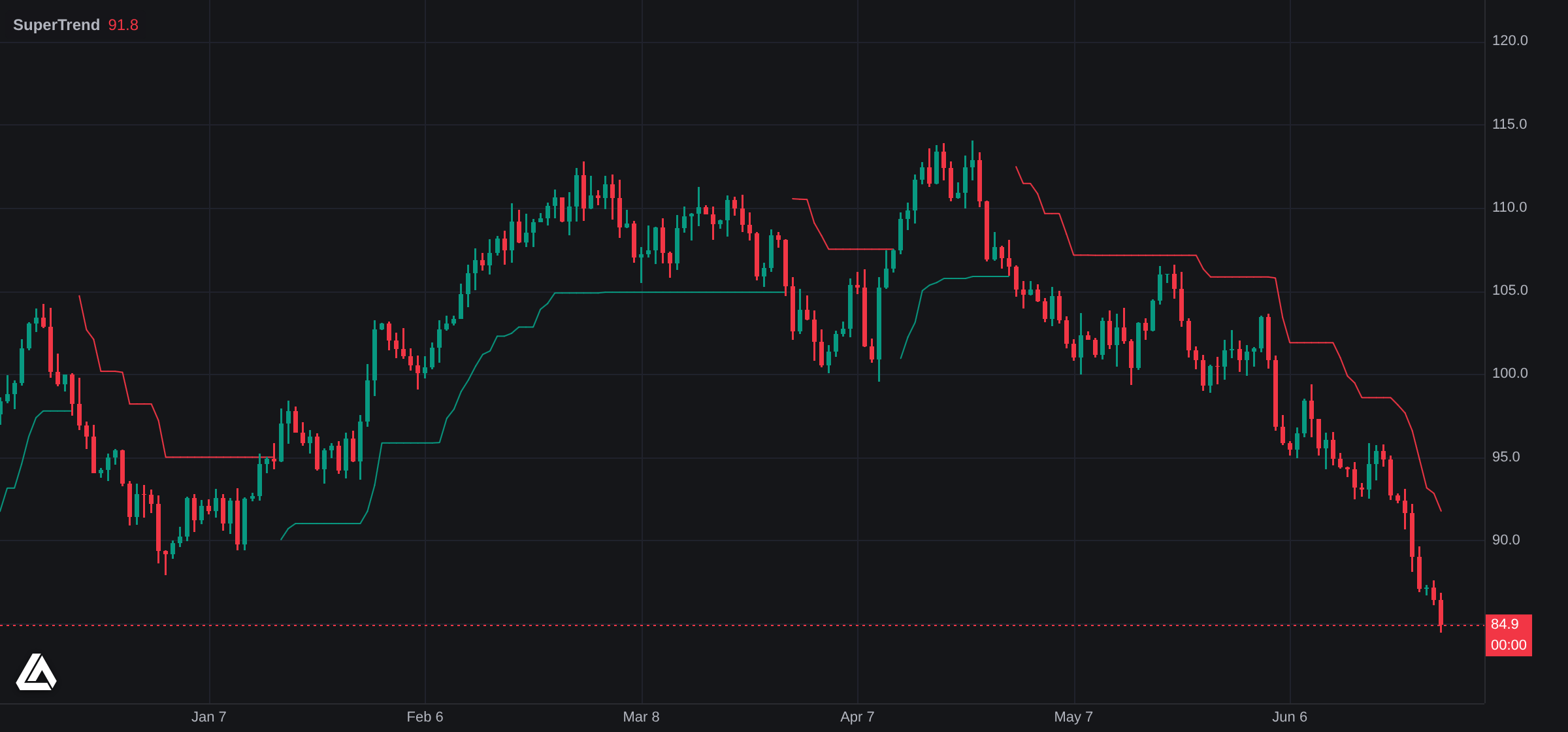
The Library's SuperTrend source as returned by library_get_source_code, executed by @luxalgo/vela-pinets on a @luxalgo/vela 0.6 chart in headless Chromium. The bars are a labelled synthetic sample.
source is the source field of a library_get_source_code result:
<div id="chart" style="height: 480px"></div>
<script src="https://cdn.jsdelivr.net/npm/@luxalgo/[email protected]/dist/vela.global.min.js"></script>
<script src="https://cdn.jsdelivr.net/npm/@luxalgo/[email protected]/dist/vela-pinets.global.min.js"></script>
<script>
  const chart = new Vela.Vela('#chart', { data: bars, timeframe: '1D', theme: 'dark' }); // bars: [{ time, open, high, low, close, volume? }]
  chart.registerEngine('pine', new VelaPinets.PineEngine());
  chart.addIndicator(source);
</script>
With a bundler: import { Vela } from '@luxalgo/vela' and import { PineEngine } from '@luxalgo/vela-pinets'; see the quickstart. Pine Script® runs through PineTS, our open-source runtime (AGPL-3.0, licensed separately). Vela's attribution mark stays on unless you show equivalent attribution next to the chart; see its NOTICE.
- Every tool, by area, with example asks and which address serves what.
- Run it yourself: the live charts, stdio with broker keys, Docker, HTTP, environment variables, architecture.
- Sign-in and privacy: OAuth 2.1 with the LuxAlgo app. This server holds no plan checks; the app decides what your account can see, exactly as on the web.
- Changelog · Security
Contributing
npm install
npm run typecheck && npm run build
npm test                 # smoke suite over stdio (live endpoints); --only library,edge for a subset
npm run test:http        # the same suite against a running HTTP entry
npm run test:parity      # simulator tools against the upstream engine
npm run test:trackers    # offline checks of the Market Trackers engine
Adding a tool: read AGENTS.md and docs/auth.md first. Pull requests target dev; commits are signed off (git commit -s, checked by CI).
Code is MIT © LuxAlgo Global, LLC. Library content and Pine Script® sources keep their own licenses; see NOTICE. LuxAlgo and Vela are trademarks of LuxAlgo Global, LLC; see TRADEMARKS.md. Nothing this server returns is investment advice: simulations are modeled estimates and statistics are historical frequencies, and a prop firm's own page is authoritative for its current rules.